Bubuka
Thank you for choosing the Yard Force MB400 Robotic Lawnmower. This manual provides essential information for the safe and efficient operation, installation, and maintenance of your new robotic lawnmower. Please read this manual thoroughly before using the product and keep it for future reference. The MB400 is designed to provide effortless lawn care for gardens up to 400m², featuring app control and a durable design.

Image: The Yard Force MB400 Robotic Lawnmower, showcasing its sleek black and orange design with the Yard Force logo visible.
Émbaran Kasalametan
Always prioritize safety when operating and maintaining the robotic lawnmower. Failure to follow safety instructions can result in serious injury or damage to the product.
- Baca sagala parentah taliti saméméh pamakéan.
- Jauhkeun leungeun jeung suku tina bilah motong.
- Ulah ngajalankeun mower dina kondisi baseuh atawa salila hujan.
- Pastikeun kawat wates dipasang leres pikeun nyegah mower kaluar tina daérah anu ditunjuk.
- Pareuman mesin motong jukut teras cabut konci kaamanan sateuacan ngalakukeun pangropéa atanapi beberesih.
- Jauhkeun barudak sareng piaraan tina tempat damel mesin motong jukut.
- Ukur nganggo suku cadang sareng asesoris aslina.
- Do not lift or carry the mower while it is operating.
Eusi pakét
Verify that all items are present in the package before beginning installation.
- Yard Force MB400 Robotic Lawnmower
- Tempat ngecas
- Ngecas Station Cover
- Adaptor kakuatan
- Kawat wates
- Pegs for Boundary Wire
- Agul cadang
- Manual pangguna (dokumén ieu)
- Key Kasalametan
Disetél
1. Charging Station Installation
Select a flat, level area near an outdoor power outlet for the charging station. Ensure there is enough clear space around the station for the mower to dock easily.
- Place the charging station on a firm, level surface.
- Sambungkeun adaptor daya ka stasiun ngecas teras colokkeun kana stop kontak luar anu cocog.
- Ensure the power cable is routed safely to avoid tripping hazards or damage.
- Install the provided charging station cover to protect it from weather elements.
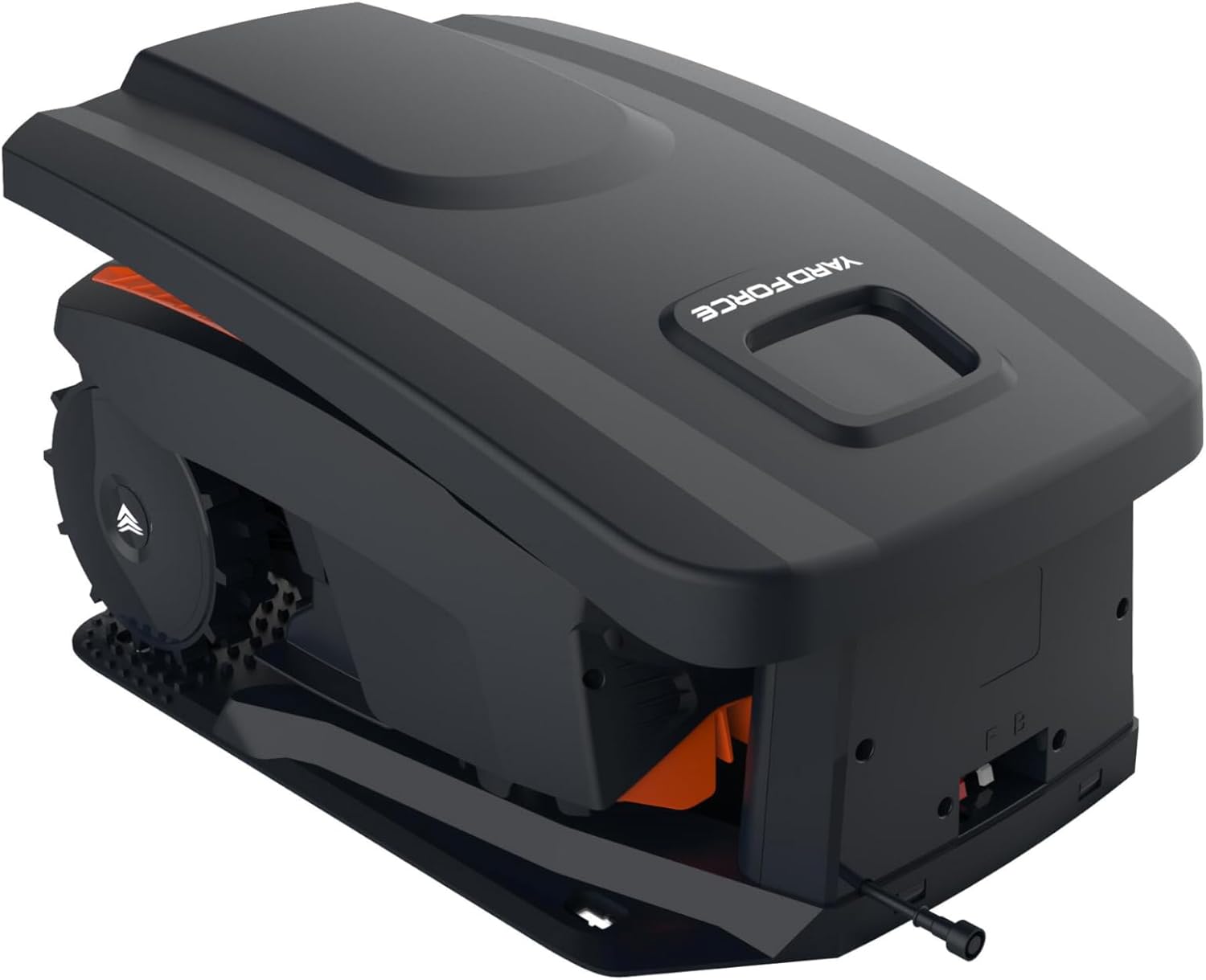
Image: The Yard Force MB400 Robotic Lawnmower positioned within its charging station, demonstrating how it docks for power.
2. Pamasangan kawat wates
The boundary wire defines the mowing area. It must be installed correctly for the mower to operate within the desired boundaries.
- Lay the boundary wire around the perimeter of your lawn, ensuring it is taut and free of kinks.
- Use the provided pegs to secure the wire to the ground every 80-100 cm.
- Maintain a minimum distance of 30 cm from obstacles such as walls, fences, and ponds.
- Connect both ends of the boundary wire to the designated terminals on the charging station.
- Ensure the indicator light on the charging station is green, indicating a successful wire connection.
3. Ngecas Awal
Before first use, fully charge the robotic lawnmower.
- Place the mower manually into the charging station.
- Ensure the mower makes proper contact with the charging pins.
- The charging indicator on the mower will illuminate. Allow several hours for a full charge.
4. App Setup (Bluetooth)
The Yard Force MB400 can be controlled via a Bluetooth app for convenient scheduling and settings adjustments.
- Download the "Yard Force" app from your smartphone's app store.
- Aktipkeun Bluetooth dina smartphone Anjeun.
- Open the app and follow the on-screen instructions to pair with your MB400 robotic lawnmower.
- Once paired, you can set mowing schedules, adjust settings, and monitor the mower's status.
Ngoperasikeun
1. Ngahurungkeun sareng Ngeureunkeun Mesin Pemotong Rumput
- Pikeun ngamimitian: Insert the safety key, press the START button, and close the cover. The mower will begin its mowing cycle or return to the charging station if scheduled.
- Pikeun eureun: Press the large STOP button on top of the mower. The mower will immediately cease operation.

Gambar: Hareupeun view of the Yard Force MB400 Robotic Lawnmower, showing the front bumper and cutting deck area.
2. Nyaluyukeun Jangkungna Motong
The cutting height can be adjusted to suit your lawn's needs, ranging from 20mm to 55mm.
- Locate the cutting height adjustment knob on the top of the mower.
- Rotate the knob clockwise to decrease the cutting height (shorter grass) or counter-clockwise to increase it (longer grass).
- Adjust the height gradually to avoid stressing the lawn.
3. Scheduling (via App)
Use the Yard Force app to set up a mowing schedule that fits your lifestyle.
- Open the Yard Force app on your paired smartphone.
- Arahkeun ka bagian "Jadwal" atanapi "Timer".
- Set desired mowing times and days. The mower will automatically start and return to the charging station as programmed.
4. Sénsor Hujan
The MB400 is equipped with a rain sensor that detects precipitation.
- If rain is detected, the mower will pause its operation and return to the charging station.
- Mowing will resume automatically after the rain stops and the sensor dries, or at the next scheduled time.
Pangropéa
Regular maintenance ensures optimal performance and extends the lifespan of your robotic lawnmower. Always turn off the mower and remove the safety key before any maintenance.
1. Ngabersihkeun Mesin Pemotong Rumput
- Bawah: Regularly clean grass clippings from the cutting deck and wheels using a brush or damp lawon. Ulah nganggo mesin cuci tekanan tinggi.
- awak: Ngusap luar ku hipu, damp lawon.
- Ngecas Kontak: Clean the charging contacts on both the mower and the charging station with a dry cloth to ensure good connection.

Gambar: Sisi view of the Yard Force MB400 Robotic Lawnmower, highlighting its large wheels and compact design.
2. Gantian sabeulah
Blades should be replaced regularly (e.g., every 1-3 months, depending on usage) to maintain cutting efficiency.
- Pareuman mesin motong jukut sareng cabut konci kaamanan.
- Taliti balikkeun mower tibalik ka handap.
- Using a screwdriver, remove the screws holding the old blades in place.
- Replace with new blades and screws, ensuring they are securely fastened.
- Always replace all blades at the same time for balanced cutting.
3. Kaperawatan batré
The MB400 is equipped with a 20V/2.0Ah lithium-ion battery.
- Always store the mower in a cool, dry place when not in use for extended periods.
- For winter storage, ensure the battery is fully charged before storing. Recharge every 3-4 months if stored for longer periods.
- Ulah ngalaan batré ka suhu ekstrim.
4. Usum Panyimpenan
Prepare your mower for winter to protect it from cold temperatures and ensure longevity.
- Thoroughly clean the mower and charging station.
- Ngeusi batre pinuh.
- Store the mower and charging station in a dry, frost-free environment.
- Disconnect the boundary wire from the charging station and store it if desired, or leave it buried/pegged.
Pamérésan masalah
This section addresses common issues you might encounter with your Yard Force MB400.
| Masalah | Mungkin Cukang lantaranana | Solusi |
|---|---|---|
| Mower teu ngamimitian. | Safety key not inserted; Battery low; STOP button pressed. | Insert safety key; Charge battery; Release STOP button. |
| Mower stays in charging station. | No schedule set; Boundary wire issue; Rain sensor active. | Set schedule via app; Check boundary wire connection/integrity; Wait for rain sensor to dry. |
| Mower motong unevenly. | Dull blades; Uneven terrain. | Replace blades; Ensure lawn is relatively level. |
| Mower sering macét. | Obstacles in mowing area; Steep slopes. | Clear obstacles; Adjust boundary wire to exclude problematic areas. |
| Masalah sambungan aplikasi. | Bluetooth off; Mower out of range; App not updated. | Ensure Bluetooth is on; Move closer to mower; Update app to latest version. |
spésifikasi
Technical details for the Yard Force MB400 Robotic Lawnmower.
- model: MB400-UK
- Ukuran produk: 38.4D x 20.6W x 44H cm
- Beurat barang: 8.2 kg
- Sumber Daya: Battery Powered (20V/2.0Ah Lithium-Ion)
- Lebar motong: 16 cm
- Motong Jangkungna: 20-55 mm (Adjustable)
- Ukuran padang rumput hejo anu disarankeun: Nepi ka 400m²
- Bahan: palastik
- Modeu operasi: Otomatis
- Konektipitas: Kontrol Aplikasi Bluetooth
- Fitur: Rain Sensor, Charging Station Cover
Garansi sareng Rojongan
Yard Force products are manufactured to high quality standards. For warranty information, technical support, or to purchase spare parts, please refer to the official Yard Force websitus atanapi ngahubungan layanan palanggan maranéhna.
Sumberdaya Online: Nganjang ka Toko Yard Force di Amazon pikeun informasi produk jeung rojongan.
Palayanan palanggan: For direct assistance, please consult the contact details provided on the official Yard Force website or within your product registration materials.


