1. Bubuka
This manual provides detailed instructions for the operation and maintenance of your PECSU G5 32GB MP3 Player. Please read this manual thoroughly before using the device to ensure proper functionality and to maximize your user experience. The PECSU G5 is an Android-based music player designed for versatile media consumption, featuring parental controls, extensive app support, and robust connectivity.
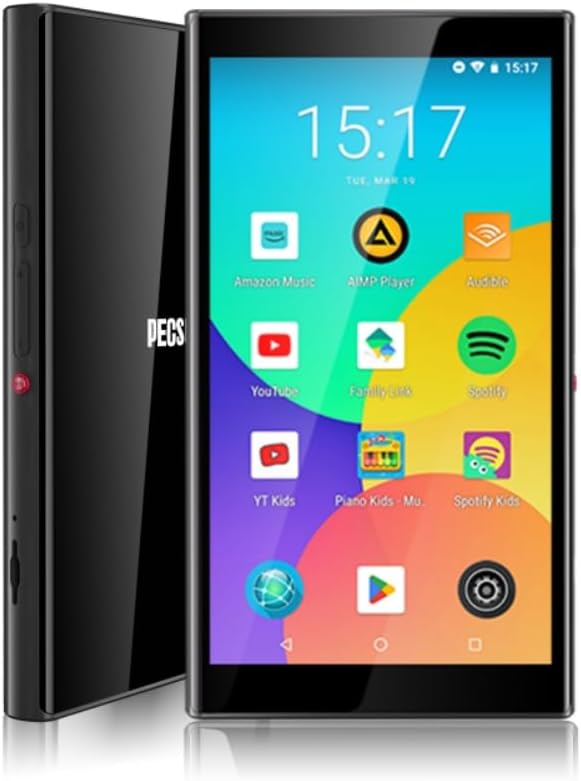
Gambar 1.1: Hareup jeung sisi view of the PECSU G5 MP3 Player, displaying its user interface with various application icons.
2. Naon dina Box
Pastikeun yén sadaya item aya dina bungkusan:
- 1 × PECSU G5 Music Player
- 1 × Buku Panduan
- 1 × Extra Screen Protector
- 1 × Tipe-C Kabel Ngecas
3. Produk Langkungview
3.1 Fitur Fisik

Image 3.1: A diagram illustrating the dimensions (5.24" height, 2.89" width, 0.47" thickness) and button layout of the PECSU G5. Labels indicate the On/Off button, Volume Up/Down, Recording Key, TF Card Port, Type-C Port, and 3.5mm Port.
The PECSU G5 features a sleek design with a 5-inch full touch screen. Key physical components include:
- Tombol Hurung/Pareum: Located on the side for powering the device on or off.
- Tombol Volume: Separate buttons for increasing jeung dekritasinvolume g.
- Recording Key: A dedicated button for one-touch voice recording.
- Port Kartu TF: Slot for inserting a Micro SD card to expand storage.
- Tipe-C Port: Pikeun ngecas sareng mindahkeun data.
- 3.5mm Audio Jack: Pikeun nyambungkeun headphone kabel.
3.2 Fitur konci
- Kadali kolot: Pre-installed Family Link application allows monitoring, setting usage times, and disabling apps. All app downloads require parental permission.
- Sistem operasi: Android 8.1 system with an Octa-core 64-bit MTK chipset.
- Google Play Store: Pre-installed for downloading popular music, video, and reading applications such as Spotify, YouTube, Amazon Music, Audible, and Libby.
- tampilan: 5-inch HD IPS full touchscreen with 1080P video playback (720*1280 PX resolution).
- Konektipitas: Bluetooth 5.0 for stable connections to speakers, earphones, and car audio systems. Dual-band Wi-Fi (2.4G & 5G) for fast data transfer and online streaming.
- Batré: Built-in 3000mAh LCO Battery, providing approximately 15 hours of continuous music playback or 6 hours of video playback.
- Panyimpenan: 32GB internal ROM and 3GB RAM, expandable up to 1TB via Micro SD card (FAT32 format).
- Kualitas Audio: Supports HiFi lossless music playback.
- Rékam sora: One-touch recording function.

Image 3.2: The PECSU G5 screen highlighting its 5-inch 1080P HD IPS display, emphasizing fast response, 720x1280 pixel resolution, and wider viewdina sudut.

Image 3.3: The PECSU G5 displaying its storage capabilities, including 3GB RAM, 32GB ROM, and support for up to 1TB TF Card expansion.

Image 3.4: An illustration of the PECSU G5's 3000mAh LCO battery, indicating up to 5 hours of video playback and up to 15 hours of music playback.

Image 3.5: A visual representation of the PECSU G5's 2-Way Bluetooth 5.0 feature, showing connections to headphones/earbuds, a portable speaker, and car audio systems.
4. Setélan
4.1 Ngecas Alat
- Connect the provided Type-C charging cable to the device's Type-C port.
- Plug the other end of the cable into a compatible USB power adapter (not included) or a computer's USB port.
- The device will indicate charging status on the screen. A full charge typically takes 2-3 hours.
4.2 Powering on / Pareum
- Pikeun Ngahurungkeun: Press and hold the On/Off button located on the side of the device until the screen illuminates.
- Pikeun mareuman: Press and hold the On/Off button until a power menu appears on the screen. Select "Power off" and confirm.
- Pikeun ngamimitian deui: From the power menu, select "Restart."
4.3 Konfigurasi Awal
Upon first power-on, you will be guided through an initial setup process:
- Pilih basa anu anjeun pikaresep.
- Connect to a Wi-Fi network to enable internet access and app downloads.
- Sign in with your Google account. This is necessary for accessing the Google Play Store and utilizing parental controls.
- Follow on-screen prompts to complete the setup.
4.4 Nyelapkeun Kartu Micro SD
To expand the device's storage:
- Locate the TF Card Port on the side of the device (refer to Image 3.1).
- Gently insert a Micro SD card (up to 1TB, FAT32 format recommended) into the slot until it clicks into place.
- The device will detect the new storage. You may need to format the card if prompted.
5. Parentah Operasi
5.1 Napigasi
The PECSU G5 features a full touchscreen interface. Use standard Android gestures:
- Ketok: Pikeun milih hiji item atawa muka aplikasi.
- Gesek: Pikeun ngagulung daptar atanapi pindah antara layar.
- Ciwit-pikeun-zum: In supported applications like image galleries or web panyungsi.
5.2 Nyambungkeun ka Wi-Fi
- Pindah ka Setélan > Jaringan & internét > Wifi.
- Togél Wi-Fi On.
- Pilih jaringan anu dipikahoyong tina daptar teras lebetkeun kecap akses upami diperyogikeun.
5.3 Nyapasangkeun Bluetooth
- Pindah ka Setélan > Alat disambungkeun > Bluetooth.
- Pindahkeun Bluetooth On.
- Pastikeun aksésoris Bluetooth anjeun dina modeu papasangan.
- Ketok Masangkeun alat énggal teras pilih asesoris anjeun tina daptar.
5.4 Using Google Play Store
The Google Play Store allows you to download and install a wide variety of applications.

Image 5.1: The PECSU G5 screen displaying the Google Play Store icon prominently, surrounded by various popular app icons like Spotify, YouTube, and Amazon Music, indicating broad app compatibility.
- Ketok dina Play Store ikon dina layar utama.
- Milarian pikeun desired apps (e.g., Spotify, Pandora, Amazon Music, Libby, Audible).
- Ketok Pasang pikeun ngaunduh sareng masang aplikasi.
5.5 Parental Controls (Family Link)
The PECSU G5 is designed with parental controls via the pre-installed Family Link app.

Image 5.2: The PECSU G5 screen showing the Family Link parental control interface, with options for daily limits, downtime, and blocked apps. The image also depicts a child sleeping with the device nearby, suggesting its use for controlled media consumption.
- Ensure Family Link is set up on both the PECSU G5 (for children) and your personal smartphone (for parents).
- From your parent device, you can:
- Monitor app usage and screen time.
- Set daily usage limits and device downtime.
- Block specific applications.
- App downloads from the Play Store will require parental approval.
5.6 Putereun Musik sareng Pidéo
- Use pre-installed music/video players or download your preferred apps from the Google Play Store.
- The device supports HiFi lossless audio formats and 1080P video playback.
5.7 Rékam sora
To use the voice recorder function:
- Pencét dedicated Konci Rékam on the side of the device (refer to Image 3.1).
- Alternatively, open the pre-installed Rékam aplikasi.
- Turutan pitunjuk dina layar pikeun ngamimitian, ngareureuhkeun, sareng nyimpen rékaman.
5.8 File Mindahkeun
Anjeun tiasa mindahkeun files to and from the PECSU G5 using the Type-C cable or wirelessly.
- Ngaliwatan Kabel USB: Connect the device to a computer using the Type-C cable. On the device, select "File transfer" when prompted. The device will appear as a removable drive on your computer.
- Transfer nirkabel: Utilize pre-installed file sharing apps or download third-party apps from the Play Store for wireless file manajemén.
6. Pangropéa
6.1 beberesih
- Anggo lawon anu lemes sareng henteu lint pikeun ngabersihan layar sareng awak alat.
- Avoid using harsh chemicals or abrasive materials, as they may damage the screen or finish.
6.2 Perawatan Batré
- Pikeun manjangkeun umur batre, ulah ngalaan alat dina suhu anu ekstrim.
- Do not allow the battery to fully discharge frequently. Charge the device when the battery level is low.
- Upami alatna henteu tiasa dianggo kanggo waktos anu panjang, muatanana dugi ka 50% sateuacan disimpen.
6.3 Apdet parangkat lunak
- Pariksa apdet sistem sacara périodik pikeun mastikeun kinerja sareng kaamanan anu optimal.
- Pindah ka Setélan > Sistim > Pembaruan sistem pikeun mariksa tur masang apdet sadia.
7. Cara ngungkulan
If you encounter issues with your PECSU G5, refer to the following common problems and solutions:
| Masalah | Solusi anu mungkin |
|---|---|
| Alat teu hurung | Ensure the device is charged. Connect to a power source and try again. If unresponsive, press and hold the power button for 10-15 seconds to force a restart. |
| Device freezes or is unresponsive | Press and hold the power button for 10-15 seconds to force a restart. If the issue persists, consider performing a factory reset (backup data first). |
| No sound from speaker or headphones | Check the volume level. Ensure headphones are properly connected or Bluetooth device is paired and connected. Test with different headphones or speakers. |
| Batré gancang boros | Reduce screen brightness. Close unused background applications. Disable Wi-Fi and Bluetooth when not in use. Check for power-intensive apps. |
| Cannot connect to Wi-Fi or Bluetooth | Ensure Wi-Fi/Bluetooth is enabled in settings. Restart the device and your router/Bluetooth accessory. Verify network password. |
| App download issues from Play Store | Check Wi-Fi connection. Ensure sufficient storage space. Verify parental permissions if Family Link is active. Clear Play Store cache and data in settings. |
8. Spésifikasi
| Fitur | Rincian |
|---|---|
| Ngaran modél | G5 |
| merek | PECSU |
| Sistem operasi | Android 8.1 |
| Prosesor | Octa-core 64-bit MTK chipset |
| Panyimpenan internal (ROM) | 32 GB |
| Ram | 3 GB |
| Panyimpenan Expandable | Up to 1 TB (Micro SD, Micro SDHC, Micro SDXC, FAT32 format) |
| Ukuran layar | 5 inci |
| Resolusi layar | 1080P HD IPS (720*1280 PX) |
| Konektipitas | Bluetooth 5.0, Dual-band Wi-Fi (2.4G & 5G) |
| Batré | 3000mAh LCO Lithium Polymer |
| Kahirupan Batré (Musik) | Approx. 15 hours (Lab. Data) |
| Kahirupan Batré (Video) | Approx. 6 hours (Lab. Data) |
| Waktu Ngecas | 2-3 jam |
| Dimensi produk | 0.47 x 2.83 x 5.2 inci (12 x 72 x 133 mm) |
| Item Beurat | 6.5 ons |
| Fitur husus | Metal & Glass Back, One-Key Recording, Parental Controls, Split-screen Mode, App Store Support |
9. Garansi jeung Rojongan
The PECSU G5 MP3 Player is covered by a manufacturer's warranty. For specific warranty terms and conditions, please refer to the documentation included with your purchase or contact PECSU customer support.
For technical assistance, troubleshooting, or warranty claims, please contact PECSU customer support through the retailer where the product was purchased or visit the official PECSU websitus pikeun inpo kontak.


