1. Émbaran Kasalametan penting
Mangga baca tur ngartos sagala parentah saméméh assembly sarta pamakéan. Simpen manual ieu pikeun rujukan ka hareup.
- Alat Anti Tip: Always install the anti-tip device provided to prevent serious or fatal crushing injuries.
- wates beurat: Do not exceed the maximum weight capacity for the top surface or drawers. Refer to the specifications section for details.
- Majelis: Assemble the dresser on a soft, clean surface to prevent scratches. Ensure all parts are securely fastened before use.
- Kaamanan Barudak: Keep small parts and packaging materials away from children. Do not allow children to climb on or play with the dresser.
- Kasalametan listrik: When using the charging station, ensure cables are not pinched or damaged. Do not overload the electrical outlets.
2. Eusi Paket
Pariksa yén sadaya komponén aya sateuacan ngamimitian assembly. Lamun aya bagian nu leungit atawa ruksak, mangga ngahubungan rojongan customer.

Angka 2.1: Ngabeledug view of dresser components.
This diagram illustrates the various parts of the dresser, including the frame, 8 wooden drawers, tempered glass tabletop, built-in charging station, retro metal handles, and solid sliding rails. All necessary hardware is included for assembly.
3. Parentah Majelis
Assembly is required for this product. Follow the step-by-step instructions provided in the included assembly guide. All parts and screws are labeled for easy identification.
- Nyiapkeun wewengkon: Clear a spacious, clean, and soft area for assembly to prevent damage to the dresser components.
- Identipikasi Bagian: Unpack all components and hardware. Match each part to the corresponding label in the assembly guide.
- Kumpulkeun pigura: Begin by assembling the main frame of the dresser according to the diagrams. Ensure all connections are secure.
- Pasang Slides Laci: Attach the drawer slides to the dresser frame and to the drawer boxes as indicated.
- Ngumpulkeun laci: Construct each of the 8 drawers, ensuring the bottoms are properly seated and the handles are attached.
- Install Tempered Glass Top: Carefully place the tempered glass top onto the dresser frame.
- Sambungkeun Komponen Listrik: Follow instructions to connect the LED lighting and charging station. Ensure proper power connection.
- Lebetkeun laci: Slide the assembled drawers into their respective slots.
- Pasang Kit Anti-Tip: Secure the dresser to the wall using the provided anti-tip kit to prevent tipping.
- Cék ahir: Verify that all screws are tightened and the dresser is stable before placing items inside.
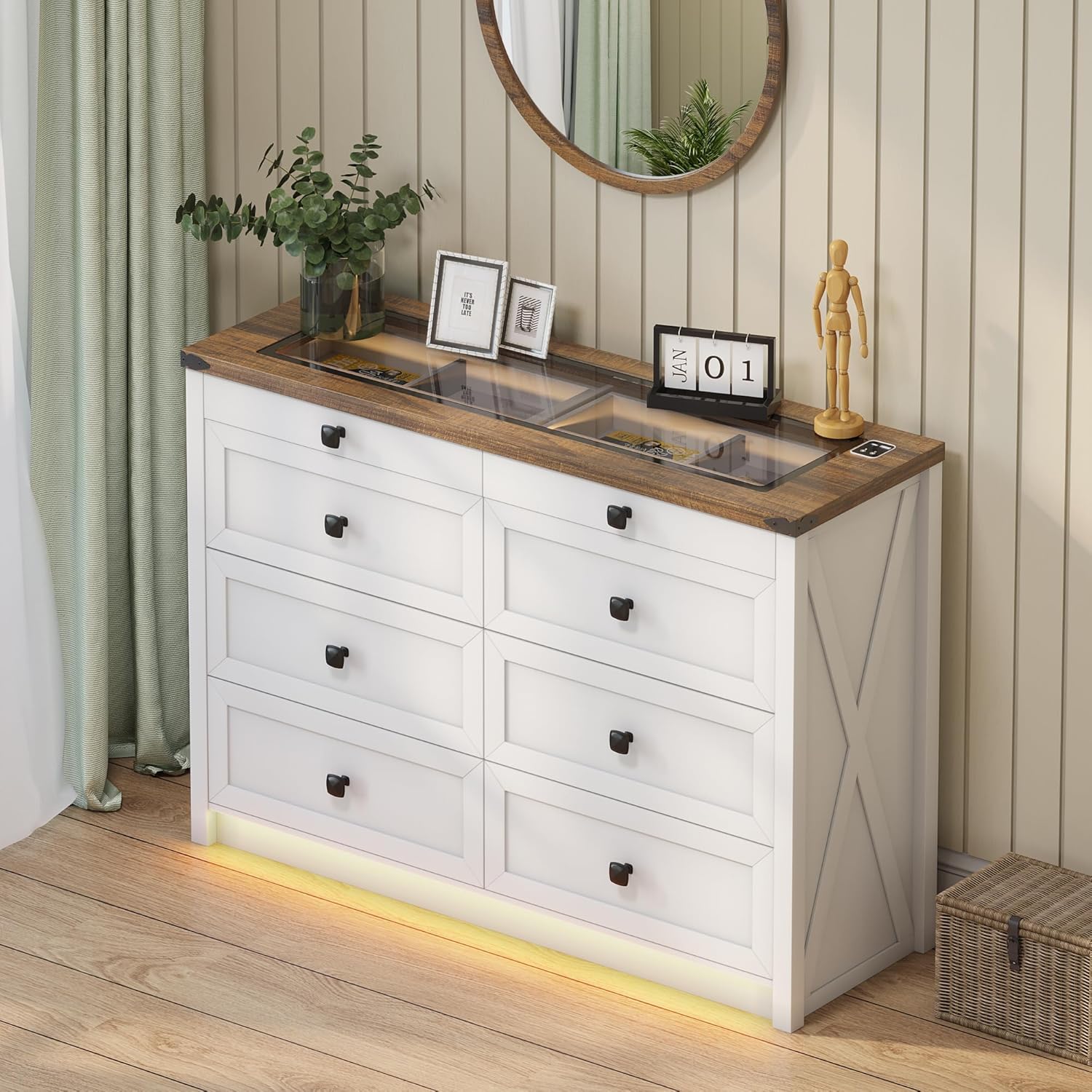
Figure 3.1: Fully assembled dresser.
This image shows the dresser fully assembled and placed in a room, ready for use. Note the integrated LED lighting at the base and the clear glass top.
4. Parentah Operasi
4.1. Sistem Lampu LED
The dresser features integrated LED lighting with customizable color and brightness settings, along with a human sensor for automatic activation.
- Hurungkeun/Pareuman: Locate the touch button on the top surface near the charging station. A short press will turn the lights on or off.
- Robah Mode Warna: With the lights on, short press the touch button repeatedly to cycle through the three available color modes: Warm Light, Natural Light, and White Light.
- Saluyukeun Caang: To adjust brightness, long press the touch button. The brightness will gradually increase or decrease. Release the button when the desired brightness is reached.
- Human Sensor: The dresser is equipped with a human sensor. When activated, the lights will automatically turn on when motion is detected nearby and turn off after a period of inactivity. Refer to the specific controls on the dresser for sensor activation/deactivation.

Figure 4.1: LED lighting color options.
This image demonstrates the visual difference between the Natural, White, and Warm light settings of the integrated LED strip, along with a brightness control slider.

Figure 4.2: Tempered glass top with and without illumination.
This visual shows how the transparent black tea-tinted glass top allows visibility of stored items when the internal light is on, and provides privacy when the light is off.
4.2. Stasiun Ngecas
The dresser is equipped with a convenient 2-in-1 charging station on its surface, featuring both USB and Type-C ports.
- Sambungkeun Kakuatan: Ensure the dresser's power cord is securely plugged into a functional wall outlet.
- Alat Ngecas: Connect your smartphone, tablet, or other electronic devices to the available USB (5V/2A) or Type-C ports using their respective charging cables.
- Pamakéan: The charging station is designed for convenient access to power for your devices while keeping them organized on the dresser top.

Figure 4.3: Integrated charging station.
A close-up of the dresser's surface, showing the integrated USB and Type-C charging ports, ready for device connection.
5. Perawatan sareng Pangropéa
Perawatan anu leres bakal manjangkeun umur sareng penampilan méja anjeun.
- beberesih: Lap beungeut méja rias ku lawon anu garing sareng lemes. Pikeun tanda anu bandel, usap sakedikamp lawon bisa dipaké, dituturkeun langsung ku lawon garing. Hindarkeun bahan kimia anu kasar atanapi pembersih abrasive.
- Kaca Top: Clean the tempered glass top with a glass cleaner and a soft, lint-free cloth.
- Debu: Rutin lebu sadaya permukaan pikeun nyegah akumulasi.
- Hindarkeun Uap: Do not place hot or wet items directly on the wood or glass surfaces without protection.
- Paparan sinar panonpoé: Hindarkeun paparan berkepanjangan ka sinar panonpoé langsung pikeun nyegah fading atanapi discoloration tina finish kai.
- Pangropéa laci: Periodically check drawer slides for smooth operation. If needed, a silicone-based lubricant can be applied sparingly.
6. Cara ngungkulan
| Masalah | Mungkin Cukang lantaranana | Solusi |
|---|---|---|
| Lampu LED teu hurung. | Power cord not connected; loose connection; faulty LED strip. | Ensure power cord is securely plugged in. Check all electrical connections. If problem persists, contact customer support. |
| Stasion ngecas teu jalan. | Power cord not connected; device cable faulty; device not compatible. | Verify dresser is plugged in. Try a different charging cable or device. Ensure device is compatible with USB/Type-C charging. |
| Laci hese dibuka/tutup. | Overloaded drawer; misaligned slides; loose hardware. | Reduce contents in the drawer. Check if drawer slides are properly aligned. Tighten any loose screws on the drawer or slides. |
| Meja rias karasana oyag. | Uneven floor; loose assembly hardware; anti-tip kit not installed. | Adjust furniture levelers if present, or place shims under the base. Retighten all assembly screws. Ensure the anti-tip kit is correctly installed and secured to the wall. |
7. Spésifikasi produk
- merek: FREDEES
- Ngaran modél: BL-97022-25/29
- Ukuran produk: 15.75 "D x 47.24" W x 33.46" H
- warna: Bodas
- Tipe Pamasangan: Lantai Gunung
- Jumlah laci: 8
- Fitur husus: Ample Storage Space, Convenient 2-in-1 Charging Solution (USB & Type-C), Customizable 3-Color Lighting, Tempered Glass Top Design, Human Sensor
- Furnitur rengse: Brown (top) / White (body)
- Beurat barang: 110.2 pon
- Majelis Diperlukeun: Sumuhun
- Perawatan produk: Ngusap ku lawon garing
- UPC: 756940843978
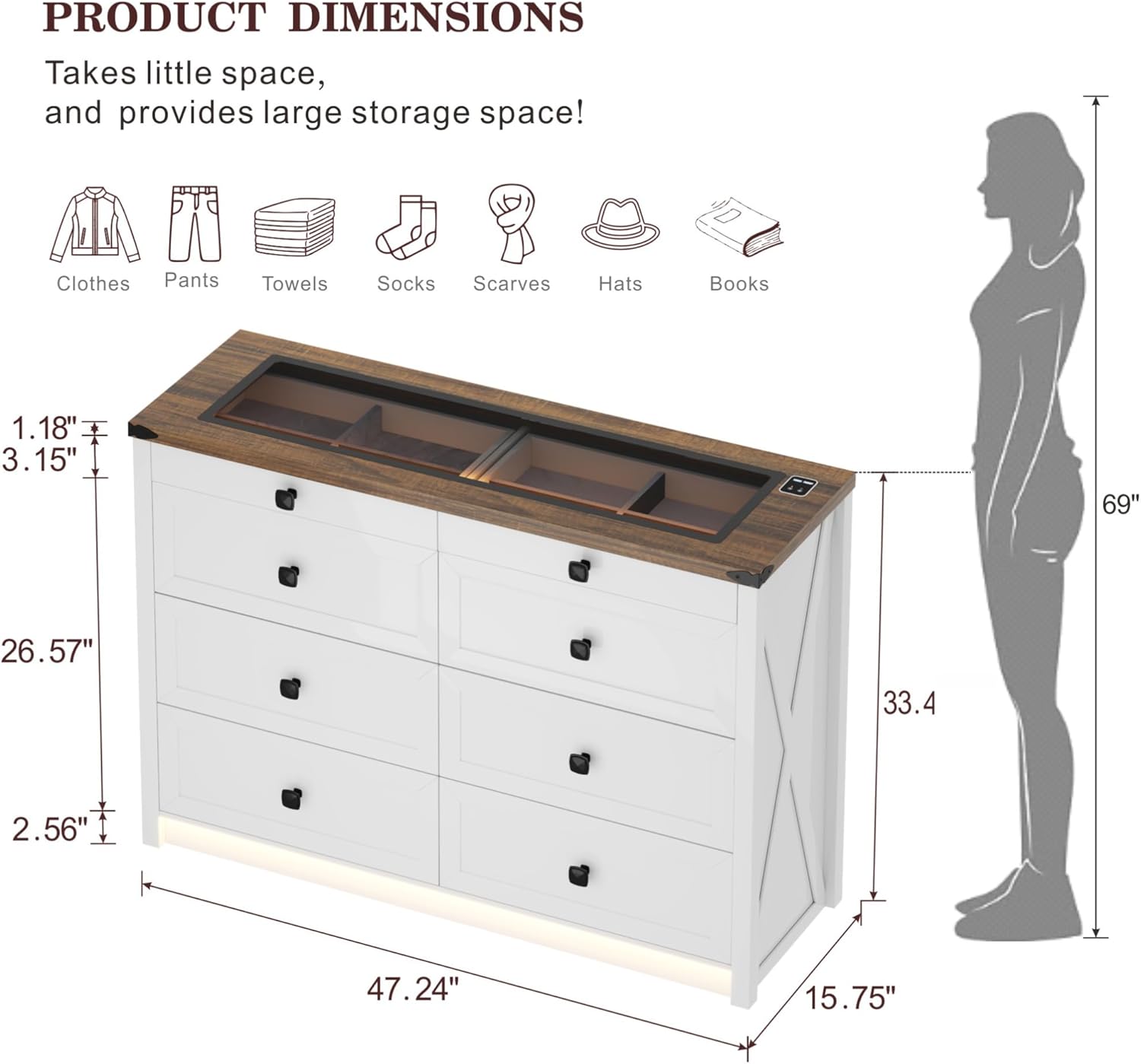
Gambar 7.1: Diménsi produk anu lengkep.
diagram ieu nyadiakeun leuwih komprehensifview of the dresser's dimensions, including overall height, width, depth, and specific measurements for drawer height and top surface thickness.

Figure 7.2: Storage capacity illustration.
An illustrative image demonstrating the ample storage capacity of each large drawer, capable of holding approximately 20-25 t-shirts or 15-20 pairs of jeans.
8. Garansi jeung Rojongan
For warranty information, technical support, or to order replacement parts, please contact FREDEES customer service directly. Refer to the product packaging or the original purchase documentation for contact details.
Please have your model number (BL-97022-25/29) and purchase date available when contacting support.


