1. Bubuka
Hatur nuhun pikeun meuliasing the HANLIM HL-108-A Portable CD Player. This device offers a versatile audio experience with its multi-function capabilities, including CD playback, Bluetooth connectivity, FM radio, MP3 playback via USB, AUX input, and microphone support. Its compact design and built-in rechargeable battery make it ideal for both indoor and outdoor use. Please read this manual carefully before operating the device to ensure proper use and to maximize its performance.
2. Eusi Paket
Sateuacan ngamimitian, mangga parios heula eusi bungkusan pikeun mastikeun sadaya barang aya:
- HANLIM HL-108-A Portable CD Player
- Kabel Daya (1.2m)
- Kadali jauh
- Manual pamaké

Gambar 2.1: Package Contents. This image displays the portable CD player, its remote control, the power cable, and the user manual, illustrating everything included in the box.
3. Produk Langkungview
Familiarize yourself with the various parts and controls of your HANLIM HL-108-A CD player.

Gambar 3.1: Hareupeun View of the CD Player. This image highlights the main display, the central control knob, and various function buttons on the front panel of the device.
3.1. Kontrol jeung palabuhan
- Layar tampilan: Shows current mode, track information, FM frequency, etc.
- Tombol Mode: Switches between CD, Bluetooth, FM, USB, and AUX modes.
- Tombol Siaga: Ngahurungkeun / mareuman unit.
- Play/Pause/Scan Button (►/SCAN): Plays or pauses playback; initiates FM scan.
- Previous/Channel Down (◀◀/CH-): Skips to previous track/station.
- Next/Channel Up (►►/CH+): Skips to next track/station.
- Jilid Kenop: Saluyukeun polumeu audio.
- Port USB: For MP3/WMA playback from USB drives (up to 32GB).
- Jack Headphone (3.5mm): Pikeun déngékeun pribadi.
- Input AUX (3.5mm): Sambungkeun alat audio éksternal.
- Jack mikropon: Connect an external microphone for singing (microphone not included).
- Input kakuatan: Sambungkeun kabel kakuatan AC.

Gambar 3.2: Rear Connections. This image illustrates the microphone input jack and the 3.5mm AUX input jack located on the back of the CD player.
4. Setélan
4.1. Powering Alat
The HANLIM HL-108-A can be powered by the included AC power cable or its built-in rechargeable battery.
- Daya AC: Connect the power cable to the power input port on the back of the unit and plug the other end into a standard wall outlet.
- Daya Batré: The unit has a built-in 2000mAh rechargeable battery. Fully charge the battery before first use. A full charge provides up to 5 hours of playback at maximum volume.
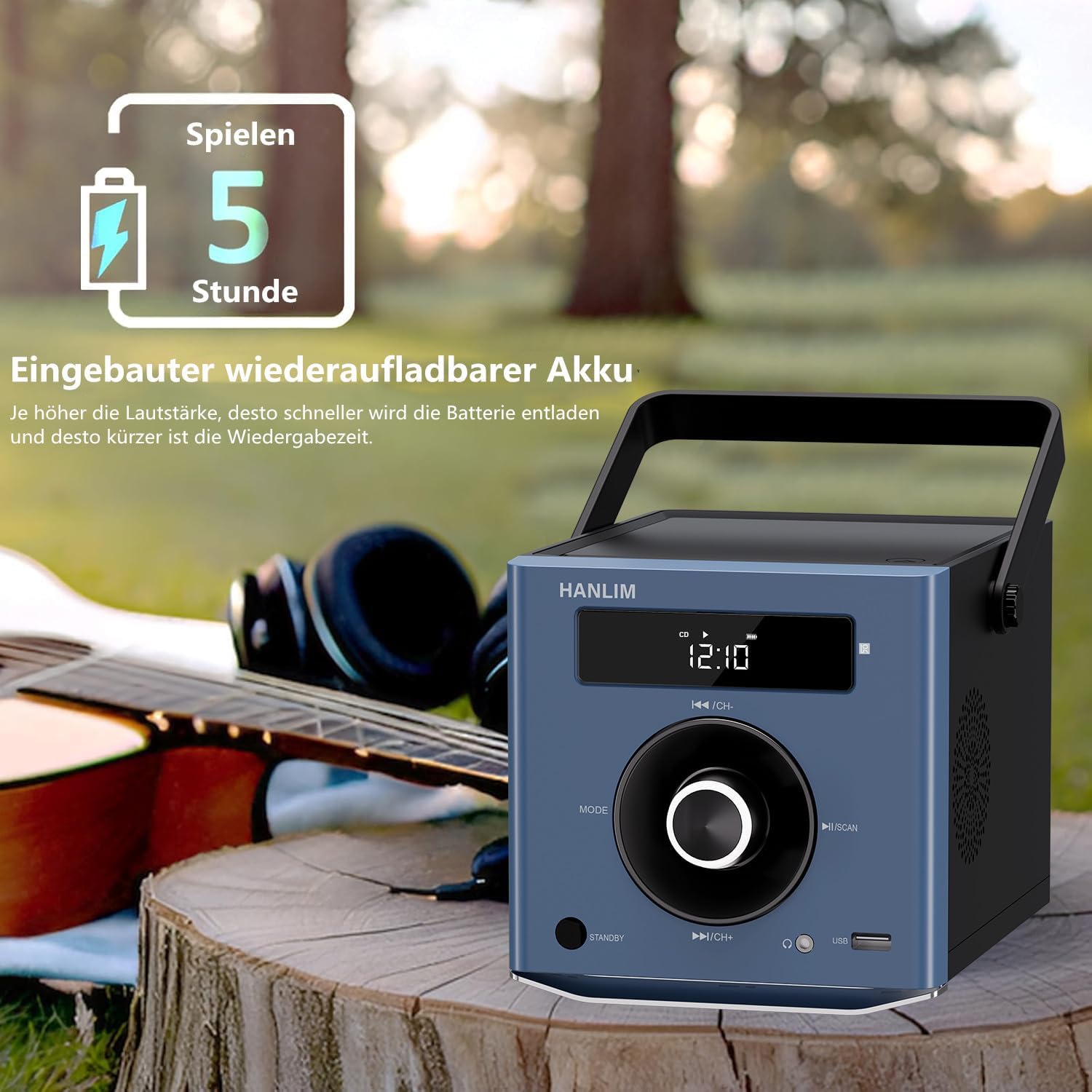
Gambar 4.1: Built-in Rechargeable Battery. This image illustrates the portability of the device and highlights its 5-hour battery life, suitable for outdoor use.
4.2. Daya Awal Hurung
Pencét éta ANTOSAN button to turn on the device. The display will light up.
5. Parentah Operasi
This section details how to use the various functions of your CD player.

Gambar 5.1: Multi-functional Portable CD Player. This image emphasizes the device's 20W output and its diverse capabilities, including CD, Bluetooth, FM radio, USB, and AUX input, along with practical features like repeat modes, resume playback, and sound equalizer options (Pop, Jazz, Rock, Classic, Flat).
5.1. CD Playback
- Open the CD compartment cover on top of the unit.
- Place a CD (CD/CD-R/CD-RW/MP3 format) onto the spindle with the label side facing up.
- Tutup panutup kompartemen CD.
- Pencét éta MODÉ button until "CD" appears on the display.
- CD bakal mimiti diputer sacara otomatis. Upami henteu, pencét tombol ►/SCAN kancing.
- Paké ◀◀/CH- jeung ►►/CH+ tombol pikeun skip lagu.
- Fungsi Ulang: Press the Repeat button on the remote control to cycle through repeat modes (one song, all songs, random).
- Neruskeun Playback: The player will resume playback from where it was last stopped when the CD mode is re-selected.
5.2. Konektipitas Bluetooth
- Pencét éta MODÉ button until "BT" or "Bluetooth" appears on the display. The device will enter pairing mode.
- On your Bluetooth-enabled device (smartphone, tablet, computer), search for "HANLIM HL-108-A" in the Bluetooth settings.
- Select the device to pair. Once connected, you will hear a confirmation sound.
- You can now play audio from your connected device through the CD player.
- Catetan: This device acts as a Bluetooth receiver; it does not support connecting to Bluetooth headphones.

Gambar 5.2: Bluetooth Connection. This image demonstrates the ease of connecting a smartphone via Bluetooth, and also points out the USB port and headphone jack for versatile audio options.
5.3. Radio FM
- Pencét éta MODÉ pencét tombol "FM" nepi ka muncul dina layar.
- Pencét jeung tahan tombol ►/SCAN button to automatically scan and store available FM stations (87.5 – 108 MHz). Up to 20 stations can be stored.
- Ngagunakeun éta ◀◀/CH- jeung ►►/CH+ tombol pikeun nganapigasi ngaliwatan stasiun nu disimpen.

Gambar 5.3: FM Radio Function. This image shows the device tuned to an FM frequency, illustrating its capability to receive radio broadcasts for news, stories, and music.
5.4. USB Playback
- Insert a USB flash drive (up to 32GB, formatted as FAT32) containing MP3/WMA audio files kana port USB.
- Pencét éta MODÉ tombol dugi "USB" nembongan dina tampilan.
- The device will automatically detect and begin playing audio files ti USB drive.
- Paké ◀◀/CH- jeung ►►/CH+ tombol pikeun skip lagu.
5.5. AUX Input
- Connect one end of a 3.5mm audio cable (not included) to the AUX IN port on the back of the CD player.
- Connect the other end of the audio cable to the headphone jack or audio output of your external device (e.g., smartphone, computer, MP3 player).
- Pencét éta MODÉ tombol dugi "AUX" nembongan dina tampilan.
- Play audio from your external device. The sound will be output through the CD player's speakers.
5.6. Input mikropon
- Connect a microphone (not included) to the Microphone Jack on the back of the unit.
- The microphone input will be active in any playback mode (CD, Bluetooth, FM, USB, AUX).
- Adjust the microphone volume using the connected microphone's controls, if available, or the main volume knob on the CD player.
5.7. Kaluaran headphone
- Connect a pair of headphones (not included) to the 3.5mm Headphone Jack on the front of the unit.
- Audio will automatically switch from the speakers to the headphones for private listening.
5.8. Sound Equalizer
The device offers 5 sound equalizer presets:
- Pop
- Jazz (for softer sounds)
- Batu (for more bass)
- Klasik
- Datar (standar)
Use the EQ button on the remote control to cycle through these sound modes.
6. Pangropéa
Proper care and maintenance will ensure the longevity of your CD player.
- beberesih: Use a soft, dry cloth to clean the exterior of the unit. Do not use abrasive cleaners or solvents. For the CD lens, use a specialized CD lens cleaner.
- Panyimpenan: Lamun teu dipaké pikeun période nambahan, nyimpen alat dina tiis, tempat garing jauh ti sinar panonpoé langsung jeung hawa ekstrim.
- Perawatan batré: To prolong battery life, avoid fully discharging the battery frequently. Recharge the battery regularly, even if the device is not in use.
- Penanganan: Hindarkeun ngaragragkeun unit atanapi nahan kana tabrakan anu kuat.
7. Cara ngungkulan
If you encounter any issues with your device, please refer to the following common problems and solutions:
| Masalah | Mungkin Cukang lantaranana | Solusi |
|---|---|---|
| Taya kakuatan | Power cable not connected; Battery drained | Ensure power cable is securely connected and plugged into a working outlet. Charge the battery. |
| CD teu bisa diputer / Kasalahan Disk | Disc is dirty, scratched, or inserted incorrectly; Unsupported disc format | Clean the disc with a soft cloth. Check for scratches. Ensure the disc is inserted correctly. Use supported CD/CD-R/CD-RW/MP3 formats. |
| Taya sora | Volume too low; Mute activated; Incorrect mode selected; Headphones connected | Increase volume. Check if mute is active on remote. Ensure correct mode (CD, BT, FM, USB, AUX) is selected. Disconnect headphones if you want sound from speakers. |
| Bluetooth teu nyambung | Device not in pairing mode; Bluetooth disabled on external device; Too far from player | Ensure CD player is in Bluetooth mode. Enable Bluetooth on your external device. Keep devices within 10 meters. |
| Radio FM panarimaan goréng | Sinyal lemah; Gangguan | Adjust the position of the unit. Try scanning for stations again. Avoid placing near other electronic devices that may cause interference. |
| USB teu dipikawanoh | Unsupported USB format/size; Corrupted files | Ensure USB drive is FAT32 format and up to 32GB. Check if files are MP3/WMA. Try another USB drive. |
8. Spésifikasi
Detailed technical specifications for the HANLIM HL-108-A Portable CD Player.
| Fitur | Spésifikasi |
|---|---|
| Nomer modél | HL-108-A |
| merek | HANLIM |
| Kaluaran kakuatan | 20W (Stereo Speakers) |
| Kasaluyuan CD | CD, CD-R, CD-RW, MP3 |
| Rentang Frékuénsi FM | 87.5 - 108 MHz |
| Vérsi Bluetooth | (Not specified, assuming standard) |
| Rojongan USB | Up to 32GB, MP3/WMA format |
| Input AUX | 3.5mm Jack |
| Kaluaran headphone | 3.5mm Jack |
| Input mikropon | Yes (Jack, microphone not included) |
| Jenis Batré | Built-in 2000mAh Lithium-ion rechargeable battery |
| Kahirupan batré | Up to 5 hours (at maximum volume) |
| Ukuran (L x W x H) | 20.5 x 16 x 15.5 cm (kira-kira 8.1 x 6.3 x 6.1 inci) |
| Beurat | 1.7 kg (kira-kira 3.75 lbs) |
| Komponén Kaasup | Portable CD Player, Power Cable, Remote Control, User Manual |
9. Garansi jeung Rojongan
HANLIM offers a one-year warranty for this product. For any questions, technical support, or warranty claims, please contact your retailer or the manufacturer directly. Please retain your proof of purchase for warranty service.
Pabrikan: HANLIM
Mangsa Garansi: 1 Taun


