Bubuka
Thank you for choosing the SETTY 20000 mAh Power Bank. This portable charger is designed to provide reliable power for your mobile devices, ensuring you stay connected on the go. With its high capacity and versatile charging options, it is an essential companion for travel and daily use. Please read this manual carefully before using the device to ensure proper operation and longevity.
Produk Leuwihview
The SETTY 20000 mAh Power Bank (Model PB1-201) features a compact design with multiple input and output ports for universal compatibility.

Figure 1: SETTY 20000 mAh Power Bank with its retail packaging, highlighting its capacity and port types.
Fitur konci:
- Kapasitas luhur: 20000 mAh provides multiple charges for smartphones and other devices.
- Kaluaran USB Ganda: Two USB-A output ports allow simultaneous charging of two devices.
- Input universal: Equipped with both microUSB and USB-C input ports for convenient recharging of the power bank.
- Indikator LED: Integrated LED lights display the remaining battery level of the power bank.
- Kompak sareng Portabel: Dirancang pikeun gampang dibawa dina saku atanapi tas.
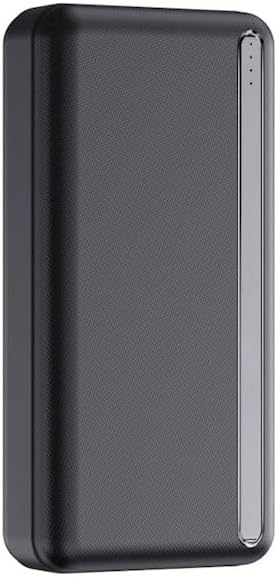
Gambar 2: Top view of the power bank, showing the USB-A output ports, USB-C input/output port, microUSB input port, and LED battery indicators.
Disetél
First Use & Charging the Power Bank:
Before initial use, it is recommended to fully charge your SETTY Power Bank.
- Connect the power bank to a power source (e.g., wall adapter, computer USB port) using either a microUSB cable or a USB-C cable.
- The LED indicators on the power bank will illuminate, showing the charging progress. Each lit LED typically represents approximately 25% of the battery capacity.
- Once all LED indicators are solid and no longer blinking, the power bank is fully charged and ready for use.
Parentah Operasi
Ngecas Alat Anjeun:
The SETTY Power Bank can charge two devices simultaneously.
- Connect your device's charging cable (USB-A or USB-C, depending on your device and the power bank's output ports) to one of the power bank's output ports.
- Sambungkeun tungtung kabel anu sanés ka alat anjeun.
- Bank kakuatan bakal otomatis mimiti ngecas alat anjeun. Indikator LED bakal nunjukkeun tingkat kakuatan sésana tina bank kakuatan.
- Pikeun ngeureunkeun ngecas, cabut kabel tina alat atanapi power bank anjeun.

Figure 3: The power bank actively charging a smartphone, demonstrating its use in a typical scenario.
Mariksa Tingkat Batré:
Press the power button (if available, or simply connect a device) to activate the LED indicators and check the current battery level of the power bank.
- 4 LED: 75% - 100% dicas
- 3 LED: 50% - 75% dicas
- 2 LED: 25% - 50% dicas
- 1 LED: 0% - 25% geus dieusi (bakal dieusi deui geura-giru)
Pangropéa
To ensure the longevity and optimal performance of your SETTY Power Bank, follow these maintenance guidelines:
- Tetep bank kakuatan garing sarta jauh tina Uap.
- Hindarkeun suhu anu ekstrim (panas atanapi tiis).
- Ulah ngaleupaskeun, ngabongkar, atanapi nyobian ngalereskeun alat ieu nyalira.
- Bersihkeun beungeutna ku lawon anu lemes sareng garing. Entong nganggo bahan kimia anu keras atanapi pembersih anu abrasif.
- For long-term storage, charge the power bank to about 50-75% and recharge it every 3-6 months to prevent deep discharge.
Pamérésan masalah
If you encounter issues with your SETTY Power Bank, refer to the following common problems and solutions:
| Masalah | Mungkin Cukang lantaranana | Solusi |
|---|---|---|
| Power bank teu ngecas | Cable issue, power source issue, power bank fully charged. | Try a different charging cable. Ensure the wall adapter/USB port is functional. Check LED indicators; it might already be full. |
| Alat teu ngecas tina bank daya | Power bank low on charge, cable issue, device issue, incorrect port. | Recharge the power bank. Try a different charging cable. Ensure your device is compatible. Use the correct output port (USB-A or USB-C). |
| Ngecas lalaunan | Cable quality, device input limit, multiple devices charging. | Use a high-quality charging cable. Ensure your device supports faster charging. Charging two devices simultaneously may reduce individual charging speed. |
| LEDs teu hurung | Power bank completely discharged, malfunction. | Coba ngecas power bank salami sababaraha jam. Upami masih teu aya réspon, hubungi layanan palanggan. |
spésifikasi
Detailed technical specifications for the SETTY 20000 mAh Power Bank (Model PB1-201):
| Fitur | Rincian |
|---|---|
| Modél | PB1-201 |
| Kapasitas batré | 20000 mAh |
| Komposisi batré | Litium-polimér |
| Palabuhan Input | MicroUSB, USB-C |
| Palabuhan Kaluaran | 2 x USB-A, 1 x USB-C |
| Voltage | 5 volt |
| Ukuran (L x W x H) | 16L x 8l x 4Ép centimeters (approx. 16 x 8 x 4 cm) |
| Alat nu cocog | Smartphones, Tablets, Smartwatches, Earbuds, etc. |

Figure 4: Visual representation of the power bank highlighting its 20000 mAh capacity, 22.5W output, and various input/output ports.
Garansi sareng Rojongan
This SETTY Power Bank comes with a standard manufacturer's warranty. Please refer to the product packaging or the retailer's websitus pikeun istilah jeung kaayaan jaminan husus.
For technical support, warranty claims, or further assistance, please contact the customer service of your point of purchase or visit the official SETTY websitus.
penting: Ulah nyobian muka atawa ngaropéa alat. Ieu tiasa ngabatalkeun jaminan sareng nyababkeun résiko kaamanan.


