1. Bubuka
This manual provides essential information for the safe and efficient operation, installation, and maintenance of your KATOOL KT-B750 Automatic Wheel Balancer. Please read this manual thoroughly before operating the equipment to ensure proper usage and to prevent potential hazards. Keep this manual accessible for future reference.

Figure 1: KATOOL KT-B750 Automatic Wheel Balancer with a wheel ready for balancing.
2. Émbaran Kasalametan
Always prioritize safety when operating any machinery. Failure to follow safety instructions can result in serious injury or equipment damage.
2.1 Kasalametan Umum
- Read and understand all instructions in this manual before operation.
- Ngan tanaga anu terlatih sareng diidinan anu kedah ngoperasikeun alat ieu.
- Anggo alat pelindung pribadi (PPE), kalebet kacamata sareng sarung tangan.
- Pastikeun wewengkon gawé beresih, cahayana alus, sarta bebas tina halangan.
- Keep bystanders, especially children, away from the operating machine.
- Ulah ngoperasikeun balancer upami aya bagian anu ruksak atanapi leungit.
2.2 Kasalametan listrik
- Connect the machine only to a grounded power outlet with the specified voltage (120V 1PH).
- Ulah ngajalankeun mesin jeung leungeun baseuh atawa di damp kaayaan.
- Inspect power cords regularly for damage. Replace damaged cords immediately.
- Pegatkeun sambungan kakuatan sateuacan ngalakukeun pangropéa atanapi perbaikan.
2.3 Kasalametan Operasional
- Ensure the wheel is securely mounted on the balancer shaft before starting operation.
- Do not exceed the maximum wheel weight capacity of 65 KG.
- Always use the wheel guard (if equipped or optional) during balancing cycles.
- Tetep leungeun jeung pakean leupas tina bagian puteran.
3. Unpacking jeung Majelis
3.1 Ngabongkar bungkusan
Carefully unpack all components from the shipping container. Inspect for any damage that may have occurred during transit. Report any damage to your supplier immediately.
3.2 Eusi
The KATOOL KT-B750 Wheel Balancer package typically includes:
- KATOOL KT-B750 Car Wheel Balancer Unit
- Mounting accessories (cones, quick-release nut, etc.)
- beurat Calibration
- Instruksi Manual
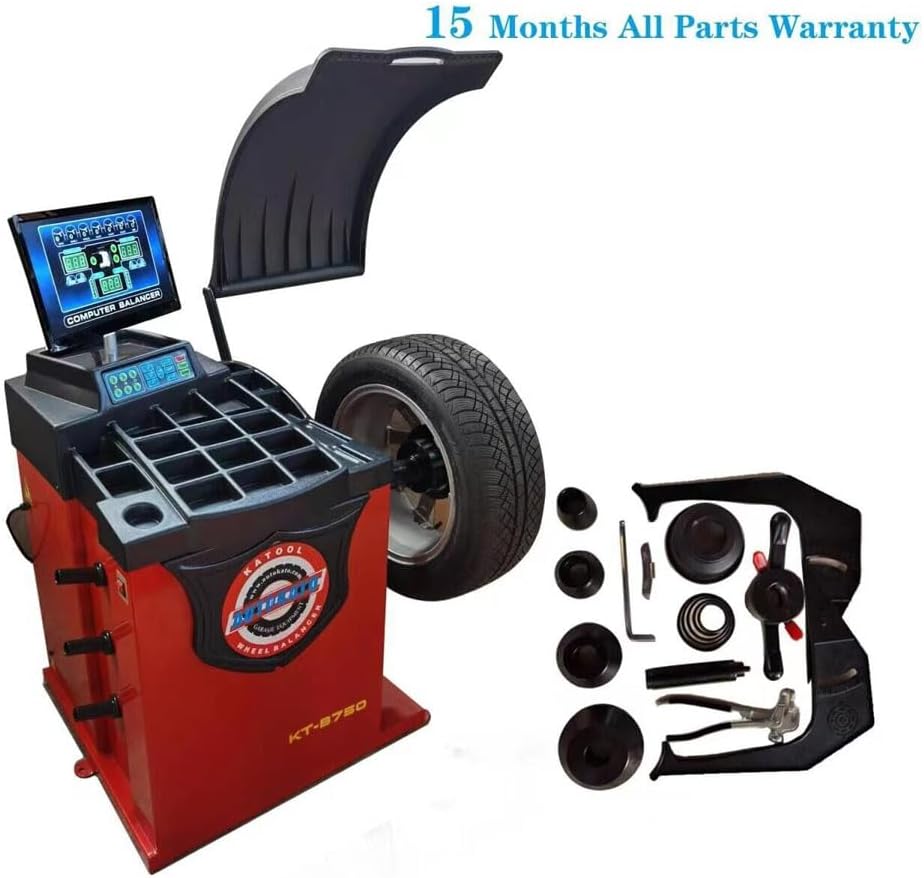
Figure 2: KATOOL KT-B750 Wheel Balancer and included accessories.
3.3 Majelis
Follow the detailed assembly instructions provided in the separate assembly guide (if applicable) or refer to the diagrams for connecting the main unit to its base and attaching any peripheral components. Ensure all fasteners are securely tightened.
4. Produk Langkungview jeung Fitur
The KATOOL KT-B750 is an automatic wheel balancer designed for precision tire balancing in home garages and professional shops. It incorporates advanced features for accuracy and ease of use.
4.1 Fitur konci
- Automatic Measurement Ruler: Automatically inputs 'A' (distance) and 'D' (diameter) values for efficient setup.
- Konstruksi anu kuat: Features a 3mm thick steel body with solid welding for high strength and minimal vibration.
- High-Precision Sensor System: All-in-one pressure sensor support design with 8mm thick bottom and side boards ensures stable and accurate measurements.
- Motor awét: Equipped with a top-level, pure copper winding motor for increased power, fast heat dissipation, and extended lifespan.
- Strong Shaft: The φ36mm shaft thread undergoes quenching treatment for high strength and durability, accommodating wider wheels.
- Advanced Computer Board: Utilizes advanced welding technology, offering moisture-proof, dust-proof, and anti-static properties for longer life.
- Multiple Balance Modes: Supports various balancing modes to suit different rim types, enhancing balancing precision.
- Built-in Diagnostics and Calibration: Includes fault diagnosis and a self-calibration program with double-side calibration, eliminating the need for memory parameters.
- Pilihan Unit: Allows selection between Ounce/Gram and MM/Inch units.
5. Spésifikasi
| Parameter | Nilai |
|---|---|
| Modél | KT-B750 |
| Diaméter pasisian | <30 inci |
| Lebar kabayang | 3 - 12 inci |
| Diaméter kabayang | <880 mm |
| Balancing Speed | 180 rpm |
| Sasayogian tanaga | 120V 1PH |
| Daya Motor | 0.25 KW |
| Rim Center Hole Diameter | <135 mm |
| Maximum Wheel Weight | <65 KG |
| Balancing Accuracy | ± 1g |
| Ngukur Waktu | 7 detik |
| Produsén | KATOOL |
| Tanggal Kahiji Sadia | 24 April 2024 |
6. Setélan
6.1 Nempatkeun
Position the wheel balancer on a level, stable surface capable of supporting the machine's weight and the maximum wheel weight. Ensure adequate space around the machine for safe operation and movement of wheels.
6.2 Sambungan Daya
Connect the power cord to a dedicated 120V 1PH grounded electrical outlet. Verify that the power supply matches the machine's requirements to prevent electrical damage.
7. Parentah Operasi
7.1 Powering On
Turn on the main power switch, usually located on the side or rear of the machine. The display panel should illuminate, indicating the machine is ready for operation.
7.2 Mounting the Wheel
- Select the appropriate mounting cone for the wheel's center bore.
- Slide the wheel onto the balancer shaft, ensuring it sits flush against the mounting flange.
- Secure the wheel with the quick-release nut, tightening it firmly but without excessive force.
7.3 Automatic Measurement
The KT-B750 features an automatic measurement ruler for inputting 'A' (distance from machine to rim) and 'D' (rim diameter) values.
- Extend the automatic measurement ruler until it touches the inner edge of the wheel rim.
- The machine will automatically detect and input the 'A' and 'D' values. Confirm these values on the display.
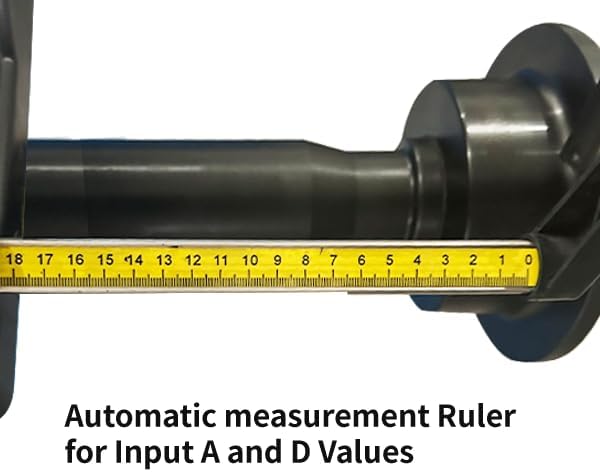
Figure 3: Using the automatic measurement ruler to input 'A' and 'D' values.
7.4 Inputting Wheel Width ('B' Value)
Manually input the wheel width ('B' value) using the control panel. Refer to the wheel's specifications or measure it directly.
7.5 Selecting Balance Mode
Choose the appropriate balance mode (e.g., static, dynamic, alloy rim modes) from the control panel based on the wheel type and desired balancing method.
7.6 Starting the Balancing Cycle
Close the wheel guard (if applicable) and press the START button. The machine will spin the wheel, measure imbalances, and display the required weight amounts and locations.
7.7 Applying Balance Weights
- Rotate the wheel manually to the indicated position for weight application. The laser indicator assists in precise placement at the 6 o'clock position.
- Apply the specified amount of balance weight to the indicated location on the rim.
- Repeat the balancing cycle if necessary until the display shows zero or minimal imbalance.

Figure 4: Laser indicator for precise weight placement at the 6 o'clock position.
7.8 Pilihan Unit
The machine allows switching between Ounce/Gram for weight units and MM/Inch for measurement units via the control panel settings.
8. Pangropéa
Regular maintenance ensures the longevity and accuracy of your KATOOL KT-B750 Wheel Balancer.
8.1 beberesih
- Keep the machine clean, especially the shaft, mounting cones, and measurement ruler.
- Ngagunakeun lemes, damp cloth to wipe down surfaces. Avoid harsh chemicals or abrasive cleaners.
- Ensure the display panel and control buttons are free from dust and debris.
8.2 Pamariksaan
- Periodically inspect all cables and connections for wear or damage.
- Check the mounting shaft and cones for any signs of wear or deformation.
- Pastikeun sadaya bagian anu gerak beroperasi lancar.
8.3 Kalibrasi
The KT-B750 has a built-in self-calibration program. Perform calibration periodically or if you suspect accuracy issues. Refer to the on-screen prompts for the double-side calibration procedure.
9. Cara ngungkulan
The KATOOL KT-B750 includes built-in fault diagnosis to assist in identifying issues. If you encounter problems, consult the display for error codes or messages.
9.1 Isu umum jeung Solusi
- Mesin teu hurung: Check power cord connection, power outlet, and main power switch.
- Inaccurate balancing results: Ensure proper wheel mounting, correct input of 'A', 'B', 'D' values, and perform self-calibration.
- Wheel not spinning: Check motor connection and ensure the wheel guard is closed.
- Pesen kasalahan dina tampilan: Refer to the machine's internal fault diagnosis system or contact technical support with the specific error code.
10. Garansi jeung Rojongan
10.1 Émbaran jaminan
The KATOOL KT-B750 Wheel Balancer typically comes with a 15 Months All Parts Warranty. Please retain your proof of purchase for warranty claims. The warranty covers defects in materials and workmanship under normal use. It does not cover damage due to misuse, neglect, unauthorized modifications, or normal wear and tear.
10.2 Rojongan Téknis
For technical assistance, parts, or service inquiries, please contact your authorized KATOOL dealer or customer support. Provide your model number (KT-B750) and a detailed description of the issue when seeking support.


