Bubuka
This manual provides detailed instructions for the Lexon LR157P4 Flip Classic LCD Alarm Clock. Designed for simplicity and functionality, this alarm clock features an intuitive 'flip' mechanism for alarm control, a clear LCD display, and a rechargeable battery. Please read this manual thoroughly to ensure proper use and maintenance of your device.
The Lexon LR157P4 is a compact and portable alarm clock, ideal for both home and travel. It offers digital time and alarm display, selectable 12 or 24-hour format, a snooze function, and adjustable backlight brightness.

Image: The Lexon LR157P4 Flip Classic LCD Alarm Clock in Rubber Pink, displaying the current time, date, and set alarm time. The 'ON' side is facing upwards, indicating the alarm is active.
Disetél
1. Unboxing sareng Biaya Awal
Upon unboxing, you will find the Lexon LR157P4 Flip Classic LCD Alarm Clock and a USB-C charging cable. It is recommended to fully charge the device before its first use.
- Sambungkeun kabel USB-C anu disayogikeun kana port ngecas di tukang jam alarm.
- Sambungkeun tungtung kabel USB-C anu sanésna kana adaptor daya USB anu cocog (henteu kalebet).
- The charging control display will indicate the charging status. A full charge provides up to 6 months of battery life.
2. Daya Hurung / Pareum
To power on or off the device, locate the power button on the back of the clock.
3. Nyetel Waktos sareng Tanggal
The control buttons for time, alarm, and screen settings are located on the back of the device.

Gambar: Tukangeun view of the Lexon LR157P4 Flip Classic LCD Alarm Clock, highlighting the power button, USB-C charging port, 'SET' button, and arrow buttons for adjustments.
- Press the 'SET' button to enter time setting mode. The hour digits will flash.
- Use the up (▲) and down (▼) arrow buttons to adjust the hour.
- Press 'SET' again to move to minute adjustment, then use the arrow buttons.
- Continue pressing 'SET' to cycle through setting the date (month/day) and selecting 12-hour or 24-hour format.
- After making all adjustments, press 'SET' one last time or wait a few seconds for the settings to be saved automatically.
Ngoperasikeun
1. Alarm Activation and Deactivation
The unique 'flip' design allows for easy alarm control:
- To activate the alarm, ensure the side of the clock marked 'ON' is facing upwards. The alarm icon will appear on the display.
- To deactivate the alarm, simply turn the clock over so the side marked 'OFF' is facing upwards. The alarm icon will disappear from the display.
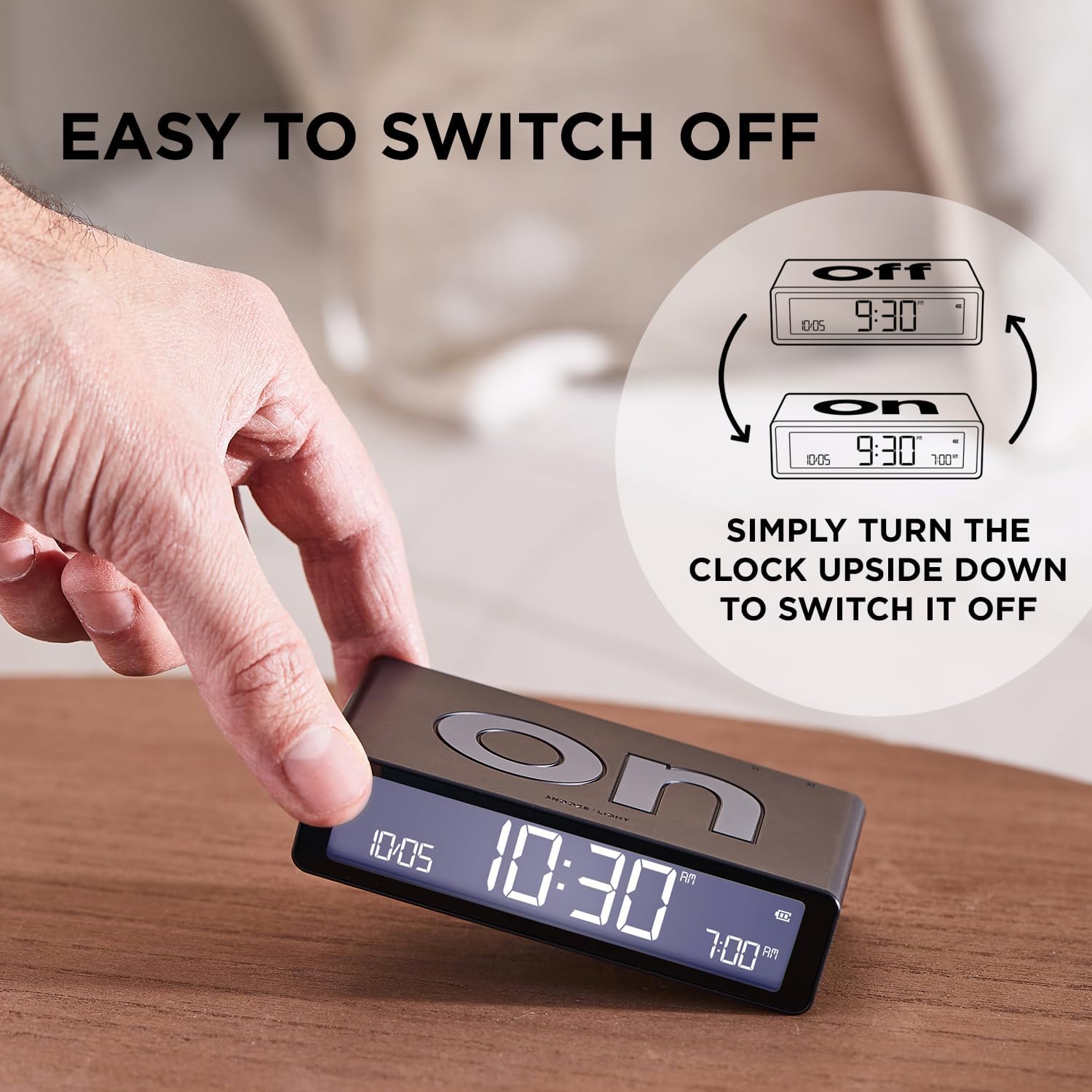
Image: Illustration of how to flip the alarm clock to switch the alarm function on or off.
2. Nyetel Time Alarm
To set the alarm time, use the 'SET' button and arrow buttons on the back of the clock:
- With the clock displaying the current time, press the 'SET' button until the alarm time digits begin to flash.
- Use the up (▲) and down (▼) arrow buttons to adjust the alarm hour.
- Press 'SET' again to move to alarm minute adjustment, then use the arrow buttons.
- Press 'SET' one last time or wait a few seconds to save the alarm time.
3. Alarm Sound and Snooze Function
- When the alarm sounds, it begins with a beep that accelerates every 10 seconds and continues for 30 seconds.
- To activate the snooze function, gently touch the top surface of the clock. The alarm will pause and repeat after 5 minutes.
- To completely stop the alarm, flip the clock to the 'OFF' side.
4. Backlight and Display Information
The clock features a touch sensor backlight and an intuitive display:
- Touch the top surface of the clock to activate the backlight for 4 seconds.
- The brightness of the display can be set to 3 different levels using the settings menu (accessed via the 'SET' button).
- The LCD display shows the current time, date, set alarm time, and battery percentage.

Image: The intuitive interface of the Lexon LR157P4 display, indicating the date, current time, alarm time, and battery percentage.
Pangropéa
1. beberesih
To maintain the appearance and functionality of your alarm clock:
- Ngusap beungeut ku lawon lemes, garing, tanpa lint.
- Avoid using abrasive cleaners, solvents, or spray cleaners, as these may damage the finish or internal components.
2. Kaperawatan batré
The Lexon LR157P4 features a built-in rechargeable battery:
- Ngecas deui alat sawaktos indikator batre nembongkeun daya lemah.
- Avoid exposing the device to extreme temperatures (hot or cold) for extended periods, as this can affect battery life.
- Simpen alat ieu di tempat anu tiis sareng garing upami henteu dianggo salami lami.
Pamérésan masalah
- Alarm teu disada: Ensure the clock is flipped to the 'ON' side. Check the battery level and recharge if necessary. Verify that the alarm time is correctly set.
- Display not working or dim: Recharge the battery. Adjust the display brightness settings. If the issue persists, try powering the device off and on again.
- Clock not charging: Ensure the USB-C cable is securely connected to both the clock and the power adapter. Try using a different USB-C cable or power adapter to rule out cable/adapter issues.
- Lepat waktos/tanggal: Re-enter the time and date settings as described in the 'Setup' section.
spésifikasi
| Fitur | Rincian |
|---|---|
| merek | Lexon |
| Modél | LR157P4 |
| Warna | Rubber Pink |
| Tipe tampilan | LCD Digital |
| Fitur husus | Alarm, Snooze, Touch Sensor Backlight, Adjustable Brightness |
| Dimensi produk | 10.4W x 2.6H centimetres |
| Item Beurat | 125 gram |
| Sumber Daya | Batré Powered (Bisa dicas deui via USB-C) |
| Kahirupan batré | Up to 6 months (on a full charge) |
| Jero rohangan / pamakéan outdoor | jero rohangan |
Garansi sareng Rojongan
Specific warranty information for the Lexon LR157P4 Flip Classic LCD Alarm Clock is not provided in this document. For warranty details, product support, or service inquiries, please refer to the official Lexon websitus atanapi ngahubungan pangecér Anjeun.