1. Bubuka
Thank you for choosing the Dreo HM311S Smart Humidifier. This manual provides essential information for safe operation, effective use, and proper maintenance of your device. Please read it thoroughly before use and retain it for future reference.
Eusi pakét:
- Dreo HM311S Smart Humidifier
- Cartridge Demineralisasi
- Sikat beberesih
- Paduan Aroma
- Manual pamaké
- Pitunjuk Kabersihan
2. Produk Langkungview
The Dreo HM311S is an ultrasonic humidifier designed to provide precise humidity control, featuring smart connectivity, a large water tank, and quiet operation.

Figure 2.1: Dreo HM311S Smart Humidifier with its main components and a smartphone displaying the control app.
Komponén konci:
- Tangki cai: Kapasitas 4 liter kanggo operasi anu berkepanjangan.
- Nozzle halimun: 30° tiltable for directional mist output.
- Panél kontrol: Digital display with touch controls for power, mist level, light, auto mode, timer, and sleep mode.
- Kotak Aroma: Integrated tray for essential oils.
- Kartrid Demineralisasi: Helps reduce mineral buildup.
- Smart Humidistat: For precise humidity measurement and automatic adjustment.

Figure 2.2: Internal components of the humidifier, including the 2.4MHz atomizer for fine mist, smart humidistat, and airflow booster.
3. Setélan
3.1 Panempatan Awal
Place the humidifier on a flat, stable, and water-resistant surface at least 15 cm (6 inches) away from walls and furniture. Ensure the mist outlet is not directed towards walls or electronic devices.
3.2 Ngeusian Tangki Cai
- Cabut panutup luhur humidifier.
- Pour clean, cool tap water directly into the water tank. Do not exceed the 'MAX' fill line. Distilled or demineralized water is recommended to prevent mineral buildup.
- Ganti panutup luhur kalawan aman.
4. Parentah Operasi
4.1 Daya Hurung/Pareuman
Plug the humidifier into a power outlet. Press the Kakuatan tombol dina panel kontrol pikeun ngahurungkeun atanapi mareuman unit.
4.2 Adjusting Mist Level
Pencét éta Halimun button to cycle through three mist output levels (Low, Medium, High). The digital display will indicate the current level.

Figure 4.1: Humidifier producing a high mist stream.

Figure 4.2: The humidifier's supersized mist output quickly hydrates the air.
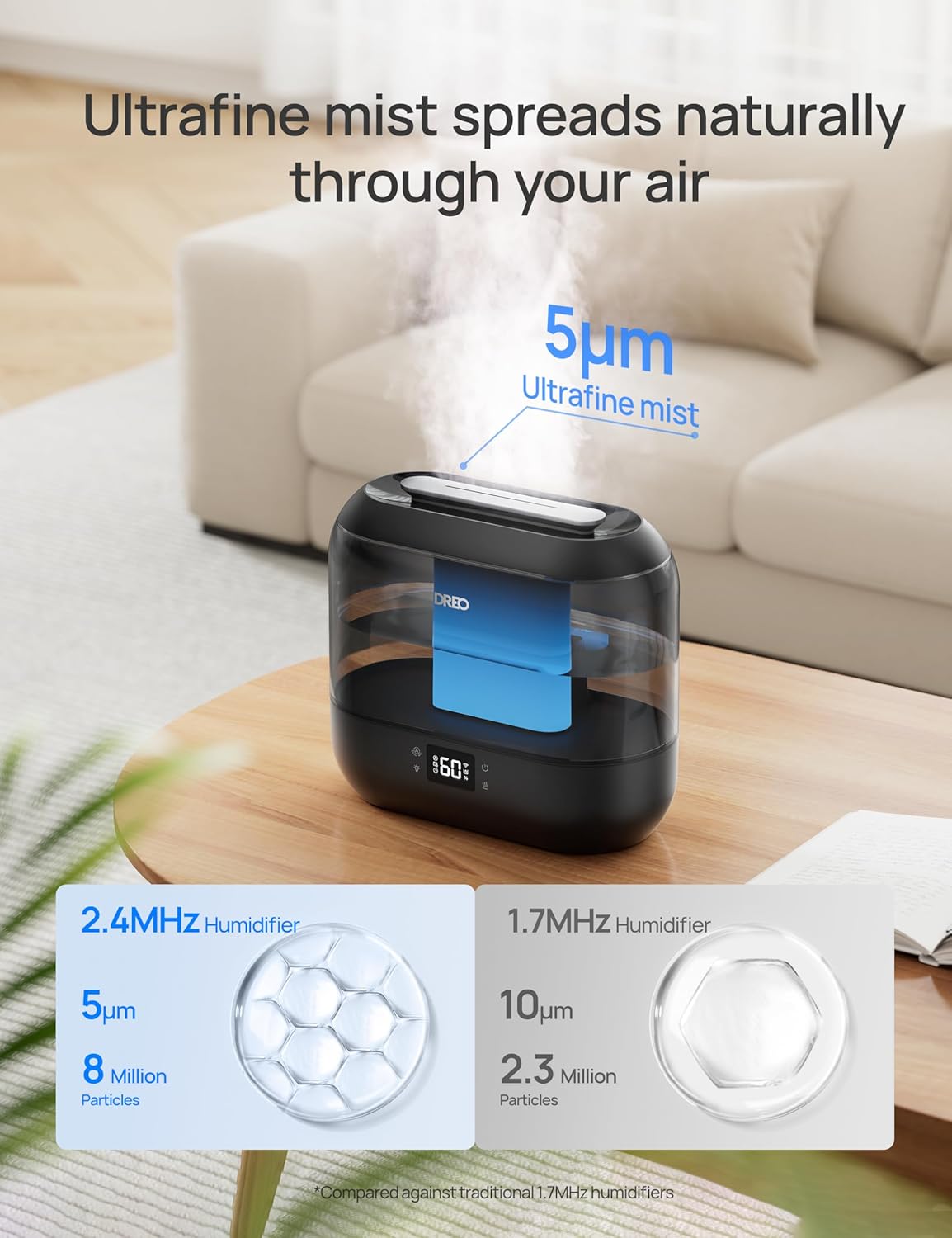
Figure 4.3: The humidifier disperses ultrafine mist particles for even distribution.
4.3 Modeu Otomatis
Pencét éta Otomatis button to activate Auto Mode. The humidifier will automatically adjust the mist output to maintain your preset humidity level. The smart ambient light will indicate humidity changes.
4.4 Lampu Peuting
Pencét éta Caang button to turn the ambient night light on or off.
4.5 Mode Saré
Pencét éta Saré button to enter Sleep Mode. The display lights will dim, and the humidifier will operate at a low, quiet mist level (28 dB) for undisturbed sleep. The 4L tank allows for up to 36 hours of continuous operation in this mode.

Figure 4.4: The humidifier provides up to 36 hours of continuous mist on a single fill, ideal for overnight use.
4.6 Fungsi Timer
Pencét éta Timer button to set an auto-off timer. You can set the humidifier to turn off after a specified number of hours.
4.7 Ambu diffuser
Pull out the aroma box located at the base of the unit. Add a few drops of your preferred essential oil onto the aroma pad. Slide the box back into place. The mist will carry the fragrance into the air.
4.8 Kontrol Pinter (Aplikasi & Sora)
Download the Dreo app to control your humidifier remotely. You can adjust mist levels, set schedules, control ambient lighting, and monitor humidity from anywhere. The humidifier is also compatible with Alexa and Google Assistant for voice control.

Figure 4.5: Control your humidifier's humidity settings precisely using the Dreo smartphone app.

Figure 4.6: Tailor the humidifier's operation to your lifestyle with smart schedules via the app.
5. Pangropéa
Regular cleaning is crucial for optimal performance and hygiene. Always unplug the humidifier before cleaning.
5.1 Pangropéa poean
- Kosongkeun tangki cai sareng dasarna unggal dinten.
- Lap tank sareng dasarna dugi ka garing nganggo lawon bersih.
5.2 beberesih mingguan
- Cabut colokan humidifier teras cabut tangki cai.
- Pour 2 cups (470ml) of distilled white vinegar into the water tank.
- Replace the top cover and let it soak for 20 minutes.
- Empty the vinegar and rinse the tank thoroughly with clean water.
- Use the provided cleaning brush to clean the atomizer and other hard-to-reach areas in the base.
- Rinse all components and wipe dry.
5.3 Demineralization Cartridge
The demineralization cartridge helps prevent white dust from hard water. Replace it every 2-3 months, or more frequently if you have very hard water or use the humidifier often.
5.4 Aroma Pad
Clean the aroma pad as needed by rinsing it with warm water and allowing it to air dry. Replace the pad if it becomes discolored or loses its effectiveness.
6. Cara ngungkulan
| Masalah | Mungkin Cukang lantaranana | Solusi |
|---|---|---|
| Taya halimun atawa kaluaran halimun low | Tingkat cai handap Penumpukan mineral dina atomizer Nozzle halimun dipeungpeuk | Eusian bak cai Clean atomizer with cleaning brush Bersihkeun sagala halangan tina nozzle kabut |
| Lebu bodas sabudeureun humidifier | Cai teuas dipaké Demineralization cartridge needs replacement | Paké cai sulingan atawa demineralized Ganti kartrij demineralisasi |
| Bau anu teu pikaresepeun | Stagcai nant Tangki/dasar cai kotor | Empty and clean water tank/base regularly Anggo cai seger unggal dinten |
| Humidifier not responding to app/voice control | Masalah sambungan Wi-Fi App teu diropéa | Ensure humidifier is connected to Wi-Fi Check app for updates and restart |
7. Spésifikasi
| Fitur | Rincian |
|---|---|
| Ngaran modél | HM311S |
| Ukuran (L x W x H) | 14 x 27.99 x 25.81 cm (5.5 x 11 x 10.1 inci) |
| Beurat | 1.42 kg (3.12 lbs) |
| Kapasitas Tangki Cai | 4 liter |
| Wewengkon Cakupan | Nepi ka 300 sq ft |
| Modeu Operasi | Ultrasonik |
| Tingkat Noise | 28 dB (dina Modeu Sare) |
| Fitur husus | Digital Display, Adjustable Humidity Control, Top-Fill, Timer, Wi-Fi/APP/Voice Control, Aroma Diffuser, Night Light |

Figure 7.1: Dimensions of the Dreo HM311S Smart Humidifier.
8. Garansi jeung Rojongan
Dreo products are manufactured with the highest quality standards. For warranty information or technical support, please refer to the warranty card included in your package or visit the official Dreo websitus.
Please have your model number (HM311S) and purchase details ready when contacting support.


