Casing Keyboard Toél Logitech Combo
User Manual for iPad Air 11-inch (M2/M3) & 5th Gen
Bubuka
The Logitech Combo Touch is a versatile keyboard case designed for the iPad Air 11-inch (M2 and M3) and iPad Air (5th generation). It features a detachable keyboard and a large trackpad, transforming your iPad into a productivity powerhouse. This manual provides essential information for setting up, operating, maintaining, and troubleshooting your Combo Touch.

Image: The Logitech Combo Touch keyboard case with an iPad Air inserted, showcasing the keyboard and trackpad in a typing position.
Kasaluyuan
The Logitech Combo Touch (Model 920-012631) is compatible with the following iPad Air models:
- iPad Air 11 inci (M2)
- iPad Air 11 inci (M3)
- iPad Air (5th Generation) - Models A2588, A2589, A2591
For optimal performance, ensure your iPad's operating system is up to date.

Image: A chart illustrating compatibility of various Logitech keyboard cases, including Combo Touch, with different iPad Pro, iPad Air, and standard iPad generations.
Key Features and Usage Modes
The Combo Touch offers multiple modes to enhance your iPad experience:
- Modeu Ngetik: Position the keyboard upright for comfortable typing. The backlit keys adjust automatically to your environment.
- ViewModeu: Detach the keyboard and use the adjustable kickstand to watch videos or make calls.
- Modeu Ngagambar: Fully recline the kickstand for a perfect angle to draw or take notes with Apple Pencil (not included).
- Mode maca: Fold the keyboard back or detach it completely for a comfortable handheld reading experience.
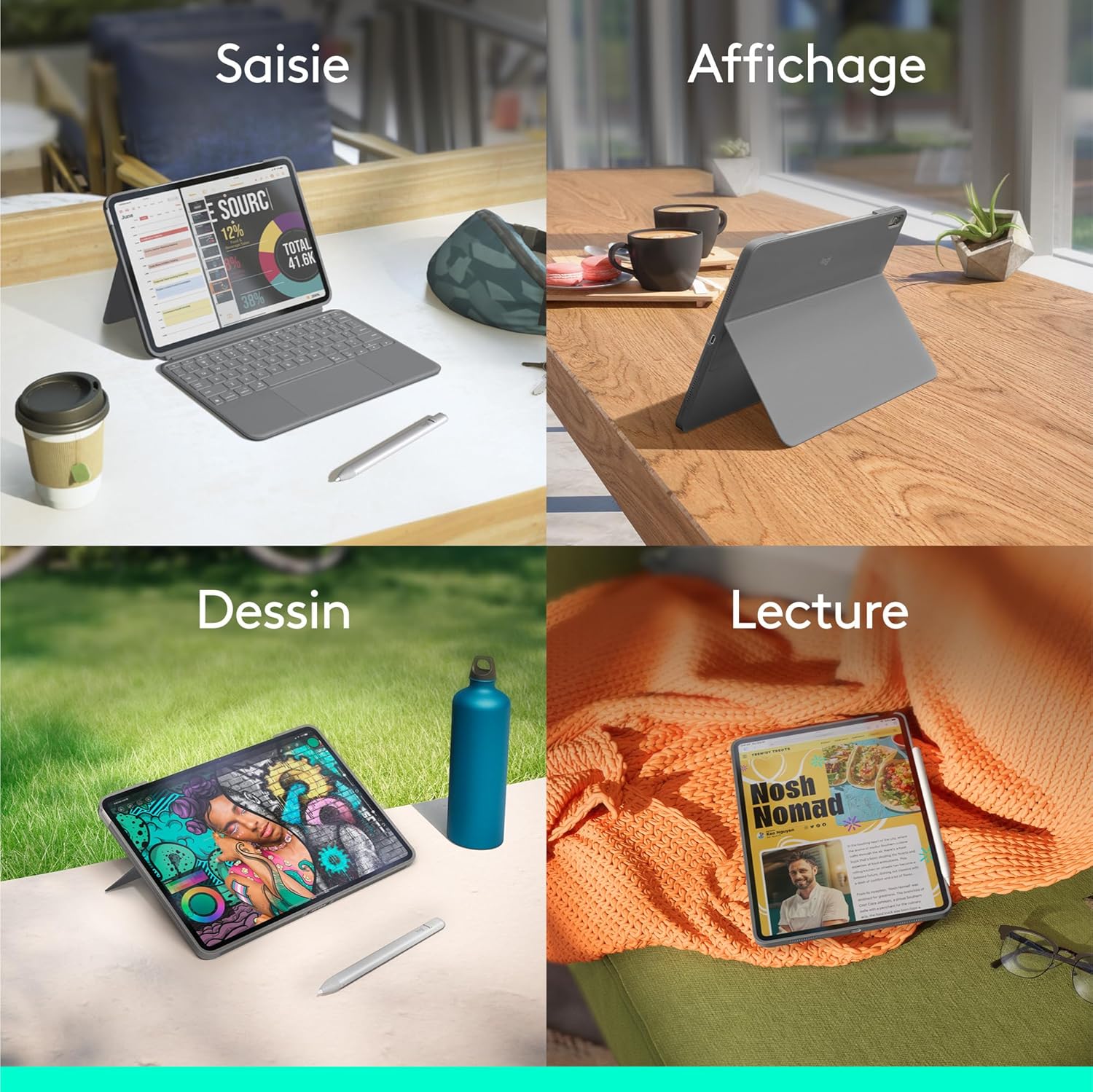
Image: A four-panel image demonstrating the different usage modes: Typing (iPad with keyboard), Viewing (iPad propped up without keyboard), Drawing (iPad laid flat with kickstand), and Reading (iPad held like a tablet).
Flexible Stand and Detachable Keyboard
The ultra-flexible kickstand allows you to find the ideal viewing or typing angle. The keyboard can be easily detached when not needed, providing greater flexibility for drawing, watching, or reading.

Gambar: A close-up view of the Logitech Combo Touch case with the flexible kickstand extended, supporting the iPad at an angle.

Gambar: A luhur-handap view of the Logitech Combo Touch keyboard, highlighting its detachable nature and backlit keys.
Large Multi-Touch Trackpad
Experience intuitive navigation with the largest trackpad ever on a Logitech Combo Touch. It supports multi-touch gestures, allowing you to swipe, pinch, double-tap, and more for enhanced productivity.

Gambar: A close-up view of the large multi-touch trackpad on the Logitech Combo Touch keyboard.
Absolute Tailored Protection
The lightweight yet robust case provides comprehensive protection for your iPad against scratches and minor impacts, ensuring peace of mind when you carry it anywhere.

Gambar: A pungkur view of the Logitech Combo Touch case, showing the protective design around the iPad's camera and edges.
Disetél
- Lebetkeun iPad: Carefully align your iPad Air with the Combo Touch case and gently press it into place until it is securely seated. Ensure all ports and buttons are accessible.
- Gantelkeun kibor: Align the Smart Connector on the keyboard with the corresponding pins on the iPad case. The keyboard will magnetically snap into place and establish an instant, secure connection. No pairing or charging is required for the keyboard, as it is powered directly by your iPad via the Smart Connector.
- Saluyukeun Kickstand: Pull out the flexible kickstand from the back of the case to prop up your iPad to your desired viewsudut ngetik atawa sudut ngetik.
Ngoperasikeun
Ngagunakeun kibor
- Ngetik: Begin typing as you would on a standard keyboard. The keys are full-sized and offer comfortable travel.
- Lampu tukang: The keyboard features adjustable backlighting. It automatically adjusts to ambient light, or you can manually control the brightness using the dedicated function keys.
- Tombol Fungsi: Utilize the row of iOS shortcut keys for quick access to home, screen brightness, search, media controls, and more.
Ngagunakeun Trackpad
- Napigasi: Move the cursor by sliding your finger across the trackpad.
- Ngaklik: Press down on the trackpad to click.
- Multi-Touch Gestures: The trackpad supports various multi-touch gestures for iPadOS, such as two-finger scrolling, pinch-to-zoom, and three-finger swipes for app switching. Refer to your iPad's settings for a full list of supported gestures.
Pangropéa
- beberesih: Ngagunakeun lemes, damp cloth to wipe down the exterior of the case and keyboard. Avoid harsh chemicals or abrasive materials.
- Panyimpenan: When not in use, keep the Combo Touch in a clean, dry environment. Avoid extreme temperatures.
- Konektor Pinter: Ensure the Smart Connector pins on both the keyboard and the case are clean and free of debris to maintain a reliable connection.
Pamérésan masalah
- Keyboard Teu Ngabales:
- Ensure the iPad is securely seated in the case and the Smart Connector is properly aligned.
- Clean the Smart Connector pins on both the iPad and the keyboard case.
- Pareuman hurungkeun deui iPad anjeun.
- Trackpad Not Working:
- Check the keyboard connection as described above.
- Ensure the trackpad is enabled in your iPad's settings (Settings > General > Trackpad).
- Lampu tukang Teu Gawé/Taram:
- Check ambient light conditions; the backlight may dim in bright environments.
- Adjust backlight brightness using the dedicated function keys.
- iPad Not Fitting Securely:
- Verify that your iPad model is compatible with this specific Combo Touch model (iPad Air 11-inch M2/M3 or 5th Gen).
- Ensure no foreign objects are obstructing the fit.
spésifikasi
| Fitur | Rincian |
|---|---|
| merek | Logitech |
| Nomer modél | 920-012631 |
| Warna | kulawu |
| Alat nu cocog | iPad Air 11-inch (M2), iPad Air 11-inch (M3), iPad Air (5th Gen) |
| Téhnologi konektipitas | Panyambung pinter |
| Katerangan kibor | Standalone, Detachable, Backlit |
| Fitur husus | Designed for a positive future (contains recycled plastic) |
| Bahan | palastik |
| Negara asal | Cina |
Garansi sareng Rojongan
The Logitech Combo Touch comes with a 2-taun jaminan produsén urang. For warranty claims or technical support, please visit the official Logitech support websitus atanapi ngahubungan layanan palanggan maranéhna. Simpen bukti pameseran anjeun pikeun validasi jaminan.
Information regarding the availability of spare parts and guaranteed software updates is not available at this time.
Pertimbangan Lingkungan
Logitech is committed to sustainability. The plastic parts of the Oxford Grey Combo Touch contain 24% certified post-consumer recycled plastic. This product is designed with a positive future in mind, incorporating recycled materials and responsible packaging.

Image: An infographic highlighting Logitech's commitment to sustainability, showing icons for recycled plastic, low carbon aluminum, and responsible packaging.


