Bubuka
This manual provides detailed instructions for the TECPHILE iPad Keyboard Case, Model T5509D. It covers setup, operation, maintenance, and troubleshooting to ensure optimal use of your device. Please read this manual thoroughly before using the product.
Kasaluyuan
The TECPHILE iPad Keyboard Case (Model T5509D) is specifically designed for the following iPad Pro 12.9-inch models:
- iPad Pro 12.9-inch (6th Generation, 2022): Modél A2436, A2764, A2437, A2766
- iPad Pro 12.9-inch (5th Generation, 2021): Modél A2378, A2379, A2461, A2462
- iPad Pro 12.9-inch (4th Generation, 2020): Modél A2233, A2229, A2069, A2232
- iPad Pro 12.9-inch (3rd Generation, 2018): Modél A1876, A2014, A1895, A1983
This case is not compatible with any other iPad models.

Image: Compatibility chart for TECPHILE iPad Keyboard Case. Please verify your iPad model number on the back of your device to ensure compatibility.
Eusi pakét
Saatos muka bungkusan, mangga pastikeun sadaya barang aya:
- TECPHILE iPad Keyboard Case (with integrated kickstand and pencil holder)
- Detachable Wireless Backlit Keyboard
- Kabel Ngecas USB-C
- Manual pangguna (dokumén ieu)
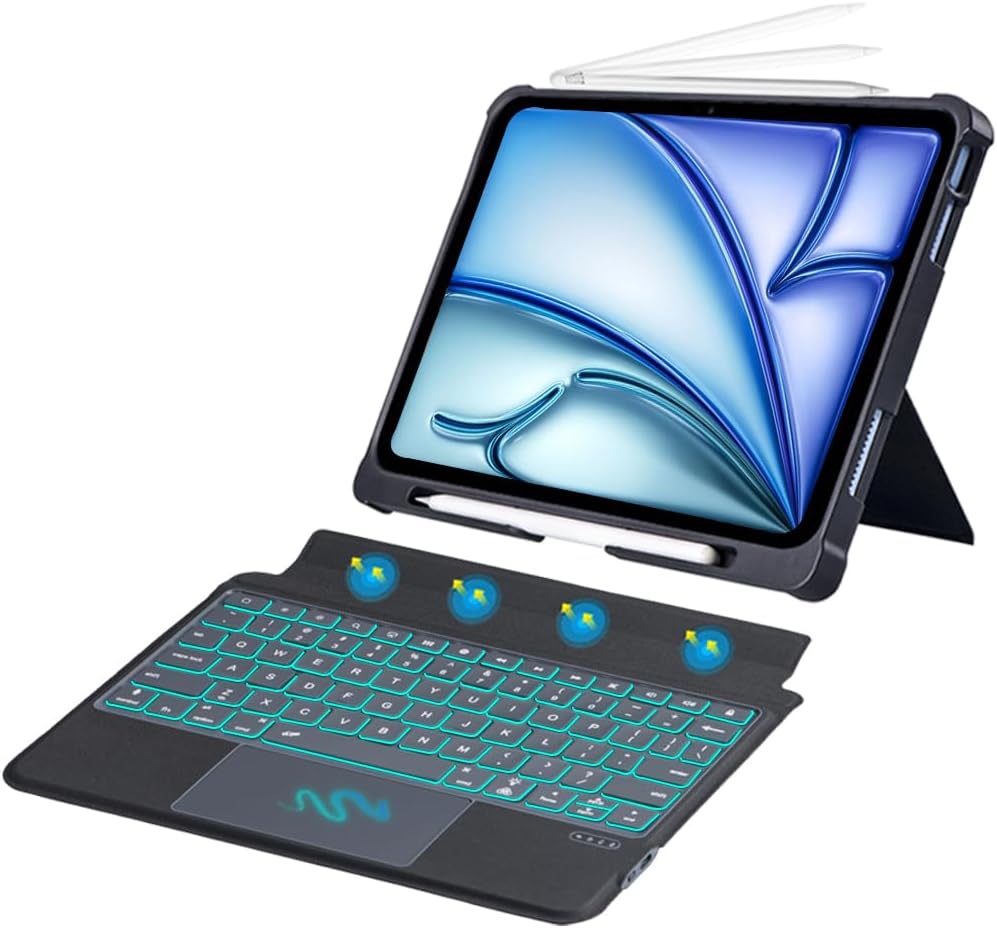
Gambar: Leuwihview of the TECPHILE iPad Keyboard Case components, including the case with an iPad and the detached wireless keyboard.
Guide Setup
1. Attaching Your iPad to the Case
- Gently align your iPad Pro 12.9-inch with the case.
- Insert the iPad into the protective shell, ensuring all corners are securely fitted. The case provides full protection and features honeycomb heat release design.
- The case includes a dedicated pencil holder and supports wireless charging for your Apple Pencil.
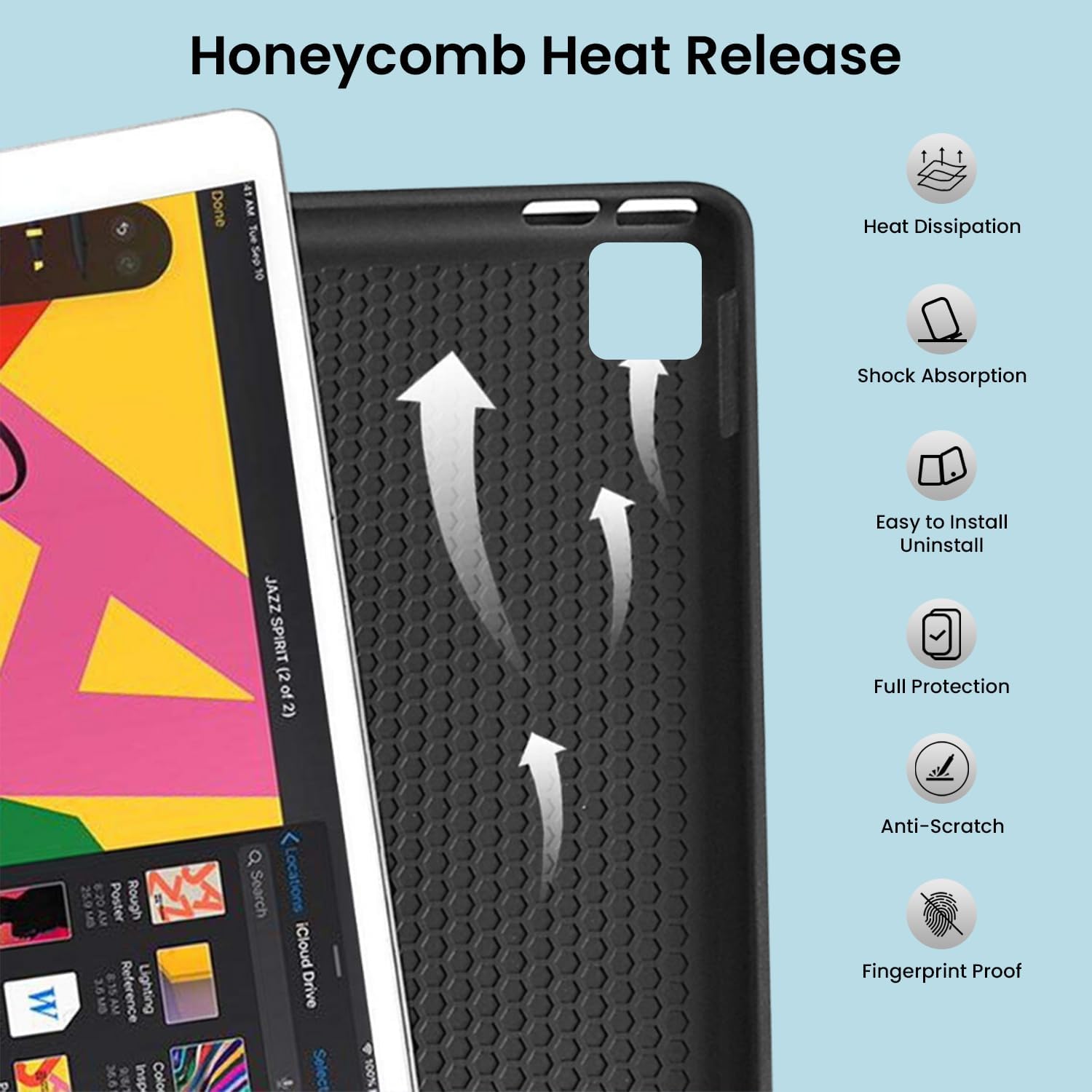
Image: Detail of the case's honeycomb structure for heat dissipation and protective features.

Image: Illustrates the wireless charging capability for the Apple Pencil and the integrated pencil holder.
2. Ngecas kibor
Before initial use, fully charge the keyboard. The keyboard has a 500mAh battery capacity.
- Panggihan port ngecas USB-C di sisi kibor.
- Connect the provided USB-C cable to the keyboard and a power source (e.g., USB wall adapter, computer USB port).
- The charging indicator light will illuminate. Once fully charged, the light may change or turn off.
A full charge provides approximately 80 hours of use without backlight or 5 hours with backlight enabled.

Image: Keyboard charging port and battery performance details.
3. Connecting the Keyboard via Bluetooth
The keyboard connects wirelessly to your iPad via Bluetooth.
- Pastikeun kibor tos dieusi sareng diaktipkeun.
- Dina kibor, pencét tombol Fn+Z keys simultaneously. The Bluetooth indicator light will start blinking, indicating it's in pairing mode.
- Dina iPad anjeun, buka Setelan > Bluetooth.
- Hurungkeun Bluetooth. iPad anjeun bakal milarian alat anu sayogi.
- Locate and tap "Bluetooth Keyboard" (or similar name) in the list of devices to connect.
- Once connected, the Bluetooth indicator light on the keyboard will stop blinking.

Image: Visual guide for Bluetooth pairing process.
Parentah Operasi
Fungsi keyboard
The detachable keyboard features a QWERTY layout with additional function keys for iPad control.
- Kontrol lampu latar: Pencét Fn + 💡 (light bulb icon) to turn on/off the backlight and cycle through 7 different colors. Press Fn + ☀️ (sun icon) to adjust the 3 levels of brightness.
- Full Shortcut Row: Access common iPad functions directly from the top row of keys.
- Intelligent Voice Input Function: Utilize the dedicated key for voice input.

Gambar: Detil view of the keyboard's backlit keys and function controls.
Smart Multi-Gesture Trackpad
The integrated large trackpad supports multi-touch gestures for enhanced navigation.
- Napigasi Dasar: Pindahkeun kursor ku cara ngageserkeun ramo anjeun dina trackpad.
- Click Functions: Supports right and left click functions.
- Multi-Finger Gestures: Utilize native iPad multi-finger gestures for scrolling, swiping, and other actions. Refer to your iPad's settings for a full list of supported gestures.
- Turn On/Off Trackpad: Pencét Fn + 🖱️ (trackpad icon) to enable or disable the trackpad.
Adjustable Kickstand and Usage Modes
The case features an adjustable kickstand that allows for multiple viewing angles and usage modes.
- Modeu Tipe: Position the iPad upright with the keyboard attached for a laptop-like experience.
- View Mode: Adjust the kickstand to a comfortable angle for watching videos or presentations without the keyboard.
- Modeu Baca: Fold the keyboard behind the iPad for a tablet-like reading experience.
- Modeu Sketsa: Lower the angle for drawing or writing with the Apple Pencil.
The kickstand offers a seamless range of angles, smoothly reclining from 30° to 160° while maintaining stability.

Image: Various usage modes enabled by the adjustable kickstand and detachable keyboard.
Fungsi Hudang/Saré Otomatis
The keyboard case includes an auto wake/sleep function to conserve battery life. Closing the case will put your iPad to sleep, and opening it will wake it up.
Pangropéa
- beberesih: Ngagunakeun lemes, damp lawon pikeun ngusap bagian luar casing sareng kibor. Hindarkeun bahan kimia anu kasar atanapi bahan anu abrasif.
- Panyimpenan: Upami teu dianggo salami lami, simpen wadah kibor di tempat anu tiis sareng garing. Pastikeun kibor dipareuman pikeun ngahémat umur batré.
- Perawatan batré: To prolong battery life, avoid fully discharging the keyboard frequently. Charge it regularly.
Pamérésan masalah
Kibor Teu Nyambung
- Pariksa kakuatan: Pastikeun kibor dihurungkeun sareng batréna cekap.
- Pasangkeun deui Bluetooth:
- Dina iPad anjeun, buka Setelan > Bluetooth.
- Forget or unpair the "Bluetooth Keyboard" if it appears in "My Devices".
- Pareuman hurungkeun deui iPad anjeun.
- Put the keyboard into pairing mode (press Fn+Z).
- Milarian pikeun and connect to the keyboard again on your iPad.
- gangguan: Jauhkeun alat nirkabel anu sanés anu tiasa nyababkeun gangguan.
Konci Teu Ngabales
- Tingkat batré: Cas keyboard sacara pinuh.
- Sambungan Bluetooth: Pastikeun kibor disambungkeun kalayan leres via Bluetooth.
- Uihan deui: Pareuman terus hurungkeun deui kibor.
Trackpad Teu Jalan
- Enable Trackpad: Ensure the trackpad is enabled by pressing Fn + 🖱️ (trackpad icon).
- Setélan iPad: Pariksa setélan aksésibilitas iPad pikeun kontrol pointer.
- Clean Trackpad: Pastikeun beungeut trackpad beresih jeung bebas tina lebu.
spésifikasi
| Ngaran modél | T5509D |
| Kasaluyuan | iPad Pro 12.9" (6th, 5th, 4th, 3rd Gen) |
| Konektipitas | Bluetooth |
| Tata perenah kibor | QWERTY |
| Lampu tukang | 7 Warna, 3 Tingkat Kacaangan |
| Trackpad | Large Multi-Gesture Trackpad |
| Kapasitas batré | 500 mAh (Litium Ion) |
| Battery Life (Non-backlight) | Nepi ka 80 jam |
| Battery Life (Backlight) | Nepi ka 5 jam |
| Port ngecas | USB-C |
| Dimensi produk | 29 x 24 x 2 cm |
| Item Beurat | 735 g |
| Bahan | Leatherite and ABS Plastic |
| Fitur husus | Adjustable Kickstand (30°-160°), Detachable Keyboard, Pencil Holder, Wireless Pencil Charging Support, Auto Wake/Sleep, Honeycomb Heat Release |
Garansi sareng Rojongan
For warranty information or technical support, please refer to the documentation included with your purchase or contact TECPHILE customer service through the retailer where the product was purchased. Please have your model number (T5509D) and purchase details ready when contacting support.
