1. Bubuka
The Motorola Solutions PMLN8342 IMPRES 2-Wire Surveillance Kit is designed for discreet and clear communication in various environments. This accessory integrates advanced IMPRES audio technology, ensuring optimal sound performance and enhanced audio gain when connected to compatible Motorola radios.
This kit features a two-wire design: one wire for receiving audio transmissions through the earpiece, and a second wire incorporating a combined microphone, a programmable button, and a Push-to-Talk (PTT) button. The translucent acoustic tube earpiece is designed for comfort and discretion.
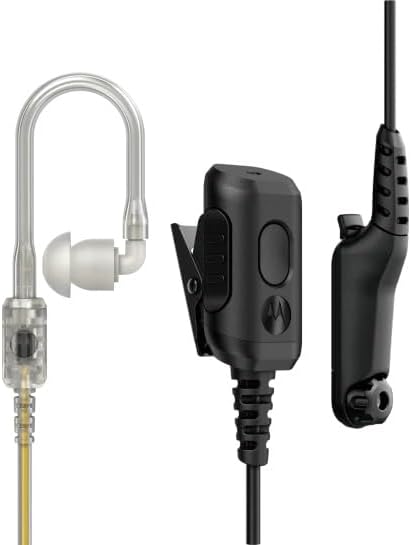
Figure 1: Motorola Solutions PMLN8342 IMPRES 2-Wire Surveillance Kit components.
2. Eusi Paket
Pastikeun yén sadaya item aya dina pakét anjeun:
- Motorola Solutions PMLN8342 IMPRES 2-Wire Surveillance Kit (Headset)
3. Setélan
- Pariksa kasaluyuan: Ensure your radio is compatible with the PMLN8342 kit. This kit is compatible with APX N70, APX N50, and APX N30 series radios.
- Nyambung ka Radio: Locate the audio accessory port on your compatible radio. Insert the 3.5 mm jack of the surveillance kit firmly into the radio's accessory port.
- Position Earpiece: Gently place the translucent acoustic tube earpiece into your ear. Adjust for a comfortable and secure fit. The earpiece is designed for in-ear placement.
- Secure Microphone/PTT: Clip the combined microphone and Push-to-Talk (PTT) unit to your clothing in a convenient location, such as a collar or lapel. Ensure the microphone is positioned to capture your voice clearly.
4. Parentah Operasi
The PMLN8342 kit facilitates two-way communication with your radio.
- Receiving Transmissions: Audio from your radio will be transmitted directly to your ear through the translucent acoustic tube earpiece.
- Transmitting Messages (Push-to-Talk - PTT):
- Press and hold the PTT button located on the combined microphone unit.
- Nyarita jelas kana mikropon.
- Leupaskeun tombol PTT pikeun ngeureunkeun ngirimkeun sarta balik deui ka modeu narima.
- Tombol anu tiasa diprogram: The combined microphone unit also includes a programmable button. Refer to your radio's user manual for instructions on how to assign specific functions to this button.
- IMPRES Audio Technology: This kit utilizes IMPRES technology for enhanced audio performance. Ensure your radio is also IMPRES-compatible to fully benefit from features like optimal audio gain and clear communication.
5. Pangropéa
- beberesih: Regularly wipe the earpiece and cables with a soft, damp lawon. Hindarkeun ngagunakeun bahan kimia anu kasar atanapi pembersih abrasive.
- Translucent Tube Replacement: The translucent acoustic tube is replaceable. If the tube becomes discolored, damaged, or loses its acoustic clarity, it can be replaced with a genuine Motorola Solutions replacement part. Consult your dealer for replacement procedures and parts.
- Panyimpenan: Store the surveillance kit in a clean, dry place away from extreme temperatures and direct sunlight when not in use.
6. Cara ngungkulan
- Teu aya sora tina earpiece:
- Ensure the 3.5 mm jack is fully inserted into the radio's accessory port.
- Pariksa tingkat volume radio.
- Verify the earpiece tube is not kinked or blocked.
- Test the kit with another compatible radio if available.
- Microphone Not Transmitting Clearly:
- Pastikeun mikropon diposisikan leres sareng henteu ngahalangan.
- Nyarios langsung kana mikropon.
- Tunda transmisi: If there is a delay between pressing PTT and transmission, ensure you pause briefly after pressing the PTT button before speaking. This allows the radio system to activate the transmission path.
- Earpiece Discomfort:
- Adjust the earpiece position for a better fit.
- Consider if an alternative earpiece tip size might be more comfortable (if available from Motorola Solutions).
7. Spésifikasi
| Fitur | Rincian |
|---|---|
| Ngaran modél | PMLN8342 |
| Téhnologi konektipitas | Dikabel |
| Headphone Jack | 3.5 mm Jack |
| Fitur husus | 2 Wire design, IMPRES Audio |
| Alat nu cocog | APX N70/N50/N30 |
| Panjang kabel | 30.0 inci |
| Wangun Earpiece | Tube (Translucent) |
| Item Beurat | 0.81 ons |
| Produsén | Motorola Leyuran |
8. Garansi jeung Rojongan
For information regarding warranty coverage, technical support, or to purchase replacement parts, please contact Motorola Solutions directly or visit their official websitus.
Anjeun oge bisa nganjang ka Toko Solusi Motorola di Amazon pikeun émbaran produk tambahan jeung sumber rojongan.


