1. Bubuka
This manual provides detailed instructions for the safe and effective use of your Streamlight Wedge Everyday Carry Flashlight. The Wedge is designed for reliable performance and durability, suitable for daily use, professional tasks, and outdoor activities.

Gambar 1.1: Hareupeun view of the Streamlight Wedge Flashlight.
2. Eusi Paket
Pastikeun yén sadaya item aya dina pakét anjeun:
- Streamlight Wedge Flashlight (with integrated Lithium Polymer battery)
- Kabel USB-C
- Pocket Clip (pre-installed or included)
- pigeulang Lanyard
- Pitunjuk pangguna (dokumén ieu)
3. Fitur konci
- Dual-Mode Brightness: Offers a standard 300 Lumens constant-on mode and a 1,000-Lumen THRO (Temporarily Heightened Regulated Output) burst mode for quick, intense illumination.
- Slim EDC Design: Ergonomic profile for comfortable handling and discreet pocket carry. Includes a deep-carry pocket clip that can be attached to either side.
- Intuitive Thumb-Rotary Control: Seamless, one-handed operation with a tactile rotary switch for mode selection and battery-level feedback.
- USB-C Rechargeable: Integrated battery recharges via USB-C in approximately 3 hours. An LED indicator shows charging status.
- Konstruksi awét: Made from rugged Type II MIL-Spec anodized aluminum housing with a polycarbonate lens. IPX7-rated for waterproofing (up to 1 meter) and drop-tested to 1 meter.

Image 3.1: The intuitive rotating thumb switch provides tactile control over light modes.
4. Persiapan: Ngecas Mimiti
Before first use, fully charge your Streamlight Wedge flashlight.
- Locate the USB-C charging port on the end of the flashlight.
- Sambungkeun kabel USB-C anu disayogikeun kana port ngecas senter.
- Sambungkeun tungtung kabel USB-C anu sanés ka sumber daya USB anu cocog (contona, adaptor témbok, port USB komputer).
- Observe the LED indicator:
- Beureum ajeg: Nandakeun batréna dieusi.
- héjo: Nunjukkeun batréna tos dieusi pinuh.
- Beureum kedip-kedip: Indicates low battery and requires charging soon.
- Ngeusi batre pinuh biasana nyandak kirang langkung 3 jam.

Image 4.1: LED indicator for battery status during charging.

Image 4.2: The USB-C charging port for convenient recharging.
5. Parentah Operasi
5.1 Daya Hurung / Pareum sareng Pamilihan Mode
The Streamlight Wedge features a thumb-rotary switch for easy operation.
- Standard Mode (300 Lumens): Rotate the thumb switch forward to the first detent. The flashlight will activate in standard mode, providing 300 lumens of constant illumination.
- THRO Mode (1,000 Lumens Burst): From the off position, rotate and hold the thumb switch fully forward past the first detent. The flashlight will activate in THRO mode, providing a temporary burst of 1,000 lumens. Release the switch to return to the off position. This mode is designed for short, intense illumination needs.
- Pareuman: Rotate the thumb switch backward to the off position.
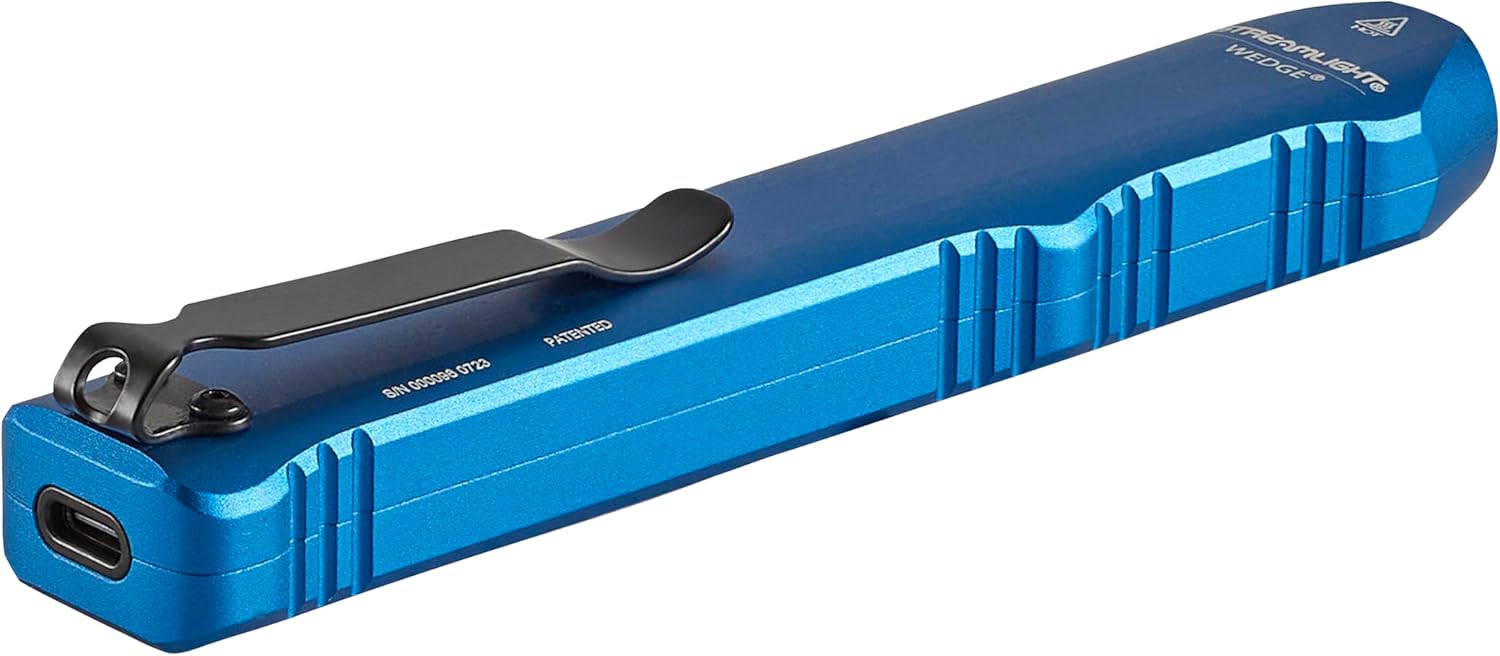
Image 5.1: Operating the flashlight with a single hand.

Image 5.2: Activating THRO (Temporarily Heightened Regulated Output) mode for 1000 lumens.
5.2 Pocket Clip Installation
The deep-carry pocket clip can be reversed to suit your preferred carry method.
- Using a small Phillips head screwdriver, carefully remove the two screws securing the pocket clip.
- Cabut klip saku.
- Align the pocket clip on the opposite side of the flashlight.
- Re-insert and tighten the two screws to secure the clip. Do not overtighten.

Image 5.3: The strong pocket clip allows for secure carry in a pocket or attached to gear.
6. Pangropéa
- beberesih: Ngusap awak senter ku hipu, damp lawon. Ulah make cleaners abrasive atawa pangleyur.
- Perawatan lensa: Clean the polycarbonate lens with a soft, lint-free cloth. For stubborn dirt, use a small amount of mild soap and water.
- Port ngecas: Tetep port ngecas USB-C bébas tina lebu.
- Panyimpenan: Store the flashlight in a cool, dry place when not in use for extended periods. Recharge the battery periodically to maintain its health.
7. Cara ngungkulan
- Senter teu hurung:
- Ensure the battery is charged. Connect the flashlight to a USB-C power source and check the LED indicator.
- Verify the thumb switch is fully rotated to the desired mode (Standard or THRO).
- Kaluaran cahaya taram:
- Batré bisa jadi lemah. Ngecas senter.
- Pastikeun lénsa bersih sareng bébas tina halangan.
- Senter teu ngecas:
- Check the USB-C cable for damage and ensure it is securely connected to both the flashlight and the power source.
- Coba kabel USB-C atanapi adaptor kakuatan anu sanés.
- Ensure the charging port on the flashlight is clean.
8. Spésifikasi
| Fitur | Rincian |
|---|---|
| Nomer modél | 88817 |
| Sumber Cahaya | LED |
| Caang (Standar) | 300 Lumén |
| Brightness (THRO Burst) | 1000 Lumén |
| Beam Distance (Standard) | 69 méter |
| Candela | 1200 Candela |
| Sumber Daya | Integrated Lithium Polymer Battery |
| Recharge Waktos | Kira-kira 3 Jam (via USB-C) |
| Runtime (Standard) | 3 Jam |
| Bahan | Anodized Aluminium |
| Tahan cai | IPX7 (Waterproof up to 1 Meter) |
| Résistansi Dampak | Drop-tested to 1 Meter |
| Diménsi | 5.46 "D x 0.6" W x 1" H |
| Item Beurat | 3.2 ons |
| Sertifikasi | ANSI FL1, CE, IPX7 |
9. Garansi jeung Rojongan
9.1 Émbaran jaminan
The Streamlight Wedge Flashlight is covered by a Kawates Jaminan Hirupna. For specific details regarding warranty coverage and claims, please refer to the official Streamlight websitus atanapi ngahubungan layanan palanggan maranéhna.
9.2 Rojongan Palanggan
For technical assistance, service, or further inquiries, please visit the Streamlight websitus or contact their customer support department.