Bubuka
This manual provides detailed instructions for setting up, operating, maintaining, and troubleshooting your NIMO Mini PC. Please read this manual thoroughly before using the device to ensure optimal performance and longevity.
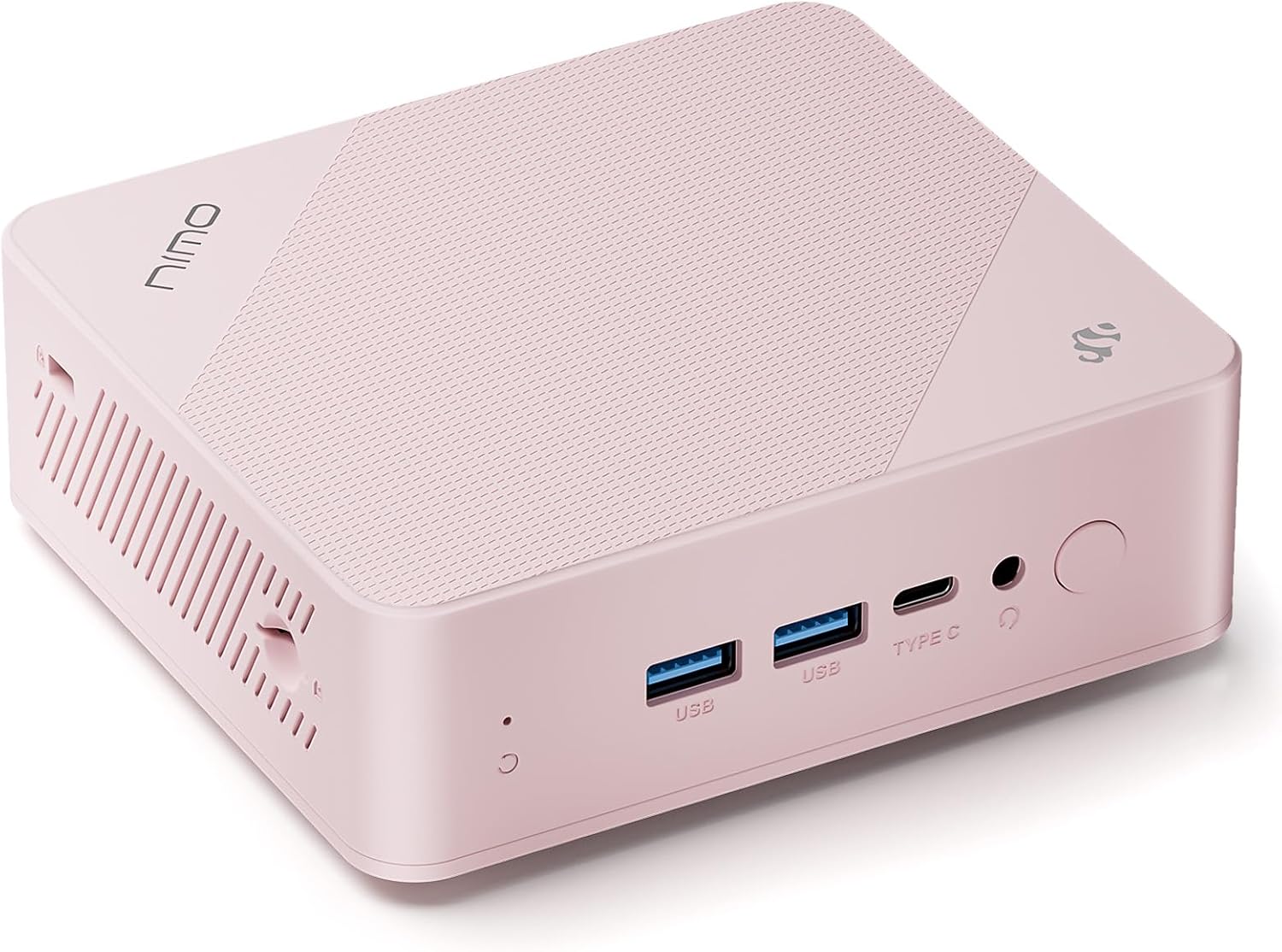
The NIMO Mini PC, a compact desktop computer featuring a 12th Gen Intel N100 processor, 16GB RAM, and 1TB SSD. It supports 4K triple-monitor display and offers extensive connectivity options.
Disetél
Eusi pakét
Pastikeun yén sadaya item aya dina bungkusan:
- 1x NIMO Mini PC
- 1x Pamasangan Bracket
- 1 x adaptor kakuatan
- 1 x Manual Instruksi (Dokumén ieu)

Image showing the NIMO Mini PC and its included accessories: power adapter, mounting bracket, and instruction manual.
Connecting Your Mini PC
- Sambungkeun tampilan: Use an HDMI cable to connect your monitor(s) to the HDMI 2.0 ports on the back of the Mini PC. For triple display, utilize both HDMI ports and the multifunction Type-C port.
- Sambungkeun Periferal: Plug in your USB keyboard and mouse into the USB Type-A ports.
- Sambungkeun Jaringan: For a wired connection, connect an Ethernet cable to the Giga LAN port. For wireless, ensure WiFi 6 is enabled in the operating system after initial setup.
- Sambungkeun Kakuatan: Plug the power adapter into the DC-IN port on the Mini PC, then connect the adapter to a power outlet.

Diwincik view of the NIMO Mini PC's comprehensive port setup, highlighting connectivity options for various devices.
Boot munggaran
After connecting all necessary cables, press the power button located on the front of the Mini PC. The system will boot into Windows 11 Home. Follow the on-screen instructions for initial Windows setup.
Parentah Operasi
Operasi Dasar
The NIMO Mini PC comes pre-installed with Windows 11 Home, providing a familiar and intuitive operating environment. Utilize standard Windows functionalities for web browsing, document creation, media consumption, and more.
Konektipitas
- Wi-Fi 6: Connect to high-speed wireless networks for seamless internet access.
- Bluetooth 5.2: Pair with wireless peripherals such as headphones, speakers, and input devices.
- USB 3.2: Utilize the high-speed USB ports for fast data transfer with external drives and devices.
Triple Display Capability
The Mini PC supports up to three independent displays simultaneously, enhancing productivity for multitasking. Connect monitors via the two HDMI 2.0 ports and the multifunction Type-C port.

Illustration of the NIMO Mini PC supporting a triple monitor setup, ideal for complex workflows and immersive experiences.
Ékspansi gudang
The device includes a TF card slot, allowing for additional storage expansion up to 512GB. This is useful for storing large files, backups, or portable data.

The TF card slot provides an easy way to expand the storage capacity of your NIMO Mini PC.
Pangropéa
Perawatan Umum
- Keep the Mini PC in a clean, dust-free environment.
- Hindarkeun ngalaan alat ka suhu atanapi kalembaban anu ekstrim.
- Ngabersihan bagian luar ku kaén anu lembut sareng garing. Ulah make cleaners cair.
Sistim cooling
The NIMO Mini PC features a 15W efficient cooling system. Ensure that the ventilation openings are not obstructed to allow for proper airflow and prevent overheating. Regularly check for dust accumulation in the vents and gently clean if necessary.
Pamérésan masalah
Isu umum jeung Solusi
| Masalah | Mungkin Cukang lantaranana | Solusi |
|---|---|---|
| Henteu aya kakuatan / Henteu hurung | Adaptor listrik teu nyambung, stop kontak lepat, masalah tombol daya. | Pastikeun adaptor daya disambungkeun sacara aman ka PC sareng stop kontak listrik anu tiasa dianggo. Coba outlet béda. |
| Henteu aya tampilan dina monitor | Incorrect cable connection, monitor input not selected, faulty cable. | Check HDMI/Type-C cable connections. Ensure monitor is set to the correct input source. Try a different cable or monitor. |
| kinerja lalaunan | Too many applications running, insufficient free storage, background processes. | Close unnecessary applications. Check available storage and free up space. Run Windows updates and system scans. Consider a system reset if issues persist. |
| Blue Screen of Death (BSOD) | Driver issues, hardware malfunction (RAM/SSD), software conflicts. | Restart the PC. Update drivers. Run Windows Memory Diagnostic Tool and check disk for errors. If persistent, contact customer support. |
| Masalah konektipitas Wi-Fi/Bluetooth | Driver issues, interference, disabled adapter. | Ensure Wi-Fi/Bluetooth is enabled in Windows settings. Update network drivers. Move closer to the router or reduce interference. |
If you encounter issues not listed here or if the suggested solutions do not resolve the problem, please refer to the Support section for further assistance.
spésifikasi
Detailed technical specifications for the NIMO Mini PC (Model: MPL1P).
| Fitur | Spésifikasi |
|---|---|
| Prosesor | 12th Gen Intel N100 (3.4 GHz, 4 Cores/4 Threads) |
| Ram | 16 GB DDR4 (3200MHz SO-DIMM) |
| Panyimpenan | 1 TB Solid State Drive (SSD) |
| Grafika | Intel UHD Graphics (Terpadu) |
| Sistem operasi | Windows 11 Imah |
| Resolusi layar Max | 3840 x 2160 piksel (4K) |
| Palabuhan | 1x Giga LAN, 2x HDMI 2.0, 2x USB Type-A, 1x DC-IN, 1x Type-C (Multifunction), 1x Audio Port, SD Card Reader, Security Slot |
| Konéktipitas Wireless | Wi-Fi 6 (2.4Gbps), Bluetooth 5.2 |
| Niiskeun | 15W Efficient Cooling |
| Ukuran (L x W x H) | 4.8 x 4.4 x 1.53 inci |
| Beurat | 1.81 pon |
Garansi sareng Rojongan
Émbaran jaminan
NIMO products are covered by a Garansi dukungan 2 taun from the date of purchase. This warranty covers manufacturing defects and hardware malfunctions under normal use conditions.

NIMO provides 2-year support for its products, ensuring assistance with any technical issues.
Kabijakan pamulangan
You may return any NIMO product for any reason within 90 days of purchase for a free return. Please ensure the product is in its original condition and packaging.

NIMO offers a 90-day return policy for customer satisfaction.
Rojongan Palanggan
For any product-related questions, technical assistance, or warranty claims, please contact our professional after-sales service team. We are committed to providing high-quality customer service.
- Surélék: service@nimopc.com
- Jam jasa: 24-hour service available.

Contact NIMO's professional customer assistance team for support.


