1. Parentah Kasalametan penting
Please read this manual carefully before operating the appliance and retain it for future reference. Failure to follow these instructions may result in electric shock, fire, or serious injury.
- Always connect the dehumidifier to a grounded power outlet.
- Ulah ngajalankeun unit ku kabel kakuatan ruksak atawa colokan.
- Keep the appliance away from water and other liquids. Do not immerse it.
- Pastikeun ventilasi anu leres di sabudeureun unit. Ulah meungpeuk inlets hawa atawa outlet.
- Cabut dehumidifier sateuacan ngabersihkeun atanapi ngalakukeun perawatan naon waé.
- Alat ieu henteu dimaksudkeun pikeun dianggo ku jalma (kalebet murangkalih) anu ngirangan kamampuan fisik, indrawi atanapi mental, atanapi kirang pangalaman sareng pangaweruh, kecuali aranjeunna dipasihan pangawasan atanapi petunjuk ngeunaan panggunaan alat ku jalma anu tanggung jawab kana kasalametanana.
- Ulah nganggo alat ieu di tempat anu aya gas atanapi uap anu gampang kaduruk.
- Operate the unit within the specified temperature range of 5-32 °C.
2. Produk Langkungview
The SENCOR SDH 3028WH is a portable smart dehumidifier designed to efficiently remove excess moisture from your indoor environment. It features Wi-Fi connectivity for app control, multiple operating modes, and a large water tank capacity.
Fitur konci:
- Dehumidification Capacity: 30 liters per day (at 30 °C, 80% Relative Humidity).
- Water Tank Capacity: 6 liters.
- Control: Wi-Fi enabled with Sencor HOME app (iOS and Android).
- Dehumidification Settings: Adjustable from 35% to 85% Relative Humidity, or Continuous operation.
- Operating Modes: Dehumidification, Fan, Laundry Drying.
- Fan Speeds: High and Low.
- Display: Precise humidity indication.
- Timer: 0-24 hours.
- Safety Features: Full tank indicator, Child safety lock, Automatic defrost function, Automatic restart function.
- Convenience: Removable and washable filter, Integrated handles and wheels for easy portability, 1-meter drain hose for continuous drainage.
- Quiet Operation: Noise level 43/41 dB.
- Suitable Room Size: 30 to 89 m².
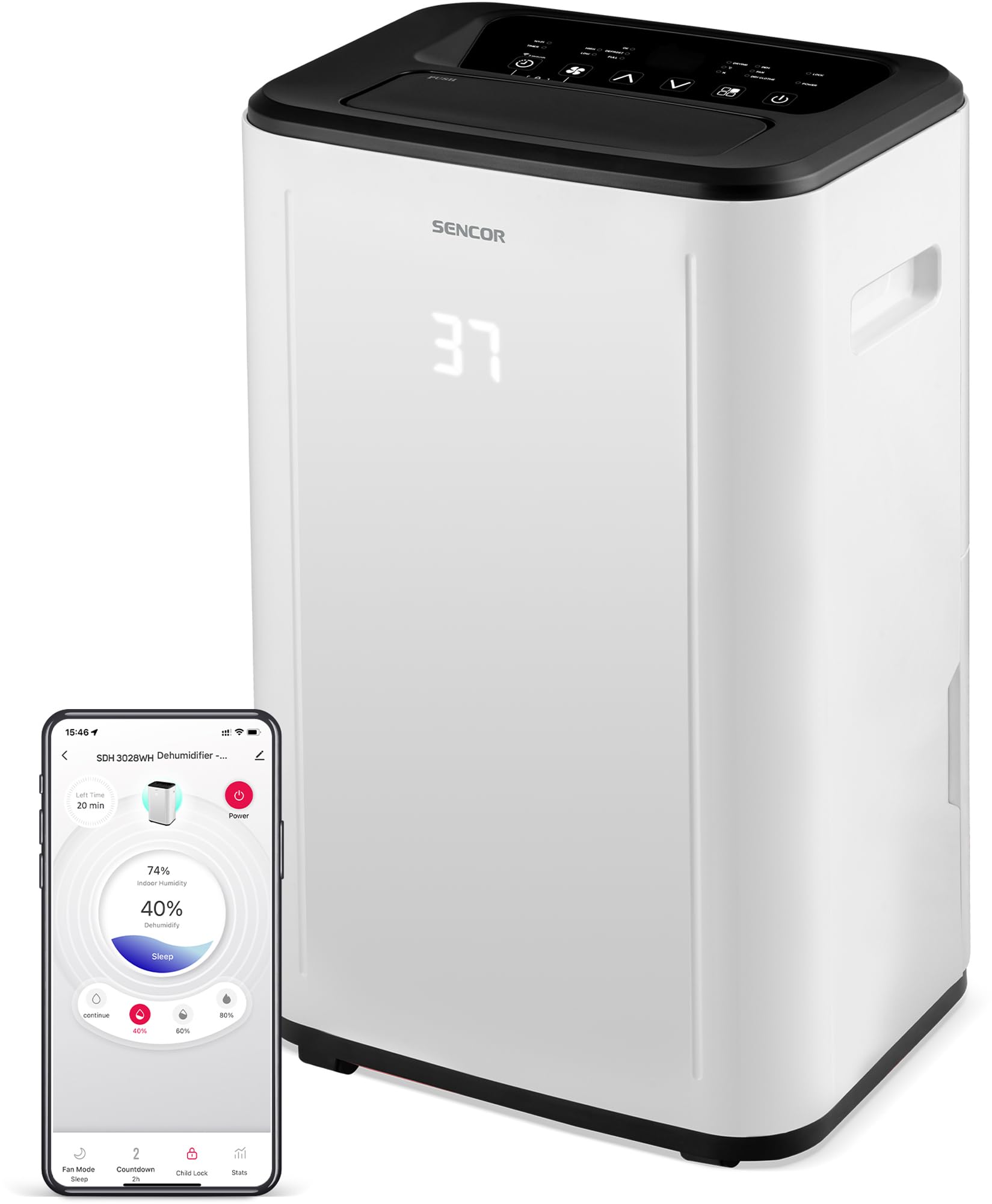
Gambar 1: Hareupeun view of the SENCOR SDH 3028WH Portable Dehumidifier.
3. Eusi Paket
Saatos ngabongkar bungkusan, pastikeun sadaya barang aya sareng dina kaayaan anu saé:
- SENCOR SDH 3028WH Portable Dehumidifier
- Instruksi Manual
- Drain Hose (1 meter)

Figure 2: Packaging of the SENCOR SDH 3028WH, illustrating key features.
4. Setélan
4.1 Nempatkeun
Place the dehumidifier on a firm, level surface in the area where dehumidification is desired. Ensure there is at least 20 cm (8 inches) of clear space around the air inlets and outlets for optimal airflow.
4.2 Sambungan Daya
Plug the power cord into a suitable grounded electrical outlet (220-240V, 50Hz). The unit will enter standby mode.
4.3 Wi-Fi Setup (Sencor HOME App)
- Download the Sencor HOME app from the App Store (iOS) or Google Play Store (Android).
- Jieun akun atawa asup.
- Follow the in-app instructions to add your SDH 3028WH dehumidifier. This typically involves putting the dehumidifier into pairing mode (refer to the app or device display for specific instructions) and connecting it to your home Wi-Fi network.
- Once connected, you can control the dehumidifier remotely and monitor its status via the app.
5. Parentah Operasi
5.1 Panel kontrol
The control panel on top of the unit allows you to manage all functions. The digital display shows the current humidity level or timer settings.
5.2 Daya Hurung/Pareuman
Pencét éta Kakuatan tombol pikeun ngahurungkeun atawa mareuman unit.
5.3 Nyetel kalembaban anu dipikahoyong
- Pencét éta Kalembaban kancing.
- Ngagunakeun éta Luhur/Turun arrows to adjust the desired humidity level between 35% and 85% RH in 5% increments.
- Unit ieu bakal beroperasi dugi ka tingkat kalembaban anu disetel, teras hurungkeun sareng pareumkeun deui pikeun ngajagana.
- To enable continuous dehumidification, select the 'Continuous' setting (usually indicated by 'CO' or similar on the display).
5.4 Modeu operasi
Pencét éta Modus tombol pikeun siklus ngaliwatan modeu sadia:
- Mode Dehumidification: Standard operation to remove moisture.
- Modeu kipas: Circulates air without dehumidifying.
- Mode Pangeringan Laundry: Optimized for drying clothes faster by continuously running the fan and dehumidifier.
5.5 Laju kipas
Pencét éta Laju kipas tombol pikeun pindah antara High na Low kipas speeds.
5.6 Fungsi Timer
- Pencét éta Timer kancing.
- Ngagunakeun éta Luhur/Turun arrows to set the desired operating duration from 0 to 24 hours.
- Unit bakal otomatis pareum atanapi hurung saatos waktos anu ditetepkeun.
5.7 Konci budak
Pikeun ngaktipkeun konci anak, pencét jeung tahan kenop Budak Konci button (or a combination of buttons as indicated on the control panel) for a few seconds. This prevents accidental changes to settings. Repeat the action to deactivate.
6. Pangropéa
Pangropéa rutin ngajamin kinerja optimal sareng manjangkeun umur dehumidifier anjeun.
6.1 Ngosongkeun Tangki Cai
- When the water tank is full, the unit will stop operating, and the 'Full Tank' indicator will illuminate.
- Taliti tarik kaluar tank cai ti tukang atawa sisi unit.
- Ngosongkeun cai anu dikumpulkeun.
- Selapkeun deui tank kosong pageuh kana posisina. Unit bakal neruskeun operasi.
6.2 Drainase kontinyu
For continuous operation without needing to empty the tank, you can use the included drain hose.
- Locate the continuous drain outlet on the back of the dehumidifier.
- Remove the rubber stopper (if present).
- Connect one end of the 1-meter drain hose to the outlet.
- Direct the other end of the hose to a suitable drain or larger container, ensuring it is lower than the dehumidifier's drain outlet for gravity flow.
6.3 Ngabersihan Saringan Udara
- It is recommended to clean the air filter every two weeks or more frequently depending on usage.
- Pareuman sareng cabut dehumidifier.
- Panggihan tur cabut filter hawa (biasana di tukang atawa samping).
- Ngumbah saringan ku cai haneut sareng deterjen anu lembut. Bilas nepi ka tuntas.
- Ngidinan saringan ka hawa garing lengkep sateuacan nyelapkeun deui kana unit. Ulah make dryer atawa panas langsung.
6.4 Ngabersihan Exterior
Ngusap bagian luar unit kalayan lemes, damp lawon. Ulah nganggo bahan kimia anu kasar, pembersih anu abrasif, atanapi pelarut.
7. Cara ngungkulan
Sateuacan ngahubungi dukungan palanggan, mangga tingal masalah sareng solusi umum ieu:
| Masalah | Mungkin Cukang lantaranana | Solusi |
|---|---|---|
| Unit teu hurung. | Taya catu daya. Kabel listrik teu nyambung leres. | Pariksa naha unitna dipasang kana stop kontak anu tiasa dianggo. Pastikeun kabel listrikna aman. |
| Dehumidifier teu ngumpulkeun cai. | Saringan hawa mampet. Suhu kamar handap teuing (di handap 5°C). Setélan asor teuing tinggi. Water tank is not properly inserted. | Ngabersihan saringan hawa. Pastikeun suhu kamar aya dina kisaran 5-32°C. Turunkeun setélan kalembaban anu dipikahoyong. Reinsert the water tank correctly. |
| Unit is noisy or vibrating excessively. | Unit is on an uneven surface. Saringan hawa mampet. | Tempatkeun unit dina permukaan anu rata sareng stabil. Ngabersihan saringan hawa. |
| Indikator "Full Tank" hurung, tapi tank teu pinuh. | Water tank is not properly seated. Saklar pelampung macét. | Cabut sareng selapkeun deui bak cai pageuh. Check the float switch inside the tank for obstructions. |
| Masalah sambungan Wi-Fi. | Sandi Wi-Fi salah. Dehumidifier too far from router. Masalah router. | Verifikasi kecap akses Wi-Fi. Move dehumidifier closer to the router. Restart your Wi-Fi router. Re-attempt pairing process. |
8. Spésifikasi
| Fitur | Rincian |
|---|---|
| merek | SENCOR |
| Nomer modél | SDH 3028WH |
| Kapasitas Dehumidification | 30 Liters/day (at 30 °C, 80% RH) |
| Kapasitas Tangki Cai | 6 liter |
| Konsumsi Daya | 420 Watt |
| Kisaran Suhu Operasi | 5-32 °C |
| Disarankeun Ukuran Kamar | 30-89 m² |
| Tingkat Noise | 43/41 dB |
| Ukuran (L x W x H) | 26 x 33.5 x 53 cm |
| Beurat | 15.3 kg |
| Bahan | palastik |
| Fitur husus | Digital display, Automatic defrost, Timer, Portable, Wi-Fi control, Child lock, Auto restart |
| Panjang Selang Solokan | 1 méter |
9. Garansi jeung Rojongan
SENCOR products are manufactured to the highest quality standards. For warranty information, please refer to the warranty card included with your product or visit the official SENCOR website. For technical support or service inquiries, please contact SENCOR customer service through their official channels.
kasadiaan suku cadang: 5 taun.


