Bubuka
Thank you for choosing EZVALO Under Cabinet Lights. This manual provides detailed instructions for the installation, operation, and maintenance of your new lighting system. Please read this manual thoroughly before use to ensure proper function and longevity of your product.
Produk Leuwihview
The EZVALO Under Cabinet Lights are versatile, rechargeable LED lights featuring motion sensing, group control, and multiple color options. They are designed for various indoor applications such as kitchens, cabinets, closets, and hallways.
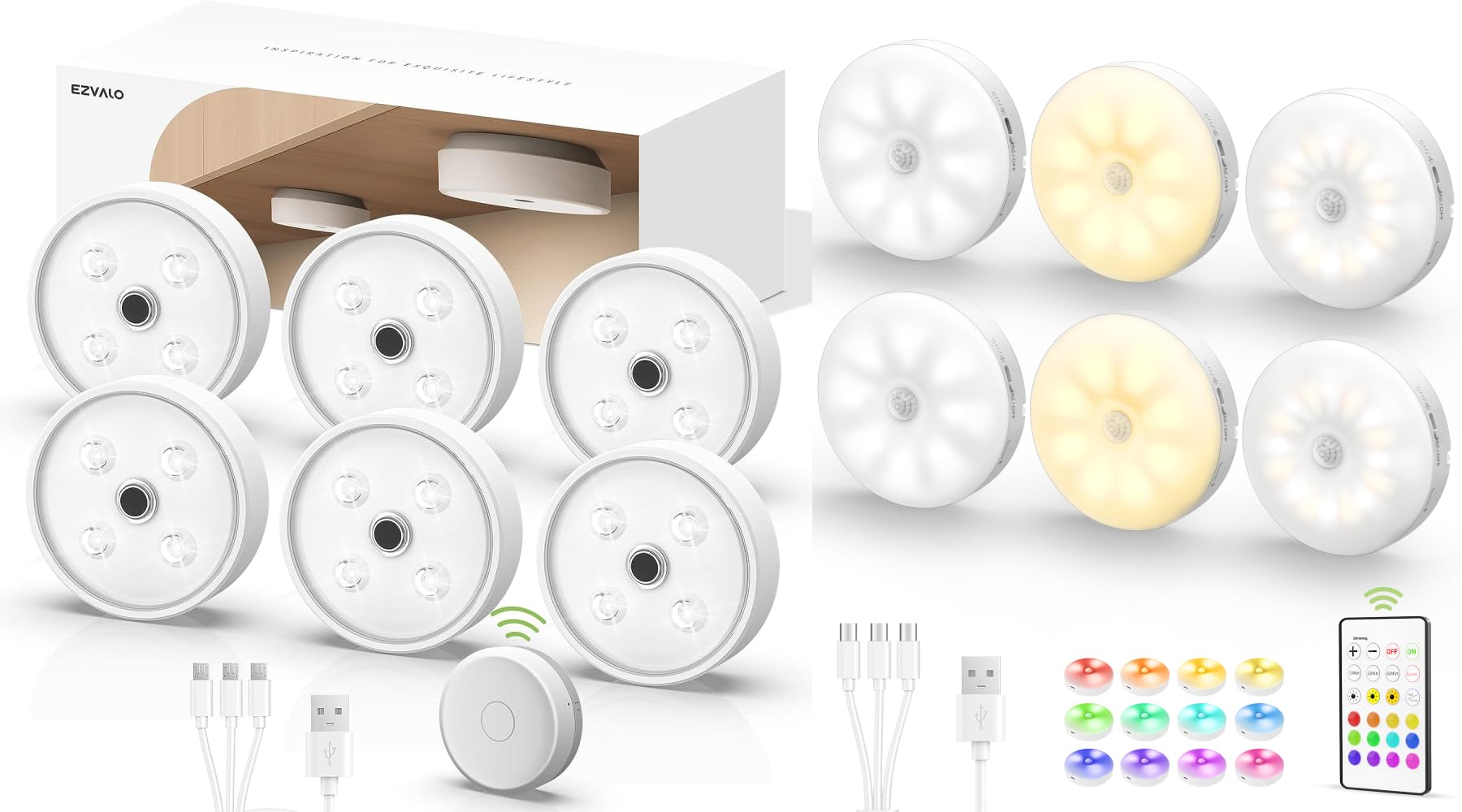
Image: EZVALO Under Cabinet Lights installed under a kitchen cabinet, demonstrating their discreet design and illumination.
Naon dina Box
- EZVALO Under Cabinet Lights (6 units)
- Kadali jauh
- Metal Sheets for installation
- Kabel Ngecas USB
- Manual pangguna (dokumén ieu)
Disetél
Ngecas Awal
Before first use, fully charge each light. Connect the provided USB charging cable to the light and a standard USB power adapter (not included). The indicator light will show red during charging and turn green when fully charged.

Image: A close-up of the EZVALO light being charged via USB, highlighting the charging port and indicator light.
Métode Instalasi
The EZVALO Under Cabinet Lights offer three convenient installation methods:
- Attachment magnét: The lights have a built-in magnet, allowing direct attachment to any ironwork surface.
- Metal Sheet Application: For non-magnetic surfaces, use the included metal sheets. Peel off the adhesive backing from a metal sheet and firmly press it onto your desired flat surface. The light can then be magnetically attached to the metal sheet.
- Hook Hanging: Utilize the hook located on the back of the light to hang it in suitable locations.

Image: The EZVALO light's control options, illustrating the physical switch for modes and the remote control for advanced functions.
Parentah Operasi
Milih Modeu Operasi
Each light features a switch to select between three operating modes:
- Modeu Salawasna Hurung: Lampu terus hurung.
- Mode poé: The light turns on automatically when motion is detected, regardless of ambient light conditions.
- Modeu wengi: The light activates only when motion is detected in a dark environment.
In motion sensor modes (Day/Night), the light will automatically turn off approximately 20-25 seconds after the last detected movement to conserve energy.

Image: Visual representation of the three operating modes (Always-On, Day, Night) and their typical use cases.
Fungsi Sénsor gerak
The integrated motion sensor detects movement within a 120° angle and up to 10 feet (3 meters) away. Ensure the sensor is not obstructed for optimal performance.
Manual Control on the Light
- Pers Tunggal: Briefly press the button on the light to cycle through different light colors.
- Pencét Panjang: Press and hold the button on the light to adjust the brightness level.
Operasi Remote Control
The included remote control provides comprehensive control over your EZVALO lights.

Image: Demonstrates the linked control feature, showing both gesture control for individual lights and remote control for group management.
Kontrol Grup
The remote can assign lights into two distinct groups (Group 1 and Group 2). Lights within the same group can be controlled simultaneously for dimming, on/off, and color changes. Refer to the remote's specific buttons for group assignment and control.
Warna jeung Caang adjustment
Use the remote to select from 12 colors and 3 color temperatures (3000K Warm White, 4200K Natural White, 6500K Cool White). The remote also allows for dimming to adjust brightness levels.

Image: A visual demonstration of the multi-color capabilities of the EZVALO lights, showcasing different ambient lighting options.
Modeu Cahaya dinamis
The remote offers two dynamic lighting modes: Flash and Fade. These modes cycle through 12 RGB colors, providing a rainbow effect suitable for various atmospheres.
Pangropéa
Ngeusi batre
The lights are equipped with a 1200mAh rechargeable lithium battery. When the battery is low, the indicator light will signal. Recharge using the provided USB cable. A full charge can last approximately 11-92 hours in Always-on Mode, or 30-60 days in motion sensor (AUTO) mode with 10-20 activations daily.

Gambar: A lengkep view of the light's internal battery and charging process, emphasizing its rechargeable nature.
beberesih
Wipe the lights with a soft, dry cloth. Do not use abrasive cleaners or immerse the lights in water.
Pamérésan masalah
| Masalah | Mungkin Cukang lantaranana | Solusi |
|---|---|---|
| Lampu henteu hurung. | Battery is depleted. Incorrect mode selected. Sensor obstructed. | Charge the light fully. Ensure the switch is in the desired mode (Always-On, Day, or Night). Clear any obstructions from the motion sensor. |
| Sénsor gerak teu jalan. | Incorrect mode (Always-On selected). Ambient light too bright (in Night Mode). Sensor obstructed. | Switch to Day Mode or Night Mode. Ensure the environment is dark enough for Night Mode. Clear sensor path. |
| Kadali jauh teu ngabales. | Remote battery low. Obstruction between remote and light. Light not in a controlled group. | Replace remote battery. Ensure clear line of sight. Verify lights are assigned to the correct group. |
| Light does not dim or change color. | Using manual press control incorrectly. Remote not paired or in range. | For manual control, use a long press for brightness and single press for color. Ensure remote is functioning and within range. |
spésifikasi
- merek: EZVALO
- model: EZVALO-UCL
- Sumber cahaya: LED
- Jumlah Sumber Cahaya: 16 per unit
- Sumber Daya: Batré Powered
- Kapasitas batré: 1200mAh Lithium (Rechargeable)
- Voltage: 1.5 volt
- Caang: Nepi ka 1200 Lumens
- Pilihan Warna: 12 colors, 3 color temperatures (3000K, 4200K, 6500K)
- Métode kontrol: Remote Control, Motion Sensor, Manual Press
- Rentang sensor gerak: 120°, 10 ft (3 meters)
- Jenis pamasangan: Magnetic Attachment, Metal Sheet Application, Hook Hanging
- Bahan: logam
- Pamakéan Indoor/Outdoor: Di jero rohangan wungkul
- Tingkat tahan cai: Henteu Tahan Cai
- Komponén Kaasup: Remote Control, Metal Sheets
Garansi sareng Rojongan
EZVALO products are designed for quality and reliability. For warranty information, technical support, or customer service inquiries, please refer to the contact information provided with your purchase or visit the official EZVALO websitus.
Pabrikan: EZVALO
Websitus: Visit the EZVALO Store on Amazon


