1. Bubuka
Thank you for choosing the Alvar 4K Smart Projector. This manual provides essential information for setting up, operating, and maintaining your projector to ensure optimal performance and longevity. Please read this manual thoroughly before using the product and retain it for future reference.
The Alvar V800P is designed to deliver a premium home entertainment experience with its 1000 ANSI lumens brightness, native 1080P resolution with 4K support, integrated Netflix, Prime Video, and YouTube apps, and advanced audio features including Dolby Audio and DBX-TV Total Sonics. It also boasts AI-powered auto-focus, auto-keystone correction, auto-obstacle avoidance, and auto-screen alignment for effortless setup.
2. Émbaran Kasalametan
To prevent fire, electric shock, or injury, always follow these basic safety precautions:
- Ulah ngalaan proyektor ka hujan atawa beueus.
- Ulah muka proyektor casing. Rujuk sadayana jasa ka tanaga anu mumpuni.
- Pastikeun ventilasi anu leres. Ulah meungpeuk bukaan ventilasi.
- Paké ngan adaptor kakuatan disadiakeun kalawan projector.
- Hindarkeun paparan panon langsung kana lensa proyektor nalika lamp dihurungkeun.
- Jauhkeun proyektor tina sumber panas sareng sinar panonpoé langsung.
- Cabut colokan proyektor nalika badai kilat atanapi nalika henteu dianggo kanggo waktos anu lami.
3. Eusi Paket
Pastikeun yén sadaya item kalebet dina pakét anjeun:
- 1 × Alvar Smart Projector
- 1 × Kawat Daya
- 1 × Kabel HDMI
- 1 × Remote Control (Requires 2 AAA batteries, not included)
- 1 × Manual Pamaké (Dokumén ieu)
4. Produk Langkungview
Familiarize yourself with the components of your Alvar V800P projector.

Gambar 4.1: Hareupeun view of the Alvar 4K Smart Projector, showcasing the main lens and sleek design.

Gambar 4.2: Tukangeun view of the projector, highlighting the various connectivity ports including USB, HDMI (x2), and AV port.
4.1. Komponén Projector
- Lensa proyéksi: Emits gambar.
- Tombol Daya: Hurungkeun/pareuman proyektor.
- Panél kontrol: Touch-sensitive buttons for basic navigation.
- Grilles ventilasi: Penting pikeun miceun panas. Ulah ngahalangan.
- Palabuhan Input:
- HDMI (x2): Connects to external devices like laptops, gaming consoles, streaming sticks.
- USB: For connecting USB drives to play media.
- Jack Headphone 3.5mm: Pikeun kaluaran audio éksternal.
- Port AV: Pikeun alat analog heubeul.
- Speaker Diwangun-di: 30W HiFi speakers with Dolby Audio and DBX-TV Total Sonics.
5. Setélan
5.1. Panempatan
Choose a suitable location for your projector. The Alvar V800P supports various installation methods:
- Tabletop Gunung: Teundeun dina datar, permukaan stabil.
- Gunung siling: Use the four holes on the bottom of the projector (covered by rubber fillers) for ceiling installation.
- Tembok Gunung: Securely mount to a wall.
Pikeun optimal viewing, ensure the projector is positioned perpendicular to the projection surface. The recommended projection distance for a 300-inch screen is approximately 19.6 feet (6 meters), and for a 50-inch screen, it's about 4.9 feet (1.5 meters).

Figure 5.1: The projector automatically adjusts the image for optimal display, even when placed at an angle.
5.2. Sambungan Daya
- Sambungkeun kabel daya ka port input daya proyektor.
- Colokkeun tungtung kabel listrik anu sanés ka stop kontak témbok.
5.3. Initial Setup and Automatic Adjustments
Upon powering on, the Alvar V800P utilizes advanced AI features for quick and precise image adjustment:
- AI Auto Focus: Automatically sharpens the image within 3 seconds.
- Koreksi Auto Keystone: Ngabenerkeun gambar anu distorsi jadi pasagi panjang anu sampurna.
- Ngahindarkeun Halangan Otomatis: Adjusts the projection to avoid objects on the wall.
- Alignment Layar Otomatis: Automatically fits the image within your projection screen boundaries.

Figure 5.2: The projector's intelligent features ensure a perfect display with minimal effort.
6. Parentah Operasi
6.1. Powering on / Pareum
- Pikeun Ngahurungkeun: Pencét tombol daya dina proyektor atawa kadali jauh.
- Pikeun mareuman: Press the power button again. A confirmation prompt may appear; select "Power Off".
6.2. Remote Control and Navigation
The projector comes with a Bluetooth/Infrared remote control and a touch pad for easy navigation.
- Use the directional buttons on the remote or touch pad to navigate menus.
- Press the "OK" or "Enter" button to confirm selections.
- The remote also features dedicated buttons for Netflix, Prime Video, and YouTube for quick access.
6.3. Nyambungkeun Alat éksternal
The Alvar V800P offers extensive connectivity options:
- HDMI: Connect laptops, gaming consoles (PS5, Switch), Roku, Fire TV Stick, etc., using an HDMI cable. Select the corresponding HDMI input from the projector's source menu.
- USB: Insert a USB flash drive into the USB port to play local media files (pidéo, poto, musik).
- Bluetooth 5.2 (Two-way):
- Modeu pamancar: Connect the projector to external Bluetooth speakers or headphones for enhanced audio.
- Mode panarima: Connect your smartphone or tablet to the projector to use its powerful 30W speakers as a standalone Bluetooth speaker.
- WiFi 6: Connect to your home network for streaming content from built-in apps or mirroring your device screen.

Figure 6.1: The projector supports a wide range of external devices for versatile entertainment.

Figure 6.2: Bi-directional Bluetooth allows flexible audio configurations.
6.4. Using Built-in Smart Apps
The Alvar V800P comes preloaded with officially licensed streaming applications:
- Netflix
- Perdana Video
- YouTube
Access these apps directly from the home screen. Ensure the projector is connected to a stable internet connection via WiFi 6 for optimal streaming performance.

Figure 6.3: Enjoy popular streaming services directly from your projector.
6.5. Nyaluyukeun Setélan
Aksés menu setelan pikeun ngaluyukeun Anjeun viewpangalaman audio sareng musik:
- Setélan Gambar: Adjust brightness, contrast, color temperature, and aspect ratio. The projector supports HDR10 for vibrant colors.
- Setélan sora: Control volume, activate DBX-TV Total Sonics for enhanced audio, and manage Dolby Audio settings.
- Fungsi zum: Adjust the screen size from 100% down to 50% without moving the projector. This feature is accessible via the setup menu and remote control.
- Setélan jaringan: Configure WiFi and Bluetooth connections.
- Setélan Sistim: Language, date/time, software updates, and factory reset options.

Figure 6.4: Experience ultra-bright and vibrant colors, even in well-lit environments.
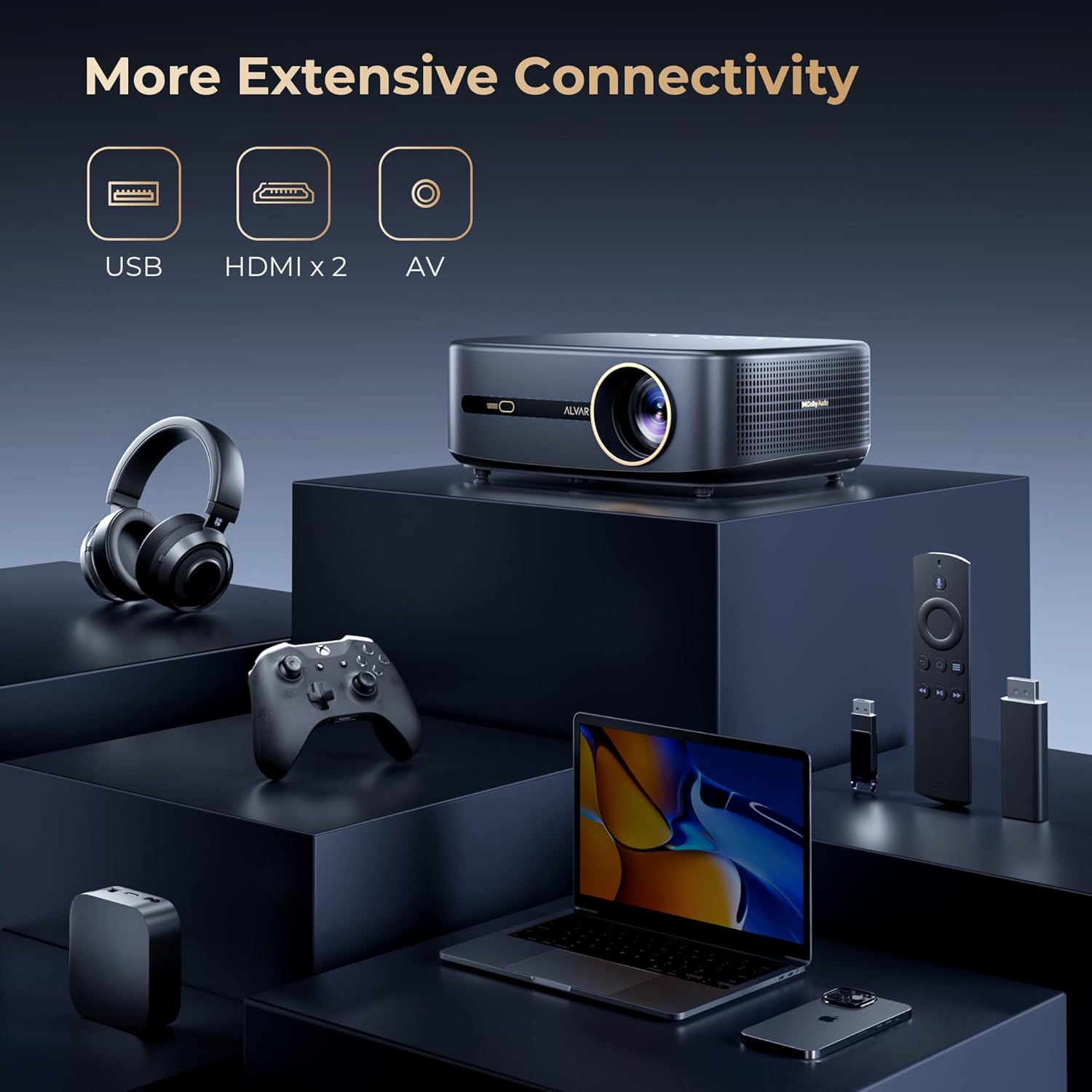
Figure 6.5: Adjust the projection size to fit any space, from 50 to 300 inches.
7. Pangropéa
7.1. beberesih
- Lensa: Anggo lawon anu lemes sareng henteu lint anu dirancang khusus pikeun lénsa optik. Ulah make cleaners abrasive atawa pangleyur.
- Casing: Ngusap bagian luar proyektor ku kaén anu lembut sareng garing. Pikeun tanda nekad, rada dampen lawon jeung cai.
- Ventilasi: Periodically check and gently clean the ventilation grilles to prevent dust buildup, which can affect performance and lifespan.
7.2. Panyimpenan
When not in use for extended periods, store the projector in a cool, dry place, away from direct sunlight and extreme temperatures. It is recommended to use the original packaging or a protective case to prevent dust and damage.
8. Cara ngungkulan
If you encounter issues with your Alvar V800P projector, refer to the following common problems and solutions:
| Masalah | Mungkin Cukang lantaranana | Solusi |
|---|---|---|
| Henteu aya gambar atanapi gambar kabur | Power issue, incorrect input source, focus/keystone not adjusted. | Ensure power is connected. Select correct input source. Allow auto-focus/keystone to complete or manually adjust. |
| Taya sora | Volume teuing leutik, kaluaran audio salah, setélan audio alat éksternal. | Increase volume. Check audio output settings on projector and connected device. Ensure Bluetooth audio is correctly paired. |
| Kadali jauh teu jalan | Batré lemah/pareum, remot teu dipasangkeun, halangan. | Replace AAA batteries. Ensure remote is paired via Bluetooth. Remove any obstructions between remote and projector. |
| Teu tiasa nyambung ka WiFi/Bluetooth | Sandi salah, di luar jangkauan, masalah jaringan. | Verify password. Move projector closer to router/device. Restart projector and router. |
| Apps not loading/crashing | Poor internet connection, app cache, outdated app version. | Check internet connection. Clear app cache in settings. Update apps if available. Restart projector. |
If the problem persists, please contact Alvar customer support.
9. Spésifikasi
| Fitur | Rincian |
|---|---|
| merek | Alvar |
| Nomer modél | V800P |
| Caang | 1000 ANSI Lumens |
| Resolusi pribumi | 1920 x 1080 (1080P) |
| Resolusi dirojong | Nepi ka 4K (60Hz) |
| Warna Gamut | 100% NTSC |
| Rojongan HDR | HDR10 |
| Téhnologi Audio | Dolby Audio, DBX-TV Total Sonics |
| Panyatur | 30W HiFi Speakers |
| Konektipitas | WiFi 6, Bluetooth 5.2 (Bi-directional), 2x HDMI, 1x USB, 1x 3.5mm Headphone Jack, AV Port |
| Fitur pinter | Netflix, Prime Video, YouTube (Officially Licensed), AI Auto Focus, Auto Keystone, Auto Obstacle Avoidance, Auto Screen Alignment |
| Ukuran proyéksi | 50-300 inches (100%-50% Zoom) |
| Diménsi | 11.8 x 9 x 3.93 inci |
| Beurat | 5.24 pon |
10. Garansi jeung Rojongan
Alvar offers comprehensive support for your projector:
- Garansi: 1-year replacement warranty and 3-year repair service.
- Rojongan Palanggan: For any questions or issues, please contact Alvar customer service. Provide your order ID and a description (or image/video) of the issue for quicker assistance. Support typically replies within 12 business hours.
- Inpormasi kontak: Refer to the contact details provided on the product packaging or the official Alvar websitus.
Kanggo inpo nu leuwih lengkep, buka di Alvar Store on Amazon.


