Bubuka
The iTouch Smart Watch Fitness Tracker, Model Active 4, is designed to help you monitor your health and fitness activities with ease. Featuring a 1.47-inch touch screen, IP68 water resistance, and a variety of health and sports modes, this device offers comprehensive tracking and smart notifications. This manual will guide you through setting up, operating, and maintaining your new fitness tracker.
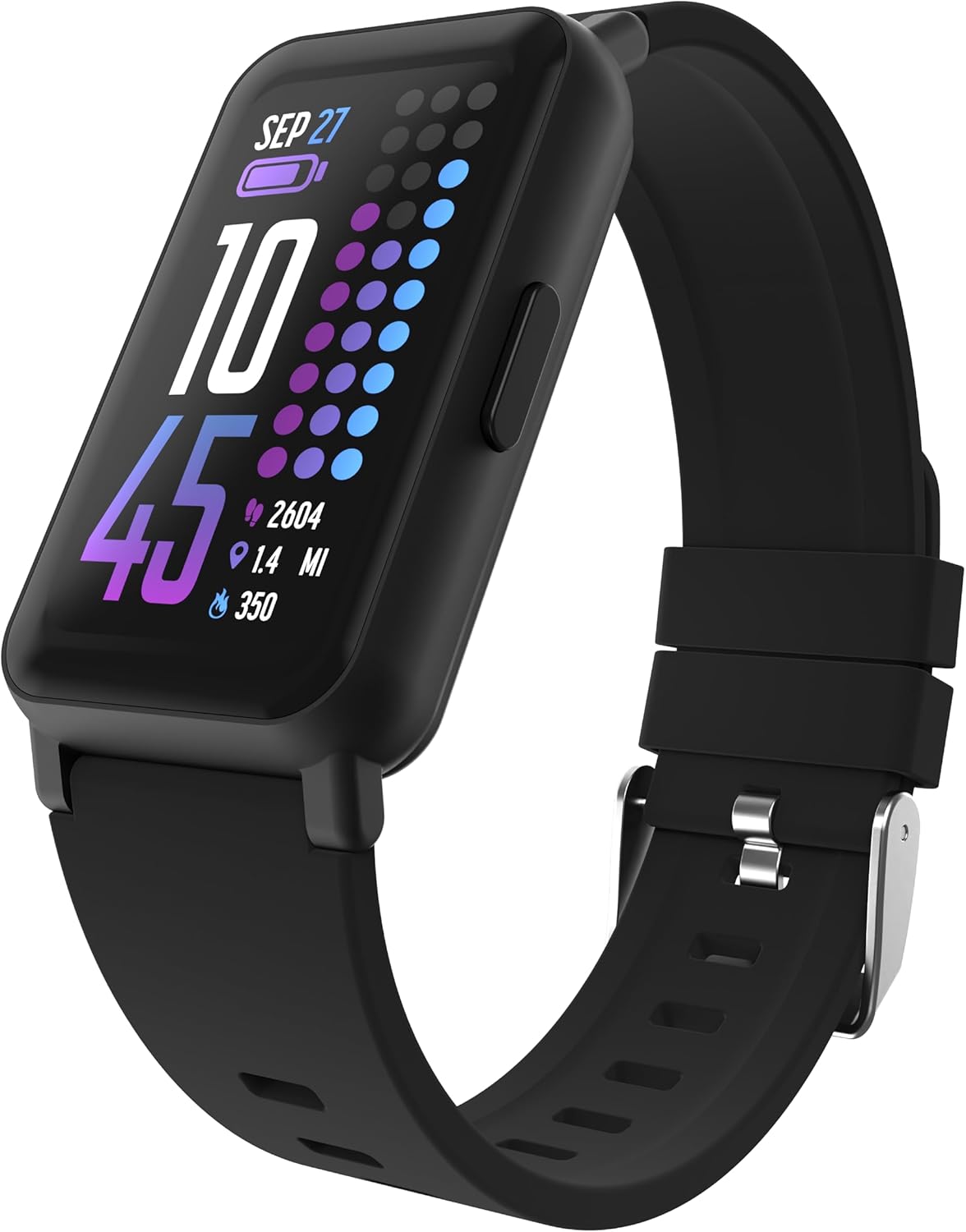
Image: The iTouch Smart Watch Fitness Tracker in black, showcasing its vibrant display with time, steps, and calorie information.
Naon dina Box
Upon unboxing your iTouch Smart Watch Fitness Tracker, you should find the following items:
- iTouch Smart Watch (Model Active 4)
- Kabel Ngecas
Disetél
1. Ngecas Alat Anjeun
Before first use, fully charge your iTouch Smart Watch. Connect the provided charging cable to the magnetic charging points on the back of the watch and to a USB power source. A full charge typically takes approximately one hour.

Image: The iTouch Smart Watch being charged via its magnetic charging cable, indicating a full battery.
2. Ngaunduh Aplikasi Companion
To unlock all features and synchronize data, download the iTouch Wearables app from your smartphone's app store (compatible with Android and iOS devices). Milarian pikeun "iTouch Wearables" and install the application.
3. Pairing Your Smart Watch
- Pastikeun Bluetooth diaktipkeun dina smartphone Anjeun.
- Open the iTouch Wearables app and follow the on-screen instructions to create an account or log in.
- Select 'Add Device' or 'Connect New Device' within the app.
- The app will search for your iTouch Smart Watch. Select 'Active 4' from the list of found devices.
- Konfirmasi pamundut papasangan dina jam tangan sareng smartphone anjeun.

Image: Multiple iTouch smartwatches alongside a smartphone screen showing the iTouch Wearables app, illustrating the connection process.
Ngoperasikeun Smart Watch Anjeun
Napigasi
The iTouch Smart Watch features a full touch screen for easy navigation. Swipe left, right, up, or down to access different menus and features. Tap to select options.
Pangimeutan Kaséhatan
Your watch continuously monitors various health metrics:
- Monitor Detak Jantung: Tracks your heart rate at 30-minute intervals.
- SP02 Tracking: Ngawaskeun kadar oksigén getih.
- Nyukcruk Stress: Ngabantosan anjeun ngartos tingkat setrés anjeun.
- Latihan pernapasan: Guided exercises to manage stress.
- Monitor Saré: Analyzes your sleep patterns.
- Nyukcruk siklus: For menstrual cycle monitoring.
- Coffee Intake Monitoring: Track your daily coffee consumption.

Image: The iTouch Smart Watch screen showing a heart rate measurement, indicating its health monitoring capability.

Image: A user wearing the iTouch Smart Watch while sleeping, highlighting the device's sleep tracking feature.
Activity and Sports Modes
The watch supports 96 sports modes and tracks various activities including steps, distance, and calories burned. Access these modes through the main menu.

Image: The iTouch Smart Watch on a user's wrist, surrounded by icons symbolizing over 100 workout modes available on the device.
Smart Connectivity & Notifications
Receive call and message notifications directly on your wrist. The watch also features music remote and camera remote functions, allowing control of your phone's media and camera from the watch.

Image: The iTouch Smart Watch displaying notifications, with a smartphone screen illustrating how to enable and manage app notifications.
Kustomisasi
Personalize your watch with over 100 watch faces and custom options. You can also set manual time/date and choose from multiple languages (English, Spanish, German, French, Dutch).

Image: A collection of iTouch smartwatches in different colors, highlighting the extensive range of customizable watch faces available.
Pangéling-ngéling
Set up hydration and sedentary reminders through the app to help you maintain healthy habits.

Image: The iTouch Smart Watch showing a hydration reminder, accompanied by a smartphone displaying the app's settings for hydration and stretch reminders.
Pangropéa
Tahan cai
The iTouch Smart Watch is IP68 water resistant, making it suitable for swimming and other water activities. However, it is recommended to dry the watch and your wrist after exposure to water to prevent skin irritation and ensure longevity.

Image: The iTouch Smart Watch with water droplets on its display, demonstrating its IP68 water-resistant capability.
beberesih
Lap jam tangan sareng talina sacara rutin nganggo kaén anu lemesamp lawon. Ulah make bahan kimia kasar atawa bahan abrasive.
Pamérésan masalah
Masalah sinkronisasi
If your watch is not syncing with the app, try the following:
- Ensure Bluetooth is on and the watch is within range of your phone.
- Force close the iTouch Wearables app and reopen it.
- Balikan deui smartphone anjeun sareng jam tangan pinter.
- Check for app updates in your phone's app store.
Display Sensitivity
If the touch screen is unresponsive or dull, ensure the screen is clean and dry. Moisture can affect touch sensitivity. If issues persist, restart the device.
Jumlah Léngkah Anu Teu Akurat
Ensure the watch is worn snugly on your wrist. Arm movements during activities other than walking or running may sometimes be misinterpreted. For best accuracy, ensure your profile settings (height, weight) in the app are correct.
Kahirupan batré
Battery life can vary based on usage. Frequent use of features like continuous heart rate monitoring, notifications, and screen brightness can reduce battery duration. To optimize battery life, adjust these settings in the app.
spésifikasi
| Fitur | Rincian |
|---|---|
| Ngaran modél | Aktif 4 |
| merek | iTouch |
| Ukuran layar | 1.47 inci |
| Tipe tampilan | Full Touch Screen (172 x 320 pixels) |
| Konektipitas | Bluetooth |
| Tahan cai | IP68 |
| Battery Life (Working) | Nepi ka 7 dinten |
| Kahirupan Batré (Siaga) | Nepi ka 10 dinten |
| Waktu Ngecas | Kurang leuwih 1 jam |
| Ukuran Kasus | 42.7 x 25 x 10.7 mm |
| Item Beurat | 28 Gram (0.988 ons) |
| Kasaluyuan | Android & ios |
| Fitur husus | Heart Rate Monitor, SP02 Tracking, Stress Tracking, GPS Via Smartphone, 96 Sports Modes, 100+ Watch Faces, Pedometer, Notifications, Music/Camera Remote, Find Watch, Weather Updates |

Image: Detailed sizing and screen specifications of the iTouch Smart Watch, including thickness, weight, pin width, and screen dimensions.


