1. Bubuka
The Rollerhouses 25TEW Smart Blinds Motor is designed to automate your window blinds, offering convenient control through various smart home platforms. This motor integrates seamlessly with Tuya/Smart Life applications, enabling remote control, voice commands via Alexa and Google Assistant, and customizable scheduling. It is engineered for easy installation and broad compatibility with standard blind tubes.

Figure 1.1: Rollerhouses 25TEW Smart Blinds Motor, remote control, smart speakers, and mobile app interface.
2. Émbaran Kasalametan
Mangga baca sadaya pitunjuk kaamanan kalayan saksama sateuacan dipasang sareng dioperasikeun. Upami henteu nuturkeun pitunjuk ieu tiasa nyababkeun sengatan listrik, kahuruan, atanapi tatu parah.
- Pastikeun catu daya dipegatkeun samemeh dipasang atawa diropéa.
- This device is designed for indoor use only. Do not expose to water or excessive humidity.
- Do not attempt to disassemble or repair the motor. Refer all servicing to qualified personnel.
- Keep children and pets away from moving blinds.
- Verify that the shade tube diameter is compatible (1.5 inches / 38mm OD) before installation.
3. Eusi Paket
Pastikeun yén sadaya item aya dina bungkusan:
- Rollerhouses 25TEW Smart Blinds Motor
- Mounting Bracket (Includes)
- DC2700-1 Channel Remote (Includes)
- Manual Pamaké (Dokumén ieu)

Figure 3.1: Contents of the Rollerhouses 25TEW Smart Blinds Motor package, including the motor, mounting brackets, and remote control.
4. Setup jeung Instalasi
Installing the smart blinds controller is a quick and easy process, typically taking only a few minutes. No professional help is required.
4.1 Cék kasaluyuan
Ensure your shade tubes meet the following specifications:
- Outside Diameter (OD): 1.5 inci (38mm)
- Shade Weight Capacity: Can pull up to 12lb (5.5kg) shades.

Figure 4.1: Guide for measuring the outside diameter (OD) of your blind tube to ensure compatibility.
4.2 Léngkah-léngkah Instalasi
- Measure Tube Dimensions: Accurately measure the Inner Diameter (ID) and Outer Diameter (OD) of your blind tube. A digital ruler is recommended for precision.
- Fit Crown and Drive Adapters: Select and fit the appropriate crown and drive adapters onto the motor shaft. These adapters ensure the motor fits snugly inside your blind tube.
- Install End Plug Side Bracket: Securely install the end plug side bracket to your window frame or wall, ensuring it is level and properly aligned with the motor's position.
- Insert Motor: Carefully insert the motor with the attached adapters into the blind tube. Then, place the motor assembly into the installed mounting brackets.
- Sambungkeun Kakuatan: Plug the motor into a standard electrical outlet. This motor is mains-powered and requires continuous power.
- Pair Remote with Motor: Follow the instructions provided with your remote control to pair it with the motor. This typically involves pressing a pairing button on the motor or remote.
- Unduh sareng Konfigurasi Aplikasi: Download the Tuya or Smart Life app to your smartphone. Follow the in-app instructions to add your new smart blinds motor and connect it to your home WiFi network.
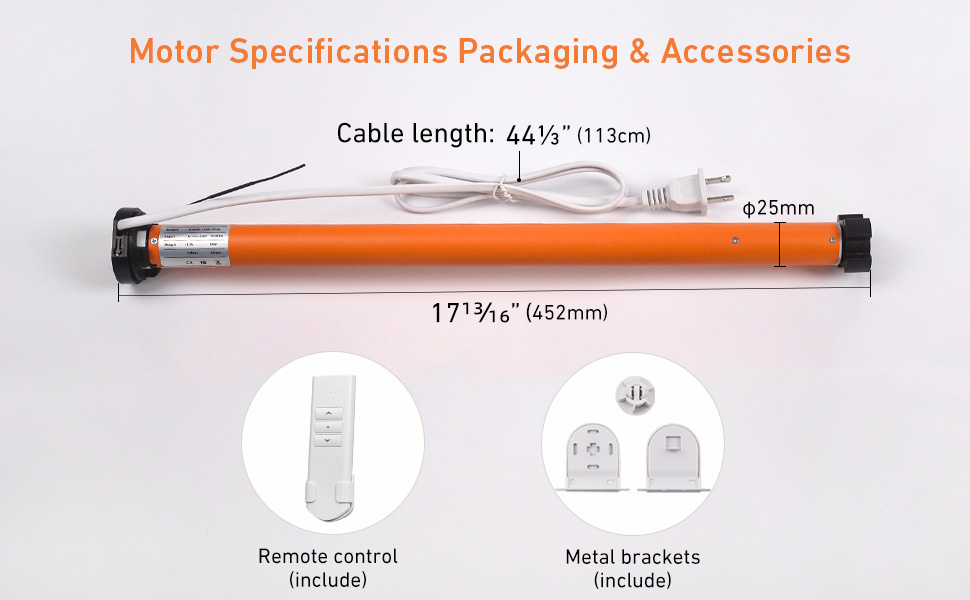
Figure 4.2: Visual guide illustrating the four key steps for easy installation of the smart blinds motor.
5. Parentah Operasi
The Rollerhouses 25TEW Smart Blinds Motor offers multiple control options for your convenience.
5.1 Kontrol Aplikasi (Tuya / Smart Life)
Control your blinds from anywhere using the Tuya or Smart Life app on your smartphone. This allows for remote operation, scheduling, and smart automation.
- Buka/Tutup: Tap the respective buttons in the app to fully open or close your blinds.
- Saluyukeun Posisi: Use the slider or percentage input in the app to set your blinds to any desired intermediate position.
- Otomatisasi pinter: Set up routines for sunset and sunrise activation, or create custom schedules for specific times. For example, program blinds to open at 7 AM and close at 10 PM daily.

Gambar 5.1: Kelample of customizable timer and scheduling features within the app, allowing automatic opening and closing at set times.
5.2 Kontrol sora
Integrate the Smart Controller with compatible voice assistants for hands-free operation.
- Asisten cocog: Alexa, Google Assistant, Siri, AppleWatch. (Note: Not compatible with Homekit, SmartThings, Philips Hue).
- Paréntah:
- "Alexa, open all blinds."
- "Hei Google, tutupkeun gorden ruang tamu."
- "Siri, set bedroom blinds to 50%."

Figure 5.2: A user demonstrating voice control, commanding a smart assistant to open the blinds.
5.3 Jauh Jauh
Use the included DC2700-1 Channel Remote for direct control of your blinds.
- Tombol Up: Opens the blinds.
- Tombol Turun: Closes the blinds.
- Tombol Eureun: Stops the blinds at their current position.
- Limit Setting Buttons: Refer to the remote's specific instructions for setting upper and lower limits.
6. Pangropéa
The Rollerhouses 25TEW Smart Blinds Motor requires minimal maintenance.
- beberesih: Spot clean the motor and external components as needed. Do not immerse in water or use harsh chemicals.
- Cék biasa: Periodically check the mounting brackets and connections to ensure they are secure.
7. Cara ngungkulan
If you encounter issues with your Rollerhouses 25TEW Smart Blinds Motor, try the following steps:
- Motor teu ngabales:
- Check if the motor is properly plugged into a working power outlet.
- Ensure the remote control has fresh batteries and is paired correctly.
- Verify your home WiFi network is active and the motor is connected to the Tuya/Smart Life app.
- Gordén Henteu Obah Mulus:
- Check for any obstructions in the blind's path.
- Ensure the blind tube is correctly seated in the motor and brackets.
- Confirm the shade weight does not exceed the 12lb (5.5kg) capacity.
- Masalah Konektipitas Aplikasi:
- Balikan deui router sareng modem anjeun.
- Ensure your smartphone is connected to the same 2.4GHz WiFi network as the motor during setup.
- Try resetting the motor (refer to the app or manufacturer's guide for specific reset procedures).
Lamun masalah persist, mangga ngahubungan rojongan customer.
8. Spésifikasi
| Fitur | Spésifikasi |
|---|---|
| Nomer modél | 25TEW-1.5/28 |
| Bahan | Logam, Plastik |
| Dimensi produk | 1"L x 18.8"W (Motor length approx. 18.8 inches / 47.8 cm) |
| Dipeunteun Power | 12W |
| ayeuna | 1A |
| Masukan Voltage | 100-240V |
| Torsi | 1.5Nm |
| Dipeunteun RPM | 28r/min |
| Protéksi Ingress (IP) Peunteun | IP22 |
| Motor Tube Diameter | φ25mm (Designed to fit 1.5" / 38mm OD shade tubes) |
| Modeu Operasi | Automatic, WiFi, APP, Voice, Remote Control |
| Tipe Pamasangan | Di jero Gunung, Luar Gunung |
| Item Beurat | 1.1 Pon (kira-kira 0.5 kg) |
| UPC | 630282563018 |
| Produsén | Rollerhouse |
9. Garansi jeung Rojongan
Rollerhouse provides comprehensive after-sales service for your product.
- Garansi: If you experience any damage or failures with the product within the valid warranty period, please provide pictures or detailed descriptions. We will work with you for a free replacement.
- Bantosan Téknis: For installation assistance, troubleshooting, or any other inquiries, please contact Rollerhouse customer support. Refer to the product packaging or the official Rollerhouse websitus pikeun inpo kontak.


