1. Bubuka
This manual provides detailed instructions for the operation and maintenance of your Jesebang Wireless Earbuds, Model IS07. Please read this manual thoroughly before using the product to ensure proper function and longevity. These earbuds feature Bluetooth 5.3 connectivity, HiFi stereo sound, and an IP7 waterproof rating, designed for use with Android and iOS devices.
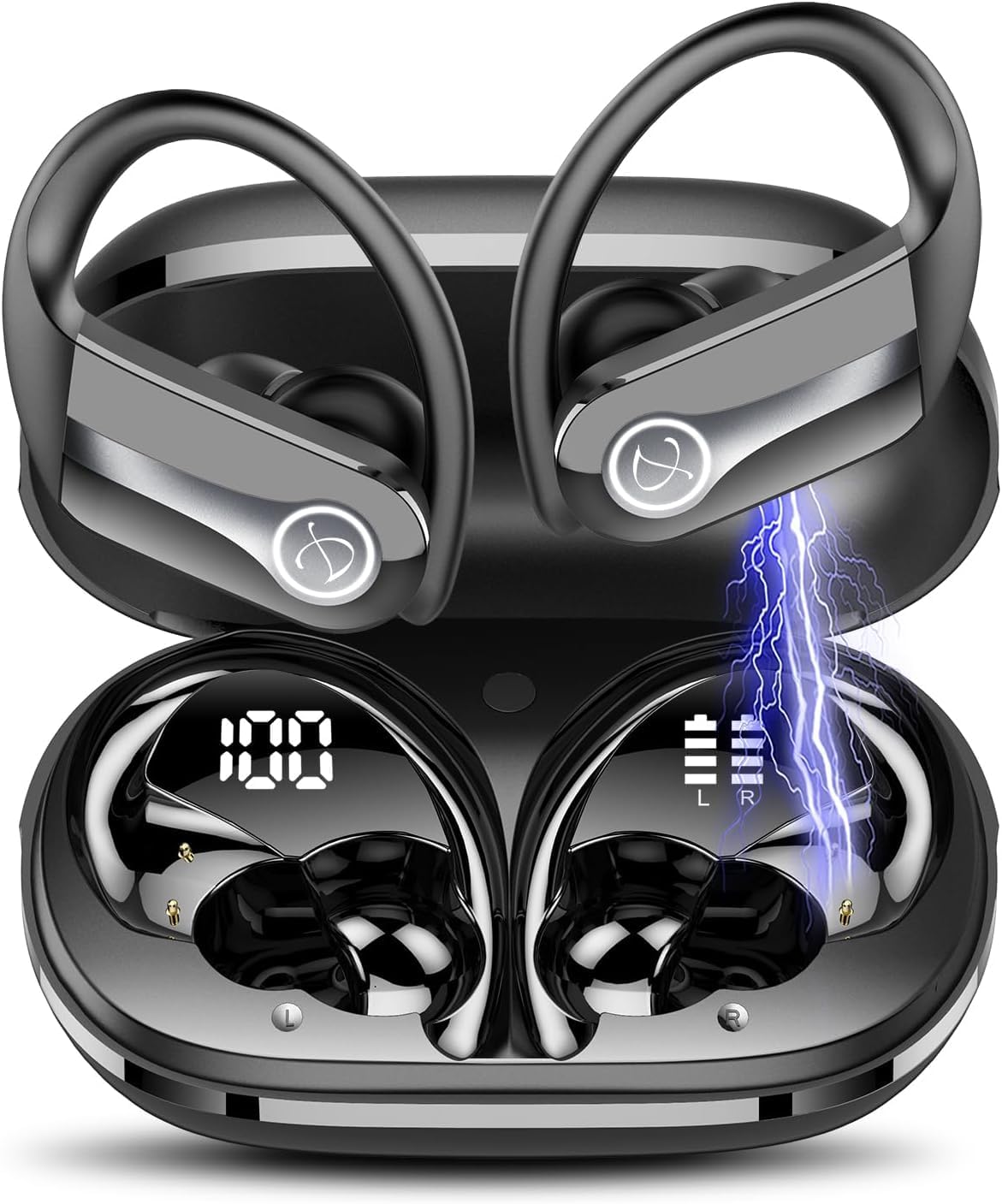
Image 1.1: Jesebang Wireless Earbuds IS07 in their charging case, displaying battery levels. The earbuds are black with silver accents and feature ear hooks for secure fit. The charging case shows a digital display for its battery percentage (100%) and individual earbud battery indicators (L and R).
2. Setélan
2.1 Ngecas Awal
Before first use, fully charge the earbuds and the charging case. The product includes a charging cable. Connect the charging cable to the charging port on the case and a compatible USB power source. The digital display on the charging case will indicate the charging status and battery percentage.
- Pastikeun yén earbuds dipasang leres dina wadah ngecas.
- Ngeusi batre pinuh biasana butuh 1-2 jam.
- The charging case display will show "100" when fully charged.
2.2 Nyapasangkeun sareng Alat
Earbud bakal otomatis asup kana modeu pairing nalika dicabut tina wadah ngecas.
- Buka wadah ngecas sareng cabut kadua earbuds.
- On your smartphone or device, navigate to the Bluetooth settings.
- Milarian pikeun available devices and select "IS07" from the list.
- Sakali disambungkeun, ajakan sora bakal mastikeun papasangan suksés.
- If pairing fails, place the earbuds back into the case, close the lid, wait a few seconds, and repeat the process.
3. Parentah Operasi
3.1 Daya Hurung/Pareuman
- Daya Hurung: Cabut earbuds tina wadah ngecas. Aranjeunna bakal hurung otomatis.
- Pareum listrik: Place earbuds back into the charging case and close the lid. They will power off automatically and begin charging.
3.2 Kontrol Toél
The Jesebang IS07 earbuds feature touch-sensitive controls for various functions:
| Aksi | Fungsi |
|---|---|
| Ketok Tunggal (L/R) | Puter/Reureuh musik, Jawab/Tungtung telepon |
| Ketok dua kali (L) | Lagu saméméhna |
| Ketok dua kali (R) | Lagu salajengna |
| Ketuk Tilu (L/R) | Aktipkeun Asisten Sora |
| Pencét Panjang (2s) (K/K) | Nolak Telepon |
| Pencét Panjang (3s) (K/K) | Volume Up (R) / Volume Down (L) |
Catetan: Functions may vary slightly depending on your connected device and operating system.
4. Pangropéa
4.1 beberesih
Regular cleaning helps maintain sound quality and product longevity.
- Anggo lawon anu lembut, garing, henteu lint pikeun ngusap earbuds sareng wadah ngecas.
- Keur kokotor bandel, rada dampen lawon jeung cai. Ulah make bahan kimia kasar atawa bahan abrasive.
- Bersihkeun kontak pangisi daya dina earbud sareng wadahna sacara périodik nganggo kapas garing pikeun mastikeun pangisian dayana leres.
4.2 Panyimpenan
Nalika henteu dianggo, simpen earbuds dina wadah ngecasna pikeun ngajagi sareng tetep dicas. Nyimpen dina tiis, tempat garing jauh ti sinar panonpoé langsung jeung suhu ekstrim.
4.3 Tahan Cai (IP7)
The earbuds are rated IP7 waterproof, meaning they can withstand immersion in water up to 1 meter for 30 minutes. This makes them suitable for workouts and light rain. However, they are not designed for swimming or prolonged submersion. Ensure earbuds are dry before placing them back in the charging case to prevent damage to the charging contacts.
5. Cara ngungkulan
If you encounter issues with your Jesebang Wireless Earbuds, refer to the following common solutions:
| Masalah | Mungkin Cukang lantaranana | Solusi |
|---|---|---|
| Earbuds teu dipasangkeun | Out of range, low battery, pairing mode not active | Ensure earbuds are charged. Place them back in the case, close, then reopen to re-enter pairing mode. Check Bluetooth on your device. |
| Ngan hiji earbud jalan | Earbuds not connected to each other, low battery on one earbud | Place both earbuds back in the case, close the lid, then remove them together. Ensure both are charged. |
| Taya sora | Volume too low, not connected, incorrect audio output selected | Increase volume on your device and earbuds. Verify Bluetooth connection. Check audio output settings on your device. |
| Masalah ngecas | Dirty charging contacts, faulty cable/adapter | Clean charging contacts. Try a different charging cable or power adapter. Ensure earbuds are correctly seated in the case. |
If the problem persists, please contact customer support (refer to Section 7).
6. Spésifikasi
| Fitur | Rincian |
|---|---|
| Ngaran modél | IS07 |
| Téhnologi konektipitas | Nirkabel (Bluetooth 5.3) |
| Panempatan Ceuli | Dina Ceuli |
| Faktor Bentuk | Dina Ceuli |
| Warna | Hideung |
| Peunteun waterproof | IP7 |
| Waktu maén | Dugi ka 40 jam (kalayan ngeusi batre) |
| Komponén Kaasup | Kabel Ngecas |
| Item Beurat | 3.52 ons |
| Batré | 3 batré Litium Polimér (kaasup) |
7. Garansi jeung Rojongan
7.1 Émbaran jaminan
Jesebang products typically come with a standard manufacturer's warranty. Please refer to the product packaging or the official Jesebang website for specific warranty terms and conditions. Keep your purchase receipt as proof of purchase for warranty claims.
7.2 Rojongan Palanggan
For technical assistance, troubleshooting beyond this manual, or warranty inquiries, please contact Jesebang customer support. You can usually find contact information on the official Jesebang websitus atawa ngaliwatan pangecér dimana anjeun dibeuli produk.
Dukungan Online: Visit the official Jesebang websitus pikeun FAQs jeung sumber rojongan. Jesebang Store on Amazon


