1. Bubuka
Hatur nuhun pikeun meuliasing the TELLUR VOX 95 Bluetooth Headset. This manual provides detailed instructions for the proper use, setup, and maintenance of your new headset. The Vox 95 is designed for seamless communication on the go, offering comfort and convenience with advanced features like Bluetooth 5.3, multipoint connectivity, and Sound+ Voice Enhancement (SVE) technology.

Gambar 1.1: Hareupeun view tina Headset Bluetooth TELLUR VOX 95, nunjukkeunasing its sleek design and main button.
2. Émbaran Kasalametan
- Ulah ngalaan headset kana suhu anu ekstrim, kalembaban, atanapi zat korosif.
- Ulah nepi ka headset murag atawa kakeunaan benturan anu kuat.
- Do not attempt to disassemble or modify the headset. This will void the warranty and may cause damage.
- Jauhkeun headset tina jangkauan barudak sareng piaraan.
- Use only the provided USB-A to USB-C cable for charging.
- When driving, prioritize road safety. Use the headset responsibly and in accordance with local laws and regulations.
- Prolonged listening at high volume levels may cause hearing damage. Adjust volume to a comfortable level.
3. Eusi Paket
Mangga parios eusi pakét pikeun mastikeun yén sadaya barang aya:
- 1 x Headset Bluetooth TELLUR VOX 95
- 1 x USB-A kana kabel ngecas USB-C
- 1 x Plastic ear hook
- 1 x Silicone ear hook
- 1 x Ear tip (Size M)
- 1 x Ear tip (Size S)
- 1 x Manual Pamaké (dokumén ieu)
4. Produk Langkungview
Familiarize yourself with the various parts of your TELLUR VOX 95 headset.

Gambar 4.1: Tukangeun view of the headset showing the ear hook attachment point and ear tip.

Figure 4.2: The headset's USB-C charging port, located at the end of the device, with the charging cable connected.
Komponén konci:
- Tombol Utama: For power on/off, answering/ending calls, playing/pausing audio.
- Tombol Volume: For adjusting volume up/down.
- Port ngecas USB-C: Pikeun nyambungkeun kabel ngecas.
- Indikator LED: Displays status (pairing, charging, low battery).
- Mikropon: For voice input during calls.
- Tip Ceuli: Provides in-ear comfort and sound delivery.
- Pancing Ceuli: Secures the headset over the ear.
5. Setélan
5.1 Ngecas Headsét
Before first use, fully charge the headset. A full charge takes approximately 2 hours.
- Sambungkeun tungtung USB-A tina kabel ngecas ka adaptor kakuatan USB (teu kaasup) atawa port USB komputer.
- Connect the USB-C end of the charging cable to the charging port on the headset.
- The LED indicator will show a specific color (refer to the LED indicator section in the manual, if available, or assume red for charging, blue/off for full).
- Saatos dicas pinuh, pegatkeun sambungan kabel ngecas.
Figure 5.1: Illustrates connecting the USB-C charging cable to the headset's charging port.
5.2 Maké Headsét
The VOX 95 is designed for comfortable wear and can be adjusted for either the left or right ear.
- Choose the ear tip (S or M) that provides the best fit and comfort for your ear.
- Attach either the plastic or silicone ear hook to the headset. The 360° adjustable earpiece allows you to rotate the ear hook to fit perfectly in your left or right ear.
- Gently place the ear tip into your ear canal and position the ear hook over your ear for a secure fit.

Figure 5.2: A woman wearing the TELLUR VOX 95 headset, demonstrating its comfortable and discreet fit.

Figure 5.3: The headset being worn by a woman while driving, highlighting its hands-free convenience for safer communication.
5.3 Nyapasangkeun sareng Alat
The VOX 95 uses Bluetooth 5.3 for a stable connection up to 15 meters.
- Daya Hurung: Press and hold the Main Button for approximately 3 seconds until the LED indicator flashes blue and red alternately, indicating it's in pairing mode.
- Aktipkeun Bluetooth: Dina telepon pinter, tablet, atanapi komputer anjeun, aktipkeun Bluetooth.
- Milarian pikeun Paranti: Dina setélan Bluetooth alat anjeun, milarian alat anu sayogi.
- Select "VOX 95": From the list of found devices, select "VOX 95".
- Konfirmasi sambungan: Once connected, the LED indicator on the headset will flash blue slowly or turn off, depending on the model's specific behavior. You will also hear a confirmation tone.
Note: The headset supports multipoint connectivity, allowing it to be connected to two devices simultaneously (e.g., a phone and a tablet/laptop).

Figure 5.4: The headset positioned on a smartphone, symbolizing its readiness for Bluetooth pairing and connection.
6. Parentah Operasi
6.1 Daya Hurung/Pareuman
- Daya Hurung: Press and hold the Main Button for approximately 3 seconds until the LED indicator flashes blue.
- Pareum listrik: Press and hold the Main Button for approximately 5 seconds until the LED indicator flashes red and then turns off.
6.2 Manajemén Telepon
- Ngajawab / mungkas Telepon: Press the Main Button once.
- Nolak Telepon: Press and hold the Main Button for 2 seconds.
- Telepon deui Nomer Panungtungan: Double-press the Main Button.
6.3 Volume Control
- Volume Up: Press the Volume Up button (+).
- Volume Turun: Press the Volume Down button (-).
6.4 Aktipkeun Asisten sora
Access your device's voice assistant (Siri, Google Assistant) with a simple button press.
- Aktipkeun Asisten Sora: Triple-press the Main Button.
Note: For iOS users, the headset also provides low battery notifications.
6.5 Konéktivitas Multipoint
The VOX 95 can connect to two Bluetooth devices simultaneously, such as a smartphone and a laptop.
- Pair the headset with the first device (e.g., your smartphone) as described in Section 5.3.
- Nonaktipkeun Bluetooth dina alat munggaran.
- Put the headset back into pairing mode.
- Pair the headset with the second device (e.g., your laptop).
- Once connected to the second device, re-enable Bluetooth on the first device. The headset should automatically reconnect to both devices.
The headset will intelligently switch between devices for calls or audio playback.

Figure 6.1: A user demonstrating multipoint connectivity, with the headset simultaneously linked to a laptop and a smartphone, indicated by blue lines.
6.6 SVE Technology for Voice Clarity
The Sound+ Voice Enhancement (SVE) technology in the VOX 95 is a passive noise reduction feature that uses advanced signal processing to improve the clarity of your voice during calls, especially in noisy environments. It helps distinguish your speech from background noise, ensuring clearer communication for the listener.
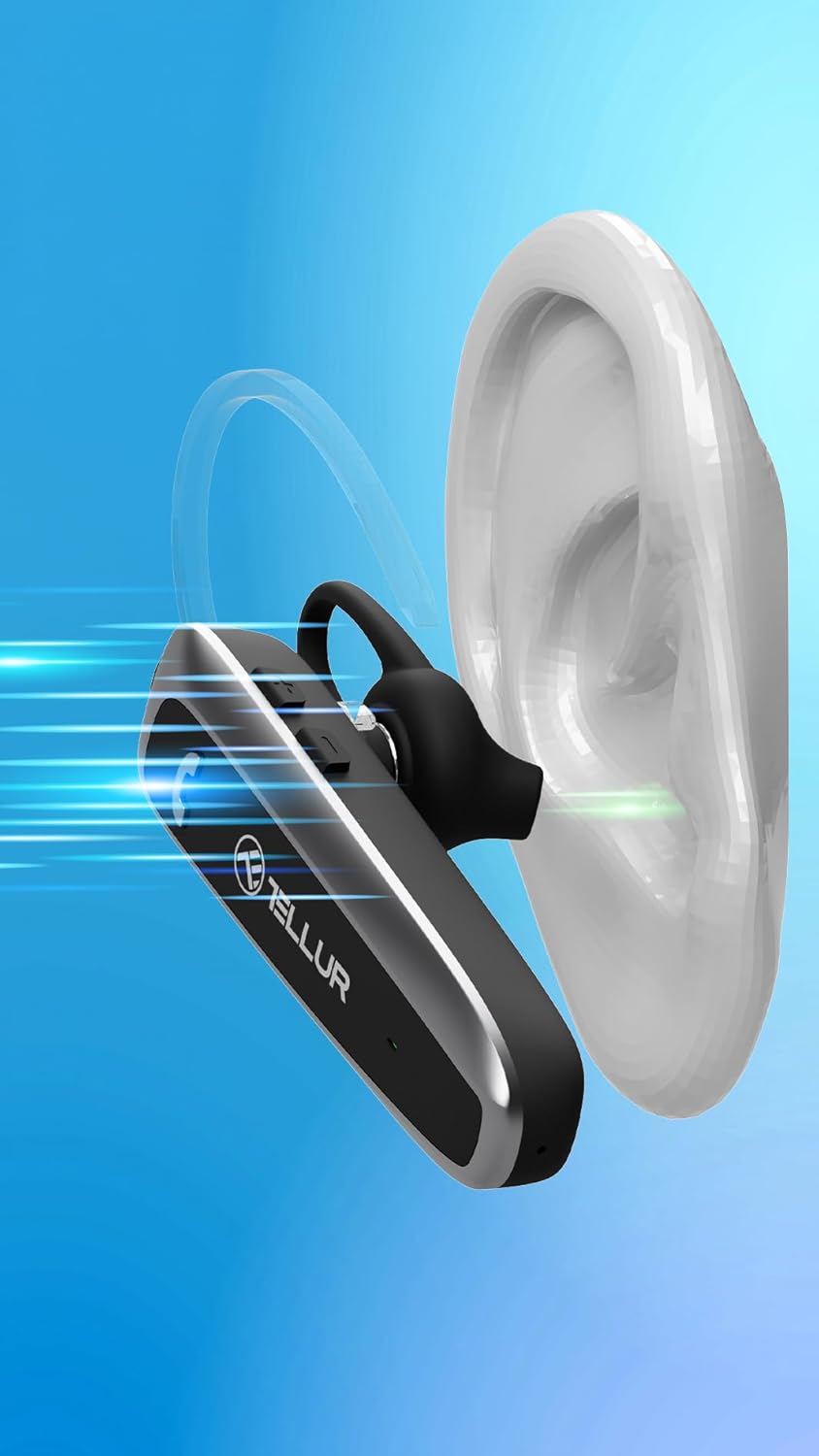
Figure 6.2: Visual representation of Sound+ Voice Enhancement (SVE) technology, showing sound waves being processed for clarity from the ear to the microphone.
7. Pangropéa
- beberesih: Anggo lawon anu lemes, garing, sareng henteu ngaganggu pikeun ngabersihkeun headset. Entong nganggo pembersih anu abrasif, alkohol, atanapi pangleyur kimia.
- Tips ceuli: The ear tips can be removed and gently cleaned with a damp cloth and mild soap, then thoroughly dried before reattaching.
- Panyimpenan: Nalika henteu dianggo, simpen headset di tempat anu tiis, garing, jauh tina sinar panonpoé langsung sareng suhu anu ekstrim.
- Perawatan batré: Pikeun ngahémat umur batré, ngecas headset sahenteuna tilu bulan sakali upami henteu dianggo sacara rutin.
8. Cara ngungkulan
| Masalah | Mungkin Cukang lantaranana | Solusi |
|---|---|---|
| Headset teu hurung. | Batré béak. | Cas headset nepi ka pinuh. |
| Teu tiasa nyapasangkeun headset sareng alat. | Headset teu dina modeu pairing; Bluetooth pareum dina alat; Alatna jauh teuing. | Ensure headset is in pairing mode (flashing blue/red). Turn on Bluetooth on your device. Move headset closer to the device (within 15m). |
| Taya sora atawa volume low. | Volume too low; Headset not connected; Audio output not set to headset. | Increase volume on both headset and connected device. Reconnect the headset. Check audio output settings on your device. |
| Kualitas telepon goréng. | Weak Bluetooth signal; Environmental noise. | Move closer to the connected device. Ensure microphone is not obstructed. SVE technology helps, but extreme noise may still affect quality. |
| Masalah sambungan multipoint. | Incorrect pairing sequence; Device conflict. | Follow the multipoint pairing instructions carefully (Section 6.5). Disconnect and reconnect devices if necessary. |
9. Spésifikasi
| Fitur | Rincian |
|---|---|
| Ngaran modél | Telur Vox 95 |
| Téhnologi konektipitas | Bluetooth |
| Vérsi Bluetooth | 5.3 |
| Rentang Bluetooth | Nepi ka 15 méter (49 suku) |
| Kahirupan Batré (Waktu Ngobrol) | Nepi ka 20 Jam |
| Waktu sayaga | Nepi ka 30 Dinten |
| Waktu Ngecas | Kurang leuwih 2 Jam |
| Port ngecas | USB-C |
| Beurat | 11.4 Gram (0.402 ons) |
| Kontrol bising | Passive Noise Cancellation (SVE Technology) |
| Wangun Earpiece | Ear Hook (360° adjustable) |
| Alat nu cocog | Smartphones (iPhone, Android), Tablets (iPad, Android), Laptops, Smart TVs (Bluetooth enabled) |
| Komponén Kaasup | Headset, USB-A to USB-C cable, Plastic ear hook, Silicone ear hook, Ear tip (M), Ear tip (S), User Manual |
10. Garansi jeung Rojongan
TELLUR products are manufactured to the highest quality standards. For detailed warranty information, please refer to the warranty card included in your package or visit the official TELLUR website. If you encounter any issues or have questions regarding your VOX 95 Bluetooth Headset, please contact TELLUR customer support through the contact information provided on the official websitus atanapi platform pameseran Anjeun.
Pikeun pitulung salajengna, anjeun tiasa nganjang ka TELLUR Store on Amazon.


