1. Bubuka
Thank you for choosing the Cyboris KKM-001 Portable Karaoke Machine. This device combines a 15W Bluetooth speaker with two wireless microphones, offering a versatile audio experience for various occasions. Please read this manual thoroughly before use to ensure proper operation and to maximize your enjoyment of the product.
2. Eusi Paket
Mangga cék kotak pikeun item di handap ieu:
- 1 x Cyboris KKM-001 Portable Karaoke Speaker
- 2 x Mikropon Nirkabel
- 1 x Kabel Ngecas Tipe-C
- 1 x Manual Pamaké (dokumén ieu)
3. Produk Langkungview
Familiarize yourself with the components and controls of your Cyboris KKM-001 Karaoke Machine.

Image: The Cyboris KKM-001 Portable Karaoke Machine in green, accompanied by two matching wireless microphones.
3.1 Speaker Controls and Ports

Image: A detailed diagram illustrating the control buttons and ports on the Cyboris KKM-001 speaker and its wireless microphone.
- Volume Turunkeun / Tombol Lagu Saméméhna: Pencét sakeudeung pikeun ngurangan volume, pencét lila pikeun lagu saméméhna.
- Volume Kaluhur / Tombol Lagu Salajengna: Pencét sakeudeung pikeun ningkatkeun volume, pencét lila pikeun lagu salajengna.
- Power On/Off Knob: Rotate to turn the speaker on or off.
- Play/Pause / Mode Switching / Lights Button: Short press to play/pause, long press to switch modes (Bluetooth, AUX, TF Card), double press to turn lights on/off.
- AUX Audio Cable Jack: For connecting external audio devices via a 3.5mm AUX cable.
- Slot Kartu TF: Pikeun muterkeun musik langsung tina kartu TF (MicroSD).
- Port Ngecas Tipe-C: Pikeun ngecas batré internal speaker.
3.2 Kontrol Mikropon
- Microphone/Reverb Volume + / Next Song Button: Short press to increase microphone volume or reverb, long press for next song (in music playback mode).
- Microphone/Reverb Volume - / Previous Song Button: Short press to decrease microphone volume or reverb, long press for previous song (in music playback mode).
- Power On/Off / Microphone Mute / Play/Pause Button: Long press to power on/off the microphone, short press to mute/unmute, double press to play/pause music.
- Original Sound Cancellation / Magic Sound Loop Switching Button: Short press to cancel original vocals from a song (karaoke mode), long press to cycle through voice change effects.
4. Setélan
4.1 Ngecas Alat
Before first use, fully charge the speaker and both microphones.
- Connect the provided Type-C charging cable to the speaker's Type-C charging port and a standard USB power adapter (not included).
- Connect the Type-C charging cable to each microphone's charging port.
- Lampu indikator ngecas bakal némbongkeun status ngecas (tingali produk pikeun paripolah lampu khusus).
- A full charge takes approximately 3 hours for the speaker and microphones.
4.2 Ngahurungkeun sareng Ngapasangkeun
- Speaker: Rotate the Power On/Off knob clockwise to turn on the speaker. A power-on prompt will sound.
- Mikropon: Long press the Power On/Off button on each microphone to turn them on. They will automatically pair with the speaker. A successful connection will be indicated by a sound prompt.
4.3 Sambungan Bluetooth
To connect the karaoke machine to your smartphone or other Bluetooth-enabled device:
- Ensure the speaker is powered on and in Bluetooth mode (indicated by a voice prompt or light). If not, long press the Play/Pause / Mode Switching / Lights Button to cycle modes until Bluetooth mode is active.
- Dina alat Anjeun, buka setelan Bluetooth tur teang alat nu sadia.
- Select "KKM-001" from the list.
- Once connected, a confirmation sound will play from the speaker. You can now stream audio from your device.
5. Parentah Operasi
5.1 Operasi Spiker
- Penyesuaian volume: Use the Volume Up/Down buttons on the speaker.
- Kontrol lagu: Long press the Volume Up/Down buttons for next/previous track.
- Puter / Reureuh: Pencét pondok tombol Play / Reureuh.
- Ngalihkeun Mode: Long press the Play/Pause button to switch between Bluetooth, AUX, and TF Card modes.
- Pangaruh cahaya: Double press the Play/Pause button to turn the LED lights on or off.
5.2 Operasi Mikropon
- Microphone Volume/Reverb: Use the +/- buttons on the microphone.
- Ngajempékeun/Nganonaktipkeun: Short press the Power On/Off button on the microphone.
- Voice Change Effects: Long press the Original Sound Cancellation / Magic Sound Loop Switching button to cycle through 6 sound modes: Original Sound, Male to Female, Female to Male, Magic Sound, Kid Sound, and Karaoke Mode.
- Original Sound Cancellation: Short press the Original Sound Cancellation button to reduce or remove vocals from a playing song, allowing you to sing along.

Image: Two children happily singing into the wireless microphones, demonstrating the dual microphone functionality of the Cyboris KKM-001.
5.3 Modeu Playback
- Mode Bluetooth: Connect your device as described in Section 4.3.
- Mode AUX: Insert a 3.5mm audio cable into the AUX jack on the speaker and connect the other end to your audio source. The speaker will automatically switch to AUX mode or can be manually selected using the mode button.
- Mode Kartu TF: Insert a TF (MicroSD) card with MP3, WAV, FLAC, or APE audio files into the TF card slot. The speaker will automatically switch to TF Card mode and begin playback.
5.4 Pangaruh cahaya LED
The speaker features vibrant LED lights that can sync with the rhythm of your music. Double press the Play/Pause button on the speaker to toggle the lights on or off.

Image: The Cyboris KKM-001 speaker showcasing its dynamic, colorful LED lighting effects.
6. Pangropéa
- Bersihkeun alat ku kaen anu lemes sareng garing. Ulah make cleaners abrasive atawa pangleyur.
- Hindarkeun ngalaan alat ka suhu anu ekstrim, sinar panonpoé langsung, atanapi kalembaban anu luhur.
- Simpen alat dina tempat anu tiis sareng garing upami henteu dianggo.
- Entong nyobian ngabongkar atanapi ngalereskeun alat nyalira, sabab ieu bakal ngabatalkeun garansi.
7. Cara ngungkulan
| Masalah | Mungkin Cukang lantaranana | Solusi |
|---|---|---|
| Taya kakuatan | Batré béak. | Charge the speaker and microphones fully. |
| Taya sora tina speaker | Volumena leutik teuing atawa teu pati jelas. Modeu inputna salah. | Increase volume. Ensure correct mode (Bluetooth, AUX, TF Card) is selected. |
| Mikropon teu jalan | Microphone is off or not paired. Battery is low. | Turn on microphone. Ensure it's paired. Charge microphone. |
| Echo or feedback (squealing) | Microphone too close to speaker. Microphone volume too high. | Increase distance between microphone and speaker. Reduce microphone volume or reverb. |
| Sambungan Bluetooth teu stabil | Device too far from speaker. Interference. | Move device closer to speaker (within 18m). Avoid obstacles. Re-pair Bluetooth. |
8. Spésifikasi
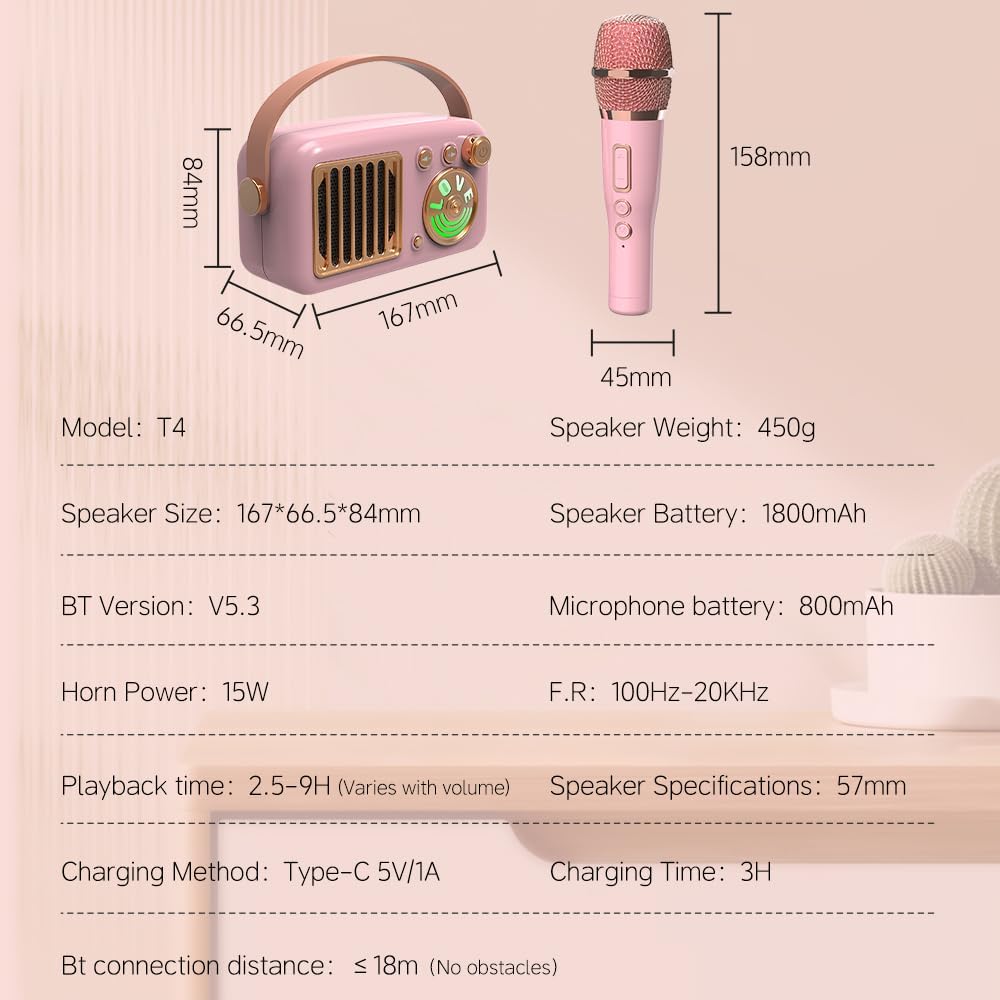
Image: A visual representation of the Cyboris KKM-001 speaker and microphone dimensions, along with key technical specifications.
| Nomer modél | KKM-001 |
| Speaker Dimensions (L x W x H) | 5.9 x 3.14 x 2.16 inci (167 x 66.5 x 84 mm) |
| Speaker Beurat | 2.27 pon (kira-kira 450g) |
| Kakuatan tanduk | 15W |
| Batré Speaker | 1800mAh Lithium Ion (kaasup) |
| Batré Mikropon | 800 mah |
| Waktu Playback | 2.5 - 9 hours (varies with volume) |
| Waktu Ngecas | Kira-kira. 3 jam |
| Métode ngecas | Tipe-C 5V/1A |
| Vérsi Bluetooth | 5.3 |
| Jarak Sambungan Bluetooth | Nepi ka 18 méter (tanpa halangan) |
| Réspon Frékuénsi | 100Hz - 20KHz |
| Input Audio | AUX, TF Card |
| Bahan | Logam, Plastik |
9. Émbaran Kasalametan
- Jauhkeun alat tina cai sareng cairan sanés.
- Entong lungsur atanapi nempatkeun alat kana tabrakan anu kuat.
- Paké ngan kabel ngecas husus.
- Jauhkeun tina jangkauan barudak leutik pikeun nyegah bahaya kaselek tina bagian-bagian leutik.
- Ulah ngadangukeun volume anu luhur teuing lila pikeun nyegah karusakan pangrungu.
10. Garansi jeung Rojongan
The Cyboris KKM-001 Portable Karaoke Machine comes with a standard manufacturer's warranty. For specific warranty details, please refer to the warranty card included in your package or contact Cyboris customer support.
For technical support, troubleshooting assistance, or warranty claims, please contact the seller or visit the official Cyboris websitus.


