1. Parentah Kasalametan penting
Always read and understand all safety warnings and instructions before operating this welding machine. Failure to follow these instructions may result in electric shock, fire, serious injury, or death.
- Sengatan Listrik Bisa Maot: Do not touch live electrical parts. Wear dry welding gloves and protective clothing. Insulate yourself from work and ground.
- Haseup jeung Gas Bisa Bahaya: Jaga sirah anjeun jauh tina haseup. Anggo ventilasi atanapi knalpot pikeun miceun haseup tina zona pernapasan.
- Sinar Busur Bisa Ngaduruk Panon jeung Kulit: Wear a welding helmet with a proper shade of filter to protect your face and eyes when welding or watching. Wear appropriate protective clothing to protect your skin.
- Bahaya Seuneu jeung Ledakan: Protect yourself and others from flying sparks and hot metal. Remove all flammables within 35 feet (10 meters) of the welding area.
- Bagian anu Panas Bisa Nyababkeun Kaduruk Parah: Allow cooling period before touching welded material.
- Overcurrent, Overvoltage, Overheating Protection: The machine is equipped with built-in protection. If activated, allow the machine to cool down before resuming operation.
For detailed safety information, refer to relevant industry standards and local regulations.
2. Eusi Paket
Carefully unpack the welding machine and check for any damage. Ensure all items listed below are present:

Figure 2.1: HVM140 Welder and Included Accessories
This image displays the HZXVOGEN HVM140 welding machine along with its complete set of accessories, including the MIG torch, electrode holder, earth clamp, flux core wire, brush hammer, and welding rods.
- HZXVOGEN HVM140 Welding Machine (1 unit)
- MIG Torch (1 unit)
- Electrode Holder (1 unit)
- Bumi Clamp (1 unit)
- Flux Core Wire (0.8mm or 1.0mm, 1 spool)
- Brush Hammer (1 unit)
- Welding Rods (5 pieces)
- Manual pamaké (1 salinan)
3. Produk Langkungview
The HZXVOGEN HVM140 is a versatile 3-in-1 multi-process inverter welding machine designed for various welding applications. It supports Gasless MIG, MMA (Stick), and Lift TIG welding modes.
3.1 Fitur konci

Figure 3.1: 3-in-1 Multi-Process Capabilities
This image highlights the HVM140's ability to perform Gasless MIG, MMA (Stick), and Lift TIG welding, showcasing its versatility for different welding tasks.
- 3-in-1 Multi-Process: Supports Gasless MIG, MMA (Stick), and Lift TIG welding modes.
- Téknologi Inverter IGBT: Provides stable arc, high efficiency, and energy saving.
- Digital Rotating Screen: Intuitive one-button control for easy and quick adjustment of welding parameters.
- VRD (Voltage Alat Pangurangan): Enhances safety, especially in MMA mode, by reducing open-circuit voltage.
- Mimitian Panas: Improves arc ignition in MMA mode, preventing electrode sticking.
- Anti-Stick: Automatically reduces current if the electrode sticks, making it easier to remove.
- gaya busur: Provides additional current during short arc length, preventing the arc from extinguishing.
- Efficient Cooling Fan: Reduces internal dust accumulation and prolongs machine lifespan.
- Portabel sareng Kompak: Lightweight design (approx. 3.7 kg) with a convenient handle for easy transport.
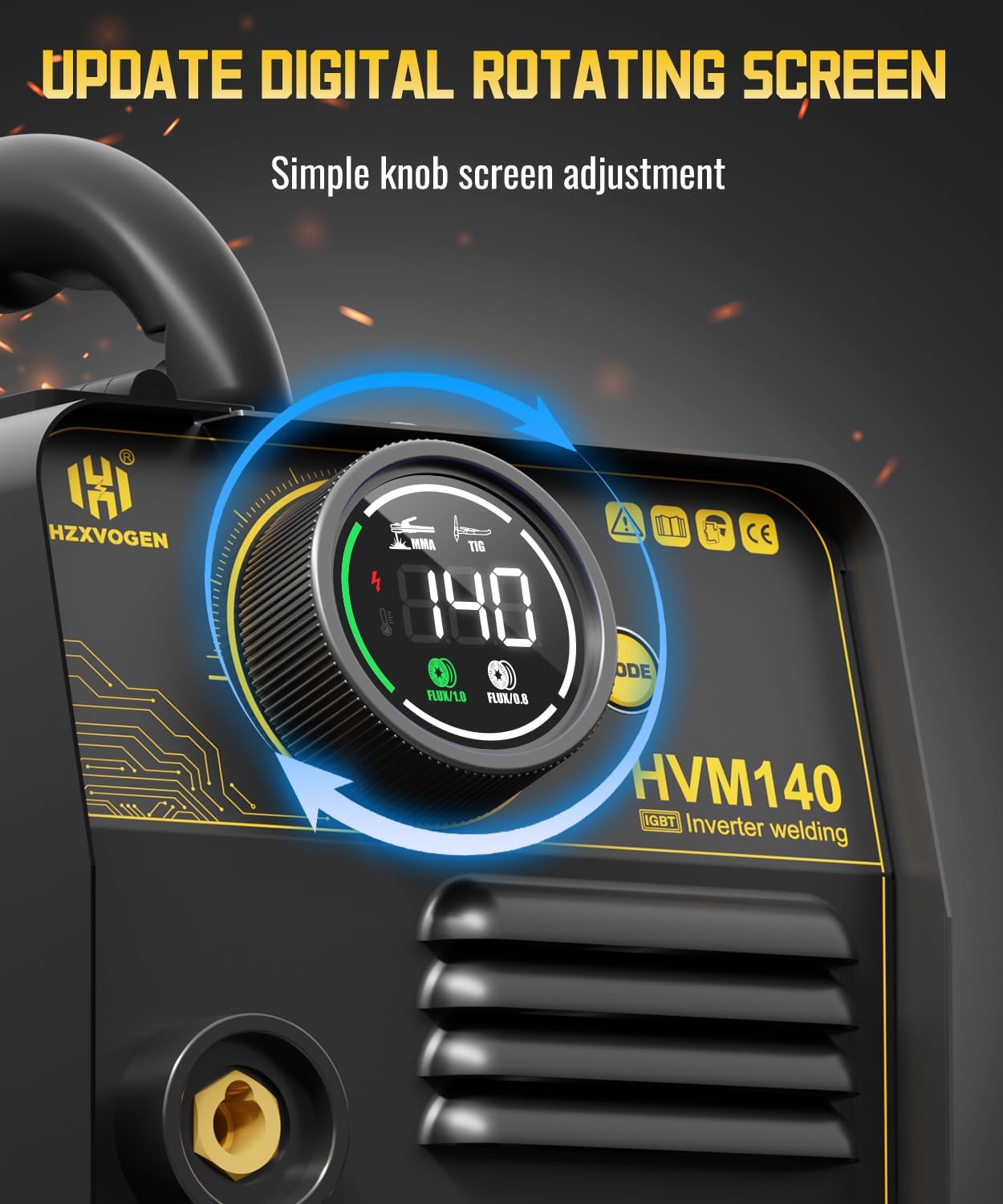
Figure 3.2: Digital Control Interface
This image shows the digital display and single knob control of the HVM140, allowing for precise and easy adjustment of welding parameters.

Figure 3.3: Professional Welder Features
This image visually represents the advanced features of the HVM140, including IGBT technology, VRD, Hot Start, efficient cooling, Anti-Stick, and Arc Force, contributing to professional welding performance.
4. Setélan
4.1 Inspeksi Awal
Before connecting the machine, inspect all cables, connections, and the machine casing for any signs of damage. Ensure the work area is clean, dry, and well-ventilated, free from flammable materials.
4.2 Sambungan Daya
- Pastikeun saklar daya dina mesin aya dina posisi "OFF".
- Connect the power cord to a suitable power outlet. The HVM140 supports a range of input voltages (refer to specifications for details).
4.3 Gasless MIG Setup
- Buka panutup kawat feeder.
- Install the flux core wire spool onto the spindle. Ensure the wire unwinds smoothly.
- Thread the wire through the wire feeder mechanism and into the MIG torch liner.
- Close the wire feeder cover.
- Connect the MIG torch to the designated MIG output terminal on the front panel.
- Nyambungkeun bumi clamp to the work piece. Ensure a good electrical connection.
- Turn on the machine. Press and hold the wire feed button (usually on the front panel or torch trigger) for approximately 5 seconds to feed the wire through the torch until it exits the contact tip.

Figure 4.1: Wire Feeding Mechanism
This diagram illustrates the internal wire feeding system of the HVM140, detailing how to install the flux core wire spool and feed the wire into the MIG torch for operation.
4.4 MMA (Stick) Setup
- Connect the electrode holder cable to the positive (+) terminal on the front panel.
- Nyambungkeun bumi clamp kabel ka terminal négatif (-) dina panel hareup.
- Securely insert the welding electrode into the electrode holder.
- Nyambungkeun bumi clamp kana sapotong karya.
4.5 Lift TIG Setup
- Connect the TIG torch (not included) to the negative (-) terminal on the front panel.
- Nyambungkeun bumi clamp cable to the positive (+) terminal on the front panel.
- Ensure a suitable tungsten electrode is installed in the TIG torch.
- Nyambungkeun bumi clamp kana sapotong karya.
- Note: This machine supports Lift TIG, which means arc initiation is done by touching the tungsten to the workpiece and lifting it slightly. No high-frequency start.
5. Parentah Operasi
5.1 Pamilihan Mode
Turn on the machine. Use the mode selection button (usually near the digital display) to cycle through MIG, MMA, and Lift TIG modes. The selected mode will be indicated on the digital screen.
5.2 Adjustment Ayeuna
Once the desired mode is selected, use the single control knob to adjust the welding current (Amperage). The digital display will show the current setting. Refer to welding charts for recommended current settings based on material thickness and welding process.
5.3 Téhnik Las
Proper welding technique is crucial for quality welds. Practice on scrap material before welding critical components.
- Las MIG: Maintain a consistent stick-out and travel speed. Use a slight push or pull angle depending on the application.
- Las MMA: Maintain a short arc length. Use a slight weaving motion for wider beads.
- Angkat Las TIG: Touch the tungsten to the workpiece to initiate the arc, then quickly lift it a small distance (1-3mm) to establish the arc. Maintain a consistent arc length and travel speed.
5.4 Siklus tugas
The HVM140 has a 60% duty cycle at its maximum output. This means it can operate continuously for 6 minutes out of every 10-minute period at maximum current before requiring a 4-minute cooling period. Exceeding the duty cycle can damage the machine. The machine's built-in thermal protection will activate if it overheats.

Figure 5.1: Duty Cycle Explanation
This graphic explains the 60% duty cycle of the HVM140, indicating that for every 10 minutes of operation at maximum output, the machine can work for 6 minutes and requires a 4-minute break to cool down.
6. Pangropéa
Pangropéa rutin ngajamin umur panjang sareng kinerja optimal mesin las anjeun.
- beberesih: Regularly clean the machine's exterior with a dry cloth. Use compressed air to blow out dust from the cooling vents. Ensure the machine is unplugged before cleaning.
- Pamariksaan kabel: Periodically inspect all cables (power, MIG torch, electrode holder, earth clamp) for cuts, abrasions, or loose connections. Replace damaged cables immediately.
- Pangropéa Obor MIG: Clean the contact tip and gas nozzle regularly. Replace worn contact tips and diffusers.
- Kawat Pangumpan: Keep the wire feeder rollers clean and free of debris. Ensure proper tension on the wire spool.
- Panyimpenan: Store the machine in a clean, dry, and dust-free environment when not in use.
7. Cara ngungkulan
Bagian ieu nyayogikeun solusi pikeun masalah umum anu anjeun tiasa pendak. Pikeun masalah anu teu didaptarkeun di dieu, hubungi dukungan palanggan.
| Masalah | Mungkin Cukang lantaranana | Solusi |
|---|---|---|
| Mesin teu hurung. | No power supply; Power switch off; Internal fuse blown. | Check power outlet and cord; Turn on power switch; Contact service for fuse replacement. |
| Taya arc. | Kl bumi anu goréngamp connection; Incorrect mode selected; Wire feed issue (MIG); Electrode not making contact (MMA/TIG). | Ensure good earth connection; Select correct mode; Check wire feed path; Ensure electrode/tungsten touches workpiece. |
| Kawat teu nyoco (MIG). | Wire tangled; Rollers not tensioned correctly; Contact tip blocked; Liner clogged. | Untangle wire; Adjust roller tension; Clean/replace contact tip; Clean/replace liner. |
| Machine overheats / Thermal protection activates. | Exceeded duty cycle; Poor ventilation; Fan blocked. | Allow machine to cool down; Ensure adequate airflow around machine; Clear fan vents. |
8. Spésifikasi
Technical specifications for the HZXVOGEN HVM140 welding machine:
| Nomer modél | HVM140 |
| Produsén | H HZXVOGEN |
| Ukuran (L x W x H) | Kira-kira. 22 x 23 x 33 cm (8.7 x 9.1 x 13 inci) |
| Ukuran Paket | 37.9 x 27.3 x 19.9 cm (14.9 x 10.7 x 7.8 inci) |
| Beurat | Approx. 3.7 kg (8.16 lbs) - Machine only |
| Beurat pakét | 6.18 kg (13.62 lbs) |
| Kisaran ayeuna | 30 - 140 A |
| Supported Wire Diameter (MIG) | 0.8 mm, 1.0 mm Flux Core Wire |
| Jinis kakuatan | Gasless (Flux Core) for MIG |
| ASIN | B0DBL932XG |

Figure 8.1: Portable and Compact Design
This image provides a visual representation of the HVM140's compact dimensions and lightweight design, emphasizing its portability for various work environments.
9. Garansi jeung Rojongan
HZXVOGEN is committed to providing high-quality products and excellent customer service.
- Garansi: This product comes with a 3-Year Extended Warranty. Please retain your proof of purchase for warranty claims.
- Rojongan Palanggan: For any questions, technical assistance, or warranty inquiries, please contact HZXVOGEN customer support. Our team is available 24/7 to assist you.
- Inpormasi kontak: Refer to the contact details provided on the product packaging or the official HZXVOGEN websitus.

Gambar 9.1: Inpormasi Garansi sareng Dukungan
This image confirms the product's certifications (DEELAY, UL), the availability of a 3-Year Extended Warranty, and 24/7 customer support, ensuring reliability and assistance.


