Bubuka
The Maxcom FW59 Kiddo is a 4G smartwatch specifically designed for children, offering a blend of safety features and communication capabilities. It allows parents to stay connected with their children and monitor their location, providing peace of mind. Key features include video and voice calls, GPS tracking with safe zone definition, an SOS button for emergencies, and a user-friendly interface.
This manual provides detailed instructions on how to set up, operate, and maintain your Maxcom FW59 Kiddo smartwatch to ensure optimal performance and safety.
Eusi pakét
Mangga cék kotak pikeun item di handap ieu:
- Maxcom FW59 Kiddo Smartwatch
- Kabel Ngecas USB
- Manual pangguna (dokumén ieu)
- SIM Card Ejector Tool (if applicable)
Guide Setup
1. Pamasangan Kartu SIM
The Maxcom FW59 Kiddo requires a nano SIM card for 4G connectivity, enabling calls and GPS tracking. Ensure the SIM card is active and supports 4G LTE networks.
- Teang slot kartu SIM di sisi jam tangan pinter.
- Using the provided SIM ejector tool or a small pin, gently press into the small hole next to the SIM slot to open the tray.
- Carefully place the nano SIM card into the tray with the gold contacts facing down, ensuring it is correctly oriented.
- Gently dorong baki SIM deui kana slot nepi ka clicks kana tempatna.
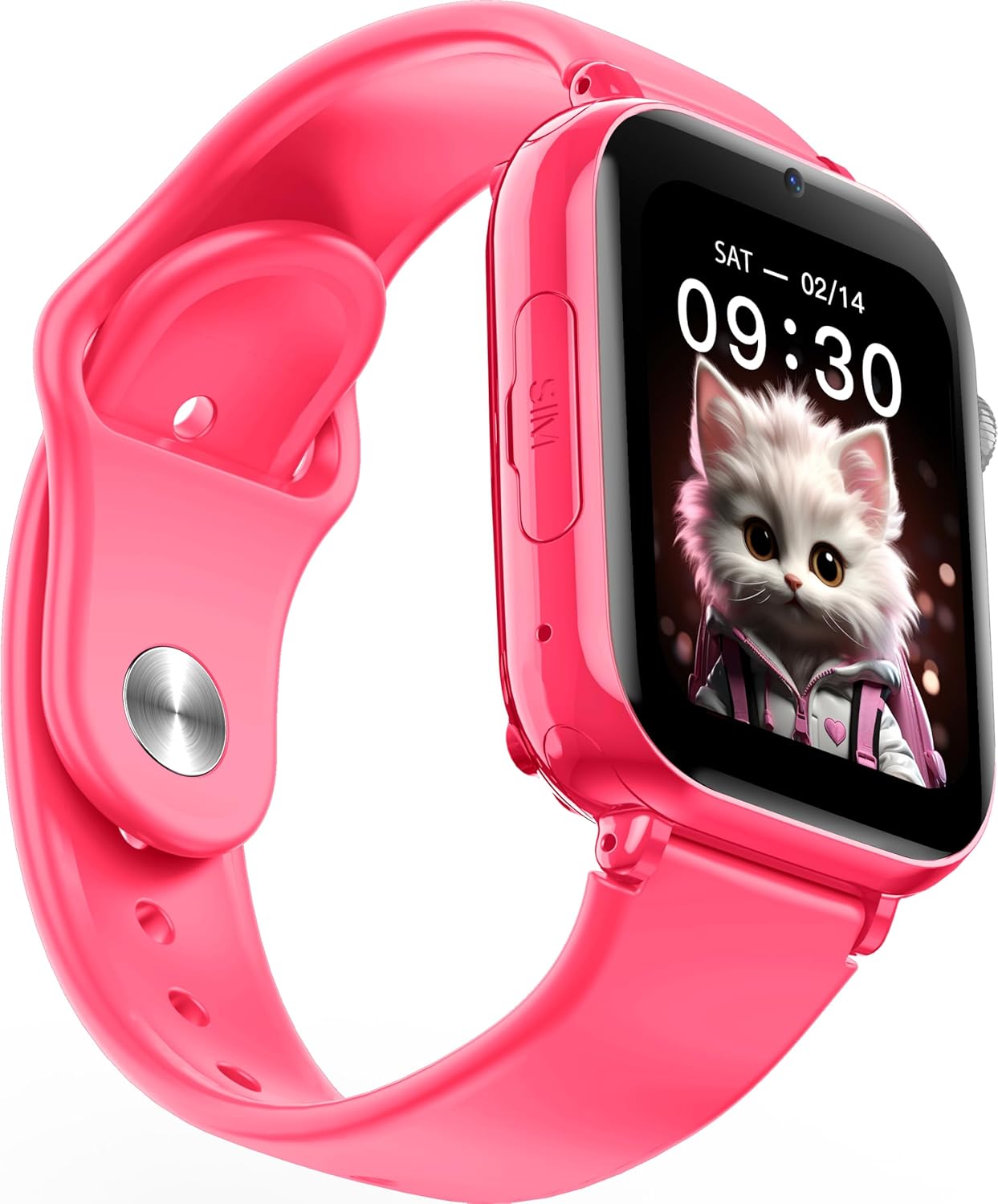
Gambar: Angled view of the Maxcom FW59 Kiddo smartwatch, highlighting the location of the SIM card slot on the side.
2. Ngecas Smartwatch
Before first use, fully charge the smartwatch. The device is equipped with a 670 mAh Lithium Ion battery.
- Connect the USB charging cable to the charging port on the smartwatch.
- Sambungkeun tungtung kabel USB anu sanés ka adaptor kakuatan USB anu cocog (teu kalebet) atanapi port USB komputer.
- Layar bakal nunjukkeun status ngecas. Ngecas pinuh biasana peryogi waktos sakitar 2-3 jam.
3. Instalasi App sarta Papasangan
To utilize all features, parents must install the "MAXCOM TRACKER" mobile application on their smartphone and pair it with the smartwatch.
- Download the "MAXCOM TRACKER" app from your smartphone's app store (Google Play Store for Android or Apple App Store for iOS).
- Buka aplikasi sareng jieun akun atanapi log in upami anjeun parantos gaduh.
- Follow the in-app instructions to add a new device. This usually involves scanning a QR code displayed on the smartwatch screen or manually entering the device ID.
- Once paired, you can configure settings, add contacts, define safe zones, and track the smartwatch's location from the app.
Ngoperasikeun Smartwatch
Napigasi Dasar
The Maxcom FW59 Kiddo features a 1.85" IPS touchscreen display for easy interaction. Swipe left/right or up/down to navigate through menus and applications. Press the side button to return to the home screen or wake the device.

Gambar: Hareupeun view of the Maxcom FW59 Kiddo smartwatch displaying the time and a cute cat wallpaper.
Video and Voice Calls
With a nano SIM card inserted, the smartwatch supports both video and voice calls to pre-approved contacts.
- Nelepon: Navigate to the "Contacts" or "Phone" application, select the desired contact, and choose to initiate a voice or video call.
- Narima Telepon: When a call comes in, the smartwatch will ring and display the caller ID. Tap the green icon to answer or the red icon to decline.
Fungsi SOS
The dedicated SOS button provides an immediate way for the child to alert pre-set emergency contacts.
- Aktipkeun SOS: Press and hold the SOS button (usually a prominent side button) for a few seconds.
- The smartwatch will automatically call the emergency contacts in a pre-defined sequence until one answers. It will also send an alert with the child's current location to the parent's app.
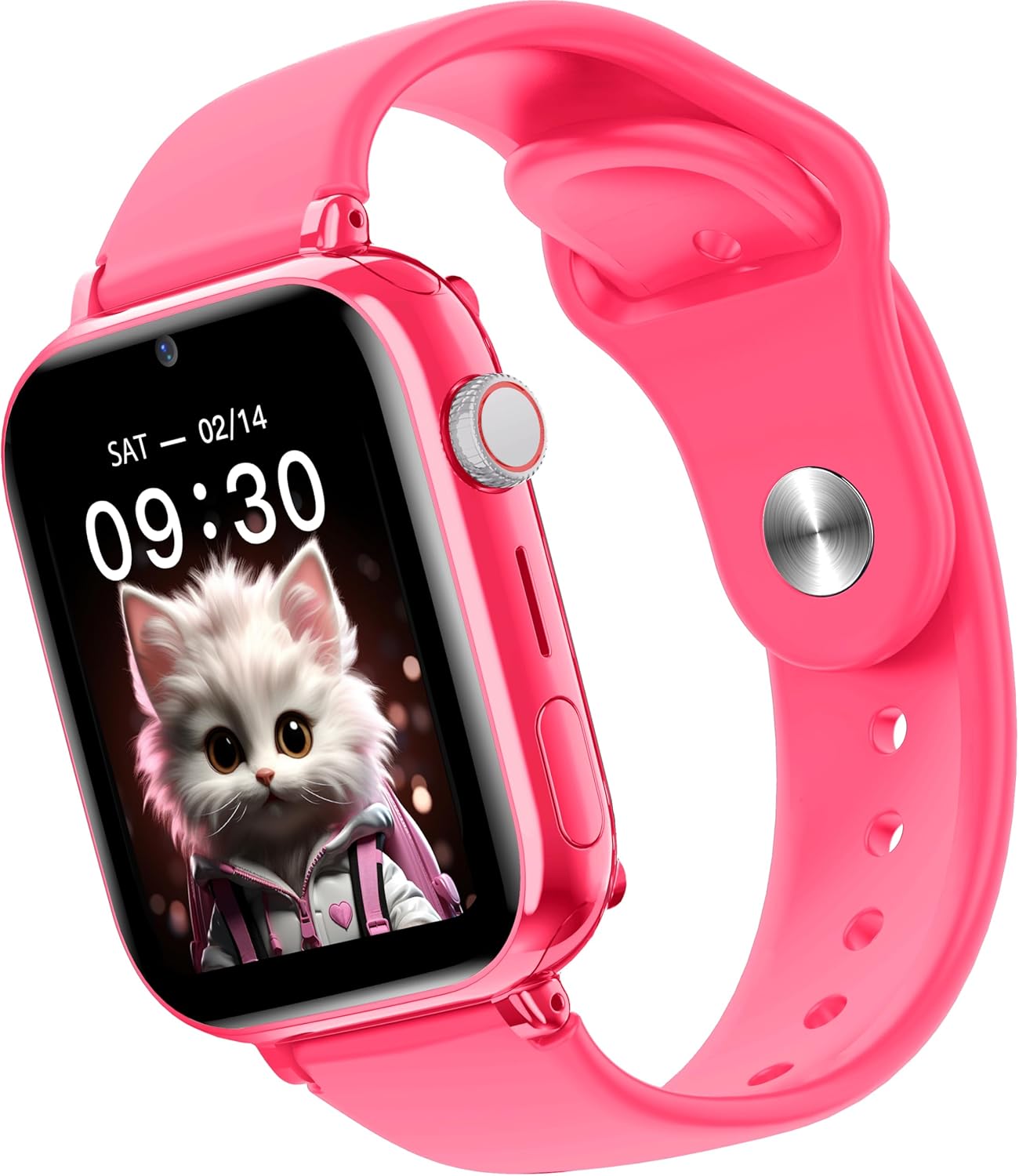
Gambar: Sisi view of the Maxcom FW59 Kiddo smartwatch, illustrating the physical buttons, including the SOS button.
GPS Tracking and Safe Zones
Parents can monitor the child's location in real-time via the MAXCOM TRACKER app.
- Nyukcruk real-time: Open the MAXCOM TRACKER app on your smartphone to view the smartwatch's current location on a map.
- Zona Aman: In the app, you can define virtual geographic boundaries (e.g., home, school). You will receive notifications when the smartwatch enters or exits these designated safe zones.
- Riwayat Rute: The app also allows you to review the historical movement data of the smartwatch.
Fungsi kaméra
The smartwatch includes a built-in camera. Children can take photos directly from the watch, and parents can remotely activate the camera from the MAXCOM TRACKER app to capture images of the surroundings.
Phone Book Management
Contacts can only be added and managed through the MAXCOM TRACKER app by the parent. This ensures that the child can only communicate with pre-approved numbers.
Pangropéa
beberesih
To keep your smartwatch clean and in good condition:
- Ngusap layar sareng awak nganggo lawon anu lemes sareng teu aya serat.
- Pikeun tanda nekad, rada dampen lawon jeung cai. Ulah make bahan kimia kasar atawa bahan abrasive.
- Ensure the charging port and SIM slot are free of dust and debris.
Perawatan batré
Proper battery care extends the life of your device:
- Hindarkeun suhu anu ekstrim, sabab tiasa ngirangan kinerja batré.
- Cas alat sacara rutin, tapi ulah ngantepkeun alat éta dina kaayaan kosong salami waktos anu lami.
- Paké ngan kabel ngecas disadiakeun.
Pamérésan masalah
If you encounter issues with your Maxcom FW59 Kiddo, refer to the following common solutions:
- Smartwatch teu hurung: Pastikeun batréna tos dicas. Sambungkeun kana carjer teras antosan sababaraha menit sateuacan nyobian ngahurungkeunana.
- No network signal/cannot make calls:
- Check if the nano SIM card is correctly inserted and active.
- Verify that the SIM card has sufficient credit or an active data plan.
- Ensure you are in an area with 4G network coverage.
- GPS location inaccurate:
- Pastikeun yén smartwatch gaduh jelas view langit pikeun panarimaan sinyal GPS optimal.
- Location accuracy can be affected by dense buildings, underground areas, or poor network signal.
- Check the MAXCOM TRACKER app settings to ensure location services are enabled for the smartwatch.
- Teu tiasa dipasangkeun sareng aplikasi:
- Ensure the smartwatch is powered on and has a network connection.
- Verify that the QR code or device ID is entered correctly in the app.
- Try restarting both the smartwatch and your smartphone.
- hirup batré pondok:
- Frequent video calls, high screen brightness, and continuous GPS tracking can consume more battery.
- Adjust settings in the app to optimize battery usage (e.g., location update frequency).
If the issue persists, please contact Maxcom customer support for further assistance.
spésifikasi
| Fitur | Rincian |
|---|---|
| merek | Maxcom |
| Ngaran modél | FW59 Kiddo |
| Ukuran layar | 1.85 inci |
| Tipe tampilan | IPS (240 x 280 resolution) |
| Sistem operasi | Closed OS |
| Kapasitas Panyimpenan Mémori | 2 MB |
| Kapasitas batré | 670 mAh (Lithium Ion) |
| Téhnologi sélular | 4G |
| Téhnologi konektipitas | Bluetooth, Frékuénsi Radio |
| Fitur husus | Kids Tracking, SOS Button, Video/Voice Calls |
| Item Beurat | 300 g |
Garansi sareng Rojongan
For information regarding warranty coverage and terms for your Maxcom FW59 Kiddo smartwatch, please refer to the warranty card included with your purchase or visit the official Maxcom website. For technical support, troubleshooting beyond this manual, or service inquiries, please contact Maxcom customer support through their official channels.


