Bubuka
This user manual provides comprehensive instructions for setting up, operating, and maintaining your MECOOL KM2 Plus Deluxe Smart TV Box. This device is designed to transform your television into a smart entertainment hub, offering access to a vast array of streaming content, applications, and smart home integrations.
The KM2 Plus Deluxe features Android TV 11.0, a powerful Amlogic S905X4 quad-core processor, 4GB RAM, and 32GB ROM, ensuring smooth performance. It supports advanced audio and visual technologies like Dolby Vision, Dolby Atmos, AV1 HDR, and 4K resolution at 60 frames per second. With built-in Google Assistant, Chromecast, WiFi6, and BT5.0, it delivers a premium and connected viewpangalaman.
Naon dina Box
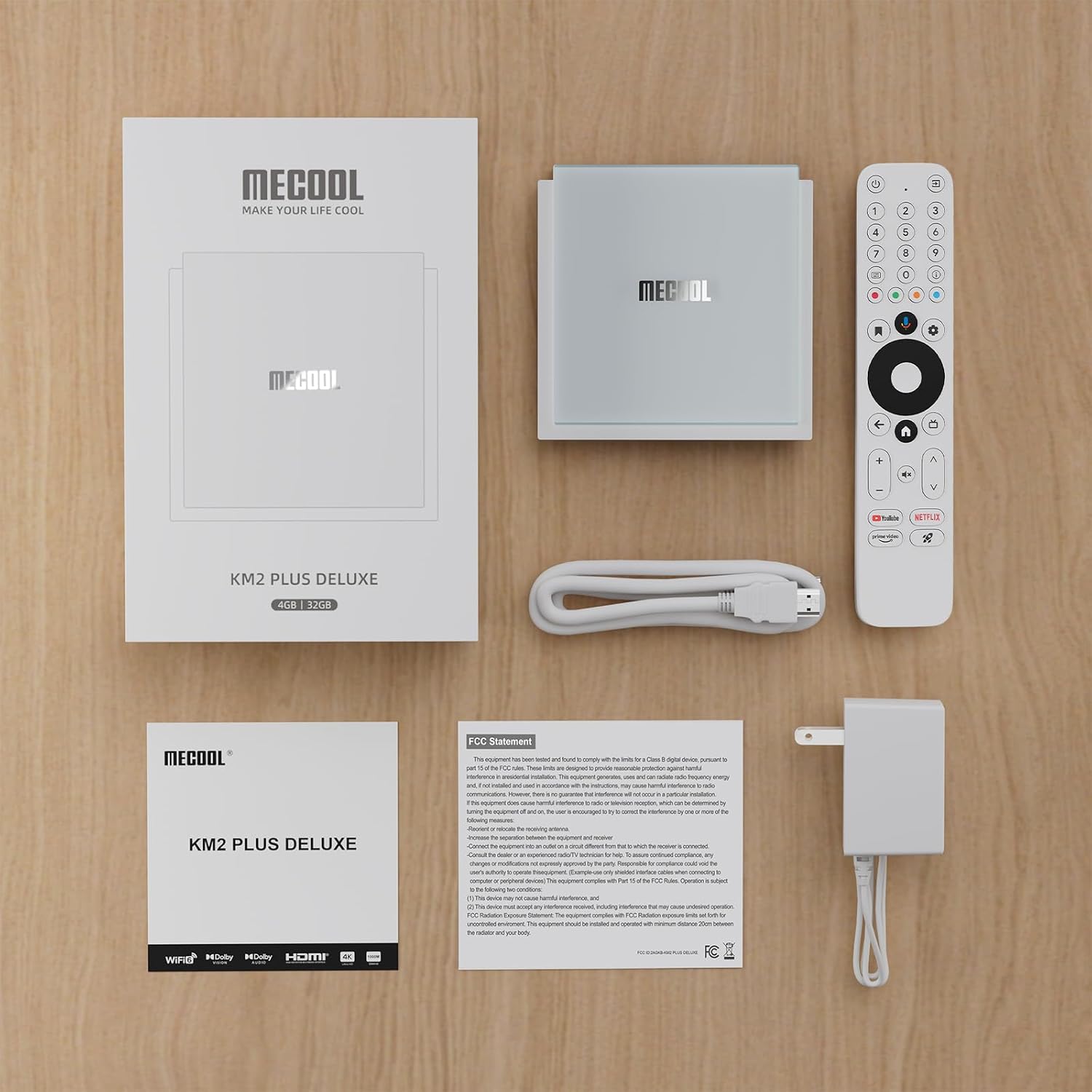
Upon unboxing your MECOOL KM2 Plus Deluxe Smart TV Box, please verify that all the following components are included:
- MECOOL KM2 Plus Deluxe Smart TV Box
- Kadali jauh
- Adaptor kakuatan
- Kabel HDMI
- Manual pamaké

Guide Setup
Setting up your MECOOL KM2 Plus Deluxe is a straightforward process. Follow these three simple steps to get started:
- Connect TV Box to TV: Use the provided HDMI cable to connect the HDMI port on the MECOOL KM2 Plus Deluxe to an available HDMI input on your television. Ensure the power adapter is connected to the TV box and a power outlet.
- Nyambung ka Internét: Once powered on, navigate through the on-screen setup prompts. You will be guided to connect to your home network via Wi-Fi (supporting WiFi6 for faster speeds) or an Ethernet cable.
- Ngamimitian Streaming: After successful internet connection, sign in with your Google account to access the Google Play Store and begin downloading your favorite streaming applications like Netflix, Prime Video, Disney+, and YouTube.

Parentah Operasi
Performance kuat
The KM2 Plus Deluxe is equipped with an Amlogic S905X4 quad-core ARM Cortex-A55 processor, ensuring efficient and responsive performance. The combination of 4GB RAM and 32GB ROM provides ample space for applications and a smooth viewing experience, even with demanding tasks.
Google Assistant Integration
Utilize the built-in Google Assistant for hands-free control and quick access to content. Simply press the Google Assistant button on your remote or say "OK Google" to search for movies, get recommendations, ask questions, and control compatible smart home devices.

Immersive Audio and Visuals with Dolby
Experience stunning clarity and vivid colors with Dolby Vision and HDR10+, which provide a higher dynamic range for images. Dolby Atmos delivers a full range of spatial audio, immersing you in sound and bringing a cinematic experience directly to your living room.


4K Cinematic Streaming
The TV Box supports high-speed 4K processing and playback at up to 60 frames per second, allowing you to stream over 800,000+ movies and TV episodes from popular services like Netflix, Prime Video, Disney+, and YouTube in stunning 4K HDR quality.

Customizable App Access
The smart TV box allows you to customize your favorite applications, enabling direct one-click access after successful definition. This feature streamlines your user experience by placing your most used apps at your fingertips.
Chromecast Diwangun
With Chromecast built-in, you can easily stream your favorite entertainment and applications from your phone, tablet, or laptop directly to the big screen. This provides seamless content sharing and expands your viewpilihan dina.

Gaming on Your TV
The high configuration of the MECOOL KM2 Plus Deluxe supports a smooth gaming experience. You can download a variety of games from the Google Play Store and play them directly on your TV, or connect a wireless gamepad via Bluetooth for enhanced control.
WiFi6 Connectivity
Benefit from faster and more reliable internet connectivity with WiFi6 support. This advanced wireless technology ensures smooth streaming and quick downloads, enhancing your overall entertainment experience.

Produk Leuwihview Video
spésifikasi
Detailed technical specifications for the MECOOL KM2 Plus Deluxe Smart TV Box:
| Fitur | Rincian |
|---|---|
| Ngaran Brand | MECOOL |
| Item Beurat | 1.35 pon |
| Dimensi produk | 3.85 x 3.85 x 0.78 inci |
| Ngaran Warna | Bodas |
| Fitur husus | Chromecast |
| Tanggal Kahiji Sadia | 1 Agustus 2024 |
Pangropéa
To ensure the longevity and optimal performance of your MECOOL KM2 Plus Deluxe Smart TV Box, please follow these maintenance guidelines:
- beberesih: Use a soft, dry cloth to clean the exterior of the device. Avoid using liquid cleaners or abrasive materials, as they may damage the finish.
- Ventilasi: Ensure the TV box is placed in a well-ventilated area. Do not cover ventilation openings or place the device in an enclosed space, as this can lead to overheating.
- Suhu: Operate the device within a moderate temperature range. Avoid exposing it to extreme heat or cold.
- Siklus kakuatan: If you experience minor issues, try unplugging the power adapter from the wall outlet for a few seconds and then plugging it back in. This can often resolve temporary glitches.
Pamérésan masalah
If you encounter any issues with your MECOOL KM2 Plus Deluxe Smart TV Box, refer to the following common troubleshooting steps:
- Henteu aya kakuatan: Ensure the power adapter is securely connected to both the TV box and a working power outlet. Try a different outlet if necessary.
- Taya Gambar/Sinyal: Verify that the HDMI cable is correctly connected to both the TV box and your television. Ensure your TV input is set to the correct HDMI port. Try a different HDMI cable or port.
- Henteu aya sambungan internét: Check your Wi-Fi router and ensure it is working correctly. Reconnect to your Wi-Fi network through the device settings. If using an Ethernet cable, ensure it is securely plugged in.
- Jauh Teu Ngabales: Check the batteries in the remote control and replace them if needed. Ensure there are no obstructions between the remote and the TV box.
- Aplikasi katirisan / nabrak: Try closing and reopening the application. If the issue persists, clear the app's cache or data through the device settings, or uninstall and reinstall the app.
- Performance Lambat: Close unused applications running in the background. Ensure you have sufficient storage space. A factory reset (found in system settings) can resolve persistent performance issues, but will erase all data and settings.
Garansi sareng Rojongan
Your MECOOL KM2 Plus Deluxe Smart TV Box is sold by Mecool Direct Store - US. For product support, please contact the seller directly through the platform where you made your purchase.
Rencana perlindungan opsional sayogi pikeun cakupan anu diperpanjang:
- Rencana Perlindungan 2 Taun: Available for one-time purchase.
- Rencana Perlindungan 3 Taun: Available for one-time purchase.
- Ngajaga lengkep: A monthly billing plan covering eligible past and future purchases.
For details on these protection plans, please refer to the product listing or your purchase documentation.


