Bubuka
Thank you for choosing the Sweetcrispy Video Game Desk Chair. This manual provides essential information for the safe assembly, operation, and maintenance of your new chair. Please read these instructions carefully before use and retain them for future reference.

Image: The Sweetcrispy Video Game Desk Chair in white, showcasing its ergonomic design and footrest.
Émbaran Kasalametan
- Ulah ngaleuwihan kapasitas beurat maksimum 275 pon (125 kg).
- Ensure all components are securely fastened before use. Regularly check for loose screws or parts.
- Ulah nangtung dina korsi atawa make eta salaku stool hambalan.
- Jaga leungeun sareng ramo tetep bébas tina bagian anu obah nalika nyetel.
- Paké korsi dina datar, permukaan stabil pikeun nyegah tipping.
- Tetep barudak jeung pets jauh ti korsi salila assembly.
Eusi pakét
Before assembly, please verify that all parts are present and undamaged. Refer to the diagram below for identification.

Image: A visual breakdown of all components included in the Sweetcrispy Video Game Desk Chair package.
For a detailed visual guide to accessories and installation steps, please watch the video below:
Video: "Accessories display & installation steps" - This video provides a comprehensive overview of all included parts and guides you through the initial setup process.
Parentah Majelis
Follow these steps carefully to assemble your Sweetcrispy Video Game Desk Chair. It is recommended to have a clear, spacious area for assembly.
- Kumpulkeun Base: Attach the five legs to the central hub of the chair base using the provided screws (R)*10. Ensure they are securely tightened.
- Attach Casters and Gas Lift: Insert the five casters (K)*5 into the ends of the assembled base legs. Then, insert the gas lift cylinder (J)*1 into the central hole of the base.
- Mount the Mechanism to the Seat: Place the seat cushion (B)*1 upside down. Align the mechanism (L2)*1 with the pre-drilled holes on the underside of the seat. Secure it with screws (Q)*8. Ensure the front of the mechanism faces the front of the seat.
- Pasang Armrests: Secure the armrests (E)*2 to the sides of the seat cushion using screws (S)*4.
- Sambungkeun Backrest ka Korsi: Align the backrest (A)*1 with the metal brackets on the seat mechanism. Secure it using screws (Q)*8.
- Attach Footrest Frame: Secure the footrest frame (M)*1 to the underside of the seat mechanism using screws (O)*6.
- Insert Footrest Cushion: Slide the footrest cushion (F)*1 into the footrest frame.
- Pasang Rakitan Korsi kana Lift Gas: Sacara saksama nempatkeun korsi anu parantos dirakit kana silinder pengangkat gas, pastikeun korsi éta aya di tengah sareng stabil.
- Attach Headrest and Lumbar Pillow: Attach the headrest pillow (C)*1 and lumbar support pillow (D)*1 using their adjustable straps.
For a visual guide to the assembly process, refer to the "Accessories display & installation steps" video in the Package Contents section.
Parentah Operasi
adjustment jangkungna
To adjust the chair's height, pull the lever located on the right side of the seat upwards. While seated, lift your weight off the seat to raise the chair, or remain seated to lower it. Release the lever to lock the height in place.

Image: A close-up of the chair's height adjustment lever and its function.
Ngalangkungan Mundur
The backrest can be reclined from 90° (focused position) to 135° (relaxed position). Pull the recline lever, typically found on the left side of the seat, and lean back to your desired angle. Release the lever to lock the backrest position.
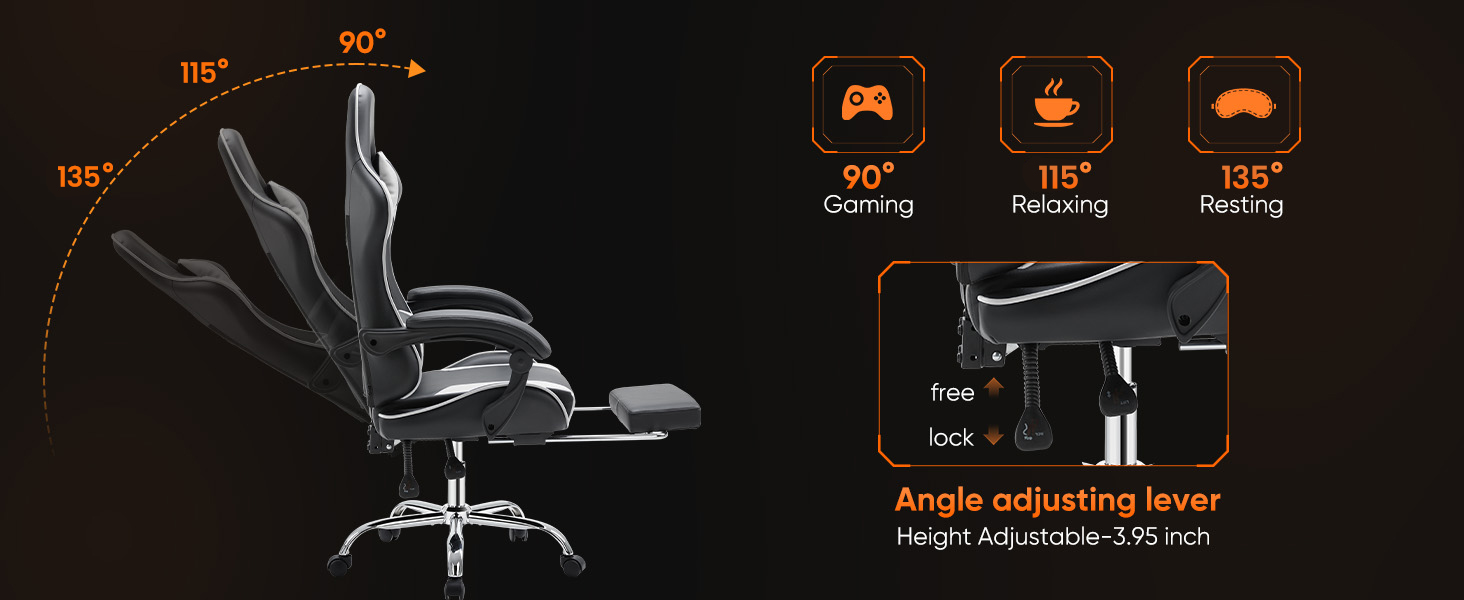
Image: Illustration showing the chair's recline capabilities, from an upright 90-degree position to a relaxed 135-degree position.
Pijakan kaki ditarik
Pikeun ngagunakeun sandaran suku, tarik kaluar tina handapeun korsi. Panjangkeun kana panjang anu dipikahoyong. Pikeun narik deui, dorong deui ka handapeun korsi dugi ka disimpen sapinuhna.

Image: The chair with its retractable footrest extended, providing leg support.
Lumbar Support and Headrest Adjustment
The lumbar support and headrest pillows are detachable and adjustable. You can slide the lumbar pillow up or down along the backrest straps to find the optimal position for your lower back. The headrest pillow can also be adjusted or removed as desired.

Image: Diagram illustrating the ergonomic support points of the chair, including head, shoulder, waist, hip, and leg areas.
Video: "Sweetcrispy Video game chair with footrest" - This video demonstrates the chair's various features, including height adjustment, recline, and footrest operation.
Pangropéa
- beberesih: Wipe the PU leather with a soft, damp cloth. Avoid harsh chemicals or abrasive cleaners. For spills, blot immediately with a clean, dry cloth.
- Pariksa Hardware: Pariksa sadaya sekrup sareng baut sacara berkala pikeun mastikeun éta pageuh. Kencengkeun deui upami diperyogikeun pikeun ngajaga stabilitas sareng kaamanan.
- Perawatan Caster: Keep the casters free of debris (hair, dust, etc.) to ensure smooth rolling and prevent floor damage.
- Hindarkeun sinar panonpoé langsung: Paparan sinar panonpoé langsung anu berkepanjangan tiasa nyababkeun kulit PU luntur atanapi retak.
Pamérésan masalah
- Korsi ngagerung: Check all bolted connections and tighten any loose screws. Applying a small amount of lubricant to moving metal parts may also help.
- Kasesahan Nyaluyukeun Jangkungna: Pastikeun tuas pengangkat gas parantos dipasang sapinuhna. Upami masalahna teras-terasan, tabung pengangkat gas panginten kedah digentos.
- Korsi Karasa Teu Stabil: Verify that all legs are securely attached to the base and that the casters are properly inserted. Ensure the chair is on a level surface.
- Footrest Not Extending/Retracting Smoothly: Check for any obstructions in the footrest mechanism. Ensure the rails are clean and free of debris.
spésifikasi
| merek | Sweetcrispy |
| Ngaran modél | Sweetcrispy Video Game Desk Chair |
| Nomer Modél Item | BKWT-DJY-H2 |
| Warna | Bodas |
| Dimensi produk | 26.8 "D x 25.4" W x 52.4" H |
| Rekomendasi beurat maksimum | 275 Pon (125 kg) |
| Bahan | Alloy Steel, Faux Leather, Foam |
| Fitur husus | Adjustable Height, Ergonomic, Foot Rest, Reclining, Rolling |
| Ngitung Posisi Reclining | 2 (90° nepi ka 135°) |
| Majelis Diperlukeun | Sumuhun |
| UPC | 722898008677 |
Garansi & Rojongan
For warranty information or customer support, please contact Sweetcrispy directly through their official channels. Our customer service team is available to provide effective and timely after-sales service for any issues you may encounter.
Additional protection plans may be available for purchase through your retailer.


