1. Bubuka
Thank you for choosing the Antec GSK850 ATX3.1 850W Full Modular Power Supply Unit (PSU). This manual provides essential information for the proper installation, operation, and maintenance of your new power supply. The GSK850 is designed to deliver stable and efficient power to your computer system, featuring ATX3.1 and PCIe 5.1 compatibility, 80 PLUS Gold certification, and a full modular design for optimized cable management.

Figure 1.1: Antec GSK850 850W Full Modular Power Supply Unit
2. Émbaran Kasalametan
Please read and follow all safety instructions carefully before installing or operating the PSU. Failure to do so may result in personal injury or damage to the product or system components.
- Bahaya listrik: Ulah muka PSU casing. Tinggi voltages are present inside, even when the unit is unplugged. There are no user-serviceable parts inside.
- Ventilasi: Ensure adequate ventilation around the PSU. Do not block the fan or ventilation openings.
- Uap: Do not expose the PSU to water or excessive humidity.
- Suhu: Operate the PSU within the specified temperature range. Avoid extreme heat or cold.
- Grounding: Sambungkeun PSU ka stop kontak anu di-groundkeun salawasna.
- Pareum listrik: Always disconnect the AC power cord from the wall outlet before installing, removing, or servicing the PSU or any connected components.
3. Eusi Paket
Pastikeun yén sadaya item aya dina bungkusan:
- Antec GSK850 ATX3.1 850W Full Modular Power Supply Unit
- Modular Cable Set (see Section 4.2 for details)
- Kabel Daya AC
- Pamasangan screws
- Manual pangguna (dokumén ieu)
4. Produk Langkungview
4.1 Fitur konci
- ATX3.1 & PCIe 5.1 Compatible: Designed to meet the latest standards for reliability and power efficiency, ensuring compatibility with modern hardware, including NVIDIA GeForce RTX 40 Series graphics cards.
- 80 PLUS Emas Certified: Achieves high power efficiency, reducing energy consumption and heat generation.
- Full Modular Cable Management: Allows users to connect only the necessary cables, improving airflow and reducing clutter inside the PC case.
- High-Quality Japanese Capacitors: Ensures tight voltage regulation, minimal ripple and noise, and extended lifespan.
- PhaseWave Design (LLC + DC-DC): Nyayogikeun pangiriman daya anu stabil sareng efisien.
- Manajer RPM Nol: The fan remains off at low loads for silent operation, activating only when necessary.
- 120mm FDB Silent Fan: Features a fluid-dynamic bearing fan for quiet operation and durability.
- CircuitShield Protection Suite: Comprehensive industrial-grade protections including OCP, OVP, UVP, SCP, OPP, OTP, SIP, and NLO for system safety.
4.2 Modular Cable Management and Compatibility
The full modular design of the GSK850 allows for flexible cable management, enabling you to use only the cables required for your system. This reduces cable clutter, improves internal airflow, and simplifies installation.

Figure 4.1: Modular Cable Connectors and ATX 3.1 / PCIe 5.1 Compatibility

Figure 4.2: Detailed Cable and Connector Information
4.3 Internal Components and Design
The GSK850 incorporates high-quality components for reliable performance and longevity.

Figure 4.3: High-Quality Japanese Capacitors for enhanced stability and lifespan.

Figure 4.4: PhaseWave Design (LLC + DC-DC) for superior power delivery efficiency.
4.4 Sistim cooling
The PSU features an advanced cooling system to maintain optimal temperatures and quiet operation.
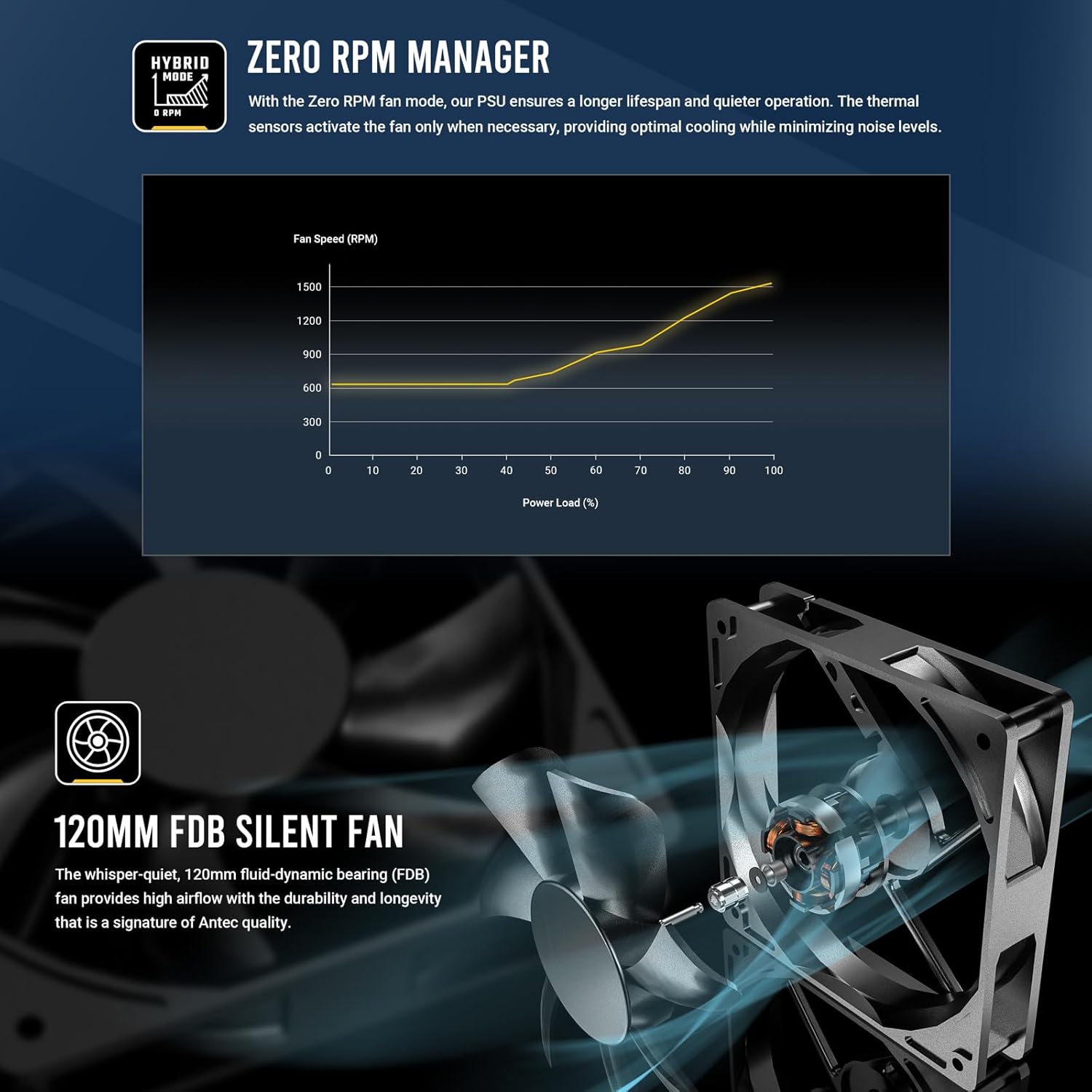
Figure 4.5: Zero RPM Manager fan curve, illustrating silent operation at low loads.

Figure 4.6: The 120mm Fluid-Dynamic Bearing (FDB) fan provides high airflow with low noise.
4.5 Compact Size
The GSK850 is designed with a compact form factor, making it suitable for a wide range of PC cases.

Figure 4.7: Compact dimensions of the GSK850 PSU, showing reduced volume compared to larger units.
5. Setup jeung Instalasi
Follow these steps to install your Antec GSK850 PSU into your computer system:
- Nyiapkeun Sistim anjeun: Pastikeun komputer anjeun pareum sapinuhna sareng dicabut tina stop kontak. Buka casing komputer anjeun.
- Cabut PSU Lama (upami aya): If replacing an existing PSU, disconnect all cables from the old PSU and remove its mounting screws. Carefully slide it out of the case.
- Pasang PSU Anyar: Slide the Antec GSK850 into the PSU mounting bay of your computer case. Align the screw holes and secure the PSU with the provided mounting screws.
- Sambungkeun Kabel Penting: Refer to Figure 4.2 for cable types and lengths. Connect the necessary modular cables to the PSU first, then to your motherboard and components:
- 24-pin ATX Motherboard Cable: Connect to your motherboard's main power connector.
- 8-pin (4+4) CPU Power Cable(s): Connect to your motherboard's CPU power connector(s).
- PCIe 5.1 12VHPWR (16-pin) or 8-pin (6+2) PCIe Cables: Sambungkeun kana kartu grafis anjeun sakumaha anu diperyogikeun.
- Kabel Daya SATA: Connect to SSDs, HDDs, and optical drives.
- Molex Cables: Connect to any peripherals requiring Molex power.
- Manajemén Kabel: Route cables neatly behind the motherboard tray or in designated cable management areas to improve airflow and aesthetics.
- Tutup Case sareng Sambungkeun Daya: Once all connections are secure, close your computer case. Plug the AC power cord into the PSU and then into a grounded wall outlet.
6. Parentah Operasi
Operating the Antec GSK850 PSU is straightforward:
- Daya Hurung: After installation, ensure the power switch on the back of the PSU is in the 'ON' (I) position. Then, power on your computer using the case's power button.
- Modeu RPM nol: The PSU's fan will remain off when the power load is low, providing silent operation. As the system load increases, the fan will automatically activate and adjust its speed to maintain optimal temperatures. This is normal operation and indicates the Zero RPM Manager is functioning correctly.
- Pareum listrik: To power off your system, use the operating system's shutdown function. For complete power disconnection, switch the PSU's power switch to the 'OFF' (O) position and unplug the AC power cord from the wall outlet.
7. Pangropéa
Proper maintenance ensures the longevity and optimal performance of your PSU:
- Ngaleungitkeun lebu: Periodically clean dust from the PSU's fan grille and ventilation openings using compressed air. Ensure the PSU is powered off and unplugged before cleaning.
- Pamariksaan kabel: Occasionally inspect all connected cables for any signs of wear, damage, or loose connections.
- Lingkungan: Ensure the PSU operates in a clean, dry, and well-ventilated environment.
8. Cara ngungkulan
If you encounter issues with your Antec GSK850 PSU, refer to the following common troubleshooting steps:
- Henteu aya kakuatan:
- Pastikeun kabel listrik AC dicolokkeun sacara aman kana PSU sareng stop kontak témbok.
- Check that the PSU's power switch on the back is in the 'ON' (I) position.
- Verify all modular cables are securely connected to both the PSU and the components.
- Nguji stop kontak témbok kalawan alat sejen pikeun mastikeun eta boga kakuatan.
- Instabilitas Sistem / Kacilakaan:
- Pastikeun PSU Anjeun wattage cekap pikeun sadaya komponén sistem anjeun.
- Pariksa sambungan kabel leupas.
- The PSU's CircuitShield protection suite (OCP, OVP, UVP, SCP, OPP, OTP, SIP, NLO) will automatically shut down the PSU in case of an electrical fault to protect your components. If this occurs, disconnect power, check for short circuits or faulty components, and then attempt to restart.

Figure 8.1: CircuitShield Protection Suite
- Kipas teu berputar:
- The GSK850 features Zero RPM mode. The fan will not spin at low loads. This is normal. The fan will activate when the system load increases.
- If the fan does not spin even under high load, ensure there are no obstructions and contact support if the issue persists.
If the problem persists after following these steps, please contact Antec customer support.
9. Spésifikasi
| Fitur | Spésifikasi |
|---|---|
| Ngaran modél | GSK850 US |
| merek | Antec |
| Kaluaran Wattage | 850W |
| Faktor Bentuk | ATX |
| Sertifikasi efisiensi | 80 PLUS Emas |
| PFC | Aktip PFC |
| Métode Cooling | Hawa (Kipas FDB 120mm) |
| Tipe Modular | Modular pinuh |
| Ukuran (L x W x H) | 5.51 x 3.38 x 5.9 inci (140 x 86 x 150 mm) |
| Beurat | 5.6 pon |
| Warna | Hideung |
| Alat nu cocog | Komputer Pribadi |
| Tipe Panyambung | ATX |
10. Garansi jeung Rojongan
The Antec GSK850 ATX3.1 850W Full Modular PSU comes with a 7-Taun Garansi ti tanggal beuli. Garansi ieu nyertakeun cacad dina bahan sareng pagawean dina panggunaan normal.
Kanggo dukungan téknis, klaim garansi, atanapi bantosan salajengna, mangga buka situs resmi Antec. websitus atanapi ngahubungan departemén layanan palanggan maranéhna. Simpen bukti pameseran anjeun pikeun validasi jaminan.
Antec Resmi Websitus: www.antec.com


