Bubuka
The Hetyre DY28S is a versatile 5-in-1 device combining a Bluetooth speaker, touch sensor LED lamp with 48 color-changing modes, digital alarm clock, MP3 player, and hands-free call function. This manual provides detailed instructions for setup, operation, and maintenance to ensure optimal performance and longevity of your device.
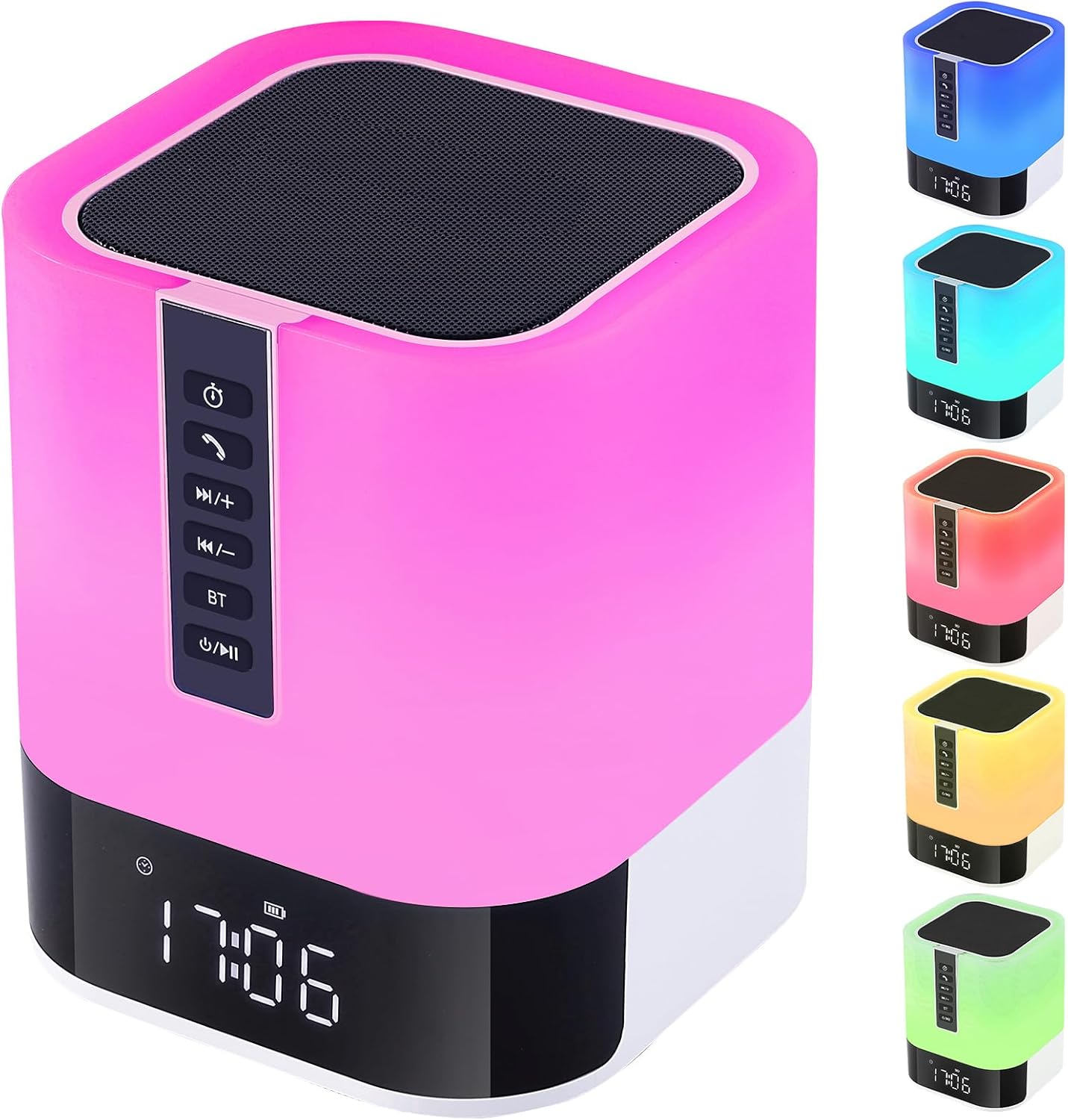
Image: The Hetyre DY28S device, showcasing its compact, square design with a speaker grille on top, control panel on the side, and a digital clock display at the base. The lamp portion is illuminated in pink, with smaller images on the right showing it in blue, cyan, red, yellow, and green.
Naon dina Box
Mangga parios eusi pakét nalika unboxing:
- Hetyre DY28S Wireless Bluetooth Speaker & Bedside Lamp
- Kabel Daya
- Manual pangguna (dokumén ieu)
Fitur konci
- 5-in-1 Multifungsi: Integrates Bluetooth speaker, touch sensor LED lamp, alarm clock, MP3 player, and hands-free call capabilities.
- Dynamic LED Lamp: Features 48 color-changing modes and 3 levels of adjustable warm light. Colors can automatically change with music rhythm or be set to a single preferred color.
- Jam Alarm Digital: Large 12/24H display with calendar, alarm, and snooze function. Supports custom alarm sounds from MicroSD card or USB disk.
- Manjangkeun Umur Batré: Built-in 2000mAh rechargeable battery provides 8-10 hours of music playback at max volume, or up to 1 week as a night light. Fully charges in 6-8 hours via USB.
- Multiple Music Playback Options: Connects via Bluetooth, or play music directly from USB flash drives and MicroSD cards.
- Telepon Hand-Free: Mikropon terintegrasi pikeun manajemén telepon anu merenah.

Image: The Hetyre DY28S device placed on a bedside table, emitting a soft pink light. A smartphone is shown wirelessly connected, illustrating its Bluetooth music playback and hands-free call features. Icons below highlight Bluetooth, Micro SD, USB Stick, Hands-free Call, and Music Rhythm Light functions.
Guide Setup
1. Ngecas Awal
Before first use, fully charge the device. Connect the provided power cable to the charging port on the speaker and the other end to a USB power adapter (not included) or a computer USB port. The charging indicator will show progress and turn off when fully charged. A full charge typically takes 6-8 hours.
2. Daya Hurung / Pareum
Pencét jeung tahan tombol Kakuatan / Puter / Reureuh button (usually marked with a power symbol and play/pause icon) on the control panel for a few seconds to turn the device on or off.
Parentah Operasi
Kontrol Panel Langkungview

Image: A close-up of the Hetyre DY28S control panel, showing the buttons and their corresponding functions. From top to bottom: Sleep Timer, Answer Call, Volume Up/Next Track, Volume Down/Previous Track, Bluetooth Mode, Power/Play/Pause.
- Tombol Timer Saré: Press to enter sleep timer mode settings.
- Tombol Telepon: Press to answer a call. Press twice to redial the last call.
- Volume Kaluhur / Lagu Salajengna: Press to increase volume. Press and hold to play the next song.
- Volume Turun / Lagu saméméhna: Press to decrease volume. Press and hold to play the previous song.
- Tombol Bluetooth (BT): Press to enter Bluetooth mode. A prompt tone will indicate successful connection and disconnection.
- Power / Play / Pause: Short press to play/pause. Long press to shut down the software. Short press again to start the software.
1. Fungsi Speaker Bluetooth
- Pastikeun spiker diaktipkeun.
- Pencét éta BT button to enter Bluetooth pairing mode. The device will emit a prompt sound.
- On your smartphone, tablet, or other Bluetooth-enabled device, search for "DY28S" in the Bluetooth settings.
- Select "DY28S" to pair. Once connected, you will hear a confirmation sound.
- You can now play audio from your device through the Hetyre speaker.
2. LED Lamp Operasi

Image: The Hetyre DY28S lamp demonstrating its three brightness levels: 30%, 60%, and 100%, illustrating how a slight tap on the top adjusts the light intensity.
- Adjusting Warm Light Brightness: Lightly tap the metal mesh on the top of the speaker to cycle through 3 levels of warm light brightness.
- Mode Ganti Warna: Press and hold the metal mesh on the top until the desired color appears, then release. The light can also automatically cycle through 48 colors or change with the rhythm of music when in music light mode.

Image: The Hetyre DY28S lamp illuminated in a vibrant blue, with musical notes floating around it, indicating its colorful lights mode. Text explains that multiple colors cycle automatically, and a specific color can be selected by pressing and holding the touch net.
3. Fungsi Jam Alarm

Image: Two scenarios illustrating the alarm clock mode of the Hetyre DY28S. One shows a person stretching, labeled "A Gentle Way to Wake Up," and the other shows a person sleeping peacefully, labeled "A Sweet Way to Fall Asleep." The device's digital clock is visible.
- Nyetél waktos: Refer to the detailed instructions in the full manual for setting the 12/24H time format and current time.
- Nyetél Alarm: Use the dedicated alarm setting buttons (refer to the full manual for specific button functions) to set your desired alarm time. You can choose to use built-in alarm sounds or select music from a MicroSD card or USB disk as your alarm.
- Fungsi Tungkul When the alarm rings, tap the top of the light lamp once to activate snooze. The alarm will ring again in 5 minutes.
- Ngeureunkeun Alarm: To stop the alarm completely without snoozing, quickly tap the top of the device twice when the alarm rings.
4. MP3 Player Function
The device supports MP3 playback from a USB flash drive or MicroSD card.
- Insert a USB flash drive or MicroSD card containing MP3 audio files kana port masing-masing dina spiker.
- Spiker bakal otomatis ngadeteksi alat panyimpen sareng mimiti muterkeun musik.
- Ngagunakeun éta Volume Up / Lagu Salajengna jeung Volume Turun / Lagu Sebelumnya buttons to navigate through your music.
5. Nelepon Hands-Free
Nalika disambungkeun ka telepon pinter anjeun via Bluetooth:
- Ngajawab Telepon: Pencét éta Nelepon tombol sakali pikeun ngajawab telepon asup.
- Nutup Telepon: Pencét éta Nelepon button once to end an ongoing call.
- Telepon deui: Pencét éta Nelepon tombol dua kali pikeun némbalan deui nomer panungtung.
Pangropéa
- beberesih: Use a soft, dry cloth to clean the surface of the device. Do not use abrasive cleaners, waxes, or solvents.
- Panyimpenan: Simpen alat dina tempat anu tiis sareng garing jauh tina sinar panonpoé langsung sareng suhu anu ekstrim.
- Perawatan batré: Pikeun manjangkeun umur batre, ulah miceun batre pinuh. Ngeusi batre alat sacara rutin, sanajan henteu dianggo kanggo waktos anu lami.
- Tahan cai: This device is NOT waterproof. Avoid exposure to water or high humidity.
Pamérésan masalah
| Masalah | Mungkin Cukang lantaranana | Solusi |
|---|---|---|
| Alat teu hurung. | batré lemah atawa euweuh muatan. | Connect the power cable and charge the device for at least 30 minutes before attempting to power on again. |
| Taya sora tina speaker. | Volume too low; Device not paired; Incorrect source. | Increase volume on both the speaker and the connected device. Ensure Bluetooth is connected or MP3 source is properly inserted. |
| Sambungan Bluetooth gagal. | Device too far; Interference; Not in pairing mode. | Ensure devices are within 33 feet (10 meters). Move away from other wireless devices. Press the BT button to enter pairing mode. Forget "DY28S" on your device and re-pair. |
| Alarm teu disada. | Alarm not set; Volume too low. | Verify alarm settings and ensure alarm volume is not muted or too low. |
spésifikasi
| Fitur | Rincian |
|---|---|
| Ngaran modél | DY28S |
| merek | Hetyre |
| Tipe Speaker | Sakuliling Sora |
| Téhnologi konektipitas | Bluetooth |
| Téknologi Komunikasi Nirkabel | Bluetooth |
| Sumber Daya | Batré Powered |
| Kapasitas batré | 2000mAh (kira-kira) |
| Speaker Maksimum Kaluaran Power | 5 Watt |
| Métode kontrol | Toél |
| Dimensi produk | 4.8 "D x 4.8" W x 5.6" H |
| Item Beurat | 1.39 pon |
| Ngawengku MP3 pamuter? | Sumuhun |
| Nyaéta Waterproof | PALSU |
| Jenis Garansi | kawates |
Garansi sareng Rojongan
This Hetyre product comes with a limited warranty. Please refer to the warranty card included in your package for specific terms and conditions. For technical support, troubleshooting assistance, or warranty claims, please contact Hetyre customer service through the retailer's platform or the official Hetyre websitus.
For the most up-to-date support information, please visit the official Hetyre support page or contact your point of purchase.

