1. Bubuka
This manual provides essential information for setting up, operating, maintaining, and troubleshooting your Apple iPad Air 5th Generation. Please read this guide thoroughly to ensure optimal use and longevity of your device.
2. Produk Langkungview
The Apple iPad Air 5th Generation is a versatile tablet designed for performance and portability. It features a 10.9-inch Liquid Retina display and is powered by the Apple M1 chip. Key features include:
- tampilan: Stunning 10.9-inch Liquid Retina Display with True Tone and P3 Wide Color.
- Prosesor: Apple M1 Chip with Neural Engine for powerful performance.
- Konektipitas: 802.11AX Wi-Fi 6 for fast wireless connections.
- Audio: Stereo Landscape Audio for immersive sound.
- Kaméra: 12MP Wide Camera (rear) and 12MP Ultra Wide Front Camera with Center Stage for enhanced video calls.
- Kaamanan: Touch ID for secure authentication.
- Kahirupan batré: Nepi ka 10 jam umur batre.
- Accessories Support: Compatible with Apple Pencil (2nd generation) and Magic Keyboard.
- Palabuhan: USB-C port for versatile connectivity.

Gambar: Hareup jeung samping view of the Apple iPad Air 5th Gen in Pink.
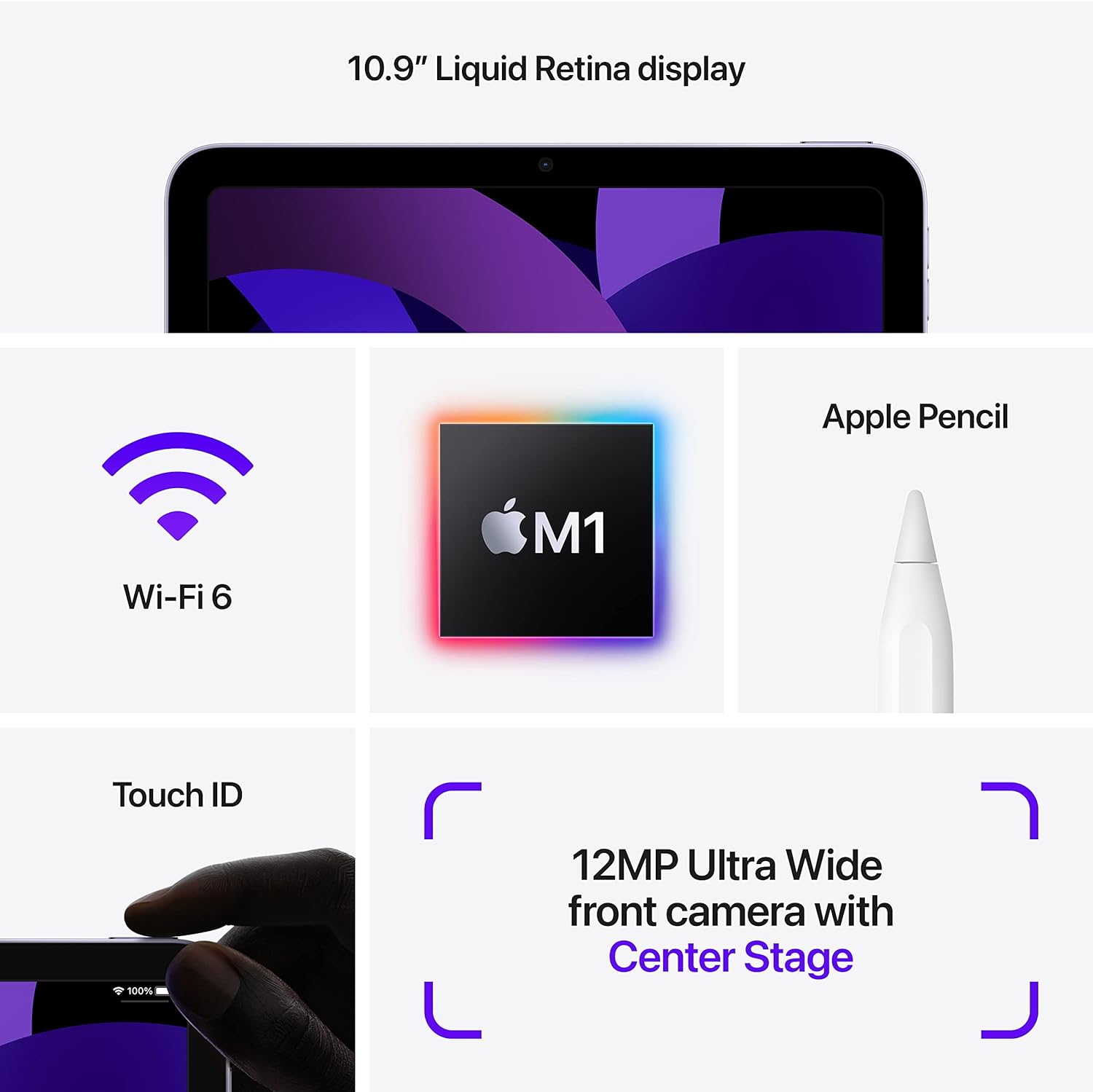
Image: Diagram highlighting key features including 10.9" Liquid Retina display, Wi-Fi 6, M1 chip, Apple Pencil support, Touch ID, and 12MP Ultra Wide front camera with Center Stage.
3. Naon dina Box
Upon unboxing your Apple iPad Air 5th Gen, you should find the following items:
- Apple 10.9-inch iPad Air 5th Gen
- Kabel Ngecas USB-C
Note: A USB-C Power Adapter may or may not be included depending on the specific package.

Image: Illustration showing the iPad Air, a USB-C Charge Cable, and a USB-C Power Adapter.
4. Setélan
4.1 Muatan Awal
Before first use, it is recommended to fully charge your iPad. Connect the provided USB-C charging cable to the iPad's USB-C port and plug the other end into a compatible USB-C power adapter (sold separately or included depending on package) or a computer's USB-C port.
4.2 Daya Hurung/Pareuman
- Pikeun Ngahurungkeun: Pencét terus tahan tombol Luhur nepi ka logo Apple nembongan.
- Pikeun mareuman: Press and hold the Top button and either Volume button simultaneously until the power off slider appears. Drag the slider to power off.
4.3 Konfigurasi Awal
Follow the on-screen instructions to set up your iPad. This includes selecting your language and region, connecting to a Wi-Fi network, setting up Touch ID, and signing in with your Apple ID. You can also restore data from a previous device or set up as a new iPad.
5. Parentah Operasi
5.1 Napigasi iPadOS
The iPad Air 5th Gen runs on iPadOS, offering an intuitive touch interface. Use gestures to navigate:
- Layar Utama: Gesek ka luhur tina ujung handapeun layar.
- Pamlih Aplikasi: Gesek ka luhur ti sisi handap teras eureunkeun di tengah layar.
- Pusat Kontrol: Gesek ka handap ti pojok katuhu luhur layar.
- Bewara: Gesek ka handap ti pojok kénca luhur layar.
5.2 Using Apple Pencil (2nd Gen)
The iPad Air 5th Gen supports the Apple Pencil (2nd generation) for drawing, note-taking, and marking up documents. To pair, attach the Apple Pencil magnetically to the right side of your iPad. It will automatically pair and charge.

Image: A person sketching on the iPad Air 5th Gen with an Apple Pencil.
The following video demonstrates the responsiveness of the Apple Pencil on the iPad Air 5th Gen:
Video: A user demonstrating writing and drawing on the iPad Air 5th Gen with an Apple Pencil.
5.3 Using Magic Keyboard
Attach the Magic Keyboard magnetically to the back of your iPad. The iPad will automatically connect and adjust its display angle. The Magic Keyboard provides a comfortable typing experience and a trackpad for precise control.
5.4 Multitasking
iPadOS supports various multitasking features:
- Beulah View: Open two apps side-by-side. Drag an app from the Dock or App Library to the side of the screen.
- Geser Ka Luhur: Keep an app open in a smaller floating window over another app.
- StagManajer e: Organize apps and windows automatically, allowing you to resize, overlap, and group them.
5.5 Pamakéan kaméra
The iPad Air 5th Gen features a 12MP Wide rear camera and a 12MP Ultra Wide front camera with Center Stage. Open the Camera app to take photos, record videos, or use features like Panorama and Time-lapse. Center Stage sacara otomatis ngajaga anjeun tetep dina pigura salami nelepon pidéo.
6. Pangropéa
- beberesih: Anggo lawon anu lemes sareng henteu lint pikeun ngabersihan layar sareng luar. Hindarkeun bahan abrasive atanapi bahan kimia kasar.
- Apdet parangkat lunak: Regularly update iPadOS to the latest version to ensure optimal performance and security. Go to Setélan > Umum > Apdet Parangkat Lunak.
- Perawatan batré: To prolong battery life, avoid exposing the iPad to extreme temperatures. For long-term storage, charge the battery to about 50%.
- Manajemén Panyimpenan: Périodik ulangview jeung mupus teu perlu files, apps, and media to free up storage space.
7. Cara ngungkulan
7.1 Alat Teu Ngabales
Upami iPad anjeun teu ngaréspon, cobian restart sacara paksa:
- Pencét sareng leupaskeun tombol Volume Naék gancang.
- Pencét sareng gancang leupaskeun tombol Volume Turun.
- Pencét terus tahan tombol Luhur nepi ka logo Apple nembongan.
7.2 Masalah Konektipitas Wi-Fi
- Pastikeun Wi-Fi diaktipkeun Setelan > Wi-Fi.
- Balikan deui router Wi-Fi anjeun.
- Pohokeun jaringan teras sambungkeun deui: Setélan > Wi-Fi > [Ngaran Jaringan] > Hilapkeun Jaringan Ieu.
7.3 Batré Draining Gancang
- Pariksa pamakean batré dina Setélan> Batré pikeun ngaidentipikasi aplikasi anu ngonsumsi daya.
- Ngurangan kacaangan layar.
- Nonaktipkeun Refresh Aplikasi Latar pikeun aplikasi anu teu penting.
8. Spésifikasi
| Fitur | Rincian |
|---|---|
| Ngaran modél | iPad Air 5th Gen |
| Nomer Modél Item | A2588 |
| Ukuran tampilan | 10.9 inci |
| Resolusi layar | 2360 x 1640 piksel |
| Prosesor | Apple M1 Chip (3.2 GHz) |
| Ukuran Mémori Flash | 64 GB |
| Sistem operasi | iPadOS (initially 15.4, upgradable) |
| Tukangeun WebResolusi cam | 12 MP |
| Rata Kahirupan Batré | 10 Jam |
| Item Beurat | 1.02 pon |
| Dimensi produk | 9.74 x 7.02 x 0.24 inci |
9. Garansi jeung Rojongan
This Apple iPad Air 5th Gen is a Renewed Premium product. For specific warranty details and support, please refer to the documentation provided with your purchase or contact Amazon Renewed customer service. General Apple support resources can be found on the official Apple websitus.
Pikeun pitulung salajengna, buka di Apple iPad Support page.


