1. Bubuka
Thank you for choosing the ROCAM CR1027K Vibrating Alarm Clock. This manual provides detailed instructions for setting up, operating, and maintaining your new alarm clock. Please read this manual thoroughly before use to ensure proper function and to maximize your product experience.
2. Produk Langkungview
The ROCAM CR1027K is a versatile vibrating alarm clock designed for heavy sleepers, children, and travelers. It features a soft silicone shell, dual alarms, adjustable vibration intensity, and a long-lasting rechargeable battery.
Fitur konci:
- Desain pikaresepeun: Soft-touch silicone shell with playful emoji faces.
- Batré Awét: 3000mAh rechargeable battery provides extended use.
- Powerful Vibration: Adjustable triple-shake intensity for effective wake-ups.
- Alarm ganda: Two independent alarms with flexible scheduling (Daily, Weekdays, Weekends).
- Silent Wake-up: Vibrate-only mode for discreet alarms.
- Konci Budak: Nyegah operasi teu kahaja.
- Portabel: Compact size ideal for travel and dorm rooms.
- USB-C ngecas: Antarbeungeut ngecas anu merenah sareng modéren.
komponén:
- Layar layar digital
- Panutup Pelindung Silikon
- Time/Snooze Button
- Alarm 1 & Alarm 2 Setting Buttons
- Up (+) / Down (-) Buttons
- Port Ngecas USB-C
- Budak konci Pindah
- Alarm Mode Selector (Vibration/Sound/Both)
- Vibration Intensity Selector

Gambar 2.1: Hareupeun view of the ROCAM CR1027K Vibrating Alarm Clock, showcasing its digital display and the four interchangeable emoji faces.
3. Setélan
3.1 Ngecas Awal
- Locate the USB-C charging port on the side or back of the alarm clock.
- Connect the provided USB-C cable to the alarm clock and plug the other end into a compatible USB power adapter (not included) or a computer USB port.
- The battery indicator on the display will show charging status. Allow the device to fully charge before first use. A full charge typically takes several hours.
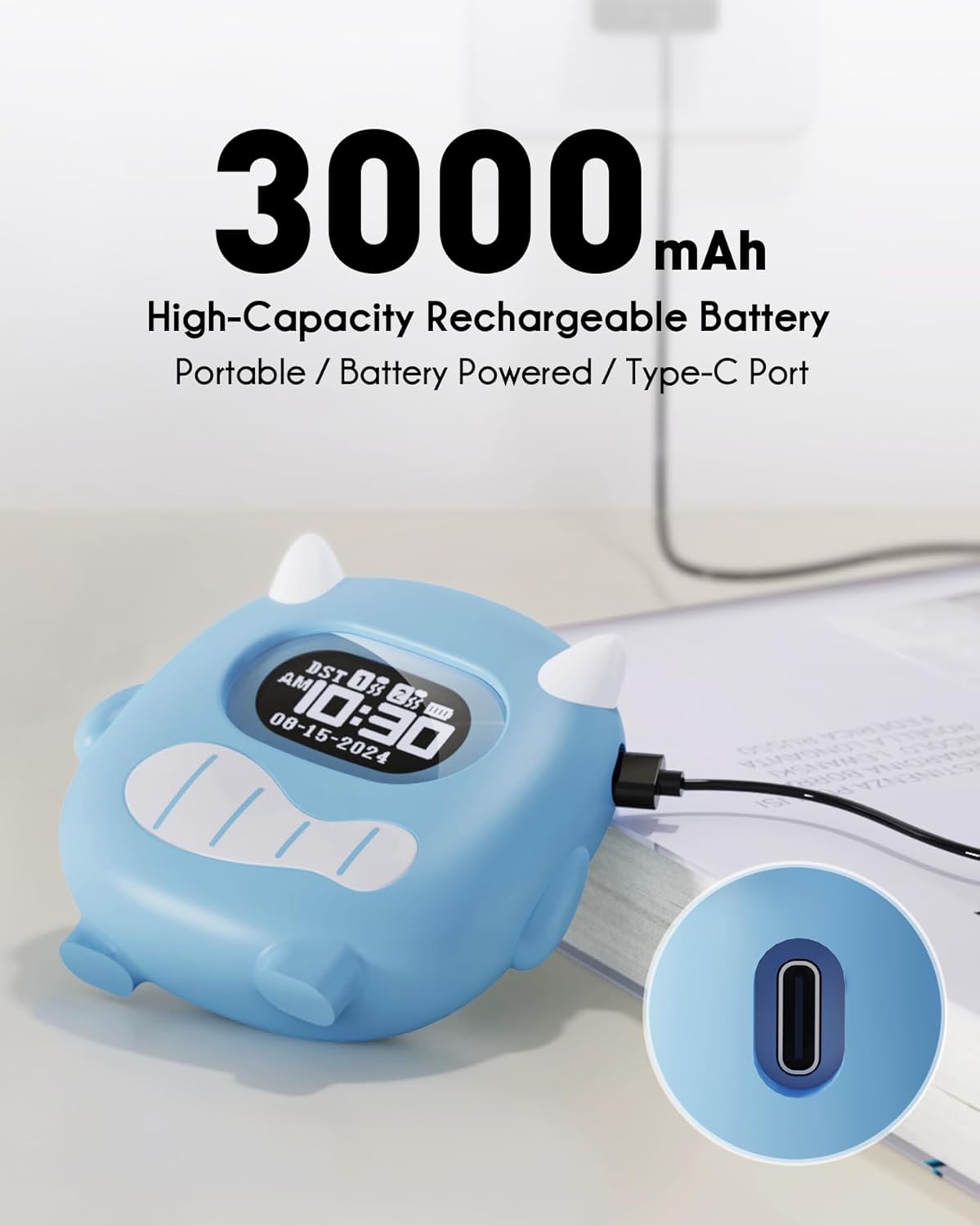
Image 3.1: The ROCAM CR1027K alarm clock being charged via its USB-C port, highlighting its 3000mAh battery capacity.
4. Parentah Operasi
4.1 Nyetél Waktos
- Pencét jeung tahan tombol Time/Snooze tombol salami 3 detik pikeun asup ka modeu setelan waktu. Angka jam bakal kedip-kedip.
- Ngagunakeun éta Ka luhur (+) or Turun (-) tombol pikeun nyaluyukeun jam.
- Pencét éta Time/Snooze pencét deui tombol pikeun mastikeun jam sareng pindah ka setélan menit. Angka menit bakal kedip-kedip.
- Ngagunakeun éta Ka luhur (+) or Turun (-) tombol pikeun nyaluyukeun menit.
- Pencét éta Time/Snooze tombol sakali deui pikeun ngonfirmasi tur kaluar mode setelan waktos.
4.2 Nyetél Alarm (Alarm 1 & Alarm 2)
The alarm clock features two independent alarms. The setting process is identical for both.
- Pencét jeung tahan tombol Alarem 1 or Alarem 2 button for 3 seconds to enter alarm setting mode. The alarm hour digits will flash.
- Ngagunakeun éta Ka luhur (+) or Turun (-) tombol pikeun nyaluyukeun jam alarm.
- Pencét anu saluyu Alarem button again to confirm the hour and move to minute setting. The alarm minute digits will flash.
- Ngagunakeun éta Ka luhur (+) or Turun (-) tombol pikeun nyaluyukeun menit alarm.
- Pencét anu saluyu Alarem button once more to confirm and exit alarm time setting.
- To activate or deactivate an alarm, briefly press the Alarem 1 or Alarem 2 kancing. Ikon alarem bakal muncul / ngaleungit dina tampilan.
Alarm Schedule Modes:
On the back of the device, locate the alarm schedule switches for Alarm 1 and Alarm 2. Slide the switch to select your desired mode:
- Senén-Minggu: Alarm activates every day.
- SEN-JUM: Alarm activates on weekdays only.
- SAPTU-MINGGU: Alarm activates on weekends only.

Image 4.1: Illustration of the dual alarm functionality, allowing separate settings for weekdays and weekends, with a child sleeping peacefully.
4.3 Adjusting Alarm Modes (Vibration/Sound/Both)
The alarm clock offers flexible wake-up options. On the back of the device, locate the alarm mode selector switch.
- Geter: The alarm will only vibrate. Ideal for silent wake-ups.
- Buzz Sound: The alarm will only produce an audible sound.
- Vibration + Buzz: The alarm will both vibrate and produce an audible sound. Recommended for heavy sleepers.

Image 4.2: Visual representation of the alarm modes: Vibration, Buzz Sound, and a combination of both, designed for heavy sleepers.
4.4 Nyaluyukeun Inténsitas Getaran
On the back of the device, locate the vibration intensity selector switch. You can choose between Low (L), Medium (M), and High (H) settings to suit your preference.
4.5 Fungsi Konci Anak
To prevent accidental changes to settings, activate the Child Lock. Locate the ON/OFF switch labeled "Child Lock" on the back of the device. Slide it to the ON position to lock the buttons. Slide it to Pareum pikeun muka konci.

Image 4.3: The Child Lock feature, depicted with a mother and child, ensuring settings remain undisturbed.
4.6 Fungsi Tunda
Lamun alarm disada, pencét badag Time/Snooze button on top of the clock to activate the snooze function. The alarm will pause for a set duration (e.g., 9 minutes) and then sound again.
5. Pangropéa
5.1 beberesih
To clean the alarm clock, gently wipe the surface with a soft, dry cloth. For stubborn marks on the silicone cover, you may use a slightly damp lawon. Ulah nganggo bahan kimia anu kasar atanapi pembersih anu kasar. Pastikeun alatna dipareuman sareng dicabut tina colokan sateuacan dibersihkeun.
5.2 Silicone Cover Removal
The soft silicone cover can be removed for cleaning or if you prefer a different aesthetic. Carefully peel the silicone cover away from the main unit. Reattach by aligning the unit within the cover and pressing firmly around the edges.

Image 5.1: The ROCAM CR1027K alarm clock with its soft silicone case removed, revealing the inner unit, demonstrating its modular design.
5.3 Perawatan Batré
The alarm clock is equipped with a high-capacity rechargeable battery. To prolong battery life, avoid fully discharging the battery frequently. Recharge the device when the battery indicator shows low power. Store the device in a cool, dry place when not in use for extended periods.
6. Cara ngungkulan
| Masalah | Mungkin Cukang lantaranana | Solusi |
|---|---|---|
| Alarm teu disada/ngageter. | Alarm not activated; incorrect alarm mode; low battery; child lock engaged. | Ensure alarm is ON; check alarm mode (Vibration/Sound/Both); charge battery; disengage child lock. |
| Pintonan kosong atanapi taram. | Low battery; device is off. | Charge the battery; ensure the device is powered on. |
| Tombol-tombol henteu ngaréspon. | Konci anak dipasang. | Disengage the child lock. |
| Umur batre langkung pondok tibatan anu disangka. | Frequent use of high vibration; aging battery. | Reduce vibration intensity; ensure full charges; contact support if issue persists. |
7. Spésifikasi
| Fitur | Rincian |
|---|---|
| merek | ROCAM |
| Nomer modél | CR1027K |
| Tipe tampilan | Digital |
| Sumber Daya | Ditenagakeun Batré (Bisa dieusi deui) |
| Kapasitas batré | 3000 mah |
| Port ngecas | USB-C |
| Fitur husus | Alarm, Powerful Vibration, Silent Wake-up, Soft Silicone Shell, Funny Emoji Faces, Dual Alarms, Child Lock |
| Dimensi produk | 4" W x 4.5" H |
| Item Beurat | 10.8 ons |
| Bahan Pigura | palastik |
| Warna | Biru |
8. Garansi jeung Rojongan
ROCAM products are manufactured to high-quality standards. For warranty information or technical support, please refer to the documentation included with your purchase or visit the official ROCAM websitus. Upami anjeun mendakan masalah anu henteu katutupan dina manual ieu, mangga ngahubungi palayanan palanggan pikeun pitulung.


