ELEHEAR Alpha Pro Hearing Aids User Manual
Model: Alpha Pro
Bubuka
Welcome to the ELEHEAR Alpha Pro Hearing Aids user manual. This guide provides comprehensive instructions for setting up, operating, maintaining, and troubleshooting your new hearing aids. Designed for individuals with mild to moderate hearing loss, the Alpha Pro features advanced AI noise cancellation, Bluetooth connectivity, and app control for a personalized listening experience.
Naon dina Box
Please check the contents of your ELEHEAR Alpha Pro package. If any items are missing or damaged, please contact customer support.

Gambar 1: Eusi pakét - The image displays the charging case, ear caps (6 pairs), a pair of hearing aids, a multifunction tool, a USB cable, the user manual, and a quick start guide.
- 1 x Kasus Ngecas
- 6 pairs of Ear Caps (various sizes)
- 1 pair of Hearing Aids (Left and Right)
- 1 x Multifunction Tool
- 1 x Kabel USB (Tipe-C)
- 1 x Manual Pamaké
- 1 x Gancang Mimitian Guide
Produk Leuwihview
The ELEHEAR Alpha Pro hearing aids are designed for comfort and superior sound clarity. They feature a lightweight, receiver-in-canal design that is barely noticeable when worn.

Gambar 2: Komponen Produk - The image shows the compact charging case, the two hearing aids, and a smartphone screen illustrating the accompanying control application.
Fitur konci:
- Super Clear Sound: Powered by VocClear AI Technology, offering noise reduction and feedback control with up to 37dB gain.
- Customizable Smart Features: Adjust volume, frequency, directionality, and environment settings via the ELEHEAR app.
- Manjangkeun Umur Batré: Up to 20 hours on a single charge for the hearing aids, with the charging case providing an additional seven full charges (total 160 hours).
- Easy Operation & Comfortable Fit: Auto-On/Off feature, lightweight receiver-in-canal design, and multiple dome sizes for optimal comfort.
- Desain tahan kesang: Advanced vacuum coating on PCBA and batteries ensures durability.
Disetél
1. Muatan Awal
Before first use, fully charge your ELEHEAR Alpha Pro hearing aids and their charging case. Connect the provided USB Type-C cable to the charging case and a power source.

Figure 3: Charging the Device - The image shows the charging case connected to a power source via its USB-C port, highlighting its long battery life.
2. Unduh Aplikasi ELEHEAR
For full control and customization, download the official ELEHEAR app from the App Store (iOS) or Google Play Store (Android). Milarian pikeun "ELEHEAR" to find the application.

Figure 4: App Download and Control - This image illustrates the ELEHEAR app interface on a smartphone, showing options for customization and connection via Bluetooth 5.3.
3. Nyapasangkeun sareng Alat Anjeun
- Open the ELEHEAR app and create an account.
- Remove the hearing aids from the charging case. They will automatically enter pairing mode.
- Follow the in-app instructions to connect your hearing aids via Bluetooth. Select "ELEHEAR Alpha Pro" from your device's Bluetooth settings if prompted.
Parentah Operasi
Wearing the Hearing Aids
The ELEHEAR Alpha Pro hearing aids are designed for a comfortable and discreet fit. Choose the ear dome size that best fits your ear canal for optimal sound quality and comfort.

Figure 5: Comfortable Fit - The image shows a user wearing the hearing aid, highlighting its lightweight and discreet design behind the ear.
Basic Controls (On-Device)
- Hurungkeun/Pareuman: The hearing aids automatically turn on when removed from the charging case and turn off when placed back in.
- Penyesuaian volume: Use the physical buttons on the hearing aid to adjust the volume up or down.
Kontrol Aplikasi sareng Kustomisasi
The ELEHEAR app provides extensive control over your hearing experience. You can fine-tune settings to match your specific needs and environment.
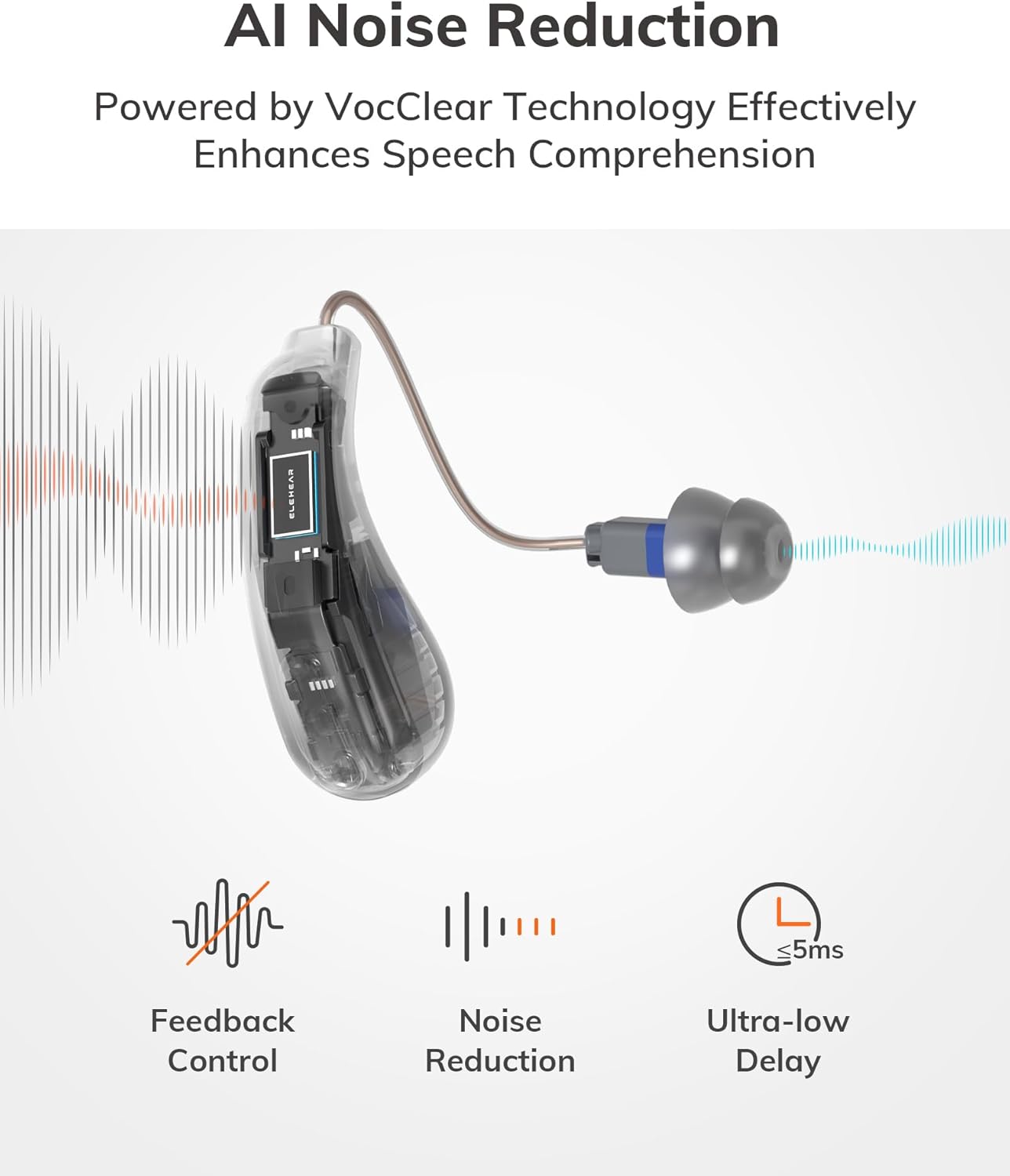
Figure 6: AI Noise Reduction - This diagram visually explains how VocClear AI Technology enhances speech comprehension by filtering background noise and controlling feedback.
- Kontrol volume: Adjust the volume for each hearing aid independently.
- Modeu sora: Switch between 4 preset modes for different listening scenarios:
- Modeu Umum
- Réstoran Mode
- Modeu TV
- Modeu luar
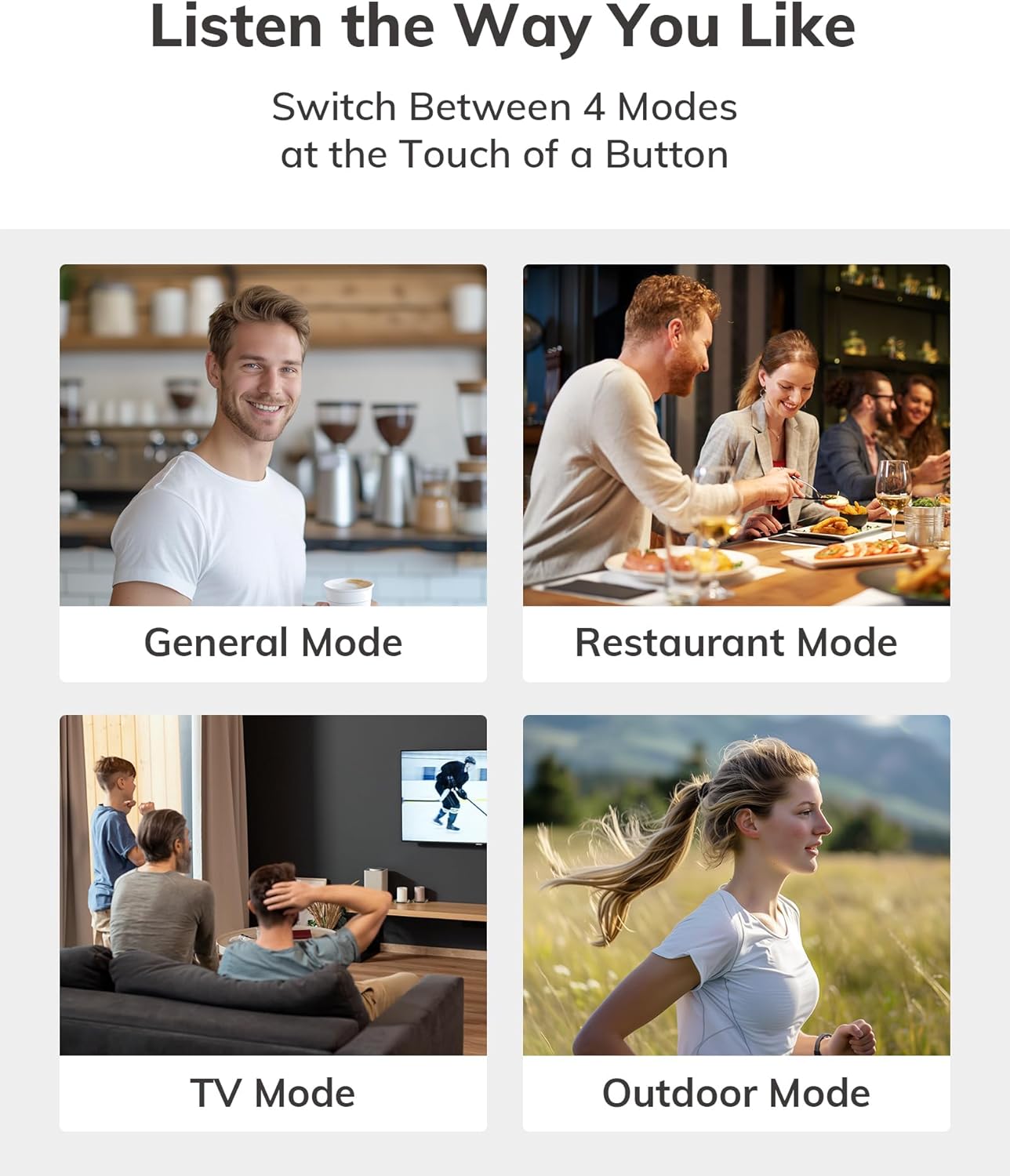
Figure 7: Adaptive Sound Modes - Visual representation of the four distinct sound modes available for various environments.
- Ningkatkeun Biantara: Optimize clarity for conversations.
- Ngepaskeun: Fine-tune frequency settings for a personalized auditory experience.
- Streaming Bluetooth: Stream audio from your phone, TV, or other Bluetooth-enabled devices directly to your hearing aids.
Ngeusi batre jeung Batré
The ELEHEAR Alpha Pro offers impressive battery life for extended use.
- Alat bantu dédéngéan: Nepi ka 20 jam pamakean kontinyu dina hiji muatan.
- Kasus ngecas: Provides an additional 7 full charges, extending total usage time to approximately 160 hours.
Prosés ngecas:
- Place the hearing aids securely into their respective slots in the charging case.
- Close the charging case. The indicator lights on the case will show the charging status.
- To charge the case itself, connect it to a USB power adapter using the provided USB Type-C cable.

Gambar 8: Manjangkeun Umur Batré - The image highlights the impressive 160-hour total battery life provided by the hearing aids and their charging case.
Pangropéa sareng Perawatan
Pangropéa anu leres mastikeun umur panjang sareng kinerja anu optimal tina alat bantu déngé anjeun.
- beberesih poean: Gently wipe the hearing aids and ear domes with a soft, dry cloth to remove any earwax or debris. Use the provided multifunction tool for hard-to-reach areas.
- Panggantian Kubah Ceuli: Replace ear domes regularly (e.g., every 1-3 months, or as needed) to maintain hygiene and sound quality.
- Panyimpenan: Store the hearing aids in their charging case when not in use to protect them from dust, moisture, and physical damage.
- Hindarkeun Uap: Although sweatproof, avoid prolonged exposure to excessive moisture. Do not submerge the devices in water.
- Suhu: Store and operate the hearing aids within recommended temperature ranges to prevent damage to the battery and internal components.

Figure 9: Sweatproof Design - The image emphasizes the durable, sweatproof construction of the hearing aids, suitable for active lifestyles.
Pamérésan masalah
If you encounter any issues with your ELEHEAR Alpha Pro hearing aids, please refer to the following common solutions:
| Masalah | Mungkin Cukang lantaranana | Solusi |
|---|---|---|
| No Sound/Low Volume | Low battery; clogged ear dome; incorrect volume setting. | Charge hearing aids/case; clean or replace ear dome; adjust volume via app or on-device. |
| Eupan balik / Whistling | Improper fit; earwax buildup; ear dome too small. | Re-insert hearing aid for a snug fit; clean ear canal; try a larger ear dome. |
| Cannot Connect to App/Bluetooth | Bluetooth off; hearing aids not in pairing mode; app issue. | Ensure Bluetooth is on; remove/re-insert aids to re-enter pairing mode; restart app/phone. |
| Hirup batré pondok | Aging battery; frequent streaming; extreme temperatures. | Ensure full charge; reduce streaming time; avoid extreme temperatures. |
If the issue persists after trying these solutions, please contact ELEHEAR customer support.
spésifikasi
- Jumlah modél: Alfa Pro
- Ukuran produk: 1.29 x 0.35 x 0.6 inci
- Beurat barang: 5.78 ons
- Batré: 2 batré Litium Ion diperlukeun (kaasup)
- Pabrikan: ELEHEAR
- ASIN: B0DDXYB7CP
- Konektipitas: Bluetooth 5.3
- Keuntungan: Nepi ka 37dB
Émbaran Kasalametan penting
Please read and understand all safety information before using your ELEHEAR Alpha Pro hearing aids.
- This device is intended for adults 18 years and older with mild to moderate hearing loss.
- Do not attempt to self-diagnose or treat severe hearing loss. Consult a healthcare professional if you experience sudden or significant hearing changes.
- Jauhkeun tina jangkauan barudak sareng piaraan. Bagian leutik tiasa nyababkeun bahaya choking.
- Hindarkeun ngalaan alat ka suhu anu ekstrim, sinar panonpoé langsung, atanapi kalembaban anu luhur.
- Ulah dianggo upami alatna katingalina ruksak.
- Pernyataan ngeunaan suplemén dietary teu acan dievaluasi ku FDA sareng teu dimaksudkeun pikeun diagnosa, ngubaran, nyageurkeun, atanapi nyegah panyakit atanapi kaayaan kaséhatan naon waé.Note: This disclaimer is from the original product data and is included as per instructions to use provided information.)
Garansi sareng Rojongan
ELEHEAR provides professional local support to ensure your satisfaction.
- Periode rojongan: 12-month support is provided.
- Kontak: For any questions, technical assistance, or warranty claims, please contact ELEHEAR customer support. Refer to the contact information provided in your Quick Start Guide or on the official ELEHEAR websitus.

Figure 10: Dedicated Support - The image represents the 12-month professional support offered by ELEHEAR for their products.


