1. Bubuka
Welcome to the user manual for your SteelSeries Arctis GameBuds Wireless Earphones. These earphones are designed to provide a superior audio experience for gaming and multimedia, featuring ultra-low latency wireless connectivity, active noise cancellation, and a comfortable, ergonomic fit. This manual will guide you through the setup, operation, and maintenance of your new device to ensure optimal performance.
2. Produk Langkungview
2.1 Eusi pakét
- SteelSeries Arctis GameBuds (Left and Right Earbuds)
- Ngecas Case
- USB-C Wireless Dongle
- USB-C kana kabel adaptor USB-A
- Ujung Ceuli Silikon (ukuran S/M/L)
- Pituduh Mimitian Gancang (Manual ieu)
2.2 Komponén jeung kadali
Familiarize yourself with the main components and controls of your Arctis GameBuds:

Image: The Arctis GameBuds, charging case, and USB-C dongle.
- Earbuds: Each earbud features a multi-function button for controls and an LED indicator.
- Kasus ngecas: Houses and charges the earbuds. Includes a slot for the USB-C wireless dongle and a charging port. An LED indicator on the front shows charging status.
- USB-C Wireless Dongle: Provides ultra-low latency 2.4GHz wireless connection to compatible devices.
3. Setélan
3.1 Ngecas Awal
Before first use, fully charge your Arctis GameBuds and their charging case.
- Lebetkeun earbud kana wadah ngecas. Pastikeun éta dipasang kalayan leres.
- Connect the USB-C charging cable to the case's charging port and to a power source (e.g., USB wall adapter, computer USB port).
- Alternatively, place the charging case on a Qi-compatible wireless charging pad for convenient wireless charging.

Image: The Arctis GameBuds charging case connected for wired charging. The case also supports Qi wireless charging.
The LED indicator on the case will show charging status. A full charge provides up to 40 hours of total playtime (10 hours from earbuds + 30 hours from case). Fast charging allows for 3 hours of use with just 15 minutes of charge.
3.2 Nyambungkeun ka Alat
The Arctis GameBuds support two primary connection methods: ultra-low latency 2.4GHz wireless via dongle and Bluetooth 5.3.

Image: The GameBuds highlighting their dual wireless connectivity options.
3.2.1 2.4GHz Wireless Connection (for PC, PlayStation, Nintendo Switch)
- Insert the USB-C wireless dongle into a compatible USB-C port on your PC, PlayStation console (PS4/PS5), or Nintendo Switch. If your device only has USB-A ports, use the included USB-C to USB-A adapter.
- Ensure the earbuds are charged and out of the case. They should automatically connect to the dongle.
- On your device, select the Arctis GameBuds as the audio output and input device.
3.2.2 Bluetooth 5.3 Connection (for Mobile Devices and other Bluetooth-enabled devices)
- With the earbuds out of the case, press and hold the multi-function button on either earbud for 3 seconds to enter Bluetooth pairing mode. The earbud LED will flash blue.
- On your mobile device, go to Bluetooth settings and select "Arctis GameBuds" from the list of available devices.
- Once paired, the earbud LED will turn solid blue.
3.2.3 Quick Switch Between 2.4GHz and Bluetooth
The Arctis GameBuds allow for seamless switching between 2.4GHz wireless and Bluetooth connections. Simply press the switch on the side of the earbud three times to toggle between the two modes.
4. Parentah Operasi
4.1 Audio Quality and Immersion
The Arctis GameBuds feature premium Hi-Fi audio drivers and a new generation chipset designed for competitive gameplay and immersive experiences.

Gambar: Detil view of the GameBuds' internal sound design.
4.2 Modeu Pembatalan Noise Aktif (ANC) sareng Transparansi
The GameBuds are equipped with Active Noise Cancellation (ANC) to minimize ambient distractions, allowing you to focus on your audio. They also feature a Transparency Mode to let in environmental sounds when needed.
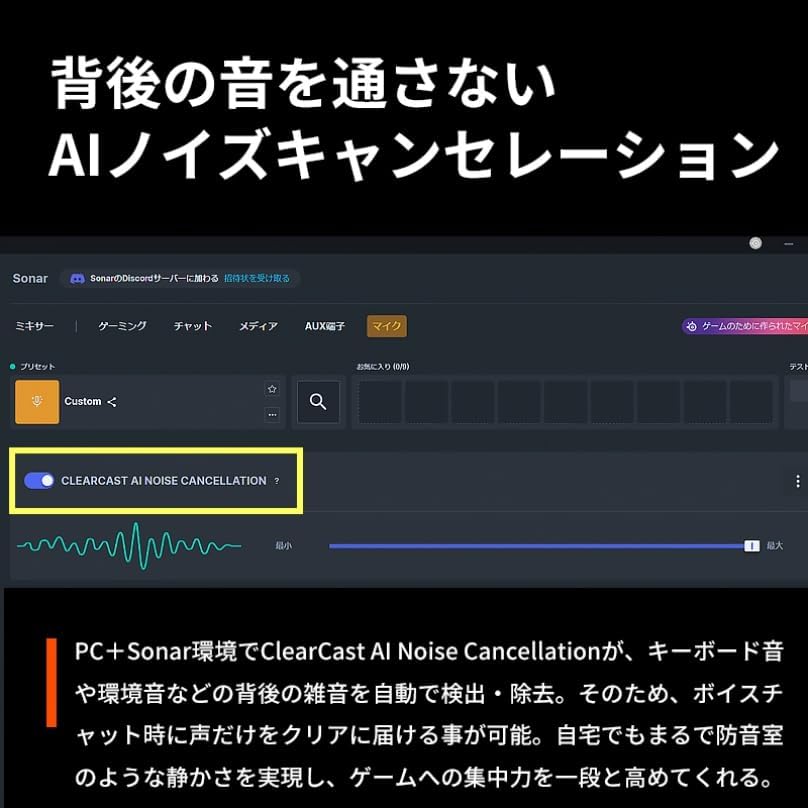
Image: The Sonar app interface for managing ClearCast AI Noise Cancellation.
Control ANC and Transparency Mode through the SteelSeries GG software on PC or the Arctis GameBuds mobile app. The integrated four-microphone hybrid technology enhances both noise cancellation and voice clarity.
4.3 Equalizer (EQ) Presets
Customize your audio experience with over 100 EQ presets optimized for various games, music genres, and movies. These presets can be accessed and managed via the SteelSeries GG software on PC or the Arctis GameBuds mobile app.

Image: EQ settings for Monster Hunter Wilds, accessible via PC and mobile applications.
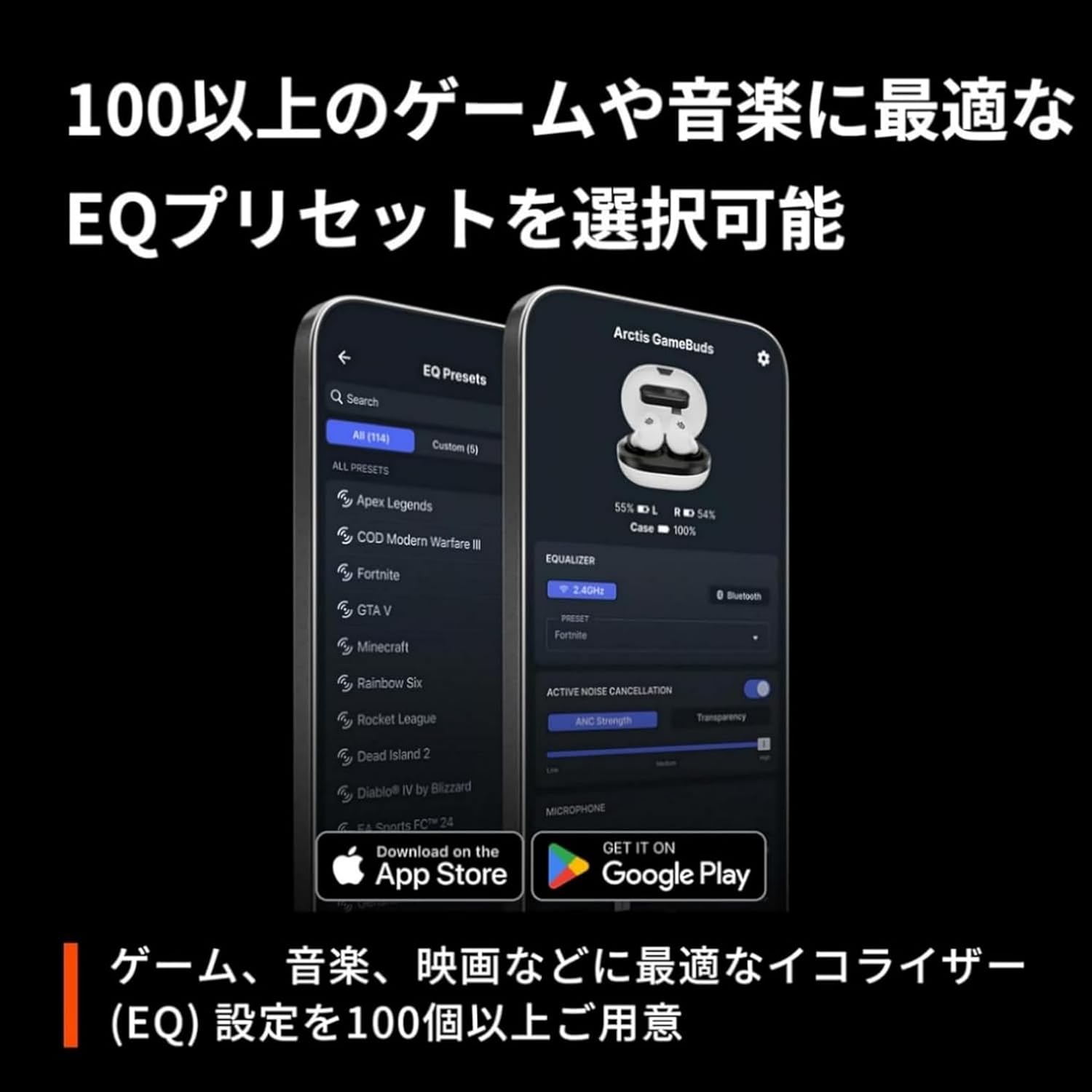
Image: The mobile app displaying a selection of over 100 game-specific EQ presets.
4.4 IP55 Dust and Water Resistance
The Arctis GameBuds are rated IP55 for dust and water resistance, making them suitable for use during sports or in light rain. This rating ensures protection against dust ingress and low-pressure water jets from any direction.

Image: The GameBuds are designed with IP55 dust and water resistance for durability.
4.5 Pas Ergonomis
Designed based on scan data from over 62,000 ears, the Arctis GameBuds provide an ultimate comfortable fit for a wide range of users, ensuring stability during extended use.

Image: The GameBuds are engineered for an ultimate comfortable fit.
4.6 Video Produk Resmi
Watch the official product video for a visual guide on the SteelSeries Arctis GameBuds features and usage.
Video: Official SteelSeries Arctis GameBuds product overview. This video demonstrates key features and benefits of the earphones.
5. Pangropéa
5.1 beberesih
- Earbuds: Lap earbud sacara saksama nganggo lawon anu lemes, garing, sareng henteu ngaganggu. Pikeun kokotor anu bandel, usap sakedikampen lawon jeung cai. Ulah make bahan kimia kasar atawa bahan abrasive.
- Tips ceuli: Remove the silicone ear tips and wash them with mild soap and water. Rinse thoroughly and allow them to dry completely before reattaching.
- Kasus ngecas: Wipe the exterior of the charging case with a soft, dry cloth. Keep the charging contacts inside the case clean and free of debris.
5.2 Panyimpenan
When not in use, store your Arctis GameBuds in their charging case to protect them from dust, dirt, and physical damage. Store the case in a cool, dry place away from direct sunlight and extreme temperatures.
6. Cara ngungkulan
If you encounter any issues with your Arctis GameBuds, refer to the following common troubleshooting steps:
- No Sound or Connection:
- Ensure the earbuds are charged and properly seated in the case.
- For 2.4GHz connection, verify the USB-C dongle is securely plugged into your device and selected as the audio output.
- For Bluetooth connection, ensure Bluetooth is enabled on your device and the earbuds are in pairing mode or already paired. Try unpairing and re-pairing.
- Check the quick switch button on the earbud to ensure you are in the correct wireless mode (2.4GHz or Bluetooth).
- Restart your audio source device (PC, console, smartphone).
- Poor Audio Quality or Latency:
- Ensure you are using the 2.4GHz dongle for gaming to minimize latency.
- Nyedekkeun ka alat anjeun pikeun ngurangan gangguan.
- Check for firmware updates via the SteelSeries GG software or mobile app.
- Active Noise Cancellation (ANC) Not Working Effectively:
- Ensure the earbuds are properly seated in your ears to create a good seal. Try different sized ear tips.
- Verify ANC is enabled in the SteelSeries GG software or mobile app.
- Clean the microphones on the earbuds.
- Masalah Kahirupan Batré:
- Pastikeun wadah ngecas parantos dicas pinuh.
- Confirm the earbuds are making proper contact with the charging pins inside the case.
- Reduce volume levels or disable ANC if not needed to conserve battery.
For further assistance, please visit the SteelSeries support websitus.
7. Spésifikasi
Below are the detailed specifications for the SteelSeries Arctis GameBuds:
| Fitur | Rincian |
|---|---|
| Ngaran modél | Arctis GameBuds white |
| Jumlah modél produk | 61682 |
| Téhnologi konektipitas | Wireless (2.4GHz via dongle, Bluetooth 5.3) |
| Faktor Bentuk Headphone | In Ear (True Wireless) |
| Warna | Bodas |
| Item Beurat | 62.1 gram |
| Dimensi produk | 3.02 x 7 x 5.24 cm |
| Lebu / Tahan Cai | IP55 |
| Kahirupan Batré (Earbuds) | Nepi ka 10 jam |
| Total Kahirupan Batré (kalayan Case) | Nepi ka 40 jam |
| Ngecas | USB-C Fast Charging, Qi Wireless Charging |
| Mikropon | 4 built-in microphones with hybrid technology |
| Noise Cancelling | Aktif Noise pembatalan (ANC) |
| Presét EQ | 100+ customizable presets via app |
| Alat nu cocog | PC, PlayStation (PS4/PS5), Nintendo Switch, Mobile Phones, Tablets |

Image: Feature comparison between Arctis Nova 5 and Arctis GameBuds.
8. Garansi jeung Rojongan
SteelSeries products are backed by a manufacturer's warranty. For detailed warranty information, product registration, and technical support, please visit the official SteelSeries websitus.
You can find additional resources and information by scanning the QR code on the product packaging or by visiting: steelseries.com/qr/gamebudspackaging


