1. Bubuka
This manual provides comprehensive instructions for the installation, operation, and maintenance of your Antec CX700 ATX Mid Tower Gaming Case. Designed for PC enthusiasts, this case features a sleek, modern design with a tempered glass side panel and pre-installed ARGB fans to enhance visual appeal and ensure optimal airflow. Please read this manual thoroughly before beginning assembly to ensure proper setup and safe operation.
2. Spésifikasi
| Fitur | Rincian |
|---|---|
| merek | Antec |
| Nomer modél | CX700 |
| Jenis Kasus | Pertengahan Menara |
| Motherboard kasaluyuan | ATX |
| Warna | Hideung |
| Bahan | Paduan Steel, Plastik |
| Item Beurat | 5.5 Kilogram (12.1 pon) |
| Métode Cooling | Hawa |
| Pre-installed ARGB Fans | 3 (Front-mounted) |
| Dukungan Kipas (Max) | Front: 3x120mm, Top: 3x120mm, Rear: 1x120mm, Bottom: 3x120mm |
| USB 3.0 palabuhan | 2 |
| Port USB Tipe-C | 1 |
| Palabuhan Audio | Headphone, Microphone |
| Bersihan GPU (Max) | 410mm (16.14 inci) |
| Rojongan HDD | 3.5 inci |
| SSD Support | 2.5 inci |
| PSU Length (Max) | 225 mm |
3. Eusi Paket
- Antec CX700 ATX Mid Tower Gaming Case
- Pre-installed ARGB Fans (3 fans, typically front-mounted as per product title)
- Accessory Box (Screws, cable ties, user manual)
- Tempered Kaca Sisi Panel
4. Parentah Setup
4.1 Ngabongkar sareng Inspeksi
Carefully remove the case from its packaging. Inspect for any signs of damage during transit. The tempered glass panel is fragile; handle with care.
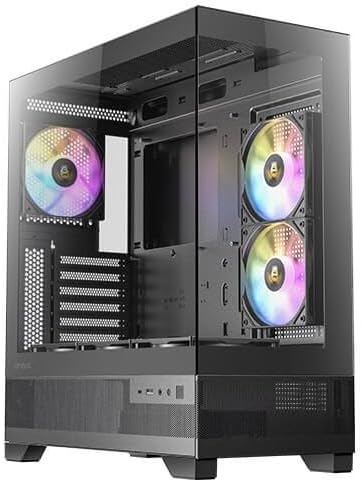
Gambar 1: Hareup jeung sisi view of the Antec CX700 case, showcasing the tempered glass panel and pre-installed fans.
4.2 Ngaleupaskeun Panel Samping
To access the interior for component installation, remove the tempered glass side panel and the solid rear side panel.
- Locate the thumbscrews on the rear of the case securing the tempered glass panel.
- Carefully unscrew these thumbscrews.
- Gently pull the tempered glass panel away from the chassis. Lay it flat on a soft, clean surface to prevent scratches or damage.
- Repeat the process for the solid rear side panel if necessary for cable management access.

Gambar 2: Tukangeun view of the Antec CX700 case, showing the rear fan and expansion slots. The side panel is removed for internal access.
4.3 Pamasangan motherboard
Install your ATX motherboard into the designated area. Ensure all standoffs are correctly aligned and secured.
4.4 Pamasangan komponén
Install your CPU, RAM, GPU (up to 410mm length), storage drives (3.5" HDD, 2.5" SSD), and power supply unit (PSU, up to 225mm length) according to their respective manuals and the case's layout.

Gambar 3: Top view of the Antec CX700 case, highlighting the pre-installed fans and internal layout for component placement.
4.5 Manajemén kabel
Mangpaatkeun potongan rute kabel sareng titik pangiket di tukangeun baki motherboard pikeun ngatur kabel sacara efektif. Ieu ningkatkeun aliran hawa sareng estetika.
4.6 Sambungan I/O Panel Hareup
Connect the front panel I/O cables (USB 3.0, USB Type-C, HD Audio, Power, Reset, LED) to the corresponding headers on your motherboard.
- Tombol Daya: Initiates system power.
- Tombol Reset: Mimitian deui sistem.
- Port USB 3.0 (x2): Pikeun mindahkeun data-speed tinggi.
- Port USB Tipe-C (x1): For modern device connectivity.
- Jack headphone: Kaluaran audio.
- Jack mikropon: Input audio.
5. Parentah Operasi
Once all components are installed and connected, replace the side panels. Connect your peripherals, monitor, and power cable. Press the power button on the top panel to start your system. The pre-installed ARGB fans will illuminate, providing customizable lighting effects.
6. Pangropéa
Pangropéa rutin mastikeun kinerja anu optimal sareng umur panjang casing sareng komponén PC anjeun.
- Saringan debu: The case includes magnetic dust filters (e.g., on the top panel) that can be easily removed and cleaned with water or a soft brush. Clean these regularly to maintain airflow and prevent dust buildup inside the case.
- Beberesih interior: Periodically open the side panels and use compressed air to remove dust from internal components and fans. Ensure the system is powered off and unplugged before cleaning.
- Kaca Tempered: Clean the tempered glass panel with a microfiber cloth and a non-abrasive glass cleaner. Avoid harsh chemicals.
7. Cara ngungkulan
Upami anjeun mendakan masalah, tingal léngkah-léngkah ngungkulan umum ieu:
- Sistem Henteu Diaktipkeun:
- Ensure the power supply is properly connected to the wall outlet and the PSU switch is in the 'ON' position.
- Verify all power cables (24-pin ATX, 8-pin CPU, PCIe for GPU) are securely connected to the motherboard and components.
- Check that the front panel power button cable is correctly connected to the motherboard's front panel header.
- Kipas Teu Diputer / ARGB Henteu Nyaangan:
- Confirm that the fan power cables and ARGB cables are correctly connected to the motherboard or a dedicated ARGB controller.
- Refer to your motherboard manual for proper ARGB header connections and software control.
- Henteu aya kaluaran tampilan:
- Ensure your monitor cable is connected to the graphics card (GPU) output, not the motherboard's integrated graphics ports (unless using integrated graphics).
- Pasang deui kartu grafik dina slot PCIe na.
8. Garansi jeung Rojongan
The Antec CX700 ATX Mid Tower Gaming Case comes with a standard manufacturer's warranty. For specific warranty terms, duration, and to register your product, please visit the official Antec websitus atanapi hubungi dukungan palangganna. Simpen bukti pameseran anjeun kanggo klaim garansi.
For further technical assistance or support, please refer to the Antec support resources available online.


