Bubuka
The CHOYONG A8W Internet Radio is a versatile and portable device designed to provide a rich listening experience. It offers seamless Wi-Fi and 4G connectivity, granting access to over 40,000 internet radio stations globally, alongside traditional FM stations. Its advanced voice search function allows for effortless navigation, while features like a rechargeable battery, alarm clock, and Micro SD card support enhance user convenience. This manual provides comprehensive instructions for setting up, operating, and maintaining your A8W radio.
Eusi pakét
- CHOYONG A8W Internet Radio Unit
- Kabel Ngecas USB
- Manual pangguna (dokumén ieu)
- (Note: Specific accessories may vary. Please check your product packaging.)
Produk Leuwihview

Gambar 1: Hareupeun view of the CHOYONG A8W Internet Radio, showing the speaker grille, display screen, and control buttons.

Gambar 2: Samping view illustrating the Micro SD card slot and the Type-C headphone port.
Kontrol sareng palabuhan:
- Layar tampilan: Némbongkeun inpormasi stasiun, waktos, status batré, sareng pilihan ménu.
- Speaker grille: Integrated multimedia speaker for audio output.
- Tombol kontrol: Includes OK, Play/Pause, Skip, Menu, News, Music, Favorite, Settings, and Voice Search.
- Volume/Navigation Knobs: Located on the side for adjusting volume and navigating menus.
- Slot Kartu SD Mikro: Pikeun muter audio filetina kartu Micro SD.
- Tipe-C Port: Used for charging the device and connecting Type-C headphones.
Disetél
1. Ngecas Alat
Before first use, fully charge the A8W radio. Connect the supplied USB charging cable to the Type-C port on the device and the other end to a standard USB power adapter (not included) or a computer's USB port. The charging indicator on the display will show the charging status.
2. Powering on / Pareum
- Pikeun Ngahurungkeun: Press and hold the Power button (usually integrated with one of the side knobs) until the display lights up.
- Pikeun mareuman: Pencét terus tahan tombol Daya deui nepi ka alat pareum.
3. Network Connection (Wi-Fi/4G)
To access internet radio stations, the A8W requires a network connection.
- Tina ménu utama, arahkeun ka Setélan.
- Pilih Jaringan or Setup Wi-Fi.
- The radio will scan for available Wi-Fi networks. Select your desired network from the list.
- Enter the Wi-Fi password using the on-screen keyboard and navigation buttons.
- Confirm the password and connect.
Important Note on Wi-Fi Security: For optimal compatibility, particularly with older firmware versions, this device may perform best with Wi-Fi networks configured to WPA2 security protocols. While WPA3 offers enhanced security, some devices may require a WPA2 setting for a stable connection. Consult your router's documentation for changing Wi-Fi security settings if needed.

Gambar 3: Leuwihview of key features including network connectivity options.
Parentah Operasi
1. Radio Internét
Access thousands of stations worldwide once connected to Wi-Fi or 4G.
- Arahkeun ka Internét Radio ti ménu utama.
- Browse stations by continent, country, genre, or popularity.
- Pilih stasiun pikeun ngamimitian playback.
- Ngagunakeun éta karesep button to save frequently listened stations.
2. Pilarian Sora
The A8W features voice search for convenient station discovery.
- Pencét éta Pilarian Sora tombol (ikon mikropon).
- Speak clearly into the device's microphone, stating the name of the station or a keyword (e.g., "Play VOA").
- The radio will search and display relevant results.

Gambar 4: Demonstrating the voice search functionality for easy station access.
3. Radio FM
To listen to local FM broadcasts:
- Arahkeun ka Radio FM ti ménu utama.
- Use the navigation knobs or buttons to tune to your desired frequency (87.5-108MHz).
- The radio may automatically scan and save available stations upon first use.
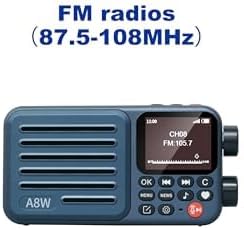
Gambar 5: Display showing FM radio mode with a tuned frequency.
4. Micro SD Card Playback
The A8W supports playing audio filetina kartu Micro SD.
- Insert a Micro SD card into the designated slot (refer to Figure 2).
- Arahkeun ka Pamuter musik or Kartu SD ti ménu.
- Browse and select audio files (MP3, AAC, etc.) to play.
5. Alarm Clock and Timer
Set alarms and timers for personalized use.
- Aksés Alarem or Timer settings from the main menu.
- Follow the on-screen prompts to set time, alarm sound (radio station or tone), and recurrence.
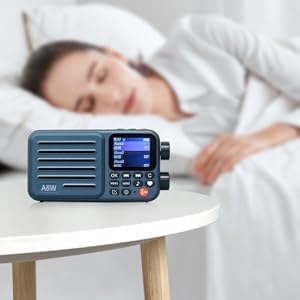
Gambar 6: The A8W functioning as an alarm clock on a bedside table.
6. Audio Output (Headphones)
For private listening, connect Type-C headphones to the dedicated port.
- Insert Type-C headphones into the Type-C port on the side of the device.
- The audio will automatically switch from the internal speaker to the headphones.
- Note: This device uses a Type-C port for audio output. Standard 3.5mm headphones are not directly compatible without an adapter.

Gambar 7: The compact size of the A8W and its compatibility with Type-C earphones.
Pangropéa
- beberesih: Anggo lawon anu lemes sareng garing pikeun ngabersihkeun bagian luar radio. Entong nganggo pembersih cair atanapi bahan anu kasar.
- Perawatan batré: Pikeun manjangkeun umur batre, ulah miceun batre pinuh. Ngeusi batre alat sacara rutin, sanajan henteu dianggo kanggo waktos anu lami.
- Panyimpenan: Simpen radio dina tempat anu tiis sareng garing jauh tina sinar panonpoé langsung sareng suhu anu ekstrim.
Pamérésan masalah
| Masalah | Mungkin Cukang lantaranana | Solusi |
|---|---|---|
| Alat teu hurung. | batré lemah; Tombol daya teu dipencet leres. | Charge the device fully. Press and hold the Power button for a few seconds. |
| Teu bisa nyambung ka Wi-Fi. | Incorrect password; Router too far; Wi-Fi security protocol incompatibility. | Double-check password. Move closer to router. Ensure your router is set to WPA2 security for best compatibility. Restart router and radio. |
| Taya sora tina headphone. | Incorrect headphone type; Headphones not fully inserted. | Ensure you are using Type-C headphones. Insert the headphone plug firmly into the Type-C port. Check headphone functionality with another device. |
| Voice search not responding. | No internet connection; Microphone obstructed. | Verify Wi-Fi/4G connection. Ensure nothing is blocking the microphone opening. Speak clearly and close to the device. |
| Resepsi FM goréng. | sinyal lemah; Gangguan lingkungan. | Relocate the radio to an area with better signal. Extend any built-in antenna if available. |
spésifikasi
| Fitur | Rincian |
|---|---|
| merek | CHOYONG |
| Modél | A8W (097049251) |
| Konektipitas | Wi-Fi, 4G network |
| Téhnologi Tuner | Internet Radio, FM Radio (87.5-108MHz) |
| Sumber Daya | Battery Powered (Rechargeable 2000mAh battery) |
| Tipe tampilan | LCD |
| Kaluaran Audio | Built-in multimedia speaker, Type-C headphone port |
| Rojongan gudang | Kartu SD mikro |
| Ukuran (L x W x H) | 7.62 x 3.3 x 13.97 cm (kira-kira 3 x 1.3 x 5.5 inci) |
| Beurat | 249.48 g (kira-kira 8.8 ons) |
| Fitur husus | Portable, Rechargeable, Voice Search, Alarm Clock, Timer Playback |
Garansi sareng Rojongan
For warranty information and technical support, please refer to the documentation provided with your purchase or contact CHOYONG customer service through their official websitus atanapi pangecér ti saha anjeun mésér produk. Simpen bukti pameseran anjeun pikeun klaim garansi.


