1. Produk Langkungview
The ILIFE A20 Pro is an advanced robotic vacuum cleaner designed for comprehensive floor cleaning. It combines powerful vacuuming with efficient mopping, utilizing LiDAR navigation for precise mapping and intelligent cleaning paths. This manual provides essential information for setup, operation, and maintenance to ensure optimal performance of your device.

Figure 1: ILIFE A20 Pro Robot Vacuum Cleaner and its components.
2. Naon dina Box
Buka bungkus eusina sacara saksama sareng pastikeun sadaya barang aya:
- 1N ILIFE A20 Pro Robot Vacuum Cleaner
- 1N Charging Dock
- Adaptor AC 1N
- 1N 2-in-1 Water Tank (integrated dustbin and water tank)
- 2N Side Brushes
- 1N Re-usable Wet Mopping Cloth
- 1N Cleaning Brush
- 1N HEPA Filter
- 1N Buku Panduan
3. Setup Guide
3.1 Ngecas Dock Nempatkeun
Place the charging dock against a wall in an open area, ensuring there are no obstacles within 1 meter to the front and 0.5 meters to the sides. Connect the AC adaptor to the charging dock and plug it into a power outlet.
3.2 Ngecas Awal
Place the robot onto the charging dock. The indicator lights will show charging status. Ensure the robot is fully charged before its first use, which may take several hours.
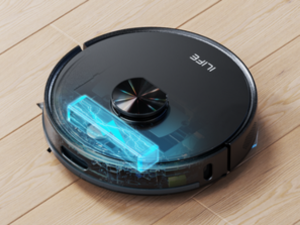
Figure 2: The robot automatically returns to its charging dock.
3.3 Pamasangan sareng Sambungan Aplikasi
Download the ILIFEHOME app from your smartphone's app store. Follow the in-app instructions to connect your ILIFE A20 Pro to your home's 2.4GHz Wi-Fi network. This enables advanced features like mapping, customized cleaning, and voice control.
3.4 Pemetaan Awal
For optimal cleaning, allow the robot to complete an initial mapping run of your home. This creates an accurate map for efficient navigation. The advanced LiDAR technology scans your environment with 360-degree coverage and 4k scans per second.

Figure 3: Advanced LiDAR navigation for accurate home mapping.
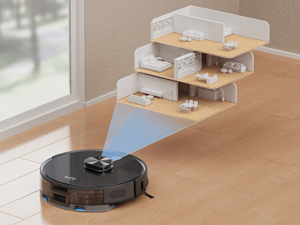
Figure 4: The robot supports multi-floor mapping, saving up to 5 maps.
4. Parentah Operasi
4.1 Modeu beberesih
The ILIFE A20 Pro offers various cleaning modes to suit different needs:
- Path Pattern: Systematic cleaning in an efficient S-shaped path.
- Modeu tepi: Cleans sapanjang tembok jeung edges jati.
- Modeu titik: Concentrates beberesih dina wewengkon leutik husus.
- 'Y' Shape Mopping: Mimics manual mopping for thorough wet cleaning.
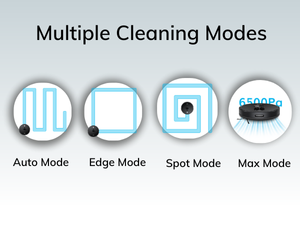
Figure 5: Multiple cleaning modes available for different scenarios.
4.2 2-in-1 Vakum jeung Paral Fungsi
The robot can vacuum and mop simultaneously using its integrated 2-in-1 water tank (300ml dustbin, 200ml water tank). You can adjust the water flow to meet specific requirements for different floor types (low, medium, high).

Figure 6: The 2-in-1 vacuum and mop function in action.
4.3 Aplikasi sareng Kontrol Sora
Utilize the ILIFEHOME app for comprehensive control over your robot. Features include:
- Customizing cleaning modes and suction power.
- Nangtukeun jadwal beberesih.
- Selecting specific rooms or areas for cleaning.
- Drawing virtual walls and no-go zones.
- Monitoring cleaning progress and battery status.
The robot is also compatible with Amazon Alexa and Google Home for convenient voice commands.

Figure 7: Control your robot with the ILIFEHOME app or voice commands.
4.4 Auto Carpet Boost
The robot automatically detects carpets and increases suction power for deeper cleaning. It reverts to normal suction on hard floors.

Figure 8: Auto Carpet Boost feature for enhanced cleaning on carpets.
4.5 Obstacle Avoidance and Anti-Fall
Equipped with anti-collision and anti-dropping sensors, the robot navigates around obstacles and avoids falling down stairs or ledges, ensuring safe operation.
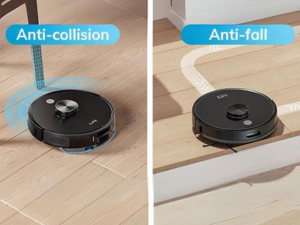
Figure 9: The robot's anti-collision and anti-fall sensors.
5. Pangropéa
Regular maintenance ensures the longevity and optimal performance of your ILIFE A20 Pro.
5.1 Tong sampah jeung saringan beberesih
Empty the dustbin daily after each cleaning cycle. Clean the HEPA filter and primary filter regularly to maintain suction power. Tap out loose debris and rinse if necessary, ensuring they are completely dry before reinstallation.
5.2 Sikat beberesih
Clean the 2-in-1 roller brush and side brushes daily or every other day. Remove any tangled hair or debris using the provided cleaning tool. Check the wheels weekly for any obstructions.
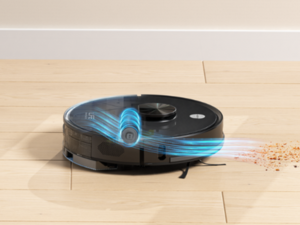
Figure 10: The 2-in-1 roller brush effectively collects dust and debris.
5.3 Mopping Cloth and Water Tank
After each mopping session, remove and wash the reusable wet mopping cloth. Empty any remaining water from the 2-in-1 water tank and allow it to air dry to prevent odors and mildew.
6. Cara ngungkulan
If your ILIFE A20 Pro encounters an issue, refer to the following general troubleshooting tips:
- Robot teu ngecas: Ensure the charging dock is properly connected to power and the robot is correctly aligned with the charging pins.
- Ngurangan daya sedot: Check and clean the dustbin, filters, and brushes for any blockages or excessive debris.
- Masalah navigasi: Clear any obstacles around the robot and charging dock. Ensure the LiDAR sensor is clean and unobstructed.
- App connectivity: Verify your Wi-Fi network is 2.4GHz and stable. Restart the app and the robot if necessary.
For more detailed troubleshooting or persistent issues, please contact ILIFE Customer Support.
7. Spésifikasi
| Fitur | Rincian |
|---|---|
| merek | ILIFE |
| Ngaran modél | A20 Pro |
| Daya nyeuseup | 6500 Pa |
| Jinis Napigasi | Upgraded LiDAR Technology |
| Fungsi beberesih | Simultaneously Vacuum & Mop |
| Kapasitas Tangki Cai | 200ml (integrated) |
| Kapasitas tong sampah | 300ml (integrated) |
| Kapasitas batré | 5200 mah |
| Daya Tahan Batré (Waktu Operasi) | Nepi ka 260 menit |
| Wewengkon Cakupan | Up to 4500 sqft (in quiet mode) |
| Métode kontrol | App, Amazon Echo, Google Home |
| Rojongan Wi-Fi | 2.4GHz |
| Dimensi produk | 33.5L x 33.5W x 9.5H Sentimeter |
| Item Beurat | 3 kg300g |
| Jenis Filter | Saringan HEPA |
| Fitur husus | Auto Carpet Boost, Roller Brush, Anti Collision, Anti Dropping, Bumper Sensors, Side Brushes, Virtual Wall, Rooms Selection Cleaning, Multiple Map Saving |

Figure 11: The robot features a 5200mAh battery for extended cleaning sessions.
8. Video Produk Resmi
Video 1: Hiji leuwihview of the ILIFE A20 Pro Robot Vacuum Cleaner's features and capabilities, including its LiDAR navigation, powerful suction, and 2-in-1 vacuum and mop function.
9. Garansi jeung Rojongan
For warranty information, technical support, or service inquiries, please contact ILIFE Innovations directly. Their customer support is known for being responsive and helpful.
- Pabrikan: ILIFE Innovations
- Alamat: 28/F, Montery Plaza, Kwun Tong, Kowloon, Hong Kong
- Nomer Kontak: 1800-274-5433