1. Bubuka
Hatur nuhun pikeun meuliasing the Greadio Boombox CD Player Cassette Player Combo. This versatile audio system combines classic and modern playback options, including CD, cassette, Bluetooth, AM/FM radio, USB, and AUX input. Designed for both home and portable use, this manual provides detailed instructions to help you set up, operate, and maintain your device for optimal performance.

Image: The Greadio Boombox CD Player Cassette Player Combo, showcasing its blue design and included remote control.
2. Produk Langkungview
The Greadio Boombox offers a comprehensive audio experience with multiple playback modes and user-friendly controls.
Fitur konci:
- Fungsi 9-in-1: Supports CD, Tape, Bluetooth, Recording, Remote Control, AM/FM Radio, USB, and AUX playback.
- Pamuter CD: Compatible with CD, CD-R, CD-RW, and MP3 formats, featuring normal, single cycle, full cycle, random, and A-B repeat functions. Programmable modes allow custom song lists.
- Cassette Player & Recorder: Enjoy classic tapes and record audio from CD, AM/FM, AUX, or Radio mode using the built-in microphone. Note: Voice recording is not supported in Tape mode.
- Nirkabel Bluetooth 5.1: Seamlessly connect to your phone, tablet, or computer for clear, powerful audio up to 26 feet away.
- Dual Full-Range Stereo Speakers: Delivers superior sound quality with an EQ feature (classic, jazz, rock, pop presets).
- Multi-Mode Playback: Includes AM/FM radio with clear reception, AUX jack for external devices, and a USB port for audiobooks/music.
- Pilihan Daya Ganda: Operates via AC adapter for indoor use or six C batteries (not included) for portable outdoor listening.
- Jack headphone: Pikeun déngékeun pribadi.

Image: Visual representation of the boombox's nine key functions, including remote control, radio, cassette, CD, Bluetooth, USB, earphone, AUX, dual speakers, and recording.
3. Setélan
Powering Boombox Anjeun:
Your Greadio Boombox can be powered by either AC power or batteries.
Operasi kakuatan AC:
- Pastikeun unit dipareuman.
- Connect the provided AC power cord to the AC IN jack located on the back of the boombox.
- Plug the other end of the AC power cord into a standard 110V/120V wall outlet.

Image: The boombox connected to a wall outlet using the AC power cord for indoor use.
Battery Operation (for Portable Use):
- Pastikeun unit dipareuman sareng dicabut tina daya AC.
- Buka panutup kompartemen batré dina handapeun unit.
- Insert six (6) C-size batteries (not included), ensuring correct polarity (+/-) as indicated inside the compartment.
- Tutup panutup kompartemen batré aman.

Image: The boombox shown with C-size batteries, illustrating its portability for outdoor listening.
4. Parentah Operasi
4.1 Playback CD
- Pencét éta MODÉ tombol pikeun milih modeu CD.
- Pencét éta BUKA/TUTUP button to open the CD compartment.
- Place a CD (CD, CD-R, CD-RW, or MP3 CD) onto the spindle with the label side facing up.
- Close the CD compartment. The display will show "Cd" and then the total number of tracks.
- Pencét éta PLAY/PAUSE (►||) tombol pikeun ngamimitian playback.
- Ngagunakeun éta PREV (◀◀) jeung SALAJENGNA (►►) tombol pikeun skip lagu.
- Pencét éta Seureuh (■) tombol pikeun ngeureunkeun playback.
- Fungsi Pangulangan: Pencét éta REP button to cycle through repeat modes (Single, All, Random, A-B).
- Program Play: Dina modeu eureun, pencét éta PROG button to program tracks in a desired order.

Image: The boombox playing a CD, highlighting its compatibility with multiple CD formats and playback options.
4.2 Cassette Playback & Recording
- Pencét éta MODÉ tombol pikeun milih modeu TAPE.
- Pencét éta STOP/EJECT tombol pikeun muka kompartemen kaset.
- Insert a cassette tape into the compartment.
- Tutup kompartemen kasét.
- Pencét éta MAÉN (►) tombol pikeun ngamimitian playback.
- Paké F.FWD (►►) jeung F.REW (◀◀) buttons for fast forward and rewind.
- Pencét éta Seureuh (■) tombol pikeun ngeureunkeun playback.
- Ngarékam: In CD, AM/FM, AUX, or USB mode, press the REC (●) button to start recording to a blank cassette. The built-in microphone will capture audio from the selected source. Note: Voice recording is not supported in Tape mode.

Image: A hand inserting a cassette tape into the boombox, demonstrating its tape playback and recording capabilities.
4.3 Operasi Bluetooth
- Pencét éta MODÉ button to select Bluetooth (BT) mode. The display will show "bt" and flash, indicating it's ready for pairing.
- Dina alat Bluetooth-diaktipkeun anjeun (smartphone, tablet, jsb), aktipkeun Bluetooth tur neangan alat nu sadia.
- Select "Greadio GB-X2A" from the list of devices.
- Once paired, the "bt" indicator on the boombox display will stop flashing and remain solid.
- You can now play audio from your device through the boombox. Use your device or the boombox controls for playback.
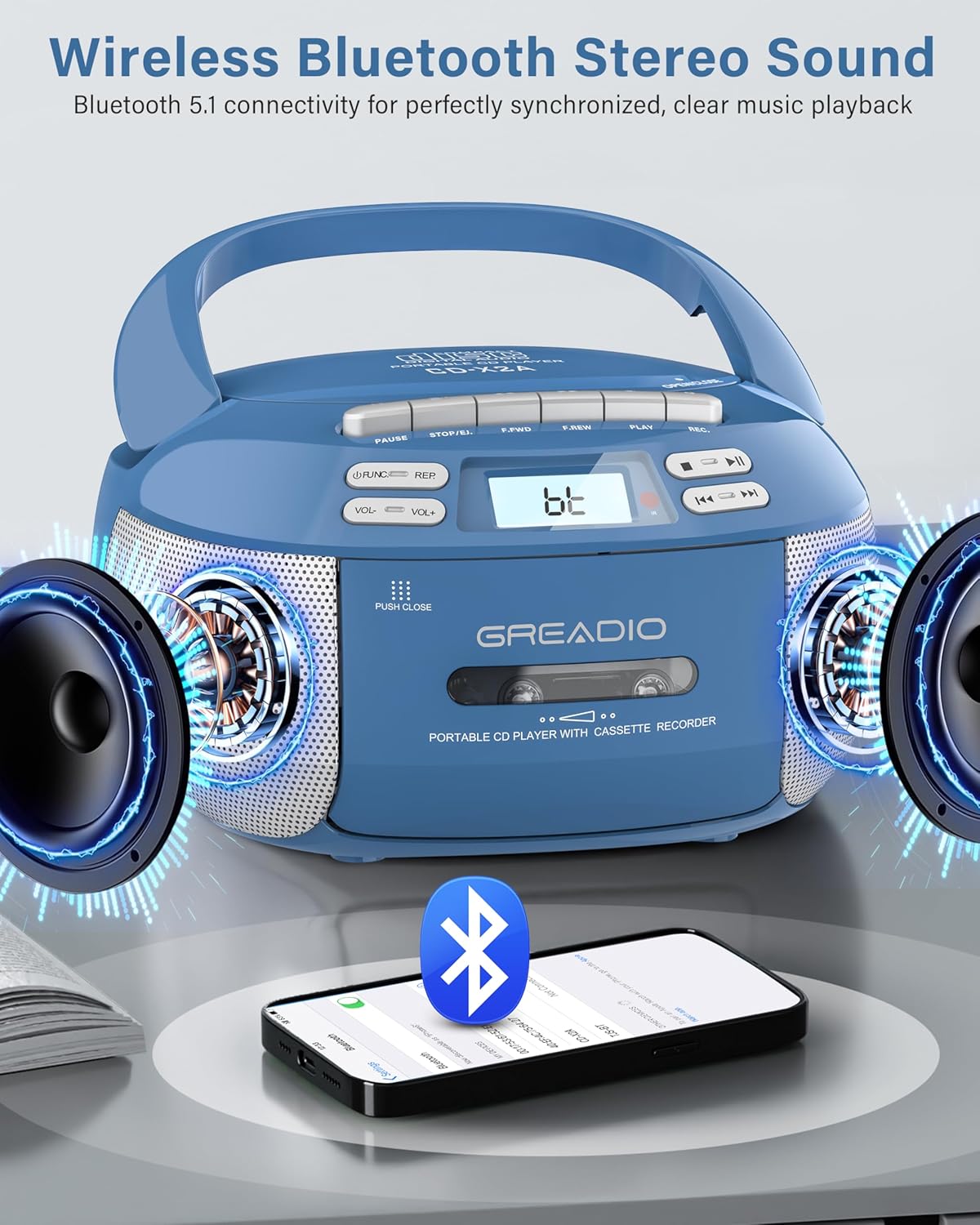
Image: The boombox demonstrating its wireless Bluetooth connectivity with a smartphone, showing sound output.
4.4 AM / Radio FM
- Pencét éta MODÉ button to select RADIO mode.
- Extend the telescopic antenna for optimal FM reception. For AM, rotate the unit for best reception.
- Ngagunakeun éta TUNING knob to manually search for radio stations. The frequency will be displayed on the LCD.

Image: The boombox in use, illustrating its various playback modes including AM/FM radio, AUX, and USB.
4.5 USB jeung AUX Playback
Puterkeun USB:
- Selapkeun USB flash drive kana port USB.
- Pencét éta MODÉ tombol pikeun milih modeu USB.
- Unit ieu bakal otomatis ngadeteksi sareng muterkeun audio anu cocog files (contona, MP3).
- Use the playback controls (PLAY/PAUSE, PREV, NEXT, STOP) as with CD playback.
Input AUX:
- Sambungkeun hiji tungtung kabel audio 3.5mm (teu kaasup) kana jack AUX IN on boombox nu.
- Connect the other end to the headphone jack or audio output of an external device (e.g., MP3 player, smartphone, computer).
- Pencét éta MODÉ tombol pikeun milih modeu AUX.
- Play audio from your external device. The sound will be output through the boombox speakers.
4.6 Jauh Jauh
The included remote control allows convenient operation of the boombox from a distance. Insert 2 x AAA batteries (not included) into the remote. Functions include power on/off, volume control, mode selection, track skip, play/pause, stop, EQ presets, and program functions.
5. Pangropéa
- beberesih: Anggo kaén anu garing sareng lemes pikeun ngabersihan bagian luar unit. Ulah make cleaners abrasive atawa pangleyur.
- Perawatan Lénsa CD: Upami lensa CD kotor, anggo pembersih lensa CD anu dijual di toko.
- Ngabersihan Kepala Kaset: Periodically clean the cassette heads, pinch rollers, and capstans with a cotton swab lightly dampdilebur ku alkohol isopropil pikeun mastikeun kualitas sora anu optimal sareng nyegah karusakan pita.
- Ngagantian batré: If using batteries, replace all six C-size batteries when the unit's performance degrades or when the display dims. Remove batteries if the unit will not be used for an extended period to prevent leakage.
- Panyimpenan: Simpen unit dina tempat anu tiis sareng garing jauh tina sinar panonpoé langsung sareng suhu anu ekstrim.
6. Cara ngungkulan
| Masalah | Mungkin Cukang lantaranana | Solusi |
|---|---|---|
| Taya kakuatan | ari AC teu nyambung; Batré béak atanapi teu leres diselapkeun. | Ensure AC cord is securely plugged in. Replace batteries with new ones, checking polarity. |
| Taya sora | Volume teuing leutik; Modeu anu dipilih salah; Headphone nyambung. | Increase volume. Select the correct playback mode (CD, Tape, BT, Radio, USB, AUX). Disconnect headphones if sound is desired from speakers. |
| CD skipping atawa teu diputer | CD is dirty, scratched, or inserted incorrectly; CD lens is dirty. | Clean the CD with a soft cloth. Try another CD. Clean the CD lens with a CD lens cleaner. Ensure CD is placed correctly. |
| Pita kaset teu diputerkeun atawa sorana distort | Tape is damaged; Cassette heads are dirty. | Try another tape. Clean the cassette heads, pinch rollers, and capstans. |
| panarimaan radio goréng | Antenna not extended; Unit position. | Fully extend the FM telescopic antenna. For AM, rotate the unit for better signal. Move unit away from other electronic devices. |
| Bluetooth teu dipasangkeun | Boombox not in BT mode; Device Bluetooth off; Too far from device. | Ensure boombox is in BT mode and flashing. Turn Bluetooth on your device. Move device closer to the boombox (within 26 feet). |
7. Spésifikasi
- Jumlah modél: GB-X2A
- Ukuran produk (L x W x H): 8.54 x 8.4 x 4.8 inci
- Beurat barang: 3.3 pounds (without batteries)
- Sumber Daya: AC 110V/120V or 6 x C-size batteries (not included)
- Téknologi konektipitas: Auxiliary, Bluetooth 5.1, USB
- Tipe Speaker: Stereo, Dual Full-Range
- Supported CD Formats: CD, CD-R, CD-RW, MP3
- Frékuénsi radio: AM (520-1710 KHz), FM (87.5-108 MHz)
- Kaasup dina Box: CD Player Boombox, AC Power Cord, Remote Control, User Manual

Image: A visual representation of the product's dimensions, weight, and included accessories.
8. Garansi jeung Rojongan
Greadio is committed to providing high-quality products and excellent customer service.
- 15-Day Hesitation Period: Allows for initial evaluation of the product.
- 12-Month Maintenance Period: Covers potential issues within the first year of purchase.
- Lifetime Service Support: Greadio offers ongoing support for the product.
- Rencana panyalindungan: Extended protection plans are available for purchase separately (e.g., 2-Year and 3-Year Protection Plans).
For any questions, concerns, or technical assistance, please contact Greadio customer support. Refer to the contact information provided in the packaging or on the official Greadio websitus.


