1. Bubuka jeung Leuwihview
The AZZA CSAZ-570B Cove is an ATX mid-tower computer case designed for gaming and high-performance PC builds. It features a back-connect supported design, optimizing cable management and internal aesthetics. This manual provides essential information for setting up, operating, and maintaining your computer case.
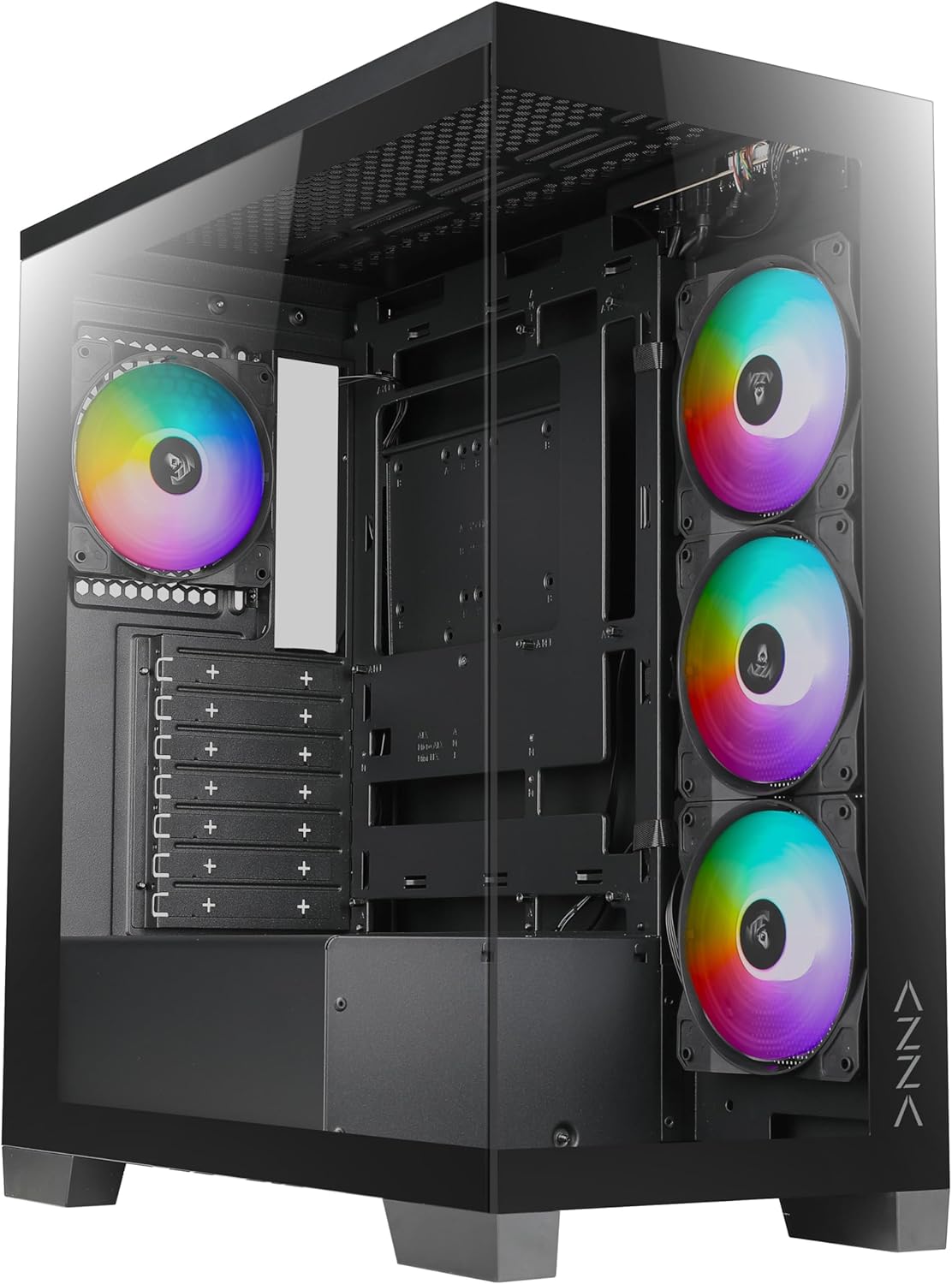
Gambar 1: Hareupeun view of the AZZA CSAZ-570B Cove computer case with RGB fans visible.
Fitur konci:
- Performance Optimized: Full mesh front panel with 4 x 120 mm pre-installed addressable RGB fans for excellent airflow.
- Multifaceted Airflow Support: Supports up to 10 x 120 mm fans, including direct GPU airflow with 2 x 120 mm fans above the PSU shroud.
- Pencahayaan anu tiasa disaluyukeun: Controllable fan lighting via the top panel LED button, with motherboard RGB software synchronization support.
- Intuitive I/O: Top panel includes Power button, LED button, Combo HD Audio, 1 x USB 2.0, 1 x USB 3.0, and 1 x Type-C port.
- Back-Connect Supported: Designed to accommodate motherboards with back-mounted connectors for cleaner internal routing.
2. Setup jeung Instalasi
This section outlines the steps for installing components into your AZZA CSAZ-570B Cove computer case.
2.1 Pamasangan motherboard
The case supports ATX (including back-connect supported), Micro ATX, and ITX motherboards. Ensure standoffs are correctly aligned for your motherboard form factor before installation.

Figure 2: Internal layout indicating motherboard support area (A), maximum CPU cooler height (B), and maximum GPU length (C).
- Align motherboard anjeun ku standoffs anu tos dipasang.
- Secure the motherboard using appropriate screws.
- Connect all necessary power cables (24-pin ATX, CPU 8-pin) and data cables.
- For back-connect motherboards, route cables through the designated rear channels.
2.2 Cooling System Configuration
The CSAZ-570B offers extensive cooling options for optimal thermal performance.

Figure 3: Diagram illustrating fan mounting locations and sizes within the case.
Rojongan kipas:
- Hareup: 4 x 120mm (pre-installed ARGB fans)
- luhur: 3 x 120mm atanapi 2 x 140mm
- Tukangeun: 1 x 120 mm
- Side (Motherboard Tray): 3 x 120 mm
- Above PSU Shroud: 2 x 120mm (for direct GPU airflow)

Figure 4: Diagram showing radiator compatibility for the AZZA CSAZ-570B case.
Rojongan Radiator:
- Motherboard Side: Nepi ka 360mm
- luhur: Up to 280mm or 360mm
2.3 Pamasangan Alat Panyimpenan
The case provides flexible options for installing 2.5" SSDs and 3.5" HDDs.

Gambar 5: Internal view highlighting locations for SSD and HDD installation.
- Panel sisi katuhu: Supports 2 x 2.5" SSDs or 1 x 3.5" HDD.
- Baki logam: Supports 1 x 2.5" SSD.
2.4 Pamasangan catu daya
The power supply mounts at the bottom of the case.
- Slide the power supply into the designated compartment at the bottom rear of the case.
- Secure the power supply with screws from the rear of the case.
3. Parentah Operasi
This section details the functionality of the front I/O panel and lighting controls.
3.1 Panel I/O Hareup
The top panel provides convenient access to essential ports and controls.

angka 6: Tutup-up view of the top I/O panel with labeled ports and buttons.
- Tombol Daya: Pencét pikeun ngahurungkeun atanapi mareuman sistem.
- Tombol LED: Cycles through various pre-programmed ARGB lighting modes for the installed fans.
- Combo HD Audio: Pikeun nyambungkeun headphone sareng mikropon.
- USB 2.0 x 1: Port USB standar pikeun periferal.
- USB 3.0 x 1: High-speed USB port for data transfer.
- Type-C x 1: Reversible USB-C port for modern devices.
3.2 Kontrol cahaya ARGB
Kipas ARGB anu tos dipasang tiasa dikontrol ku dua cara:
- Tombol LED: Use the dedicated LED button on the top panel to cycle through different lighting effects and colors.
- Parangkat Lunak Motherboard RGB: If your motherboard supports Addressable RGB (ARGB) synchronization, connect the case's ARGB cable to the motherboard's ARGB header. This allows you to control the fan lighting directly through your motherboard's software (e.g., ASUS Aura Sync, MSI Mystic Light Sync, Gigabyte RGB Fusion, ASRock Polychrome Sync). Ensure the LED button is not actively overriding the motherboard control.
4. Pangropéa
Regular maintenance helps ensure optimal performance and longevity of your computer case and its components.
- beberesih lebu: Periodically clean dust filters (if present) and internal components using compressed air. Dust accumulation can impede airflow and lead to overheating.
- Kipas beberesih: Gently clean fan blades to remove dust buildup, which can affect fan performance and noise levels.
- Manajemén Kabel: Ensure cables are neatly routed and secured to prevent interference with airflow and moving parts.
- Bersihan Luar: Ngusap permukaan luar kalayan lemes, damp lawon. Ngahindarkeun cleaners abrasive.
5. Cara ngungkulan
This section provides general troubleshooting tips for common issues.
- Sistem Henteu Diaktipkeun:
- Check if the power supply is properly connected to the wall outlet and the motherboard.
- Pastikeun kabel tombol daya tina casingna disambungkeun kalayan leres kana header panel hareup motherboard.
- Pastikeun saklar catu daya aya dina posisi 'ON'.
- Fans Teu Spinning/RGB Teu Gawé:
- Pastikeun kabel daya kipas parantos disambungkeun kalayan pageuh kana motherboard atanapi kontroler kipas.
- Check ARGB cables for proper connection to the motherboard's ARGB header or the case's ARGB controller.
- If using motherboard software, ensure the software is running and configured correctly.
- Try cycling the LED button on the top panel to see if the lights respond.
- Port USB Teu Berfungsi:
- Ensure the USB 2.0, USB 3.0, and Type-C headers from the case are correctly plugged into the corresponding headers on your motherboard.
- Check device drivers for your motherboard's USB controllers.
6. Spésifikasi
Detailed technical specifications for the AZZA CSAZ-570B Cove computer case.
| Fitur | Spésifikasi |
|---|---|
| Ngaran modél | CSAZ-570B |
| Jenis Kasus | Pertengahan Menara |
| Warna | Hideung |
| Bahan | Plastic, Tempered Glass |
| Ukuran produk (L x W x H) | 17.1"D x 9.1"W x 19.3"H (435mm x 230mm x 490mm) |
| Item Beurat | 21.8 pon |
| Motherboard kasaluyuan | ATX (Back-connect supported), Micro ATX, ITX |
| Max CPU Cooler Jangkungna | 170 mm |
| Max GPU Panjangna | 400 mm |
| Power Supply ningkatna Tipe | Gunung handap |
| Kipas anu tos dipasang | 4 x 120mm ARGB (Front) |
| Port I / O payun | Power Button, LED Button, Combo HD Audio, 1x USB 2.0, 1x USB 3.0, 1x Type-C |
| Drive Bays | 2 x 2.5" SSD or 1 x 3.5" HDD (Right Side Panel), 1 x 2.5" SSD (Metal Tray) |
Figure 7: Product dimensions of the AZZA CSAZ-570B case.
7. Garansi jeung Rojongan
For warranty information and technical support, please contact AZZA directly.
- Pabrikan: AZZA
- Penjual: AZZA USA (via Amazon)
- Rencana Perlindungan Produk: Additional protection plans are available for purchase separately. These plans offer extended coverage beyond the standard manufacturer's warranty.
- Plan Protection 3 Taun
- Plan Protection 4 Taun
- Ngajaga Lengkep (langganan bulanan)
- Kabijakan pamulangan: This product is eligible for a 30-day return policy (refund/replacement) from the date of purchase.
- Official AZZA Store: For further information and product updates, visit the AZZA Store on Amazon.


