1. Bubuka
Thank you for choosing the Kaidi KD-G1 Wireless Gaming Earbuds. This manual provides essential information for the safe and efficient use of your new device. Please read these instructions carefully before use and retain them for future reference. The KD-G1 earbuds offer a true wireless experience with Bluetooth 5.3 connectivity, designed for gaming, music, and calls, featuring an in-ear design for comfort and water resistance for active lifestyles.
2. Eusi Paket
Pastikeun sadaya item anu didaptarkeun di handap aya dina pakét anjeun:
- Kaidi KD-G1 Wireless Gaming Earbuds (Left and Right)
- Kasus Ngecas Nirkabel
- Kabel Ngecas USB
- Tips Ceuli (rupa-rupa ukuran)
- Manual pamaké
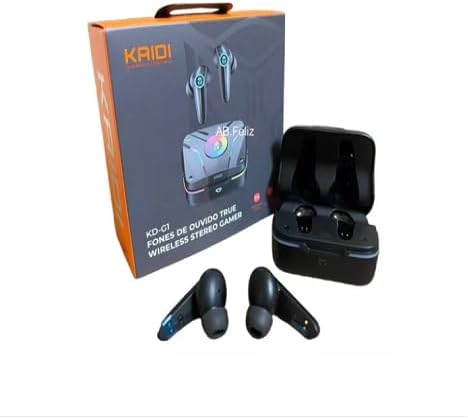
Image: Kaidi KD-G1 Wireless Gaming Earbuds, charging case, and retail packaging. The image shows the earbuds, their charging case, and the product box, illustrating the complete package contents.
3. Produk Langkungview
Familiarize yourself with the components of your Kaidi KD-G1 earbuds and charging case.
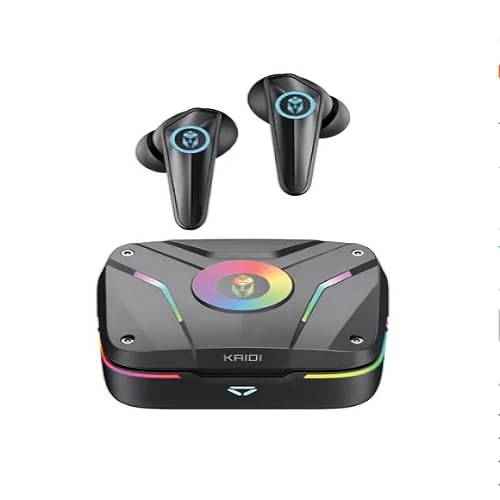
Image: Kaidi KD-G1 Wireless Gaming Earbuds and Charging Case. The image displays the two earbuds removed from their open charging case, highlighting their design and the case's indicator lights.
- Earbuds: In-ear design with integrated microphone and touch controls.
- Kasus ngecas: Stores and charges the earbuds, features a USB-C charging port and LED indicators.
- Tips ceuli: Ujung silikon anu tiasa digentos pikeun ukuran anu aman sareng nyaman.
4. Setélan
4.1 Ngecas Earbuds sareng Case
- Teundeun earbuds kana wadah ngecas, pastikeun aranjeunna ditempatkeun leres.
- Connect the USB charging cable to the charging port on the case and to a compatible USB power source (e.g., computer, wall adapter).
- The LED indicators on the case will show the charging status. A full charge for the case takes approximately 1.5 hours.
- Saatos dicas pinuh, pegatkeun sambungan kabel ngecas.
The earbuds have a battery capacity of 35mAh each, and the charging case has a capacity of 320mAh.
4.2 Nyapasangkeun Bluetooth
- Pastikeun yén earbuds dieusi.
- Open the charging case. The earbuds will automatically enter pairing mode, indicated by flashing LED lights (refer to product for specific light patterns).
- Dina alat Bluetooth-diaktipkeun anjeun (smartphone, tablet, komputer), buka setélan Bluetooth.
- Milarian pikeun available devices and select "KD-G1" from the list.
- Sakali disambungkeun, earbuds bakal nunjukkeun pasangan suksés (contona, sora ajakan atawa lampu LED ajeg).
- Headphone bakal otomatis nyambung deui ka alat anu terakhir dipasangkeun nalika dicabut tina casingna, upami Bluetooth diaktipkeun dina alat éta.
5. Parentah Operasi
The Kaidi KD-G1 earbuds feature touch controls for various functions. Specific touch gestures may vary; please refer to the quick start guide included with your product for precise controls.
5.1 Daya Hurung/Pareuman
- Daya Hurung: Buka wadah ngecas, sareng earbuds bakal hurung sacara otomatis.
- Pareum listrik: Teundeun earbuds deui kana wadah ngecas sareng tutup tutupna. Aranjeunna bakal pareum otomatis.
5.2 Puterkeun Musik
- Puter / Reureuh: Ketok tunggal dina boh earbud.
- Lagu salajengna: Ketok dua kali dina earbud katuhu.
- Lagu Sateuacanna: Ketok dua kali dina earbud kénca.
- Kontrol volume: (If supported) Triple tap on left/right earbud for volume down/up.
5.3 Manajemén Telepon
- Ngajawab / mungkas Telepon: Ketok tunggal dina boh earbud.
- Nolak Telepon: Pencét jeung tahan boh earbud salila 2 detik.
5.4 Asistén Sora
- Aktipkeun Asisten Sora: Pencét terus tahan salah sahiji earbud salami 2 detik (nalika teu keur nelepon).
6. Pangropéa
6.1 beberesih
- Rutin ngabersihkeun earbuds sareng wadah ngecas ku lawon anu lemes, garing, teu aya lint.
- Cabut tip ceuli sareng bersihkeun ku sabun sareng cai anu hampang, teras garing sateuacana dipasang deui.
- Ulah make cleaners abrasive atawa pangleyur.
6.2 Tahan cai
The Kaidi KD-G1 earbuds are water resistant, making them suitable for workouts and light rain. However, they are not waterproof. Do not submerge the earbuds in water or expose them to strong jets of water. The charging case is not water resistant.
6.3 Panyimpenan
Upami teu dianggo, simpen earbud dina wadah ngecasna pikeun ngajaga sareng ngajaga daya tetep dicas. Simpen di tempat anu tiis, garing, sareng jauh tina suhu anu ekstrim sareng sinar panonpoé langsung.
7. Cara ngungkulan
If you encounter issues with your Kaidi KD-G1 earbuds, try the following solutions:
- Earbuds teu dipasangkeun: Ensure both earbuds are charged. Place them back in the case, close the lid, then open it again to re-enter pairing mode. Forget "KD-G1" from your device's Bluetooth list and try pairing again.
- Taya sora tina hiji earbud: Ensure both earbuds are charged and connected. Try resetting the earbuds (refer to specific product instructions if a reset function is available).
- Masalah ngecas: Check the charging cable and power adapter. Ensure the charging contacts on the earbuds and case are clean and free of debris.
- Kualitas sora goréng: Ensure the earbuds are properly seated in your ears. Try different sized ear tips for a better seal. Ensure your device is within the Bluetooth transmission range (>12m).
8. Spésifikasi
| Ngaran modél | KD-G1 |
| Téhnologi konektipitas | Nirkabel (Bluetooth) |
| Vérsi Bluetooth | 5.3 |
| Protokol anu dirojong | HFP, HSP, A2DP, AVRCP |
| Unit Supir | 13 mm |
| Sensitipitas | 110 ± 3 dB |
| Impedansi | 32 ohm |
| Réspon Frékuénsi | 20 - 20000Hz |
| Kapasitas Batré Earbud | 3.7 V/35 mAh |
| Ngecas Kapasitas Batré Case | 3.7 V/320 mAh |
| Waktu Ngecas | <1.5 jam |
| Music Playback Time (80% volume) | Nepi ka 6 jam |
| Talk Time (80% volume) | Nepi ka 4 jam |
| Standby Time (Earbuds) | 30 jam |
| Standby Time (Case) | >3 months (in hibernation) |
| Rentang Frékuénsi | 2.400 - 2.485 GHz |
| Jarak Pangiriman | > 12 méter |
| Tingkat Résistansi Cai | Tahan cai |
| Fitur husus | Rechargeable battery, Fast charging, Noise isolation, Lightweight, Microphone included |
| Alat nu cocog | Alat anu diaktipkeun Bluetooth |
9. Garansi jeung Rojongan
9.1 Garansi Produsén
Produk ieu hadir kalawan a 3-month seller warranty ti tanggal pameseran. Garansi ieu ngawengku cacad manufaktur dina panggunaan normal. Éta henteu ngawengku karusakan anu disababkeun ku salah panggunaan, kacilakaan, modifikasi anu teu sah, atanapi karusakan normal. Mangga simpen bukti pameseran anjeun pikeun klaim garansi.
9.2 Rojongan Palanggan
For any questions, technical support, or warranty claims, please contact the seller or retailer from whom you purchased the product. They will be able to assist you with further instructions and service.


