1. Bubuka
The IMIKI FRAME LITE ST2 is a versatile smartwatch designed for daily use, offering a blend of style and functionality. It features a 1.96-inch IPS display, Bluetooth connectivity, and various health monitoring capabilities. This manual provides essential information for operating and maintaining your device.
2. Eusi Paket
Punten parios yén sadaya barang aya dina pakét anjeun:
- IMIKI FRAME LITE ST2 Smartwatch
- Kabel Ngecas magnét
- Manual pamaké
3. Alat Leuwihview
Familiarize yourself with the main components of your smartwatch.
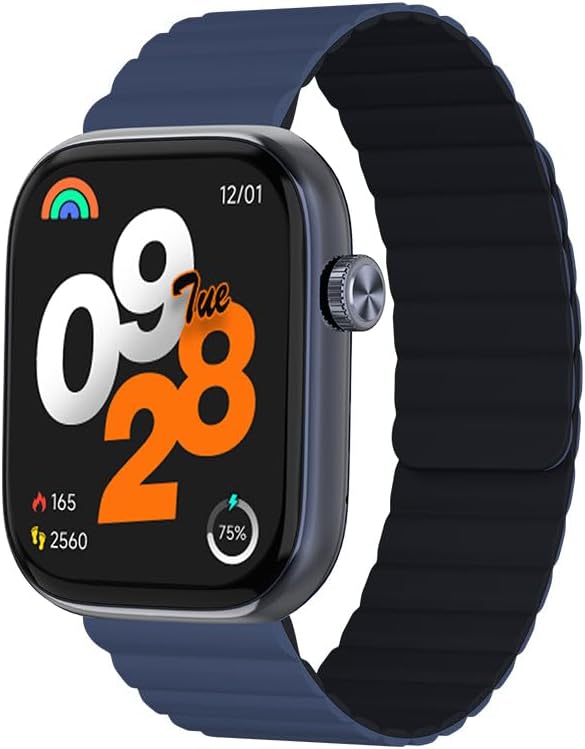
Gambar 1: Hareupeun view of the IMIKI FRAME LITE ST2 Smartwatch, displaying the time, date, and activity metrics on its 1.96-inch IPS screen. The watch features a blue case and a blue magnetic strap.

Gambar 2: Samping view of the IMIKI FRAME LITE ST2 Smartwatch, highlighting its slim profile and the integrated crown button for navigation and control.
4. Setélan
4.1 Ngecas Smartwatch
Before initial use, fully charge your IMIKI FRAME LITE ST2 Smartwatch.
- Connect the magnetic charging cable to the charging points on the back of the smartwatch.
- Colokkeun tungtung USB kabel kana adaptor kakuatan USB standar (teu kaasup) atawa port USB komputer.
- Layar jam tangan bakal nunjukkeun status ngecas. Ngecas pinuh peryogi waktos sakitar 2 jam.
A fully charged 250 mAh battery provides up to 15 days of typical use or 5 days of intensive use.
4.2 Masang Aplikasi Companion
To unlock the full features of your smartwatch, download and install the companion application on your smartphone.
- Scan the QR code provided in the quick start guide or search for the official IMIKI app in the Apple App Store (for iOS) or Google Play Store (for Android).
- Pasang aplikasi dina smartphone Anjeun.
- Turutan parentah dina-layar pikeun nyieun akun tur nyetel pro Anjeunfile.
4.3 Masangkeun sareng Smartphone Anjeun
Ensure Bluetooth is enabled on your smartphone and the smartwatch is sufficiently charged.
- Open the IMIKI companion app on your smartphone.
- Navigate to the 'Device' or 'Add Device' section within the app.
- The app will search for available devices. Select 'IMIKI FRAME LITE ST2' from the list.
- Konfirmasi pamundut papasangan dina smartphone Anjeun sareng smartwatch upami dipenta.
- Once paired, the smartwatch will synchronize data with your phone.
5. Ngoperasikeun Smartwatch
5.1 Napigasi Dasar
- Layar cabak: Gesek ka kenca, ka katuhu, ka luhur, atanapi ka handap pikeun nganapigasi menu sareng bewara. Ketok pikeun milih item.
- Tombol Samping / Mahkota: Press to wake the screen, return to the home screen, or access the app list. Rotate (if applicable) to scroll through lists.
5.2 Manajemén Telepon
With Bluetooth 5.3 connectivity, you can manage calls directly from your smartwatch when paired with your smartphone.
- Ngajawab Telepon: Tap the green icon on the watch screen when an incoming call is displayed.
- Nolak Telepon: Tap the red icon to reject an incoming call.
- Asistén Sora: Aksés asisten sora smartphone anjeun langsung tina jam tangan pikeun paréntah hands-free.
5.3 Pemantauan Kaséhatan sareng Kabugaran
The IMIKI FRAME LITE ST2 is equipped with sensors to track your health and fitness activities.
- Ngawaskeun Laju haté: Sénsor optik terus-terusan ngawaskeun denyut jantung anjeun. View data real-time dina jam tangan atanapi dina aplikasi.
- Pangukuran Oksigén Getih (SpO2): Ukur kadar saturasi oksigén getih anjeun. Pastikeun jam tangan dianggo pageuh dina pigeulang anjeun pikeun hasil anu akurat.
- Modeu latihan: Choose from 105 supported workout modes to track specific activities. The watch records statistics such as duration, calories burned, and heart rate during exercise.
- Nyukcruk saré: Awasi pola sare anjeun, kalebet sare tibra, sare hampang, sareng waktos hudang.
5.4 Kustomisasi
Personalize your smartwatch experience through the companion app.
- Nyanghareupan: Select from a variety of watch faces or create custom ones using the app.
- Setélan Bewara: Manage which app notifications appear on your smartwatch.
6. Pangropéa
6.1 beberesih
Regular cleaning helps maintain the smartwatch's appearance and functionality.
- Ngusap layar tur awak lalajo ku lawon lemes, tanpa lint.
- Keur kokotor bandel, rada dampen lawon jeung cai. Ulah make bahan kimia kasar atawa bahan abrasive.
- Ngabersihan kontak ngecas périodik pikeun mastikeun ngecas ditangtoskeun.
6.2 Tahan cai
The IMIKI FRAME LITE ST2 has an IP68 water resistance rating, meaning it is protected against dust ingress and can withstand immersion in water up to 1.5 meters for 30 minutes. It is suitable for daily use, such as hand washing or light rain. However, it is not recommended for swimming, diving, or exposure to high-pressure water.
6.3 Panyimpenan
When not in use for extended periods, store the smartwatch in a cool, dry place. Ensure it has some charge to prevent deep discharge of the battery.
7. Cara ngungkulan
Upami anjeun ngalaman masalah sareng jam tangan pinter anjeun, tingali solusi umum ieu:
- Lalajo teu hurung: Pastikeun arloji dicas pinuh. Sambungkeun ka carjer sahenteuna 10 menit.
- Teu tiasa dipasangkeun sareng smartphone:
- Pastikeun Bluetooth diaktipkeun dina telepon anjeun.
- Pastikeun arlojina aya dina jangkauan telepon anjeun.
- Balikan deui smartwatch sareng smartphone anjeun.
- Hapuskeun cache Bluetooth dina telepon anjeun (upami aya).
- Data kaséhatan teu akurat: Pastikeun arloji dipaké pas dina pigeulang anjeun, teu ketang teuing atawa longgar teuing. Ngabersihan sénsor dina tonggong arloji.
- Bewara teu muncul: Check notification settings in the companion app and on your smartphone. Ensure the app is running in the background.
- Layar teu ngaréspon: Try restarting the smartwatch by pressing and holding the side button for several seconds.
8. Spésifikasi
| Fitur | Spésifikasi |
|---|---|
| merek | IMIKI |
| Ngaran modél | IMIKI FRAME LITE ST2 |
| Ukuran layar | 1.96 inci |
| Tipe tampilan | IPS |
| Téhnologi konektipitas | Bluetooth 5.3 |
| Alat nu cocog | Smartphone (Android & iOS) |
| Kapasitas batré | 250 mAh |
| Kahirupan Batre pamakéan has | Nepi ka 15 dinten |
| Intensive Usage Battery Life | Nepi ka 5 dinten |
| Waktu Ngecas | Kurang leuwih 2 jam |
| Peunteun Résistansi Cai | IP68 |
| Pangimeutan Kaséhatan | Blood Oxygen, Heart Rate |
| Modeu Latihan | 105 |
| Tipe Tali | Magnét |
9. Garansi jeung Rojongan
For warranty information and customer support, please refer to the warranty card included in your product packaging or visit the official IMIKI websitus. Simpen resi pameseran anjeun salaku bukti pameseran.
If you require further assistance or have questions not covered in this manual, please contact IMIKI customer service through their official channels.


