1. Bubuka
This manual provides detailed instructions for the setup, operation, and maintenance of your KEJOG Mini Projector. Designed for versatility, this projector features native 1080P Full HD resolution with 4K support, a 360° adjustable stand, electric focus, auto keystone correction, and dual Bluetooth 5.2 connectivity, making it ideal for various entertainment and presentation needs.
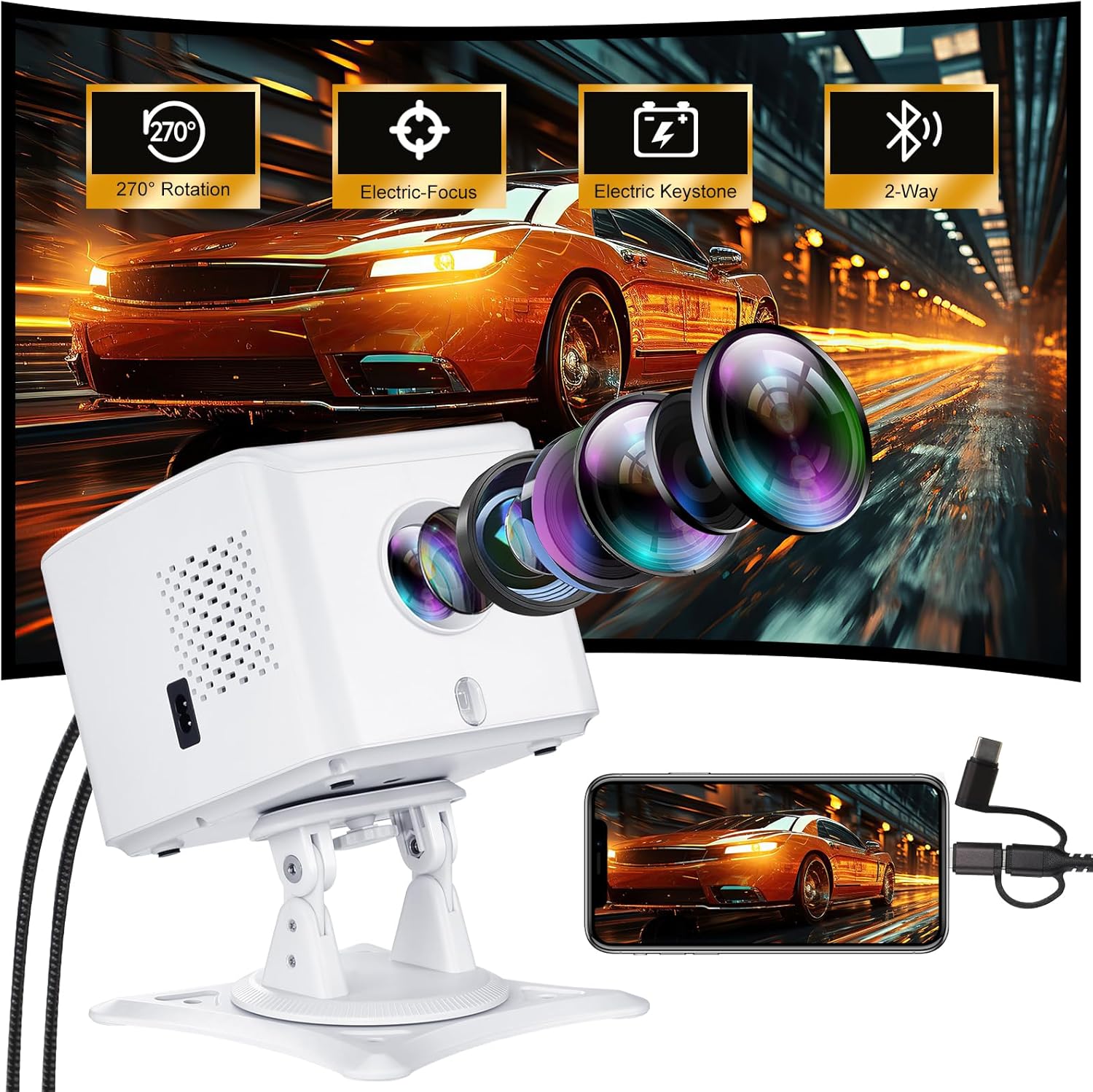
Image: The KEJOG Mini Projector, showcasing its lens, adjustable stand, and connectivity options, alongside a smartphone mirroring its display.
2. Naon dina Box
Punten parios eusi bungkusan nalika unboxing pikeun mastikeun yén sadaya barang aya:
- Proyektor Mini KEJOG
- Kadali jauh
- Kabel Daya
- Manual pangguna (dokumén ieu)
- Kabel HDMI
- Screenor layar
Note: TV stick is not included.
3. Fitur Produk
- Native 1080P Full HD & 4K Support: Experience true 1920×1080 resolution with a 10,000:1 contrast ratio for sharp images and vivid colors. Supports up to 4K content for enhanced viewing.
- Proyeksi layar ageung: Adjustable screen size from 40 to 200 inches, with a throw distance of 4.9 to 16.4 feet, allowing for flexible setup in various environments.
- 360° Rotating Stand: The triangular stand allows for 270° rotation, enabling projection onto walls, ceilings, or floors for versatile viewdina sudut.

Image: The projector positioned at various angles (0°, 90°, 180°) to demonstrate its 270° adjustable projection capability.
- Electric Auto-Focus & Keystone Correction: Adjust clarity and correct image distortion effortlessly from the remote control. Features ±15° vertical keystone correction and 50% zoom.
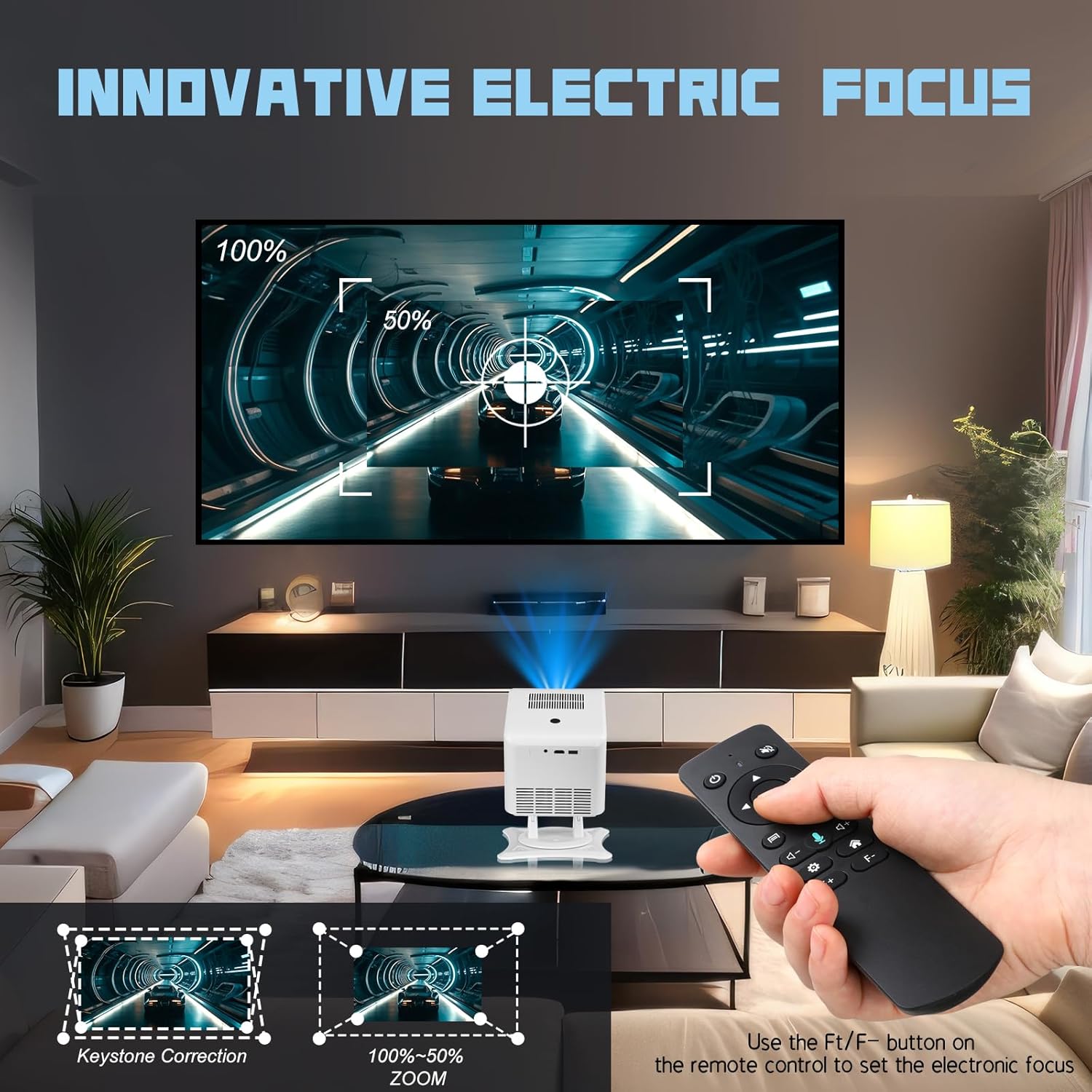
Image: A hand holding the remote control, demonstrating the use of the F+/F- button to set the electronic focus and zoom, with an image showing keystone correction.

Image: The projector projecting an image with automatic obstacle avoidance and automatic keystone correction features highlighted.
- Dual-Bluetooth 5.2 & Hi-Fi Sound: Bidirectional Bluetooth allows the projector to function as a standalone speaker or connect to external headphones/soundbars. Built-in stereo speakers provide room-filling sound.

Image: The projector illustrating its two-way Bluetooth capability, connecting to a smartphone for audio input and to external speakers for audio output.
- Kasaluyuan Universal: Equipped with HDMI, USB, and 3.5mm ports for connecting TV sticks, gaming consoles (PS5/Xbox), laptops, and USB drives.
- Pangeunteungan layar nirkabel: Supports screen mirroring for iOS and Android devices, allowing for cable-free sharing of content.
- Panjang Lamp Kahirupan: Proyéktor lamp is designed to last up to 100,000 hours, significantly longer than conventional lamps, ensuring extended use and durability.

Image: A visual representation highlighting the projector's lamp hirup nepi ka 100,000 jam.
4. Setélan
4.1 Nempatkeun
Position the projector on a stable, flat surface. Utilize the 360° rotating stand to adjust the projection angle as needed. You can project onto a wall, ceiling, or dedicated screen.
4.2 Sambungan Daya
- Sambungkeun kabel kakuatan ka port input kakuatan proyektor.
- Colokkeun tungtung kabel daya anu sanésna kana stop kontak listrik standar.
- The projector will power on or enter standby mode.
4.3 Fokus jeung Keystone adjustment
After powering on, the projector will automatically adjust focus and keystone. If further adjustments are needed:
- Use the remote control to fine-tune the electric focus (F+/F- buttons) for a clear image.
- The projector features automatic keystone correction. If manual adjustment is required, navigate to the settings menu using the remote.
5. Parentah Operasi
5.1 Daya Hurung/Pareuman
- Daya Hurung: Pencét tombol daya dina proyektor atawa kadali jauh.
- Pareum listrik: Pencét deui tombol daya. Pastikeun mareuman upami dipenta.
5.2 Pilihan Sumber Input
Use the 'Source' button on the remote control to cycle through available input options (HDMI, USB, Screen Mirroring).
5.3 Navigasi Menu
Use the arrow keys and 'OK' button on the remote control to navigate through the projector's on-screen menu for settings adjustments.
6. Konektipitas
6.1 Sambungan HDMI
Connect devices such as TV sticks, gaming consoles, or laptops using an HDMI cable to the projector's HDMI port.

Image: The projector connected to various devices including a PS5, PC, phone, and TV Box Fire Stick, illustrating its broad compatibility.

Image: The projector displaying content from a TV Box Fire Stick, with a smartphone connected for screen mirroring.
Note: For streaming services like Netflix, Hulu, or Amazon Prime, an external TV stick (not included) is required due to HDCP copyright restrictions. Direct screen mirroring from a laptop for these services may also require an HDMI cable.
6.2 Sambungan USB
Insert a USB drive into the projector's USB port to play media files langsung.
6.3 Sambungan Bluetooth
The projector supports dual-Bluetooth 5.2. You can:
- Connect your phone/tablet to the projector to use the projector as a standalone Bluetooth speaker.
- Pair the projector with external Bluetooth headphones or soundbars for enhanced audio output.

Image: The projector wirelessly connected via Bluetooth to an external speaker, projecting a movie scene.
6.4 Wireless Screen Mirroring (iOS/Android)
To mirror your smartphone or tablet screen wirelessly:
- Select the 'Screen Mirroring' input source on the projector.
- Follow the on-screen instructions to connect your iOS or Android device. This typically involves connecting both devices to the same Wi-Fi network.

Image: A diagram illustrating wired connection methods for smartphones to the projector, including an Apple phone with a data cable and an Android phone with an HDMI cable (adapter not included).
7. Pangropéa
7.1 Ngabersihan Lensa
Lembut usap lénsa proyektor ku kaén anu lembut, bébas serat anu dirarancang khusus pikeun permukaan optik. Ulah make cleaners abrasive atawa gaya kaleuleuwihan.
7.2 beberesih umum
Lap bagian luar proyéktor ku lawon anu lemes sareng garing. Ulah nganggo pembersih cair langsung kana alat.
7.3 Panyimpenan
When not in use, store the projector in a cool, dry place away from direct sunlight and extreme temperatures. Use the original packaging or a protective case to prevent dust accumulation.
8. Cara ngungkulan
8.1 Taya Gambar
- Pastikeun kabel kakuatan disambungkeun aman tur projector diaktipkeun.
- Verify the correct input source is selected (HDMI, USB, Screen Mirroring).
- Check the connection cable (HDMI, USB) for damage and ensure it is properly seated.
- Adjust the focus using the remote control.
8.2 Taya Sora
- Increase the volume on the projector and the connected device.
- Check if external speakers or headphones are connected via Bluetooth; if so, ensure they are powered on and paired correctly.
- Verify that the audio output settings on your connected device are configured correctly.
8.3 Image is Distorted/Not Rectangular
- Utilize the electric keystone correction feature via the remote control to adjust the image shape.
- Ensure the projector is placed as perpendicular to the projection surface as possible.
8.4 Cannot Connect via Screen Mirroring
- Pastikeun proyéktor sareng alat sélulér anjeun nyambung ka jaringan Wi-Fi anu sami.
- Balikan deui proyéktor sareng alat sélulér anjeun.
- Some streaming apps (Netflix, Prime Video) require a TV stick due to copyright protection (HDCP).
9. Spésifikasi
| Fitur | Spésifikasi |
|---|---|
| merek | KEJOG |
| Nomer modél | Projector With Wifi and Bluetooth |
| Resolusi tampilan | 1920 x 1080 (1080P Asli, 4K Dirojong) |
| Babandingan Kontras | 10,000:1 |
| Téhnologi konektipitas | Jack 3.5mm, Bluetooth, HDMI, USB |
| Fitur husus | Built-In Speaker, Lightweight, Portable, 360° Adjustable Stand, Electric Focus, Auto Keystone |
| Item Beurat | 2.42 pon |
| Dimensi produk | 8.15 x 7.2 x 3.94 inci |
| Warna | Bodas |
| Lamp Hirup | Nepi ka 100,000 jam |
10. Garansi jeung Rojongan
Your KEJOG Mini Projector comes with a 1-year replacement warranty. We also offer lifetime technical support with 24/7 customer service and free firmware updates. For any inquiries or assistance, please contact KEJOG customer service.


