1. Bubuka
This manual provides essential information for the safe and efficient use of your XIAOMI Vacuum Cleaner G20 Max. Please read it thoroughly before first use and retain it for future reference. The G20 Max features 180AW strong suction power, an LED display, a specialized pet hair brush, and a 60-minute run time for comprehensive cleaning.

Image: The main unit of the XIAOMI Vacuum Cleaner G20 Max, showcasing desain na sleek.
2. Parentah Kasalametan penting
Pikeun ngirangan résiko kahuruan, sengatan listrik, atanapi tatu, salawasna turutan tindakan pencegahan kaamanan dasar nalika nganggo alat listrik, kalebet ieu di handap:
- Baca sadaya parentah sateuacan nganggo alat.
- Entong tinggalkeun alat nalika dicolokkeun. Cabut colokan tina stop kontak upami teu dianggo sareng sateuacan ngalayanan.
- Ulah make di luar atawa dina surfaces baseuh.
- Ulah ngantep dipaké salaku cocooan. Perhatian caket diperyogikeun nalika dianggo ku atanapi caket barudak.
- Anggo ngan sakumaha anu dijelaskeun dina manual ieu. Paké ngan kantétan dianjurkeun produsén urang.
- Entong dianggo nganggo kabel atanapi colokan anu rusak. Upami alat henteu jalan sakumaha sakuduna, parantos turun, ruksak, ditinggalkeun di luar, atanapi turun kana cai, balikkeun deui ka pusat layanan.
- Ulah narik atawa mawa ku ari, make ari salaku cecekelan, nutup panto dina ari, atawa narik ari sabudeureun ujung seukeut atawa juru. Ulah ngajalankeun alat ngaliwatan kabel. Tetep ari jauh ti surfaces dipanaskeun.
- Ulah cabut colokan ku cara narik kana kabel. Pikeun cabut colokan, keupeul colokan, teu ari.
- Ulah nanganan colokan atawa alat ku leungeun baseuh.
- Ulah nempatkeun obyék nanaon kana bukaan. Entong nganggo sareng bukaan anu diblokir; tetep bébas tina lebu, serat, rambut, sareng naon waé anu tiasa ngirangan aliran hawa.
- Jauhkeun buuk, pakean longgar, ramo, sareng sadaya bagian awak tina bukaan sareng bagian anu obah.
- Ulah nyokot naon bae anu kaduruk atawa ngaroko, kayaning roko, korek api, atawa lebu panas.
- Entong dianggo pikeun nyandak cairan anu gampang kaduruk atanapi kaduruk, sapertos béngsin, atanapi dianggo di daérah anu aya.
- Ulah nyokot bahan toksik (misalna, pemutih klorin, cleaner amonia, cleaner solokan).
- Ulah make tanpa kantong lebu jeung/atawa saringan di tempat.
- Pareuman sadaya kadali sateuacan cabut colokan.
- Paké perawatan tambahan nalika meresihan dina tangga.
- Ulah dipaké pikeun nyokot barang teuas atawa seukeut kayaning kaca, paku, screws, koin, jsb.
3. Komponén produk jeung Asesoris
The XIAOMI Vacuum Cleaner G20 Max comes with a comprehensive set of accessories designed for versatile cleaning tasks. Familiarize yourself with each component:
- Unit Vakum Utama: The core device housing the motor, dustbin, and controls.
- Motorised Brush with LED Lights: For general floor cleaning, illuminating hidden dust.
- Pakakas lawon jeung kasur: Designed for upholstery and bedding.
- Combination Crevice Tool: A versatile tool for narrow spaces and dusting.
- Selang Extension: Provides extended reach for cleaning high or awkward areas.
- Pet Groom Tool: Specifically designed for grooming pets and collecting loose hair.
- Wall Dock with Charging Station: Pikeun neundeun merenah tur ngecas.
- Kit aksésori: Additional small parts and brushes.
- adaptor: Power supply for charging.

Image: A comparison table highlighting features and accessories across different Xiaomi vacuum models, including the G20 Max.

Image: The 2-in-1 nozzle attachment, useful for cleaning crevices and surfaces.
4. Setup jeung Pamakéan Awal
4.1 Majelis
- Buka bungkus sadaya komponén sareng pastikeun sadaya bagian aya.
- Connect the main vacuum unit to the extension wand until it clicks into place.
- Attach the desired cleaning head (e.g., motorised brush) to the end of the extension wand.
- Pikeun panggunaan sacara genggeman, pasangkeun asesoris langsung kana unit utama.
4.2 Ngecas Batré
Before first use, fully charge the vacuum cleaner. The battery provides up to 60 minutes of runtime in Eco mode.
- Mount the wall dock in a suitable location near a power outlet.
- Connect the adapter to the charging station and plug it into a power outlet.
- Place the vacuum cleaner onto the charging station. The LED display will indicate charging status.
- Ngeusi batre pinuh biasana nyandak kirang langkung 3.5 jam.

Image: The wall-mounted charging dock, providing a convenient storage and charging solution for the vacuum.
5. Ngoperasikeun vacuum cleaner
5.1 Daya Hurung / Pareum sareng Pamilihan Mode
Press the power button on the handle to turn the vacuum on or off. Use the mode selection button to cycle through the three power modes: Eco, Standard, and High Power.
- Modeu Eco: Pikeun beberesih hampang sareng umur batre anu langkung lami (dugi ka 60 menit).
- Modeu standar: For daily cleaning of small particles and general floor surfaces.
- Mode kakuatan tinggi: For stubborn dirt and large debris, providing maximum suction.

Image: The LED display on the vacuum cleaner, indicating battery level and current operating mode.
5.2 Ngagunakeun Kantétan
Pilih kantétan anu cocog pikeun tugas beberesih anjeun:
- Motorised Brush with LED Lights: Ideal for all floor types. The built-in LED lamp reveals hidden dust for a more thorough clean.
- Pet Groom Tool: Use this tool to gently groom your pet and simultaneously vacuum loose hair. Ensure your pet is comfortable with the tool before use.
- Combination Crevice Tool: Perfect for reaching into tight corners, between sofa cushions, or for dusting delicate surfaces.
- Selang Extension: Connect this to the main unit or extension wand with an accessory for increased flexibility and reach, useful for cleaning high shelves or inside vehicles.
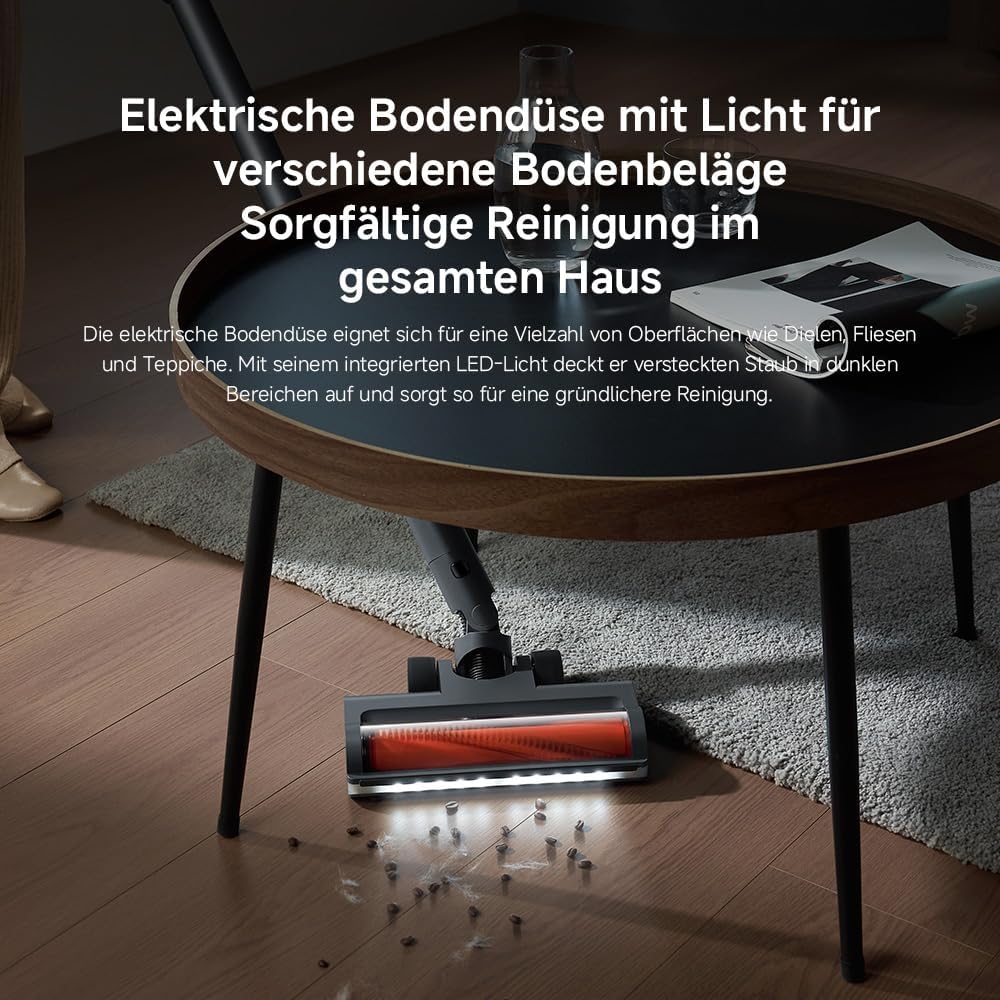
Image: The motorised floor nozzle with LED lights, highlighting its ability to reveal dust on a hard floor surface.
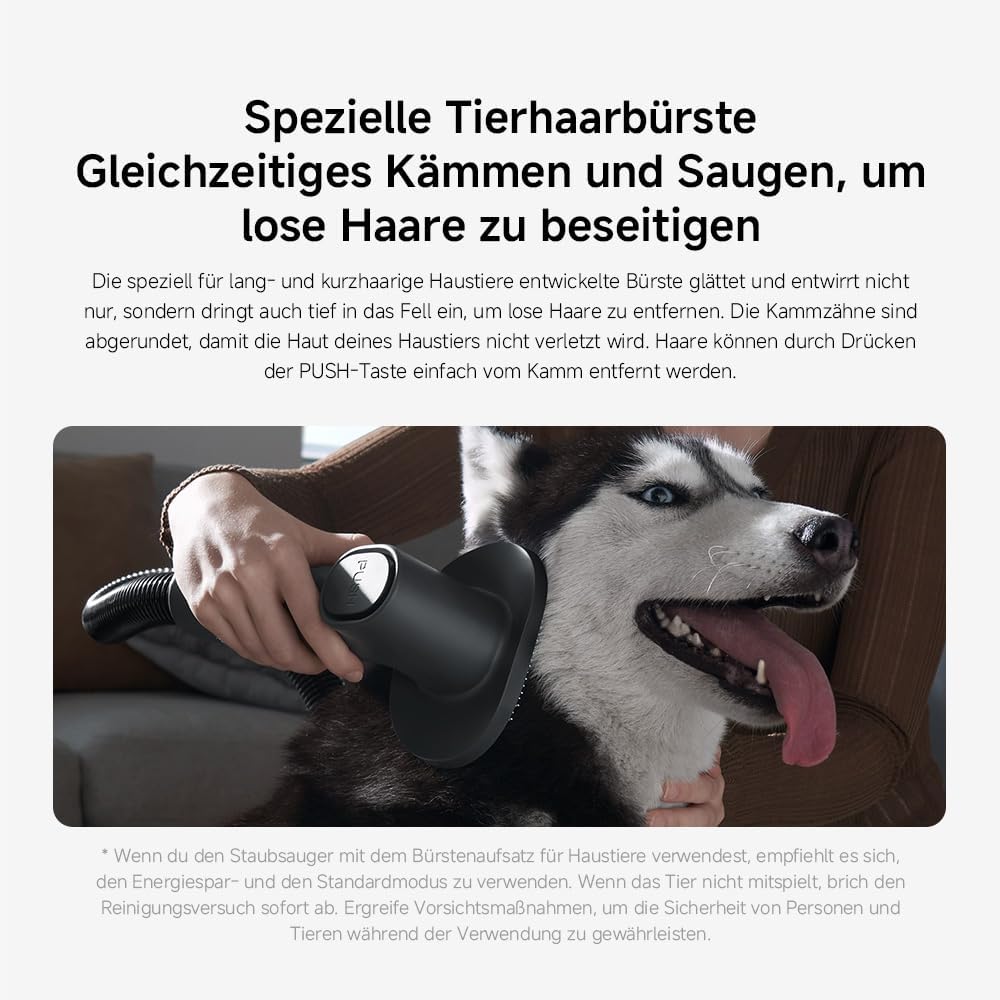
Image: The specialized pet hair brush attachment in use, demonstrating its function for grooming and vacuuming pet fur.

Image: The vacuum cleaner equipped with the extension hose and a crevice tool, reaching a high surface for cleaning.
6. Pangropéa sarta perawatan
Pangropéa rutin ngajamin kinerja anu optimal sareng manjangkeun umur vacuum cleaner anjeun.
6.1 Ngosongkeun tong sampah
The 0.6-liter dustbin should be emptied regularly, especially when the MAX line is reached.
- Pastikeun vakum dipareuman sareng dipegatkeun tina carjer.
- Pencét tombol sékrési tong sampah pikeun ngaleupaskeun tina unit utama.
- Position the dustbin over a waste bin and press the bottom release button to open the flap and empty the contents.
- Tutupkeun panutupna teras pasangkeun deui tempat sampah kana unit utama dugi ka ngaklik pageuh.

Image: A hand demonstrating the process of emptying the vacuum cleaner's dustbin.
6.2 Saringan beberesih
The G20 Max features a 5-stage precision filtration system with washable components, including a HEPA filter. Clean filters regularly to maintain suction power.
- Cabut tong sampah sapertos anu dijelaskeun di luhur.
- Pulas sareng tarik kaluar rakitan saringan tina tong sampah.
- Misahkeun komponén filter individu.
- Rinse all washable filter parts under running water until clean. Do not use detergents.
- Allow all filter components to air dry completely for at least 24 hours before reassembling and placing back into the vacuum. Ensure they are completely dry to prevent mold or damage.

Image: Various washable filter components being cleaned under running water, illustrating the ease of maintenance.
6.3 Ngabersihan Sikat Roll
Periodically check the brush roll for tangled hair or debris. Use scissors to cut away any tangled hair and remove it. The brush roll can often be removed for easier cleaning.
7. Cara ngungkulan
If you encounter issues with your XIAOMI Vacuum Cleaner G20 Max, refer to the following common problems and solutions:
| Masalah | Mungkin Cukang lantaranana | Solusi |
|---|---|---|
| Vakum henteu hurung | Batréna béak Tombol daya teu dipencet leres | Ngecas batré pinuh Pastikeun tombol daya dipencet pageuh |
| Kaleungitan kakuatan nyeuseup | Tong sampah pinuh Saringan mampet Hose or brush head is blocked | Kosongkeun tong sampah Ngabersihan atawa ngaganti saringan Pariksa sareng mupus sumbatan naon waé |
| Batré teu ngecas | Charger teu nyambung leres Faulty adapter or charging dock | Ensure adapter is securely plugged into both the dock and power outlet Kontak rojongan customer lamun masalah persist |
| Sikat gulung teu spinning | Bulu atawa lebu kusut dina sikat Kantétan sirah sikat teu bener disambungkeun | Clean the brush roll, removing any obstructions Pasang deui sirah sikat sacara aman |
If the problem persists after attempting these solutions, please contact XIAOMI customer support for further assistance.
8. Spésifikasi produk
| Fitur | Rincian |
|---|---|
| merek | XIAOMI |
| Nomer modél | Xiaomi Vacuum Cleaner G20 Max EU 57805 |
| Warna | Titanium Gray |
| Dimensi produk | 12.4 x 22.6 x 34 cm |
| Item Beurat | 3.7 kg |
| Kapasitas | 0.6 ltr |
| Daya / Wattage | 450 watt |
| Jumlah Speeds | 3 |
| Tingkat Noise | 72 desibel |
| Runtime | Up to 1 hour (in Eco mode) |
| Fitur husus | Bagless, Cordless, HEPA, Lightweight, Spotless Cleaning |
| Jenis Filter | Saringan HEPA |
| Komponén Kaasup | Accessory Kit, Adapter, Charging Dock, Crevice Tool, Dusting Brush |
| Dupi Tanpa kabel? | Sumuhun |
9. Garansi sarta Rojongan Palanggan
Your XIAOMI Vacuum Cleaner G20 Max is covered by a manufacturer's warranty. Please refer to the warranty card included in your product packaging for specific terms and conditions, including the warranty period and coverage details.
For technical support, service, or warranty claims, please contact XIAOMI customer service through their official website or the contact information provided in your product documentation. When contacting support, please have your model number (BHR8828EU) and purchase date ready.
You can find more information and support resources on the official XIAOMI websitus: www.mi.com/global/support


