1. Bubuka
Thank you for choosing the Mesqool CR1025 Clock Radio. This device combines an alarm clock, Bluetooth speaker, FM radio, night light, and phone charger into one compact unit. This manual provides detailed instructions for setup, operation, and maintenance to ensure optimal performance and user experience.

Figure 1: Mesqool CR1025 Clock Radio
2. Produk Langkungview
2.1 Fitur konci
- Desain multifungsi: Alarm Clock, Bluetooth Speaker, FM Radio, Night Light, and Phone Charger.
- Bluetooth 5.0: For stable and quick wireless audio streaming.
- Radio FM: 87.5MHz-108.0MHz frequency range with 20 preset stations.
- Kacaangan adjustable: 5 levels for the LED display.
- Volume saluyukeun: 16 levels (45dB to 116dB).
- Timer Saré: Allows automatic shutdown of audio playback.
- Fungsi Tungkul 9-minute delay for alarms.
- Cadangan batré: Nyimpen setélan waktos sareng alarm nalika mareuman dayatages.
- Dual USB Port Ngecas: Type-C and USB-A for device charging.
- Format waktos: 12-hour and 24-hour display options.
- Daylight Saving Time (DST): Quick adjustment feature.

Gambar 2: Fungsi 5-in-1
2.2 Eusi pakét
- Mesqool CR1025 Clock Radio
- Adaptor kakuatan
- Kabel USB
- CR2032 Lithium Battery (pre-installed or separate for backup)
- Manual pangguna (dokumén ieu)

Gambar 3: Eusi pakét
3. Kadali jeung tampilan
Familiarize yourself with the buttons and ports on your Mesqool CR1025 Clock Radio.
3.1 Kadali Panel Top
- Sleep Timer Knob: Rotate to set sleep timer duration. Press to confirm.
- Tombol Alarm: Press to set or activate/deactivate alarms.
- Time/12/24 Button: Press to set time. Hold to switch between 12/24-hour format.
- Dimmer/DST Button: Press to adjust display brightness. Hold to activate/deactivate Daylight Saving Time.
- Tombol SNOOZE/LAMPU: Press to snooze alarm or turn night light on/off.
- Preset/Pair Button: Press to cycle through FM presets. Hold to enter Bluetooth pairing mode.
- Play/Mode Button: Press to play/pause in Bluetooth mode. Hold to switch between FM/Bluetooth modes.
- Power/Scan Knob: Rotate to adjust volume. Press to power on/off. Hold to auto-scan FM stations.
3.2 palabuhan Panel pungkur
- DC IN: Port input kakuatan.
- Kaluaran USB-A: Pikeun ngecas alat éksternal.
- Kaluaran Tipe-C: Pikeun ngecas alat éksternal.
4. Setélan
4.1 Sambungan Daya
- Connect the power adapter to the DC IN port on the back of the clock radio.
- Colokkeun adaptor kakuatan kana stop kontak témbok standar. Pintonan bakal hurung.

angka 4: Sambungan kakuatan
4.2 Cadangan Batré
The CR2032 battery provides backup for time and alarm settings during a power outage. The display will not show time, and alarms will not sound until power is restored.
- Ensure the battery insulator tab is removed if the battery was pre-installed.
- If replacing, open the battery compartment on the bottom and insert a new CR2032 battery with the correct polarity.
4.3 Nyetél Waktos
- Pencét jeung tahan tombol Time/12/24 tombol nepi ka angka jam flash.
- Puterkeun Daya / Scan kenop pikeun nyaluyukeun jam.
- Pencét éta Time/12/24 button again to confirm the hour, and the minute digits will flash.
- Puterkeun Daya / Scan kenop pikeun nyaluyukeun menit.
- Pencét éta Time/12/24 button to save the time setting.
4.4 12/24-Format Jam
To switch between 12-hour and 24-hour time formats, press the Time/12/24 button briefly while the time is displayed.

Figure 5: 12H/24H and DST Display
4.5 Daylight Saving Time (DST)
To activate or deactivate DST, press and hold the Dimmer / DST button. The 'DST' indicator will appear or disappear on the display.
5. Parentah Operasi
5.1 Nyetél Alarm
- Pencét jeung tahan tombol Alarem tombol nepi ka jam alarm hurung hurup.
- Puterkeun Daya / Scan kenop pikeun nyaluyukeun jam alarm.
- Pencét éta Alarem button again to confirm the hour, and the minute digits will flash.
- Puterkeun Daya / Scan kenop pikeun nyaluyukeun menit alarm.
- Pencét éta Alarem tombol pikeun ngahémat waktos alarm.
- Pikeun ngaktipkeun/nganonaktipkeun alarm, pencét tombol Alarem tombol sakeudeung. Ikon alarm bakal muncul/ngaleungit dina tampilan.
5.2 Fungsi Tunda
Nalika alarm disada, pencét éta SNOOZE / CAHAYA button to activate the 9-minute snooze function. The alarm will sound again after 9 minutes. This can be repeated up to 9 times. To stop the alarm completely, press the Alarem kancing.

Figure 6: Snooze Function
5.3 Operasi Radio FM
- Pencét éta Play/Mode tombol pikeun pindah ka modeu Radio FM.
- Scan otomatis: Pencét jeung tahan tombol Daya / Scan knob to automatically scan and save available FM stations (up to 20 presets).
- Tuning Manual: Briefly rotate the Daya / Scan kenop pikeun nyetel frékuénsi.
- Pilih Preset: Pencét éta Prasetél/Pasangan tombol pikeun ngagulung dina stasiun anu disimpen.
- Penyesuaian volume: Puterkeun Daya / Scan knob to adjust the volume (16 levels).

Gambar 7: Fitur Radio FM
5.4 Operasi Spiker Bluetooth
- Pencét éta Play/Mode button to switch to Bluetooth mode. The 'BT' icon will flash on the display.
- On your mobile device, enable Bluetooth and search for 'CR1025'.
- Select 'CR1025' to pair. Once connected, the 'BT' icon will stop flashing.
- Play audio from your device. Use the Play/Mode tombol pikeun maén / reureuhan.
- Penyesuaian volume: Puterkeun Daya / Scan tombol pikeun ngatur polumeu.

Gambar 8: Bluetooth 5.0 Konektipitas
5.5 Night Light Operation
Pencét éta SNOOZE / CAHAYA button to turn the night light on or off. The night light provides a soft, warm glow.

Figure 9: Warm Night Light
5.6 adjustment kacaangan tampilan
Pencét éta Dimmer / DST button repeatedly to cycle through 5 levels of display brightness, from off to brightest.
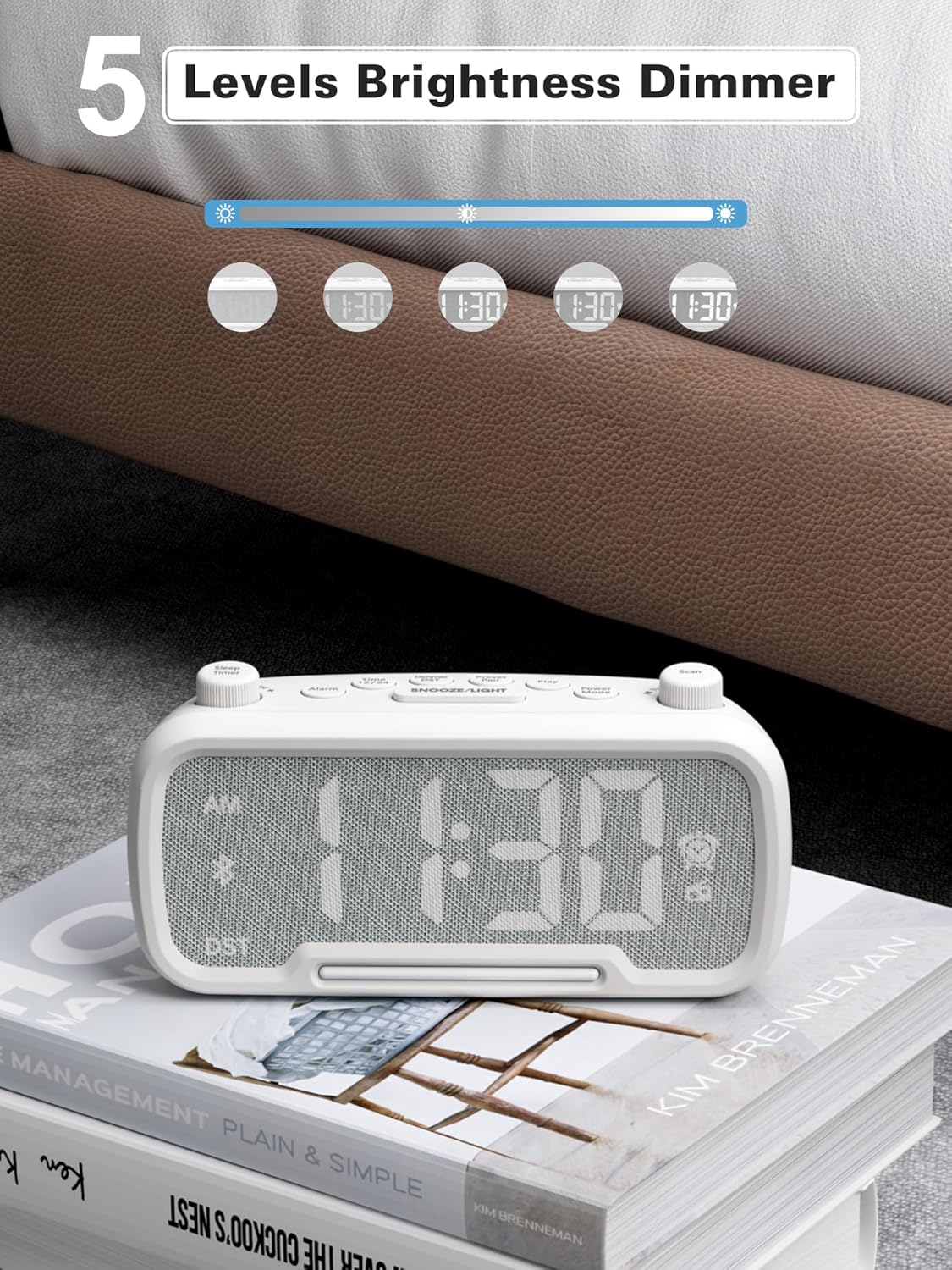
Figure 10: 5 Levels Brightness Dimmer
5.7 Timer Saré
The sleep timer allows you to set a duration after which the radio or Bluetooth audio will automatically turn off.
- While playing FM radio or Bluetooth audio, rotate the Timer Saré knob to select the desired sleep duration (e.g., 15, 30, 60, 90 minutes).
- The display will show the remaining sleep time. The audio will turn off automatically when the timer expires.
5.8 Telepon Ngecas
The clock radio features two USB charging ports (Type-C and USB-A) for convenient charging of your mobile devices.
- Connect your device's charging cable to either the USB-A or Type-C port on the back of the clock radio.
- Connect the other end of the cable to your mobile device. Charging will begin automatically.

Figure 11: Dual USB Charging Ports
6. Pangropéa
- Bersihkeun unitna nganggo lawon anu lemes sareng garing. Entong nganggo pembersih atanapi pelarut anu abrasif.
- Jauhkeun unit tina sinar panonpoé langsung, sumber panas, sareng kalembaban.
- Pastikeun ventilasi anu leres di sabudeureun unit.
- Upami unit henteu tiasa dianggo kanggo waktos anu panjang, cabut colokan tina stopkontak.
7. Cara ngungkulan
| Masalah | Mungkin Cukang lantaranana | Solusi |
|---|---|---|
| Henteu aya kakuatan / tampilan pareum | Adaptor listrik teu nyambung atanapi lepat. | Ensure power adapter is securely plugged into the unit and wall outlet. Check outlet functionality. |
| Alarm teu disada | Alarm teu diaktipkeun atanapi teu leres disetel. | Verify alarm time is set and the alarm icon is visible on the display. Check alarm volume. |
| panarimaan radio FM goréng | Sinyal lemah atanapi gangguan. | Adjust the unit's position. Try auto-scanning again. |
| Bluetooth teu dipasangkeun | Alat henteu dina mode papasangan atanapi jauh teuing. | Ensure the clock radio is in Bluetooth mode (BT icon flashing). Move device closer. Forget device on phone and re-pair. |
| USB ngecas teu jalan | Cable faulty or device incompatible. | Try a different USB cable. Ensure the clock radio is powered on. |
8. Spésifikasi
- model: CR1025
- Input kakuatan: AC 100-240V, 50/60Hz
- Cadangan batré: 1 x CR2032 (kaasup)
- Frékuénsi FM: 87.5 - 108.0 MHz
- Vérsi Bluetooth: 5.0
- Kaluaran USB: USB-A, Type-C (Charging only)
- Kacaangan tampilan: 5 tingkat
- Tingkat volume: 16 tingkat (45dB - 116dB)
- ukuran: 5.9 x 3.81 x 8.4 cm (2.32 x 1.5 x 3.31 inci)
- beurat: 216 g (0.48 lbs)
Gambar 12: Dimensi Produk
9. Garansi jeung Rojongan
Mesqool products are designed and manufactured to the highest quality standards. For warranty information, technical support, or customer service inquiries, please refer to the contact information provided on the product packaging or visit the official Mesqool websitus.
Websitus: Mesqool Official Store


