1. Produk Langkungview
The Ulefone Armor 27T is a rugged smartphone designed for durability and advanced functionality, featuring thermal imaging, a high-resolution camera system, and a robust battery. This manual provides essential information for setting up, operating, maintaining, and troubleshooting your device.
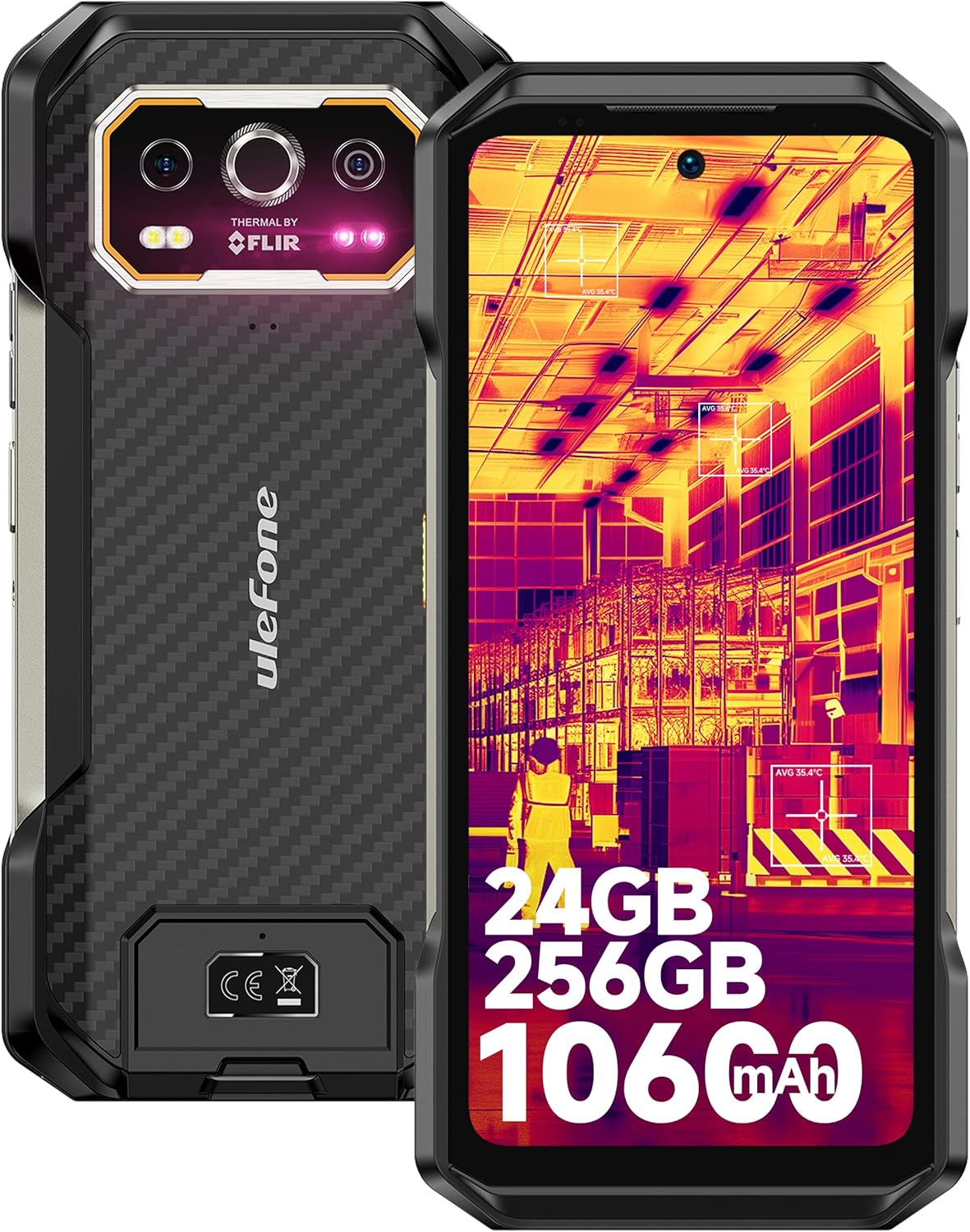
Gambar 1.1: Hareup jeung tukang view of the Ulefone Armor 27T, showcasing its rugged design and thermal camera module.
2. Eusi Paket
Pastikeun yén sadaya item aya dina pakét produk anjeun:
- Ulefone Armor 27T Smartphone
- AC power charger (33W)
- Kabel Data Tipe-C ka Tipe-C (100cm)
- Pelindung layar (diterapkeun atanapi dina kotak)
- SIM Dulang Ejector
- Lanyard
- Manual pangguna (dokumén ieu)

Image 2.1: The Ulefone Armor 27T and its included accessories.
3. Setup Guide
3.1. Kartu SIM sareng Pamasangan Kartu TF
- Tangtukeun lokasi baki kartu SIM di sisi alat.
- Selapkeun alat ejector baki SIM kana liang leutik gigireun baki terus pencét pageuh nepi baki pops kaluar.
- Place your Nano-SIM card(s) and/or TF card into the designated slots on the tray. Ensure the gold contacts face downwards. The device supports a 3-card slot configuration.
- Taliti selapkeun deui baki kana telepon nepi ka siram jeung awak alat.
3.2. Ngecas Awal
Before first use, fully charge your Ulefone Armor 27T.
- Sambungkeun kabel Tipe-C kana port ngecas di handapeun telepon.
- Connect the other end of the cable to the 33W AC power charger.
- Colokkeun carjer kana stop kontak. Indikator ngecas bakal némbongan dina layar.
- For wireless charging, place the phone on a compatible 30W Qi wireless charging pad (sold separately).

Image 3.1: The Ulefone Armor 27T undergoing 33W fast charging.
3.3. Powering on / Pareum
- Pikeun Ngahurungkeun: Pencét terus tahan tombol Daya (anu aya di sisi katuhu) dugi ka logo Ulefone némbongan.
- Pikeun mareuman: Pencét jeung tahan tombol Daya, teras pilih 'Pareuman' tina pilihan dina layar.
- Pikeun ngamimitian deui: Pencét jeung tahan tombol Daya, teras pilih 'Balikan deui' tina pilihan.
4. Parentah Operasi
4.1. Napigasi Dasar
The Ulefone Armor 27T runs on Android 14. Navigate the interface using touch gestures:
- Ketok: Pilih hiji item.
- Gesek: Gulung ngaliwatan layar atawa daptar.
- Ciwit: Ngazum gede atawa leutik dina gambar na web kaca.
- Pencét Panjang: Aksés ménu kontekstual atanapi pindahkeun ikon.

Image 4.1: Android 14 OS interface examples.
4.2. Thermal Imaging Camera (FLIR Lepton)
The integrated FLIR Lepton thermal micro-camera allows you to detect infrared light and visualize heat signatures. This is useful for various applications such as:
- Detecting heat loss in buildings.
- Identifying electrical issues.
- Locating objects in low visibility conditions (darkness, smoke).
- Monitoring temperature changes in mechanical systems.
The camera features MSX and VividlR image processing for enhanced clarity. Temperature measurement range is -10°C to 450°C.

Image 4.2: Key technologies in the thermal camera, including FLIR Lepton.

Gambar 4.3: Examples of thermal camera applications.
4.3. Sistim kaméra
The Armor 27T features a versatile camera setup:
- Kaméra Tukang Utama 50MP: Equipped with a Samsung ISOCELL GN1 sensor (1/1.31" ultra-large, 1.2um pixel size, F/1.65 aperture) for high-quality photos.
- Kaméra Visi Peuting 64MP: OMNIVISION'S OV64B sensor with two infrared LEDs and upgraded Ulefone NightElf Ultra 3.0 algorithm for clear images in complete darkness.
- Kaméra hareup 32MP: Samsung GD1 Sensor with a 5P lens and 80.4° field of view pikeun selfies jeung nelepon video.

Image 4.4: Using the 64MP Night Vision Camera.
4.4. Panyambung ékspansi uSmart
The custom uSmart Expansion Connector allows for integration with professional accessories (sold separately), such as endoscopes, microscopes, or external night vision cameras, extending the phone's utility.

Image 4.5: uSmart Expansion Connector and compatible accessories.
4.5. Fitur séjén
- NFC: Pikeun pamayaran tanpa kontak sareng transfer data.
- Konci custom: A programmable button for quick access to specific functions or apps.
- IR Blaster: Kontrol alat infra red anu cocog.
- Radio FM Tanpa Headset: Listen to FM radio without needing headphones as an antenna.
- Kotak Pakakas Luar Ruangan: A suite of utility apps for outdoor activities.
- GPS + GLONASS + Beidou + Galileo: Multiple navigation systems for accurate positioning.
- Fingerprint Unlock & Face Unlock: Biometric security options.

Gambar 4.6: Leuwihview of additional features.
5. Pangropéa
5.1. Ngabersihan Alat Anjeun
Pikeun ngajaga kinerja optimal sareng penampilan:
- Ngusap layar sareng awak nganggo lawon anu lemes sareng teu aya serat.
- Keur kokotor bandel, rada dampen lawon jeung cai atawa cleaner layar.
- Hindarkeun ngagunakeun bahan kimia anu kasar, pembersih abrasive, atanapi hawa anu dikomprés.
- Ensure all port covers are securely closed before cleaning with liquids.
5.2. Kaperawatan batré
The 10600mAh battery is designed for extended use. To prolong its lifespan:
- Avoid exposing the device to extreme temperatures (below -30°C or above 55°C) for prolonged periods.
- Anggo ukur pangecas anu disayogikeun atanapi pangecas anu cocog anu disertipikasi.
- Do not fully discharge the battery regularly; partial discharges are generally better for lithium-ion batteries.
5.3. Cai jeung Lebu Résistansi
The Armor 27T is certified IP68/IP69K and MIL-STD-810H, making it resistant to water, dust, and drops. However, proper care is still necessary:
- Ensure all port covers are tightly sealed before exposing the phone to water or dust.
- Do not intentionally submerge the phone in water beyond the specified depth (1.5m) or duration (30 minutes).
- Bilas telepon ku cai bersih upami kakeunaan cai asin atanapi cairan korosif anu sanés, teras garingkeun dugi ka garing.
- Avoid dropping the phone from excessive heights, as extreme impacts can compromise its seals.

Image 5.1: Ruggedness and environmental resistance features.
6. Cara ngungkulan
If you encounter issues with your Ulefone Armor 27T, try the following steps:
6.1. Masalah umum
- Alat teu hurung: Pastikeun batréna geus dieusian. Sambungkeun ka carjer sahenteuna 10 menit sateuacan nyobian hurungkeun.
- Masalah ngecas: Check the charging cable and adapter for damage. Ensure the charging port is clean and free of debris. Try a different outlet.
- Sinyal jaringan goréng: Pariksa naha kartu SIM anjeun parantos dipasang kalayan leres. Pindah ka daérah anu jangkauan jaringanana langkung saé. Hubungi panyadia layanan anjeun upami masalahna masih aya.
- Aplikasi nabrak atanapi katirisan: Tutup teras buka deui aplikasina. Hapus cache sareng data aplikasi dina Setélan > Aplikasi. Pareuman terus hurungkeun deui telepon.
- Layar rampa teu ngaréspon: Restart the device by holding the power button. If unresponsive, force restart by holding the power button for an extended period (usually 10-15 seconds).
6.2. Factory Reset (Last Resort)
Reset pabrik bakal ngahapus sadaya data tina telepon anjeun sareng mulangkeun kana setélan pabrik aslina. Nyadangkeun sadaya data penting sateuacan neraskeun.
- Pindah ka Setélan.
- Arahkeun ka Sistim > Reset pilihan.
- Pilih Hapus sadaya data (reset pabrik).
- Konfirmasi kaputusan anjeun sarta asupkeun PIN / sandi anjeun lamun dipenta.
7. Spésifikasi
| Fitur | Spésifikasi |
|---|---|
| Ngaran modél | Ulefone Armor 27T |
| Sistem operasi | Android 14 |
| Prosesor | MediaTek Helio G99 (8-Core, up to 2.2 GHz) |
| Ram | 24 GB (12GB fisik + 12GB virtual) |
| Panyimpenan internal | 256 GB |
| Panyimpenan Expandable | Nepi ka 2TB via kartu TF |
| Ukuran tampilan | 6.78 inci |
| Resolusi tampilan | 2460x1080 (FHD+) |
| Refresh Laju | 120 Hz |
| Protéksi tampilan | Corning Gorila Kaca Victus |
| Kaméra Rear Utama | 50 MP |
| Wengi Visi kaméra | 64 MP |
| Kaméra hareup | 32 MP |
| Kaméra termal | FLIR Lepton (80x60 pixels, -10°C to 450°C) |
| Kapasitas batré | 10600 mAh |
| Ngecas kabel | 33W Flash Charge |
| Ngecas nirkabel | 30W Qi Wireless Charging, Wireless Reverse Charging |
| Ratings durability | IP68, IP69K, MIL-STD-810H |
| Konektipitas | 4G LTE, Wi-Fi 6, Bluetooth, NFC, GPS (GLONASS, Beidou, Galileo) |
| Diménsi | 7.19 x 3.4 x 0.73 inci |
| Beurat | 15.6 ons (441 gram) |
| Audio Jack | 3.5 mm |
8. Garansi jeung Rojongan
8.1. Émbaran jaminan
The Ulefone Armor 27T comes with a Layanan garansi produsén 12 bulan in the US. This warranty covers defects in materials and workmanship under normal use. It does not cover damage caused by misuse, accidents, unauthorized modifications, or normal wear and tear.
8.2. Rojongan Palanggan
For any questions, technical assistance, or warranty claims regarding your Ulefone Armor 27T, please contact Ulefone customer support. You can typically find contact information on the official Ulefone websitus atanapi ngalangkungan saluran dukungan anu ngajual.

Image 8.1: Ulefone Exclusive Service Center representation.


