Bubuka
The Hyundai L43HYNDA630 is an advanced 43-inch Full HD Smart LED TV designed to deliver a superior viewing experience. This frameless television integrates excellent features with a sleek aesthetic, operating on the intuitive WebOS 2.0 platform. It provides crisp images with a 1920 x 1080 resolution via an A+ grade panel, boasting a brightness of 300 ± 20 nits and a 60 Hz refresh rate. Equipped with a TPD.SK331.PB801 (75W) mainboard, 1.5 GB RAM, and 8 GB storage, it ensures smooth smart TV functionality. Comprehensive connectivity includes 3 HDMI ports, 2 USB ports, Bluetooth, and screen sharing capabilities. The built-in T2/S2 receiver further enhances its versatility. The TV features a durable metal back cabinet and dual 8W speakers for high-quality audio. It comes with a Magic Remote for convenient control and supports multiple OSD languages including English, Arabic, French, German, Italian, Spanish, and Dutch.
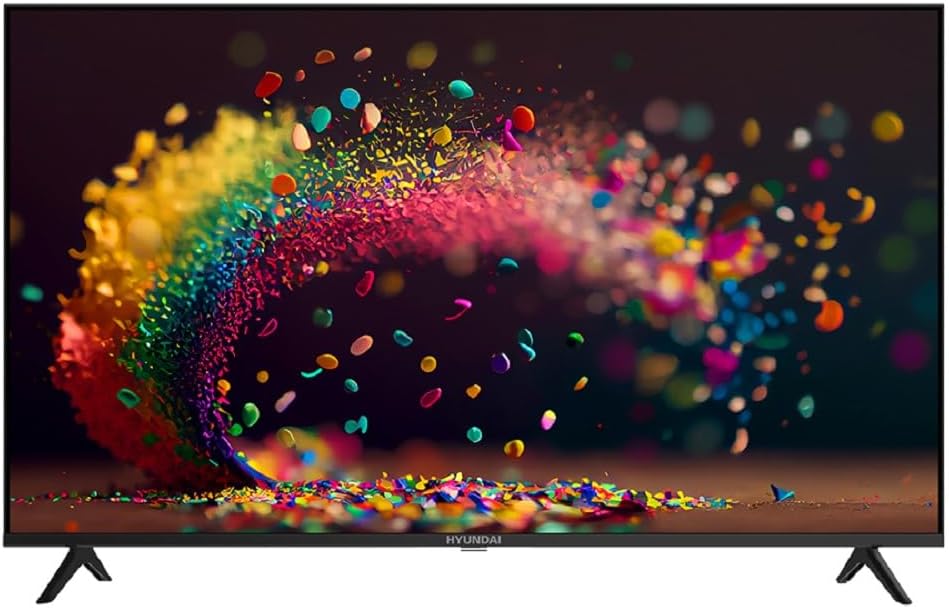
Gambar 1: Hareupeun view of the Hyundai 43-inch Smart LED TV.
Guide Setup
1. Unpacking jeung Inspection
Carefully remove the TV from its packaging. Inspect the TV and all accessories for any signs of damage. Keep the packaging materials for future transport or service needs.
2. Ngalampirkeun Stand
Place the TV screen-down on a soft, flat surface to prevent scratches. Align the stand bases with the corresponding slots on the bottom of the TV. Secure the stands using the provided screws. Ensure they are firmly attached.

Gambar 2: Sisi view illustrating the TV's profile jeung desain nangtung.
3. Nyambungkeun Power
Colokkeun kabel listrik kana input kakuatan TV, teras colokkeun tungtung anu sanésna kana stop kontak témbok. TV bakal asup kana mode standby.
4. Setup Awal
Upon first power-on, the TV will guide you through the initial setup process. This includes selecting your preferred language, connecting to a Wi-Fi network, and scanning for channels using the built-in T2/S2 receiver. Follow the on-screen prompts.
5. Magic Remote Pairing
The included Magic Remote may require pairing. Point the remote at the TV and press the OK button. If pairing fails, try replacing the batteries or moving closer to the TV.
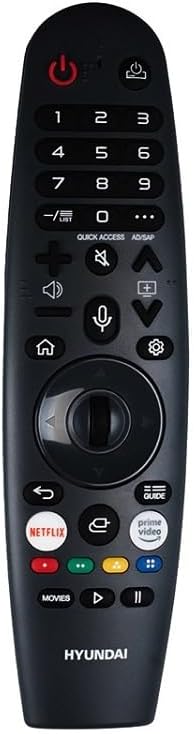
Figure 3: The Hyundai Magic Remote control.
Parentah Operasi
Kadali dasar
- Hurungkeun/Pareuman: Pencét éta Kakuatan tombol dina kadali jauh.
- Penyesuaian volume: Ngagunakeun éta Volume Kaluhur/Turun kancing.
- Pilihan Saluran: Ngagunakeun éta Saluran luhur / handap tombol atawa pad angka.
- Sumber Input: Pencét éta Input button to select between HDMI, USB, and other sources.
Fitur Smart TV (WebOS 2.0)
Your Hyundai Smart TV runs on WebOS 2.0, providing a user-friendly interface for accessing various applications and streaming services. Use the Magic Remote's pointer function to navigate the on-screen menus and select apps.
- Layar Utama: Pencét éta Imah button to access the launcher bar with your favorite apps.
- App Store: Download and install new applications from the integrated app store.
- Bagikeun layar: Utilize the screen sharing feature to mirror content from compatible devices to your TV.
Konektipitas
TV ieu nawiskeun sababaraha pilihan konektivitas:
- Port HDMI: Connect external devices like Blu-ray players, gaming consoles, or set-top boxes to the 3 HDMI ports.
- Port USB: Colokkeun drive USB ka view photos, videos, or listen to music via the 2 USB ports.
- Bluetooth: Pair Bluetooth-enabled devices such as headphones or soundbars for wireless audio.
- Wifi: Sambungkeun ka jaringan asal anjeun pikeun aksés internét sareng fitur TV pinter.

Gambar 4: Handap view displaying the TV's connectivity ports.
OSD Language Selection
To change the On-Screen Display (OSD) language, navigate to the TV's settings menu. Select 'General' or 'Language' and choose your preferred language from the available options (English, Arabic, French, German, Italian, Spanish, Dutch).
Pangropéa
Ngabersihan Layar
To clean the screen, first turn off the TV and unplug it from the power outlet. Use a soft, lint-free cloth, slightly dampened with water or a specialized screen cleaner. Do not spray liquid directly onto the screen. Avoid using abrasive cleaners, alcohol, or benzene, as these can damage the screen surface.
Ngabersihan Awak TV
For the TV's body, use a soft, dry cloth to wipe away dust. For stubborn marks, a slightly damp cloth can be used. Ensure no liquid enters the ventilation openings or ports.
Software Apdet
Periodically check for software updates through the TV's settings menu. Keeping your TV's software updated ensures optimal performance and access to the latest features and security enhancements.
Pamérésan masalah
Upami anjeun ngalaman masalah sareng TV anjeun, tingali masalah sareng solusi umum di handap ieu sateuacan ngahubungi dukungan palanggan.
| Masalah | Solusi anu mungkin |
|---|---|
| TV teu hurung. | Pastikeun kabel listrik dicolokkeun sacara aman kana TV sareng stop kontak témbok anu tiasa dianggo. Coba outlet béda. |
| Taya gambar atawa sora. | Pariksa yén sumber input anu leres parantos dipilih. Pariksa sadaya sambungan kabel (HDMI, anteneu, jsb.) aman. |
| Kadali jauh teu jalan. | Check and replace the batteries. Ensure there are no obstructions between the remote and the TV. Re-pair the Magic Remote if necessary. |
| Teu bisa nyambung ka Wi-Fi. | Pastikeun router Wi-Fi anjeun hurung sareng tiasa dianggo. Lebetkeun deui kecap akses Wi-Fi. Cobi hurungkeun deui TV sareng router. |
| Kualitas gambarna goréng. | Check the signal strength for broadcast channels. For external devices, ensure high-quality cables are used and the device output resolution matches the TV's capabilities. |
spésifikasi
| Fitur | Rincian |
|---|---|
| merek | Hyundai |
| Nomer modél | L43HYNDA630 |
| Ukuran layar | 43 inci |
| Téknologi tampilan | LED |
| Resolusi | HD lengkep (1920 x 1080 piksel) |
| Refresh Laju | 60 Hz |
| Sistem operasi | WebOS 2.0 |
| Ram | 1.5 GB |
| Panyimpenan | 8 GB |
| Caang | 300 ± 20 nits |
| Konektipitas | Wi-Fi, Bluetooth, 3 x HDMI, 2 x USB |
| Diwangun-di panarima | T2/S2 Digital Wireless Frequency |
| Kaluaran Audio | Speaker Dual 8W |
| Fitur husus | Frameless Design, A+ Panel, Magic Remote |
| Ukuran produk (D x W x H) | 8.6 x 95.6 x 56 cm |
| Beurat produk | 7.4 kg |
| Komponén Kaasup | Remote Control, Nangtung |
| Negara asal | Mesir |
Émbaran jaminan
Your Hyundai L43HYNDA630 Smart LED TV comes with a standard manufacturer's warranty. Please refer to the warranty card included in your product packaging for specific terms, conditions, and duration. Keep your proof of purchase for any warranty claims.
Pilihan garansi anu diperpanjang tiasa sayogi ti panyadia pihak katilu. Salaku contoample, extended warranty plans for 1 or 2 years are offered by Boxy. Please check with your retailer or the warranty provider for details on coverage and purchase.
Rojongan Palanggan
For technical assistance, service, or further inquiries regarding your Hyundai Smart LED TV, please contact Hyundai customer support. Refer to the contact information provided in your product documentation or visit the official Hyundai websitus pikeun wewengkon Anjeun.
When contacting support, please have your TV's model number (L43HYNDA630) and serial number ready. This will help the support team assist you more efficiently.


