1. Bubuka jeung Leuwihview
The 70mai Dash Cam A510+ is a high-performance front and rear dual-camera system designed to enhance driving safety and provide comprehensive surveillance. It captures video in Ultra HD 1944P (front) and 1080P (rear) resolution, ensuring clear visuals and detailed recordings. Equipped with advanced features such as STARVIS 2 IMX675 sensor, HDR technology, G-Sensor, and LTE support (with optional hardwire kit), the A510+ offers superior performance in various driving conditions, including low-light environments and during parking.
This manual provides essential information for setting up, operating, and maintaining your 70mai Dash Cam A510+ to ensure optimal functionality and longevity.
2. Naon dina Box
- 70mai Dash Cam A510+ (Front Camera Unit)
- Rear Camera Unit
- 64GB Micro SD Card
- Power Cable (USB-A to USB-C)
- Car Charger (Dual USB-A ports)
- Bracket dipasang pikeun Kaméra hareup
- Static Stickers for Windshield (for easy removal of mount)
- Adhesive Pads (extra for repositioning)
- Kabel Routing Alat
- User Manuals (Front and Rear Camera)
- Optional: 70mai 4G Hardwire Kit UP05 (sold separately, required for 24H Parking Monitor and LTE features)

Image: The 70mai Dash Cam A510+ front unit and the rear camera unit, along with included accessories like cables, charger, and mounting hardware.
3. Setup jeung Instalasi
3.1 Masang Kaméra Hareup
- Bersihkeun bagian kaca hareup tempat dasbor bakal dipasang.
- Apply a static sticker to the cleaned area. This allows for easy removal and repositioning without leaving adhesive residue.
- Attach the mounting bracket with an adhesive pad to the static sticker.
- Slide the 70mai Dash Cam A510+ onto the mounting bracket until it clicks securely.
- Adjust the camera lens angle to ensure optimal road coverage. The lens is rotatable for precise positioning.
3.2 Masang Kaméra Tukang
- Bersihkeun bagian kaca hareup tukang.
- Apply a static sticker to the cleaned area.
- Attach the rear camera with an adhesive pad to the static sticker.
- Connect the rear camera to the front camera unit using the provided long cable.
3.3 Sambungan Daya
There are two primary methods for powering your 70mai Dash Cam A510+:
- Standard Power (Cigarette Lighter Adapter): Connect the USB-A to USB-C power cable to the dash cam and plug the USB-A end into the provided car charger. Insert the car charger into your vehicle's cigarette lighter socket. The dash cam will power on/off with your vehicle's ignition.
- Hardwire Kit (Optional for 24H Parking Monitor & LTE): For continuous power and advanced parking surveillance features, install the 70mai 4G Hardwire Kit UP05 (sold separately). This kit connects directly to your vehicle's fuse box, providing constant power even when the ignition is off. Professional installation is recommended for hardwire kits.
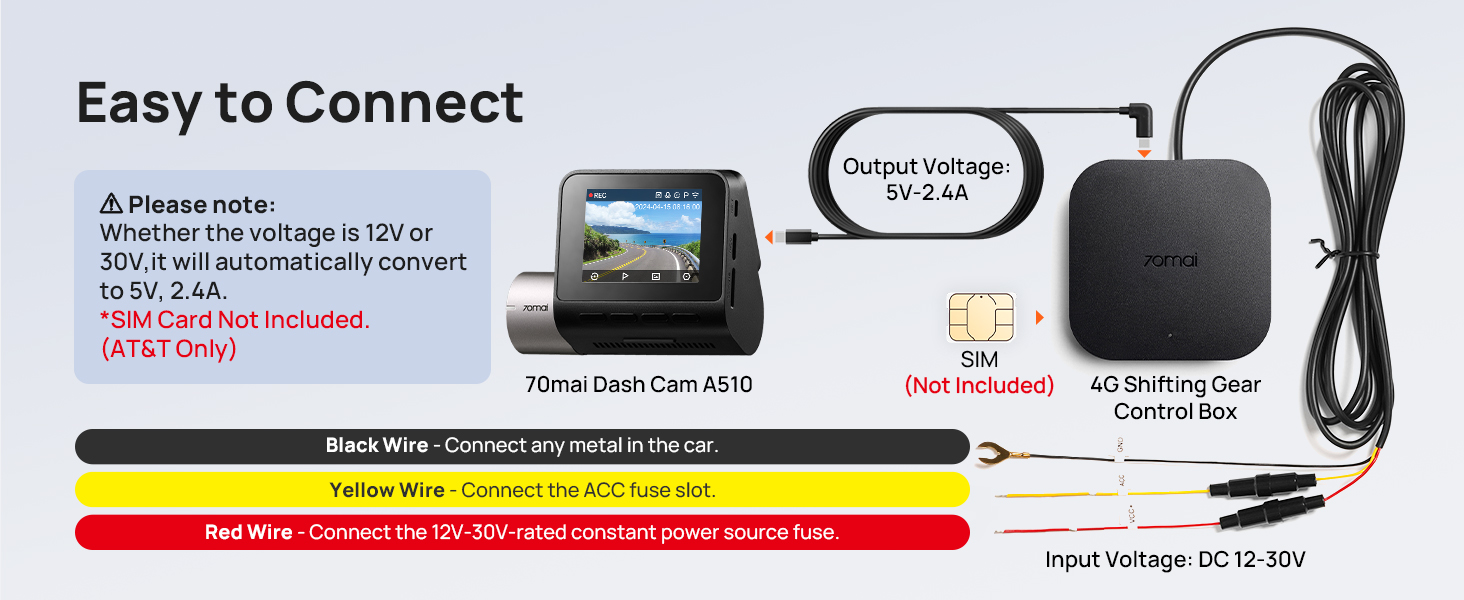
Image: Diagram illustrating how to connect the 70mai Dash Cam A510+ to the 4G Hardwire Kit UP05, showing connections for black (ground), yellow (ACC fuse), and red (12V-30V constant power) wires.
3.4 SD Card Insertion and Formatting
- Insert the provided 64GB Micro SD card into the designated slot on the side of the front camera unit.
- Upon first use, the dash cam will prompt you to format the SD card. Follow the on-screen instructions to format the card. This ensures proper functionality and prepares the card for recording.
Video: A detailed guide on the installation process of the 70mai A510 dash cam, including mounting and wiring.
4. Parentah Operasi
4.1 Daya Hurung/Pareuman
- The dash cam automatically powers on when your vehicle's ignition is turned on (standard power) or when connected via the hardwire kit.
- To manually power on/off, press and hold the power button located on the side of the front camera unit for a few seconds.
4.2 Napigasi Menu jeung Setélan
- Use the buttons below the screen to navigate through the menu options.
- The screen displays various settings such as video resolution, recording duration, parking surveillance mode, sound settings, and app download options.
- Select your preferred language (English, Russian, Japanese, etc.) during initial setup.
4.3 Modeu ngarékam
- Ngarekam Loop Kontinyu: The dash cam continuously records video in segments (e.g., 1, 2, or 3 minutes). When the SD card is full, it automatically overwrites the oldest footage.
- Rekaman Darurat: Activated by the built-in G-sensor upon detecting a sudden collision or vibration. Emergency footage is locked and saved to a separate folder, preventing it from being overwritten. You can also manually trigger emergency recording by pressing the designated button.
- Ngarekam Selang Waktu: (Requires Hardwire Kit UP05) Compresses long periods of footage into short videos, ideal for monitoring parked vehicles over extended periods.
4.4 Kaméra View Ngalihkeun
While recording, you can switch between different camera views on the screen:
- Press the rotation button to cycle through views: Front Camera only, Rear Camera only, or Both Cameras simultaneously (picture-in-picture).
Video: A hands-on overview of the 70mai A510 dash cam, demonstrating its features and user interface.
5. Fitur konci
5.1 Dual Camera Recording (1944P+1080P)
The A510+ captures the road ahead in Ultra HD 1944P (2592x1944) with a 140° field of view and the rear in 1080P (1920x1080) with a 130° field of view. This dual-channel recording provides comprehensive coverage, reducing blind spots and capturing critical details from both directions.
Image: Illustration of the 70mai Dash Cam A510+ dual camera system, showing 1944P front and 1080P rear recording with 140° and 130° fields of view masing-masing.
5.2 Super Night Vision with STARVIS 2 IMX675 & HDR
Equipped with the advanced STARVIS 2 IMX675 sensor, a large F1.8 aperture, six-layer optical lens, and HDR technology, the A510+ excels in low-light conditions. It captures clear and detailed footage of license plates, pedestrians, and signs, ensuring enhanced safety during night driving.

Image: Visual comparison of HDR ON vs. HDR OFF, highlighting enhanced details and balanced highlights/shadows with Sony IMX675 sensor and 1944P HDR.

Image: Depiction of the dash cam's Super Night Vision capabilities, showcasing clear footage in low-light environments thanks to Sony STARVIS 2, HDR, 6-layer lens, and f/1.8 aperture.
5.3 G-Sensor & Emergency Recording
The built-in G-sensor automatically detects sudden shakes or collisions and triggers emergency recording. These crucial video segments are locked and stored separately to prevent overwriting, providing vital evidence in case of an incident.
6. Kontrol Aplikasi sareng Konéktipitas
The 70mai Dash Cam A510+ offers seamless connectivity with your smartphone via the 70mai app, providing convenient control and access to your recordings.
6.1 Connecting to the 70mai App
- Download the 70mai app from your smartphone's app store.
- Hurungkeun kaméra dasbor.
- Open the 70mai app and follow the on-screen instructions to add a new device. The app will scan for nearby dash cams.
- Connect your smartphone to the dash cam's Wi-Fi hotspot as prompted by the app.
6.2 Fitur Aplikasi
- Pangimeutan sacara real-time: View hirup footage from your dash cam directly on your smartphone.
- Footage Playback & Download: Access and play back recorded videos. Download important clips directly to your phone's gallery.
- Penyesuaian Setélan: Easily modify dash cam settings such as video resolution, recording duration, G-sensor sensitivity, and parking surveillance options.
- Instant App Alerts: Receive notifications on your phone if unusual activity or collisions are detected while your car is parked (requires Hardwire Kit UP05).
- Vehicle Location & Tracking: Track your vehicle's real-time location and route history (requires Hardwire Kit UP05).

Image: Illustration of the 70mai Dash Cam A510+ with built-in 4G remote interconnection, showing remote live view, recording & snapshot, settings adjustment, and cloud storage features for both traveling and stopped vehicles.

Image: A smartphone displaying real-time footage from the 70mai Dash Cam A510+, allowing users to check vehicle conditions remotely.

Image: A smartphone showing an instant app alert from the 70mai Dash Cam A510+ indicating suspicious persons detected around the vehicle.

Image: A smartphone displaying the 70mai app's vehicle location and tracking feature, showing the car's real-time position, distance traveled, and average speed.

Image: A hand holding a smartphone displaying the 70mai app's vehicle location feature in a parking lot, emphasizing easy vehicle retrieval.
7. Parking Surveillance and Security
The 70mai Dash Cam A510+ provides robust parking surveillance features to protect your vehicle 24/7. These features require the optional 70mai 4G Hardwire Kit UP05 (ASIN: B0DDT9HMYJ) for continuous power.
7.1 Monitor Parkir 24 Jam
- When your vehicle is stationary, the built-in G-sensor detects sudden vibrations or collisions and automatically initiates recording.
- Recorded parking videos can be manually uploaded to the cloud remotely for viewing, offering real-time surveillance.

Image: A car with a shield icon indicating 24 hours of smart parking surveillance, highlighting the system's ability to keep the vehicle safe day and night.

Image: Features of the 24H Parking Monitor, including remote monitoring, time-lapse recording, and G-sensor functionality, ensuring around-the-clock security.
7.2 Rekaman Selang Waktu
Compresses every 15 minutes of footage into 1 minute, utilizing a 7*24 hours low power consumption mode (1 frame per second). This saves memory card space and allows for faster playback, making it easier to review noteworthy events.
7.3 Intelligent Battery Voltage Ngawaskeun
The Hardwire Kit UP05 continuously tracks your car's voltage in real-time, automatically protecting against over-discharge. It logs critical events like engine starts and dash cam shutdowns for reliable parking surveillance.

Image: A smartphone displaying a graph of vehicle battery voltage monitoring, showing continuous tracking and protection against over-discharge.
7.4 ACC Smart Detection
ACC intelligently recognizes the car's driving status, ensuring that traffic light waits and temporary stops are recorded uninterruptedly, reducing the risk of dash cam misjudgments.

Image: A white SUV with a digital display showing "Status: In Driving...", illustrating the ACC Smart Detection feature that recognizes driving status.
7.5 Lemah Voltage panyalindungan
The Hardwire Kit UP05 features an intelligent low-voltage protection system. When the battery voltage reaches a set protection voltage value (default low-voltage protection), it automatically turns off the dash cam to prevent the vehicle battery from being drained. Selectable protection voltage levels are available.

Image: A car with a battery icon and a diagram of the 70mai Hardwire Kit UP05, illustrating the low voltage protection system with selectable voltage levels to prevent battery drain.
Video: An official 70mai video demonstrating the installation process of the 4G Hardwire Kit UP05.
8. Pangropéa
- beberesih: Regularly clean the camera lenses with a soft, dry cloth to ensure clear recordings. Avoid using abrasive cleaners.
- Manajemén Kartu SD: Periodically format the Micro SD card (at least once a month) to maintain optimal performance and prevent data corruption. Back up important footage saméméh pormat.
- Pembaruan firmware: Check the 70mai app regularly for firmware updates. Keeping your dash cam's firmware up-to-date ensures access to the latest features and performance improvements.
9. Cara ngungkulan
- Dash Cam Henteu Diaktipkeun: Ensure the power cable is securely connected to both the dash cam and the power source. Check the vehicle's cigarette lighter socket or fuse connection if using the hardwire kit.
- Masalah Rekaman: Verify that the Micro SD card is inserted correctly and formatted. If issues persist, try a different compatible SD card.
- Kualitas pidéo goréng: Clean the camera lenses. Ensure the dash cam is securely mounted and not vibrating. Check video resolution settings in the app.
- Masalah Konektipitas Aplikasi: Ensure the dash cam's Wi-Fi hotspot is enabled and your phone is connected to it. Restart both the dash cam and your phone.
- Sensitipitas G-Sensor: If emergency recordings are triggered too frequently or not at all, adjust the G-sensor sensitivity settings in the 70mai app.
10. Spésifikasi
- Ngaran modél: A510
- Front Camera Video Resolution: 1944p (2592x1944)
- Rear Camera Video Resolution: 1080p (1920x1080)
- Widang Kaméra Hareup tina View: 140°
- Widang Kaméra Tukang View: 130°
- Sénsor Gambar: STARVIS 2 IMX675
- Aperture: F1.8
- Fitur husus: HDR, G-Sensor, Parking Monitor, Loop Recording, App Control, LTE Support (with UP05)
- Téknologi konektipitas: 4G LTE (with UP05), Wireless (Wi-Fi for app)
- Tipe Pamasangan: Windshield Mount / Dashboard Mount
- warna: Hideung
11. Garansi jeung Rojongan
- Garansi: 18 Bulan
- Rojongan Palanggan: 24 Jam
- Kabijakan pamulangan: 30 poé
- Email Kontak: pitulung@70mai.com
- Telepon Kontak: 1-877-746-6088 (Mon-Fri 9am-6pm PST)


