1. Bubuka
The Cleer ARC Open Ear Headphones are designed to provide a unique audio experience that allows you to enjoy your music while remaining aware of your surroundings. Featuring an open-ear design, comfortable fit, and dynamic sound, these true wireless earbuds are ideal for various activities, from daily commutes to outdoor sports.
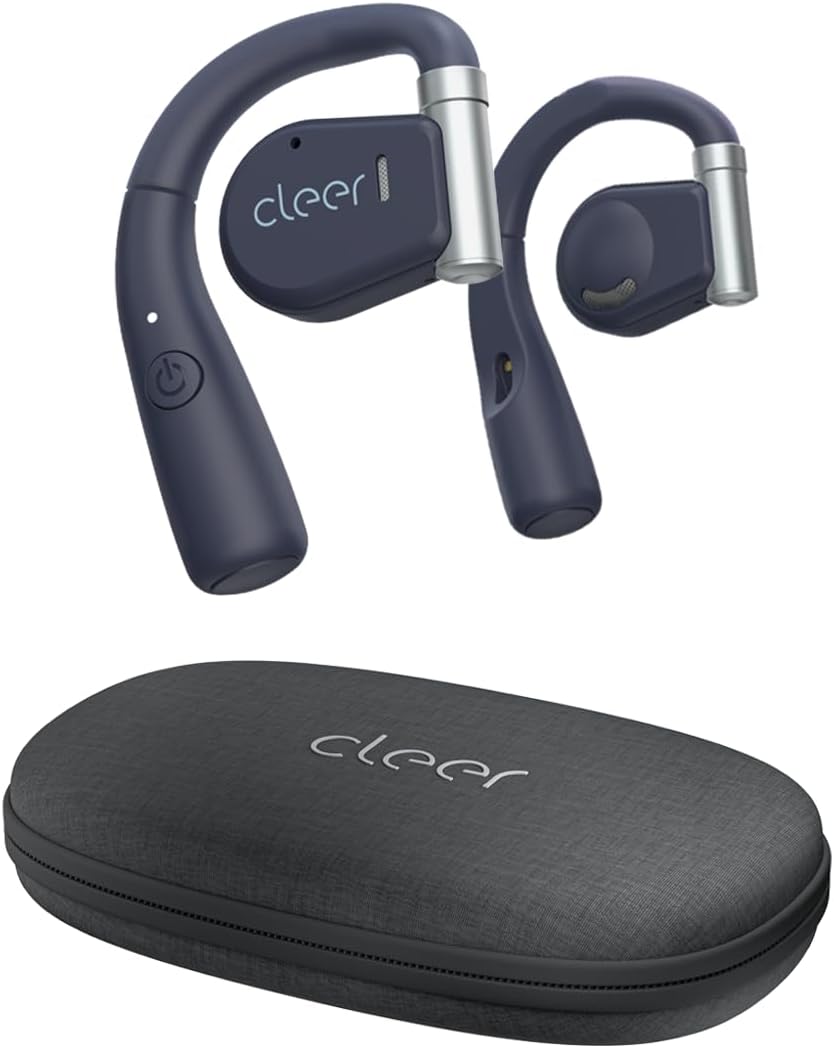
Image: Cleer ARC Open Ear Headphones and their compact charging case.
2. Naon dina Box
- Cleer ARC Open Ear Headphones (Left and Right)
- Charging Case with integrated charging cable
3. Setup jeung pamakéan munggaran
3.1 Ngecas Headphone
Before first use, fully charge your Cleer ARC headphones. The charging case has an integrated charging cable. Connect the case to a USB power source. The indicator light on the headphones will show charging status.
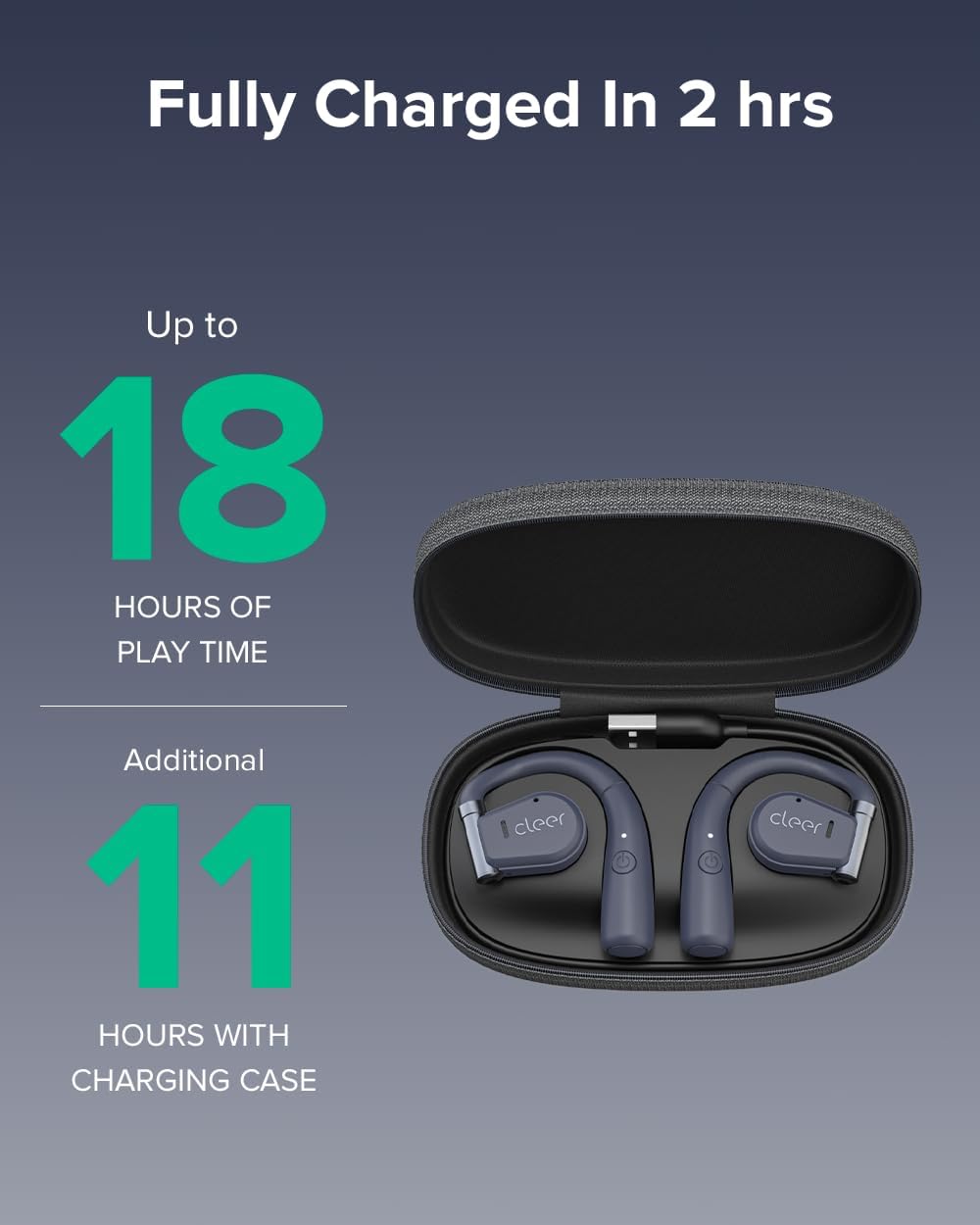
Image: Cleer ARC headphones in their charging case. The headphones provide up to 18 hours of playtime, with an additional 11 hours provided by the charging case.
A full charge takes approximately 2 hours. The headphones offer up to 18 hours of playtime on a single charge, with the charging case providing an additional 11 hours of battery life.
3.2 Nyapasangkeun Bluetooth
- Ensure the headphones are properly charged.
- Open the charging case. The headphones will automatically enter pairing mode, indicated by a flashing LED light.
- On your mobile device (smartphone, tablet, or computer), go to Bluetooth settings.
- Select "Cleer ARC" from the list of available devices.
- Once connected, the LED indicator on the headphones will stop flashing.
The ARC headphones utilize Bluetooth 5.0 for a stable and extended connection range.
3.3 Cleer+ App Installation
For enhanced functionality and customization, download the free Cleer+ App from your device's app store (iOS or Android). The app allows you to personalize EQ settings, customize touch controls, and receive firmware updates.

Image: The Cleer+ App provides personalized EQ settings and customizable device controls.
4. Parentah Operasi
4.1 Maké Headphone
The ARC Open Ear headphones are designed to fit securely by twisting onto your ear without entering the ear canal. The flexible hinge design helps keep each bud in place comfortably.

Image: Proper wearing of Cleer ARC Open Ear Headphones for ergonomic comfort and situational awareness.
4.2 Smart Touch Controls
The Cleer ARC headphones feature intuitive touch controls on the earbud surface:
- 1x Single Tap: Puter/Reureuh musik.
- 2x Double Tap: Next track / Answer/End calls.
- 3x Triple Tap: lagu saméméhna.
- Pencét Panjang: Activate voice assistant (customizable via Cleer+ App).

Image: Visual guide to the smart touch controls on the Cleer ARC headphones.
4.3 Audio Quality and EQ Settings
Experience dynamic, rich, and detailed audio thanks to the Arc's 16.2mm neodymium drivers. These drivers beam audio towards your ears, providing clear sound without sacrificing volume or bass. You can further personalize your listening experience by adjusting the EQ settings within the Cleer+ App.

Image: Internal components of the Cleer ARC headphone, showcasing the 16.2mm precision Hi-Fi driver and dynamic EQ technology.
4.4 Fungsi Telepon
The ARC headphones support hands-free communication with enhanced call quality and improved voice pickup. Use the touch controls to answer or end calls.

Image: A user demonstrating the crystal clear call capabilities of the Cleer ARC headphones.
4.5 Situational Awareness
The open-ear design allows you to enjoy your audio content while still hearing your surroundings naturally. This feature is particularly useful for outdoor activities or when you need to remain aware of your environment, such as in an office or home setting.

Image: The open-ear design of Cleer ARC headphones allows for situational awareness, ideal for multitasking.
4.6 Video Produk Resmi
Watch this official video from Cleer for an overview of the ARC headphones' key features and benefits:
Video: Cleer Audio ARC talking points, provided by Cleer inc.
5. Pangropéa
5.1 beberesih
Gently wipe the headphones and charging case with a soft, dry, lint-free cloth. Do not use harsh chemicals or abrasive materials. Avoid getting moisture into any openings.
5.2 Panyimpenan
When not in use, always store your Cleer ARC headphones securely in their provided carrying case. This protects them from dust, damage, and helps maintain their condition.
6. Cara ngungkulan
6.1 Teu Aya Sora / Volume Leutik
- Ensure headphones are properly paired and connected to your device.
- Check the volume levels on both the headphones (via touch controls) and your connected device.
- Pastikeun headphone dicas.
6.2 Masalah papasangan
- Pastikeun Bluetooth diaktipkeun dina alat Anjeun.
- Ensure the headphones are in pairing mode (flashing LED).
- Coba hilap alat dina setélan Bluetooth telepon anjeun sareng pasangkeun deui.
- Caketkeun alat anjeun pikeun mastikeun anjeun aya dina jangkauan Bluetooth.
6.3 Pas Teu Nyaman
- Adjust the flexible hinge to find the most comfortable and secure position on your ear.
- Ensure the headphones are correctly oriented for left and right ears.
7. Spésifikasi
| Fitur | Rincian |
|---|---|
| Ngaran modél | ARC |
| Téhnologi konektipitas | Nirkabel (Bluetooth 5.0) |
| Panempatan Ceuli | Buka Ceuli |
| Ukuran Supir Audio | 16.2 mm |
| Rentang Frékuénsi | 20 - 20,000 Hz |
| Daya Tahan Batré (Headphone) | Nepi ka 18 Jam |
| Kahirupan Batré (kalayan Case Ngecas) | Tambahan 11 Jam |
| Waktu Ngecas | Kira-kira. 2 jam |
| Tipe Kontrol | Toél, App |
| Tingkat Résistansi Cai | Tahan cai |
| Item Beurat | 3.36 ons |
| Dimensi produk | 6.61 x 3.31 x 7.6 inci |
8. Garansi jeung Rojongan
Cleer products are designed and manufactured to the highest quality standards. For detailed warranty information, please refer to the official Cleer websitus atanapi kartu garansi anu kalebet sareng produk anjeun.
For further assistance, troubleshooting, or to access the full user manual in PDF format, please visit the official Cleer support page or refer to the provided PDF document: Cleer ARC User Manual (PDF).
You can also visit the official Cleer Store on Amazon for more product information and support: Cleer Store.


