1. Bubuka
The TOPDON ArtiDiag EU-BBA is a specialized full-system diagnostic tool designed for Mercedes-Benz, BMW, and V.A.G group vehicles. This manual provides detailed instructions for setting up, operating, and maintaining your device to ensure accurate and efficient vehicle diagnostics and maintenance.
2. Produk Langkungview jeung Naon dina Box
The ArtiDiag EU-BBA is a compact and powerful diagnostic scanner. Before starting, please verify all components are present.

Image: The ArtiDiag EU-BBA device, diagnostic cable, charging cable, carrying case, quick user guide, and user manual.
Eusi Kotak:
- 1 x ArtiDiag EU-BBA Diagnostic Tool
- 1 x Diagnostic Cable (OBD2)
- 1 x Kabel Ngecas
- 1 x Mawa Kasus
- 1 x Pituduh Pamaké Gancang
- 1 x Manual Pamaké (dokumén ieu)
3. Parentah Setup
3.1 Ngecas Awal
The device contains a 3000mAh Lithium Ion battery. For initial use, it is recommended to fully charge the device using the provided charging cable. The device can also charge when connected to a vehicle's OBD2 port.
3.2 Nyambungkeun ka Kandaraan
- Tangtukeun lokasi port OBD2 wahana, ilaharna di handapeun dasbor di sisi supir urang.
- Connect the diagnostic cable to the ArtiDiag EU-BBA device.
- Colokkeun tungtung kabel diagnostik anu sanésna kana port OBD2 kendaraan.
- Hurungkeun ignition kendaraan ka posisi 'ON' (mesin pareum).
- The ArtiDiag EU-BBA will power on automatically.
3.3 Software Updates and Language Selection
The ArtiDiag EU-BBA supports lifetime free updates. Connect the device to a Wi-Fi network to download the latest software and vehicle data. Updates can be performed with a single click from the device's main menu. The device supports 11 languages, which can be selected in the settings menu.
4. Parentah Operasi
The ArtiDiag EU-BBA features a 4-inch touchscreen display for intuitive navigation. The main interface provides access to various diagnostic and service functions.

Image: The ArtiDiag EU-BBA displaying diagnostic trouble codes for a BMW vehicle.
4.1 Diagnostik Sistim pinuh
This function allows for a comprehensive scan of all available electronic control units (ECUs) in the vehicle. It covers systems such as Engine (ECM), Transmission (TCM), Anti-lock Braking System (ABS), Supplemental Restraint System (SRS), Tire Pressure Monitoring System (TPMS), ESP, Immobilizer, Gateway, Steering, and Radio.

Image: The ArtiDiag EU-BBA connected to a vehicle, illustrating its capability for full system diagnostics.
To perform a full system diagnostic:
- Tina ménu utama, pilih 'Diagnostik'.
- The device will automatically identify the vehicle's VIN (Vehicle Identification Number). Confirm the vehicle information.
- Select 'Full System Scan' to initiate a scan of all accessible modules.
- Review the displayed fault codes and system status.
4.2 Kontrol Dua Arah (Tés Aktif)
Bi-directional control allows you to send commands to vehicle ECUs to test specific components. This helps in accurately pinpointing issues without disassembling parts.

Gambar: Examples of bi-directional control, including throttle modulation, window operation, fuel pump activation, and AC clutch testing.
ExampSababaraha komponén anu tiasa diuji nyaéta:
- Modulating throttle
- Muka/nutup jandela
- Activating the fuel pump
- Turning the AC clutch on/off
- Wiper activation
4.3 Kodeu Online ECU
ECU Online Coding enables customization of vehicle settings, activation of hidden features, disabling unwanted functions, and component matching. This function allows for optimization of vehicle performance and personalization.

Image: The ArtiDiag EU-BBA demonstrating ECU coding options for vehicle customization.
Consult your vehicle's service manual or a qualified technician before performing ECU coding to avoid unintended consequences.
4.4 All Service Functions
The ArtiDiag EU-BBA provides a comprehensive suite of service functions for routine maintenance and repairs. These functions help reset and initialize vehicle systems after component replacement or service.

Image: A selection of maintenance service functions available on the ArtiDiag EU-BBA.
Key service functions include:
- Reset minyak
- Éléktronik Parkir marake (EPB) Reset
- System Management Batre (BMS) Reset
- Diajar Throttle
- Headlamp Pangaluyuan
- Power Window Normalization
- Diesel Particulate Filter (DPF) Regenerasi
- Anti-lock Braking System (ABS) Bleeding
- Steering Angle sensor (SAS) Reset
- Reset Sistem Pemantauan Tekanan Ban (TPMS)
- Gearbox cocog
- Suspénsi Cocog
- Sunroof Initializing
- Kodeu Injector
- Reset AdBlue
4.5 Full OBD2 Modes
The device supports all 10 OBD2 test modes for comprehensive engine diagnostics on compliant vehicles.

Image: An illustration of the full OBD2 diagnostic modes available.
Modeu ieu kalebet:
- Maca sareng Hapus Kodeu Masalah Diagnostik (DTC)
- View Live Data Stream
- View Freeze Data pigura
- Status Kesiapan I/M
- Tés Sénsor O2
- Tés Monitor Dina-Papan
- Test Sistim EVAP
- Read Vehicle Information (VIN, CID, CVN)
4.6 Fitur tambahan
The ArtiDiag EU-BBA includes several practical functions to streamline diagnostics:
- Smart AutoVIN: Automatically identifies vehicle information upon connection.
- Fungsi Dipandu VAG: Provides step-by-step instructions for V.A.G vehicles.
- Laporan sareng Bagikeun Data: Ngahasilkeun sareng ngabagi laporan diagnostik.
- Data Langsung Grafis: Visualize live sensor data for easier analysis.
- Eupan balik pamaké: Submit feedback directly from the device.
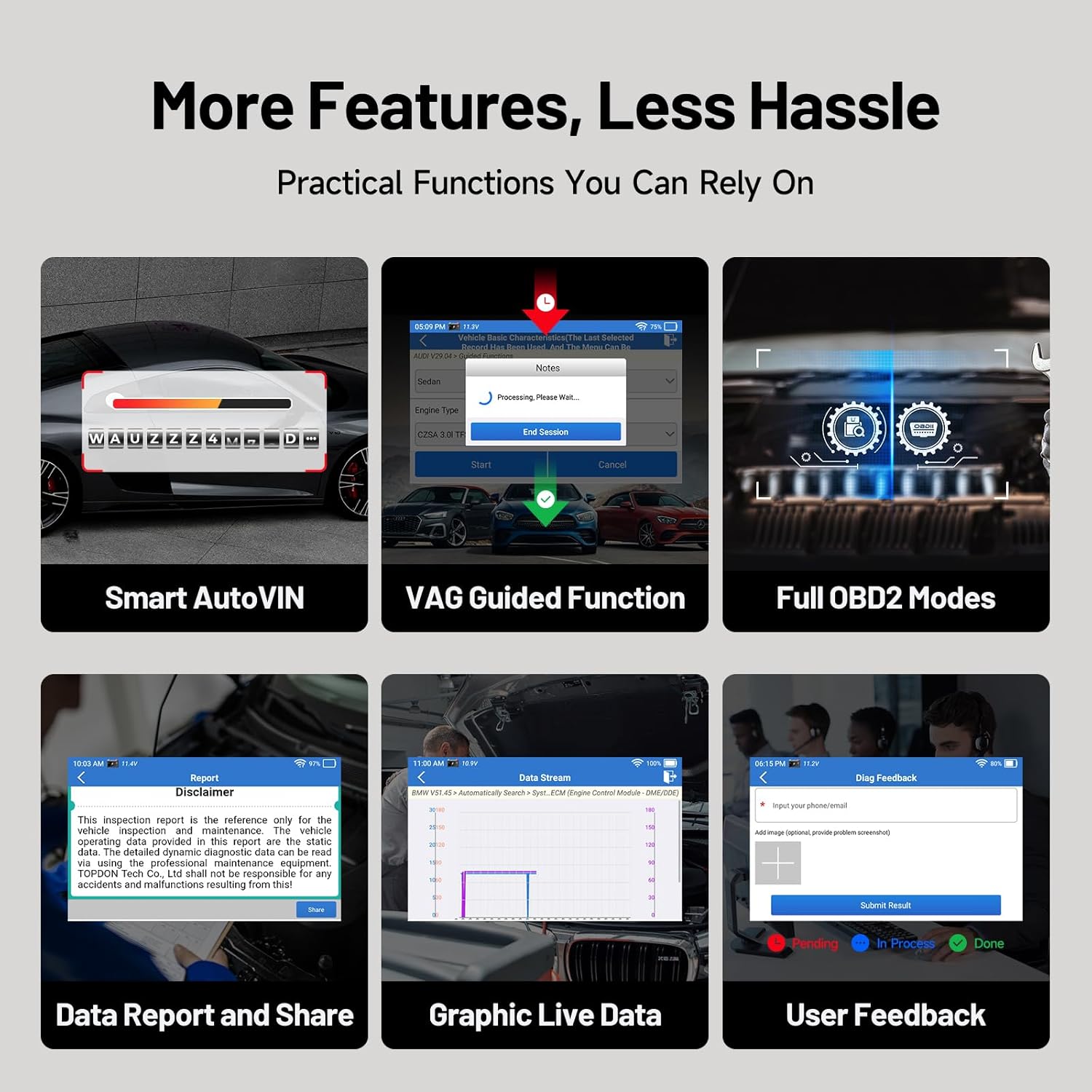
Gambar: Leuwihview of additional practical functions on the ArtiDiag EU-BBA.
5. Pangropéa
5.1 Apdet parangkat lunak
Ensure your device is always up-to-date by regularly checking for and installing software updates via Wi-Fi. These updates provide new features, vehicle coverage, and bug fixes.
5.2 Ngabersihan Alat
Wipe the device screen and body with a soft, damp lawon. Ulah nganggo pembersih abrasif atanapi pelarut anu tiasa ngaruksak layar atanapiasing.
5.3 Perawatan Batré
Pikeun manjangkeun umur batré, ulah sering-sering ngecas alat sacara pinuh. Simpen alat di tempat anu tiis sareng garing upami henteu dianggo salami lami.
6. Cara ngungkulan
If you encounter issues with your ArtiDiag EU-BBA, consider the following:
- Alat teu hurung: Ensure the device is charged or properly connected to the vehicle's OBD2 port.
- Masalah sambungan: Verify the diagnostic cable is securely connected to both the device and the vehicle. Ensure the vehicle's ignition is on.
- Software update failures: Check your Wi-Fi connection. Ensure there is sufficient storage space on the device.
- Inaccurate readings or functions: Ensure the vehicle's make, model, and year are correctly identified. Perform a software update to ensure the latest vehicle data is installed.
For persistent issues, utilize the 'User Feedback' function on the device or contact TOPDON customer support.
7. Spésifikasi

Image: Key technical specifications and internal components of the ArtiDiag EU-BBA.
| Fitur | Spésifikasi |
|---|---|
| tampilan | 4-inch, 800x480 pixels |
| Prosesor | 1.3GHz Quad-Core |
| Ram | 2GB |
| Rom | 32GB |
| Sistem operasi | Android 8.1 |
| Batré | 3000mAh Litium Ion |
| Diménsi | 25 x 17.5 x 7.6 cm |
| Beurat | 897 g |
| Basa anu Dirojong | 11 (including English, French, German, Spanish, Italian, Portuguese, Polish, Russian, Chinese) |
8. Garansi jeung Rojongan
8.1 Émbaran jaminan
The TOPDON ArtiDiag EU-BBA comes with a 1-year warranty from the date of purchase, covering manufacturing defects. Please retain your proof of purchase for warranty claims.
8.2 Rojongan Palanggan
For technical assistance, warranty inquiries, or any questions regarding the operation of your device, please contact TOPDON customer support. Refer to the official TOPDON websitus pikeun inpo kontak panganyarna.


