Bubuka
The DroneMobile X2-MAX Module is an advanced GPS tracker designed for comprehensive vehicle monitoring in North America. This device provides real-time tracking, unlimited range, and smartphone control, enhancing vehicle security and convenience. It integrates advanced GPS technology, on-board security sensors, and a built-in lithium-ion backup battery for reliable performance.

Image: DroneMobile X2-MAX module shown with its product packaging, highlighting the device's design and branding.
Naon dina Box
Upon unboxing your DroneMobile X2-MAX, verify that all components are present:
- X2MAX-LTE Module: The main tracking unit with a built-in backup battery.
- Data Harness: Used for connecting to aftermarket remote start/security systems.
- 30-Day Premium Trial: Information for activating smartphone control, GPS tracking, and alarm alerts.
- OBD Harness: A plug-and-play OBD-II T-Harness for standalone installation.
- Hardwire Harness: For hardwired standalone installations, including 12V, Ground, Ignition, and CAN Hi/Low connections.

Image: A green card with "DRONE Your Car, Connected." and "Activate Your Free Trial Today!" text, indicating the included premium trial.
Setup sareng Instalasi
The DroneMobile X2-MAX Module offers flexible installation options. Professional installation is recommended for optimal performance and to ensure proper integration with your vehicle's systems.
Métode pamasangan:
- Standalone Installation (OBD-II):
For plug-and-play setup, connect the provided OBD Harness to your vehicle's OBD-II port and to the X2MAX-LTE Module. This method is suitable for basic GPS tracking and vehicle health monitoring.
- Standalone Installation (Hardwire):
For a more permanent and secure installation, use the Hardwire Harness. This requires connecting 12V, Ground, Ignition, and CAN Hi/Low wires directly to your vehicle's electrical system. Consult a professional for this method if you are not experienced with vehicle wiring.
- Integration with Aftermarket Remote Start/Security System:
Utilize the Data Harness to connect the X2MAX-LTE Module to a compatible aftermarket remote start or security system. This enables advanced features like remote start, keyless entry, and enhanced security alerts via the DroneMobile app.
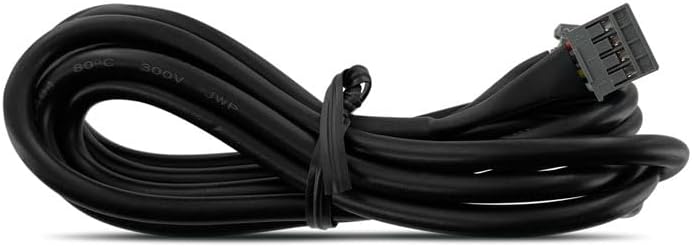
Image: A black data harness cable, typically used for connecting the DroneMobile module to other vehicle systems.
Aktipkeun:
After physical installation, download the DroneMobile app on your smartphone and follow the in-app instructions to activate your device and subscription. The included 30-day premium trial will provide access to all features.
Operating the DroneMobile X2-MAX
The DroneMobile X2-MAX is primarily operated through the DroneMobile smartphone application, available for both iOS and Android devices. Ensure your device is connected to the internet for full functionality.
Fitur konci sareng panggunaan:
- Ngalacak GPS:
Locate your vehicle in real-time using the DroneMobile Maps feature within the app. You can view your vehicle's current location, travel history, and set geofences for alerts when entering or exiting specific areas.

Image: A smartphone screen displaying the DroneMobile app's GPS tracking interface, showing a vehicle's location on a map.
- Kontrol smartphone:
If integrated with a compatible remote start/security system, use the app to remotely start/stop your engine, lock/unlock doors, and open the trunk from virtually anywhere with LTE coverage.
- Pangimeutan Kaséhatan Kandaraan:
Monitor critical vehicle data such as fuel level, tire pressure, battery voltage, and odometer readings. The system can also read Diagnostic Trouble Codes (DTCs) from your vehicle's OBD-II system, providing insights into potential issues.

Image: A smartphone screen displaying the DroneMobile app's vehicle health section, showing fuel level and tire pressure readings.

Image: A smartphone screen displaying the DroneMobile app's diagnostic trouble code (DTC) explanation for P0122, detailing the problem and its implications.
- Pangimeutan Kaamanan:
Receive push notifications for security alerts, including intrusion detection, shock, tilt, glass-break, and towing attempts. The built-in backup battery ensures alerts are sent even if the main vehicle battery is disconnected.
- Curfew Alerts & Points of Interest:
Set up alerts for when your vehicle is driven during specific hours or when it enters/exits predefined geographical areas (Points of Interest).
- Panginget pangropéa:
Schedule mileage-based or date-based service reminders to help keep your vehicle in optimal condition.
Pangropéa
The DroneMobile X2-MAX Module is designed for low maintenance. Follow these general guidelines to ensure its longevity and optimal performance:
- Tetep garing: Avoid exposing the module to water or excessive moisture.
- Suhu: Operate the device within its specified temperature range. Extreme temperatures can affect battery life and performance.
- Pembaruan firmware: Regularly check the DroneMobile app for available firmware updates for your X2-MAX module. Updates often include performance improvements and new features.
- Langganan: Ensure your DroneMobile subscription is active to maintain full functionality and connectivity.
Pamérésan masalah
If you encounter issues with your DroneMobile X2-MAX Module, refer to the following common troubleshooting steps:
| Masalah | Mungkin Cukang lantaranana | Solusi |
|---|---|---|
| No GPS Signal / Inaccurate Location | Vehicle parked indoors or in an area with poor satellite reception; module obstruction. | Move vehicle to an open area. Ensure module is not obstructed by metal or other materials. |
| No Communication with App | No LTE coverage; expired subscription; module power issue. | Verify LTE coverage in your area. Check subscription status. Ensure module is properly powered. Restart the app. |
| Vehicle Health Data Not Updating | Improper OBD-II connection; vehicle ignition off. | Ensure OBD Harness is securely connected. Turn vehicle ignition on. |
| Backup Battery Alert | Main vehicle battery disconnected or low. | Check vehicle's main battery connection and charge. This alert indicates the module is operating on its internal backup battery. |
For persistent issues, contact DroneMobile customer support or an authorized dealer.
spésifikasi
| Fitur | Rincian |
|---|---|
| Nomer modél | X2MAX-LTE |
| Dimensi produk | 6 x 5 x 3 inci |
| Item Beurat | 1 pon |
| Batré | 1 batré Litium Ion (kaasup) |
| Téhnologi konektipitas | AT&T LTE |
| Fitur husus | Real Time Tracking, Standalone or Add-on |
| Aplikasi anu Dirojong | Location Tracking, Smartphone Control, Vehicle Health Monitoring, Security Monitoring, Speed Monitoring, Engine Monitoring, Battery Voltage Monitoring, Geofencing, Points of Interest |
| Mangpaat husus | Fleet tracking, Security monitoring, Vehicle health monitoring |
Garansi sareng Rojongan
For detailed warranty information regarding your DroneMobile X2-MAX Module, please refer to the official DroneMobile websitus atanapi ngahubungi layanan palangganna sacara langsung. Sarat garansi biasana ngawengku cacad manufaktur.
Rojongan Palanggan:
- Visit the official DroneMobile support page for FAQs, troubleshooting guides, and contact options.
- Contact an authorized DroneMobile dealer for installation support or advanced diagnostics.
Always ensure you are using the latest version of the DroneMobile app for the best experience and access to the most current features and support resources.


