Bubuka
This manual provides detailed instructions for the installation, operation, and maintenance of your Carro Smart Ceiling Fan. The Tilbury 52-inch smart ceiling fan is designed to provide efficient cooling and lighting for large indoor and outdoor living spaces. It features a modern design with a white finish, elegant plywood blades, and an integrated 4000K LED cool light. This fan incorporates remote control, Wi-Fi app control, Siri Shortcut, and voice control technology, compatible with Amazon Alexa and Google Home Assistant, to customize your fan preferences.
Émbaran Kasalametan
Mangga baca sadaya pitunjuk kaamanan kalayan saksama sateuacan dipasang sareng dianggo. Upami henteu nuturkeun pitunjuk ieu tiasa nyababkeun sengatan listrik, kahuruan, atanapi cilaka pribadi.
- Pastikeun kakuatan dipareuman di circuit breaker saméméh instalasi atawa ngalayanan.
- Sadaya kabel kedah saluyu sareng kode listrik nasional sareng lokal.
- Taroskeun ka tukang listrik anu mumpuni upami anjeun henteu yakin ngeunaan prosedur kabel.
- Mount the fan to a structurally sound ceiling capable of supporting the fan's weight.
- Jaga leungeun, buuk, sareng pakean tetep bersih tina bilah kipas nalika dioperasikeun.
- Do not attempt to repair or modify the fan yourself. Contact customer support for assistance.
Setup sareng Instalasi
The Carro Smart Ceiling Fan is designed for straightforward installation. The process typically takes about 20 minutes to replace your current ceiling fan.
- Ngabongkar komponén: Cabut sadaya bagian tina bungkusna kalayan ati-ati. Pariksa sadaya komponén aya numutkeun daptar bungkusna.
- Pegatkeun daya: Before beginning installation, ensure the power supply to the fan location is turned off at the main circuit breaker.
- Pamasangan bracket dipasang: Securely attach the mounting bracket to the ceiling junction box. Ensure the junction box is rated for ceiling fan support.
- Sambungan Wiring: Connect the fan's electrical wires to the household wiring according to the provided wiring diagram. Ensure all connections are secure and properly insulated.
- Majelis kipas: Attach the fan motor assembly to the mounting bracket. Install the fan blades and light kit as per the instructions.
- Pamulihan kakuatan: Once installation is complete, restore power at the circuit breaker and test the fan's operation.

Gambar: Leuwihview of Carro Smart Ceiling Fan components and general installation steps.
Parentah Operasi
Your Carro Smart Ceiling Fan offers multiple control methods for convenience and customization.
1. Métode kontrol
The fan can be controlled via the included remote, a mobile app, or voice commands through smart home assistants.
- Kadali jauh: Use the dedicated remote to adjust fan speed, light settings, and turn the fan on/off. This ensures control even without a Wi-Fi connection.
- Aplikasi Mobile: Download the Carro Home app to customize settings remotely. The app allows for advanced control and scheduling.
- Kontrol sora: The fan is compatible with Amazon Alexa, Siri, and Google Assistant. Use voice commands such as "Alexa, set the white ceiling fan in the bedroom to speed 8, turn the yellow light to 75%, and adjust the white light to 36%."

Image: Remote control and mobile phone app interface for fan operation.

Image: Demonstrates voice control functionality with Amazon Alexa, Google Assistant, and Siri Shortcuts.
2. Fan Operation (DC Motor)
The fan is equipped with an efficient DC motor, offering quiet operation and energy savings.
- Setélan laju: Choose from 10 adjustable wind speeds, ranging from a maximum airflow of 4500 CFM to a minimum of 980 CFM.
- Aliran Udara anu tiasa dibalikkeun: The reversible function allows you to change the direction of airflow. Use the downward airflow for cooling in summer and upward airflow to circulate warm air in winter.
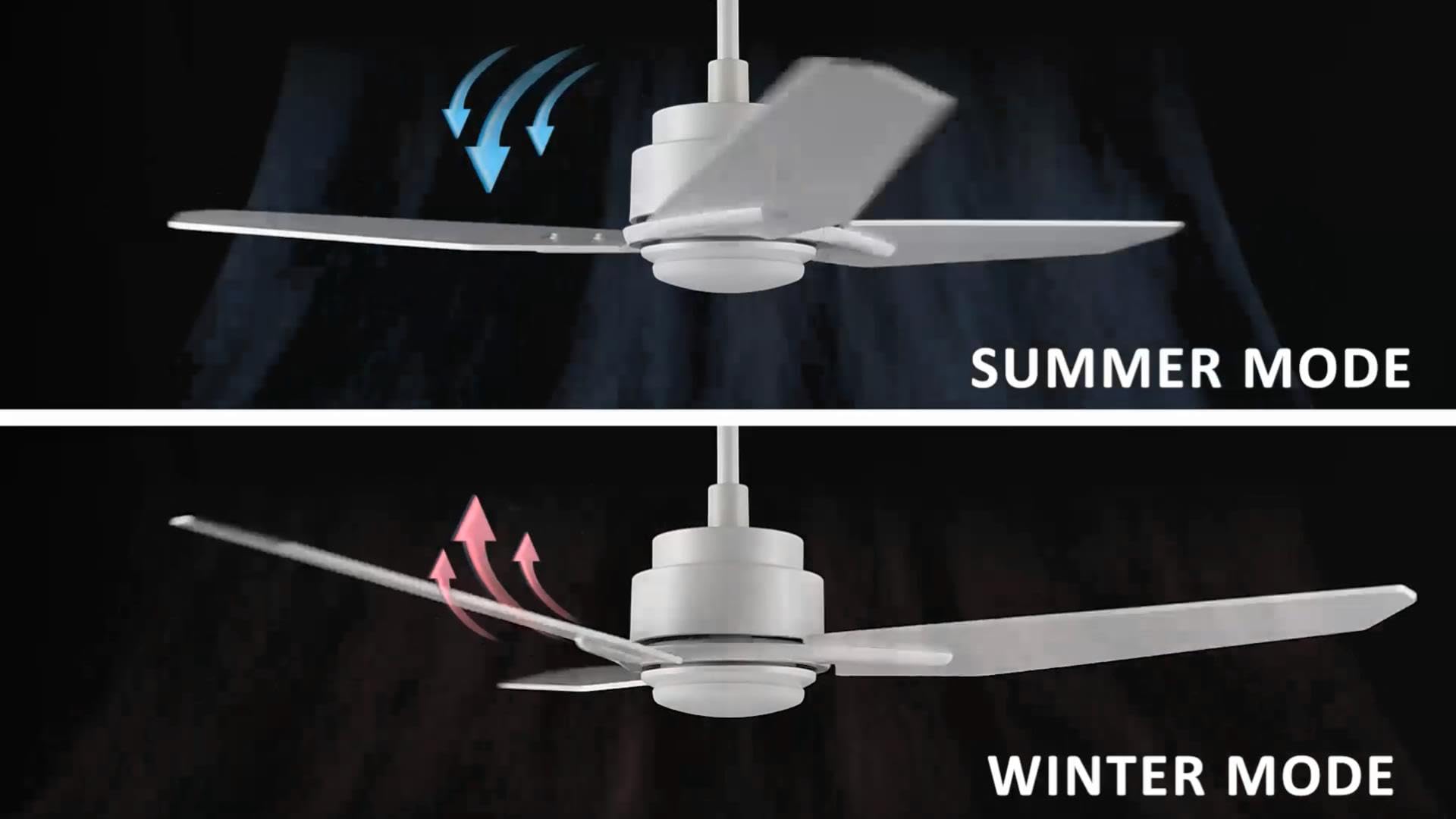
Image: Illustration of summer mode (downward airflow) and winter mode (upward airflow) for optimal air circulation.
3. Adjustable Dimmable LED Lights
Control the fan's lighting independently with ease.
- Pilihan Suhu Warna: Select from three light colors: 4000K (cool light), 3000K (bright light), and 2700K (warm light).
- Fungsi Dimmable: The LED lights are dimmable from 1% to 100%, allowing you to adjust brightness for any situation.
- Smart Grouping: Group the LED lights with the fan or other smart devices for unified control via the app or voice commands.

Image: Visual representation of the three dimmable light color options: Cool Light (4000K), Natural Light (3000K), and Warm Light (2700K).
4. Timer and Scheduling Options
Utilize the scheduling feature through the mobile app to automate fan and light operations.
- Set Routines: Program the fan to activate at specific times, with desired light and fan settings, for different areas of your home.
- Example: Program the living room fan to turn on daily at 18:00 with both yellow and white lights. Set the study fan to turn on at 21:00 from Monday to Friday, illuminating only the yellow light.
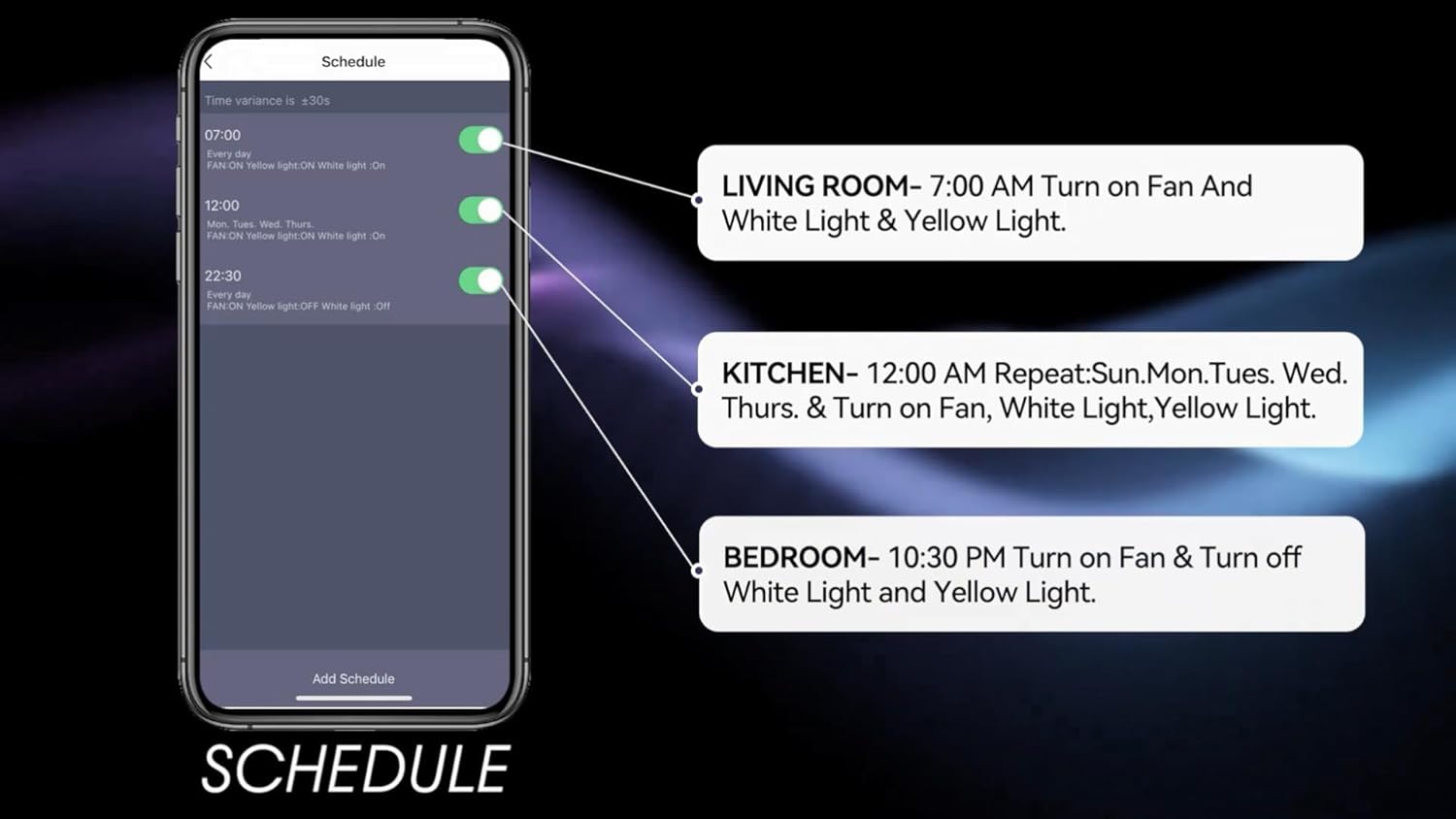
Image: Screenshot of the mobile app's scheduling interface, demonstrating how to set routines for different rooms.
Pangropéa
Pangropéa rutin ngajamin kinerja optimal sareng umur panjang kipas siling anjeun.
- beberesih: Debu bilah kipas sareng perumahan motor sacara périodik kalayan lemes, damp lawon. Ulah make cleaners abrasive atawa pangleyur.
- Kateguhan Bilah: Check blade screws annually to ensure they are secure. Loose blades can cause wobbling and noise.
- Kit lampu: The integrated LED light source is designed for long life and typically does not require replacement. If issues arise, contact customer support.
- Pareum listrik: Always turn off the power at the circuit breaker before performing any cleaning or maintenance.
Pamérésan masalah
If you encounter issues with your Carro Smart Ceiling Fan, refer to the following common problems and solutions:
| Masalah | Mungkin Cukang lantaranana | Solusi |
|---|---|---|
| Kipas teu ngamimitian | Taya kakuatan pikeun kipas; sambungan kabel leupas; batré kadali jauh low. | Pariksa circuit breaker; Pastikeun sadaya sambungan kabel aman; Ganti batré kadali jauh. |
| Kipas angin ngagelebug | screws sabeulah leupas; bilah teu saimbang; bracket dipasang leupas. | Tighten sadayana screws sabeulah; Paké kit balancing (teu kaasup) pikeun nyaimbangkeun wilah; Pastikeun bracket dipasang aman fastened. |
| Lampu teu jalan | No power to the light kit; Loose wire connections; Light setting off. | Check power supply; Verify light kit wiring; Ensure light is turned on via remote, app, or voice control. |
| Kadali jauh teu jalan | Low battery; Remote not paired. | Replace remote battery; Refer to pairing instructions in the full manual (if applicable). |
| Teu tiasa nyambung ka Wi-Fi/Aplikasi | Sandi Wi-Fi salah; Router jauh teuing; App teu diropéa. | Verify Wi-Fi password; Move router closer or use a Wi-Fi extender; Update the Carro Home app to the latest version. |
Spésifikasi produk
| Fitur | Spésifikasi |
|---|---|
| merek | Carro |
| Modél | 52" White |
| Warna | Bodas |
| Desain kipas listrik | Kipas Ceuli |
| Sumber Daya | AC/DC |
| Gaya | Modern |
| Dimensi produk | 52 "D x 52" W x 13.4" H |
| Tipe Kamar | Bedroom, Dining Room, Home Office, Living Rooms, Study Room |
| Fitur husus | Bisa diprogram |
| Dianjurkeun Mangpaat | Sirkulasi hawa |
| Jumlah wilah | 3 |
| Kapasitas Aliran Udara | 4500 suku kubik per Menit |
| Panjang sabeulah | 22.7 inci |
| Voltage | 120 volt |
| Komponén Kaasup | Ceiling fan X1 |
| Spesifikasi Met | ETL |
| Métode kontrol | Sora, Jarak Jauh, Aplikasi |
| Item Beurat | 15.7 pon |
| Tipe Pamasangan | Downrod Gunung |
Émbaran jaminan
Carro products are manufactured to the highest quality standards. This product comes with a limited warranty against defects in materials and workmanship. Please refer to the warranty card included in your product packaging or visit the official Carro websitus pikeun istilah jeung kaayaan jaminan lengkep.
Rojongan Palanggan
For technical assistance, troubleshooting, or warranty claims, please contact Carro customer support:
- Websitus: Visit the official Carro websitus pikeun FAQs jeung sumber rojongan.
- Surélék: Refer to your product packaging for customer service email.
- Telepon: Refer to your product packaging for customer service phone number.
Please have your model number (52" White) and purchase date ready when contacting support.


