1. Émbaran Kasalametan penting
- Ulah ngalaan alat ka suhu ekstrim atawa sinar panonpoé langsung pikeun période berkepanjangan.
- Keep the device away from water and moisture. This product is not waterproof unless specified.
- Paké ngan kabel ngecas disadiakeun jeung adaptor.
- Ulah nyobian ngabongkar atawa ngalereskeun alat sorangan. Rujuk ka tanaga jasa anu mumpuni.
- Ensure the memory card is inserted correctly before operation.
- Clean lenses with a soft, lint-free cloth. Avoid abrasive materials.
2. Produk Langkungview
The OhO sunshine HD 1080p Video Recording Sunglasses are designed for capturing high-quality video and photos during various outdoor activities. They feature a built-in camera, polarized lenses with UV400 protection, and come with a 32GB memory card.
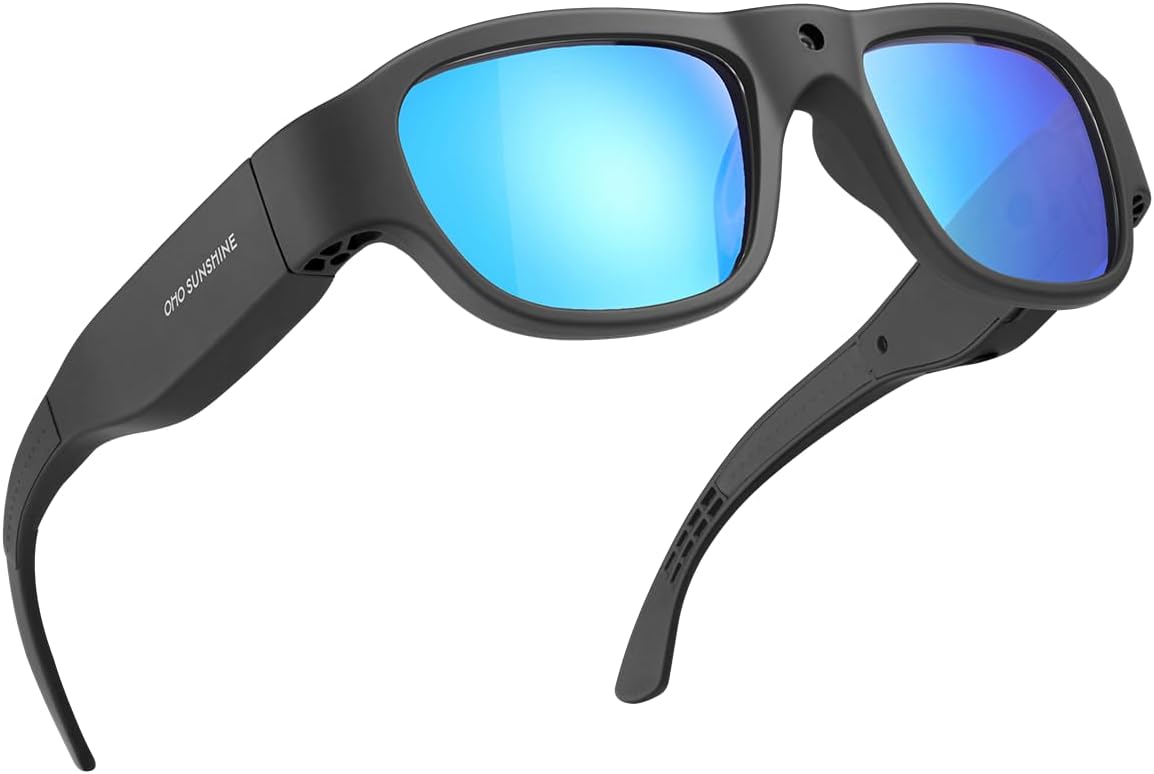
Gambar 2.1: Hareupeun view of the OhO sunshine HD 1080p Video Recording Sunglasses, showcasing the black frame and blue polarized lenses.

Figure 2.2: Key features of the camera sunglasses, including video recording, photo capture, 1080p Full HD resolution, 32GB memory, UV protection, and anti-scratch lens properties.
Eusi pakét:
- OhO sunshine HD 1080p Video Recording Sunglasses
- 32GB Micro SD Card
- Kabel Ngecas USB
- Kain beberesih
- Manual pangguna (dokumén ieu)
3. Komponén jeung kadali

Figure 3.1: Labeled diagram of the sunglasses highlighting the Power & Record Button, Photo Button, LED Indicator, and the Built-in Camera lens.
- Power & Record Button: Used to power the device on/off and to start/stop video recording.
- Tombol Poto: Used to capture still images.
- Indikator LED: Provides status feedback (e.g., charging, recording, low battery).
- Kaméra anu diwangun: The lens for capturing video and photos.
- Port USB: Pikeun ngecas sareng mindahkeun data.
- Slot Kartu SD Mikro: Pikeun nyelapkeun kartu mémori.

Gambar 3.2: A close-up view demonstrating the location of the Video and Photo buttons on the side arm of the sunglasses.
4. Setélan
4.1 Ngecas Batré
Before first use, fully charge the sunglasses. Connect the provided USB charging cable to the sunglasses' USB port and the other end to a USB power source (e.g., computer, wall adapter). The LED indicator will show charging status and turn off when fully charged. A full charge provides approximately 60 minutes of recording time.
4.2 Nyelapkeun Kartu Micro SD
Locate the Micro SD card slot on the sunglasses. Gently insert the included 32GB Micro SD card into the slot until it clicks into place. Ensure the card is oriented correctly. To remove, push the card in slightly until it springs out.
5. Parentah Operasi
5.1 Daya Hurung/Pareuman
- Pikeun Ngahurungkeun: Press and hold the Power & Record Button for approximately 3 seconds until the LED indicator lights up.
- Pikeun mareuman: Press and hold the Power & Record Button for approximately 3 seconds until the LED indicator turns off.
5.2 Rékam pidéo
- With the device powered on, press the Power & Record Button once to start video recording. The LED indicator will flash to indicate recording is in progress.
- To stop recording, press the Power & Record Button once again. The LED indicator will stop flashing and return to standby mode.
- Videos are recorded in Ultra Full HD 1080p resolution.
5.3 Poto Capture
- With the device powered on, press the Photo Button once to capture a still image. The LED indicator will briefly flash to confirm the photo has been taken.
- Photos are captured at 16M pixel resolution.
5.4 Nyambungkeun ka Komputer (Transfer Data)
To access recorded videos and photos, connect the sunglasses to your computer using the USB cable. The device will appear as a removable disk drive. You can then drag and drop files kana komputer Anjeun.
5.5 Video produk
Video 5.1: Hiji leuwihview of the HD Camera glasses, highlighting their features and functionality, including Bluetooth speaker capabilities. (Duration: 0:29)
Video 5.2: A demonstration of the Full HD camera built into the sunglasses, showcasing its discreet design and recording capabilities. (Duration: 0:37)
6. Pangropéa
6.1 beberesih
- Use the provided cleaning cloth or a soft, lint-free cloth to wipe the lenses and frame.
- Do not use chemical cleaners, alcohol, or abrasive materials, as these can damage the lenses and frame.
6.2 Perawatan Batré
- Pikeun manjangkeun umur batre, ulah miceun batre pinuh.
- Ngeusi batre alat rutin, sanajan teu dipake, pikeun ngajaga kaséhatan batré.
6.3 Panyimpenan
Store the sunglasses in a cool, dry place, away from direct sunlight and extreme temperatures. Use the protective case (if included) to prevent scratches and damage.
7. Cara ngungkulan
| Masalah | Mungkin Cukang lantaranana | Solusi |
|---|---|---|
| Alat teu hurung. | Batré lemah; Tombol daya teu dipencét kalawan bener. | Charge the device fully. Press and hold the Power & Record Button for 3 seconds. |
| Teu tiasa ngarékam pidéo / nyandak poto. | Memory card full or not inserted correctly; Device not powered on. | Check memory card insertion and free space. Ensure device is powered on. |
| Kualitas video/poto goréng. | Dirty lens; Low light conditions; Rapid movement. | Clean the camera lens. Ensure adequate lighting. Minimize sudden movements during recording. |
| Audio not recording (as per some reviews). | Potential software issue or specific model limitation. | Ensure firmware is up to date (check manufacturer's website). If issue persists, contact customer support. |
8. Spésifikasi
| Fitur | Rincian |
|---|---|
| Nomer modél | 588F |
| Resolusi Video | Ultra Full HD 1080p |
| Resolusi Poto | 16M piksel |
| Mémori | 32GB Micro SD Card (kaasup) |
| Kahirupan batré | Approx. 60 minutes recording |
| Tipe Lénsa | 100% UV400 Protection Polarized, Impact Resistant (ANSI/ISEA Z87.1-2015) |
| Item Beurat | 1.62 ons |
| Dimensi produk | 6.38 x 6.1 x 1.85 inci |
| Jenis Batré | 1 batré Litium Ion (kaasup) |
| Warna | Lénsa Pigura Hideung-biru |
9. Garansi jeung Rojongan
OhO sunshine products are manufactured to high quality standards. For warranty information, technical support, or service inquiries, please refer to the contact information provided on the product packaging or visit the official OhO sunshine websitus. Punten tahan bukti pameseran anjeun pikeun klaim garansi.
For additional support, you may visit the OhO sunshine Store on Amazon: OhO sunshine Store


