1. Produk Langkungview
The Baseus Security Camera S1 Pro 2-Cam Kit and B1 2K Wireless Solocam provide comprehensive outdoor surveillance solutions. The S1 Pro features an innovative sun-powered tracking system and dual 3K cameras for wide and detailed views, while the B1 offers 2K clarity with a 145° field of view and color night vision.

Image: The complete Baseus Security Camera S1 Pro 2-Cam Kit and B1 2K Wireless Solocam setup, showcasing both camera types and the central hub.

Gambar: A close-up view of the Baseus S1 Pro security camera, highlighting its dual lens system and integrated solar panel.

Image: A detailed shot of the Baseus B1 2K Wireless Solocam, showing its single lens and compact design.
1.1 Baseus S1 Pro Features
- Sun-Powered Tracking System: Solar panel moves 40° left and right to optimize sunlight absorption, enhancing charging efficiency.
- Dual 3K Cameras: Equipped with wide-angle and telephoto lenses for comprehensive coverage and sharp 3K HD video.
- Warna Night Vision: Provides clear monitoring even in low light conditions.
- Simultaneous APP View: Monitor both cameras concurrently within the application.
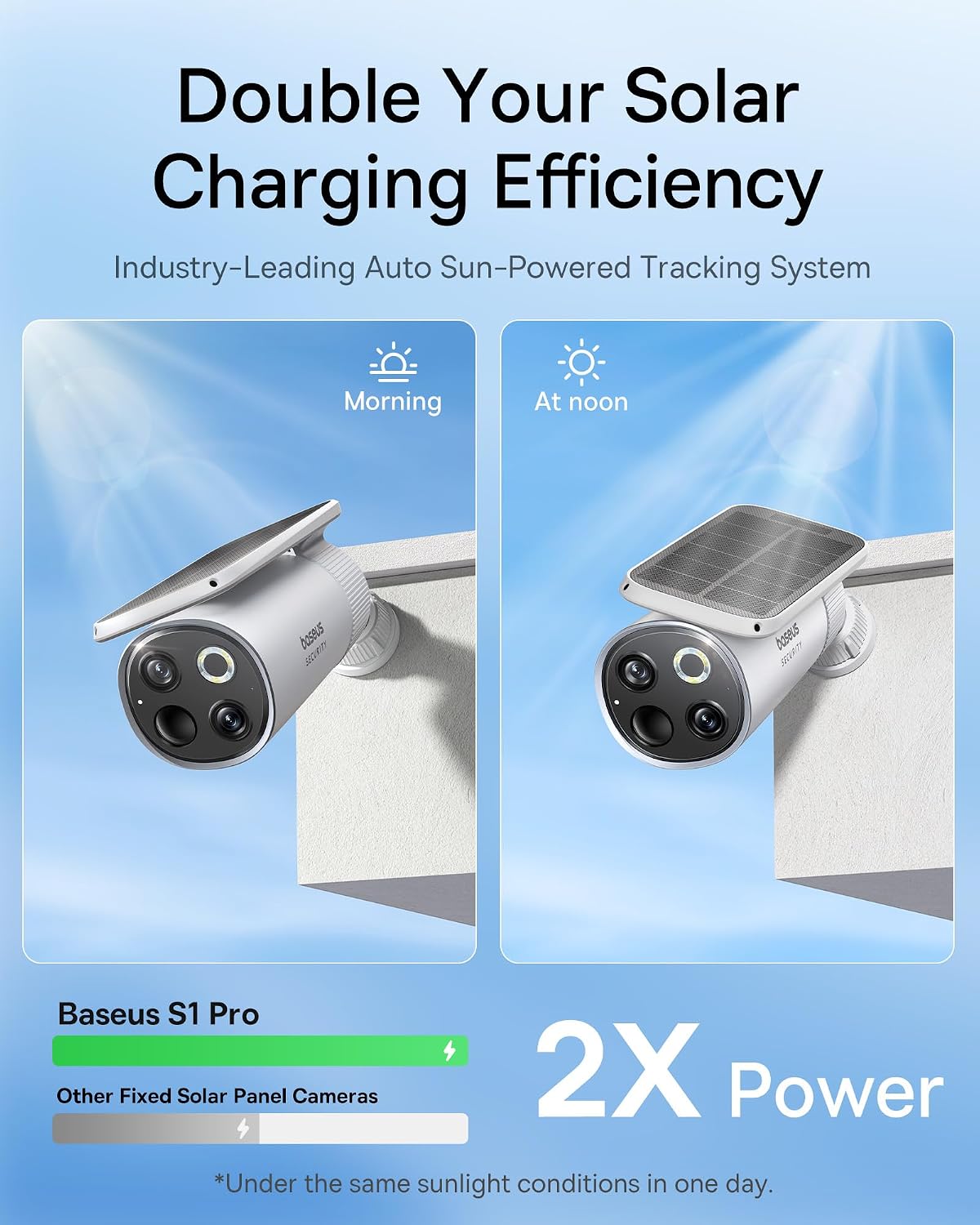
Image: Illustration demonstrating the Baseus S1 Pro's solar panel adjusting its angle for optimal sun exposure, leading to double the charging efficiency compared to fixed panels.

Image: A close-up of the Baseus S1 Pro's dual camera lenses, detailing the 3K clarity, 8x digital zoom, and f/1.6 aperture for both wide-angle and telephoto views.

Image: Screenshot of the Baseus app interface showing the crystal-clear dual view from the S1 Pro, with separate feeds for wide-angle and telephoto lenses.
1.2 Baseus B1 Features
- 2K HD Clarity: Delivers sharp 2K HD videos for clear day and night monitoring.
- 145° FOV: Wide-angle lens provides comprehensive views, minimizing blind spots.
- Color Night Vision with 100lm Spotlight: Ensures clear visibility in low light and acts as a deterrent.
- IP67 All-Weather Durability: Built to withstand various weather conditions from -20°C to 50°C.

Image: Comparison showing the Baseus B1's clear 2K surveillance capabilities during both day and night, highlighting its color night vision feature.

Image: Visual comparison illustrating the Baseus B1's 145° ultra-wide field of view, demonstrating its ability to cover a larger area and reduce security blind spots compared to cameras with narrower FOV.

Image: The Baseus B1 camera mounted outdoors in rainy conditions, illustrating its IP67 rating and ability to withstand extreme temperatures from -20°C to 50°C.
2. Eusi Paket
Please verify that all components are present in your package. The kit typically includes:
- Baseus S1 Pro Security Camera (x2 for 2-Cam Kit)
- Baseus B1 2K Wireless Solocam
- Pamasangan kurung jeung screws
- Kabel Ngecas USB
- Manual pangguna (dokumén ieu)
- Gancang Mimitian Guide
Note: Specific contents may vary based on the purchased kit version. Refer to your product packaging for exact details.
3. Setup Guide
3.1 Charging the Cameras
Before initial use, ensure your cameras are sufficiently charged. The S1 Pro utilizes solar power for continuous charging, while the B1 can be charged via its USB port.
- Baseus S1 Pro: Position the camera in an area with ample direct sunlight. The integrated solar panel will automatically charge the internal battery. For initial setup or if the battery is low, you may use a USB charger (not included) to fully charge it.
- Baseus B1: Connect the provided USB charging cable to the camera's charging port and to a standard USB power adapter (not included). The charging indicator light will show the charging status.
3.2 Unduh Aplikasi sareng Pendaptaran Akun
Pikeun ngatur jeung view your cameras, download the official Baseus Security app.
- Milarian pikeun "Baseus Security" in your mobile device's app store (Google Play Store for Android or Apple App Store for iOS).
- Unduh sareng pasang aplikasina.
- Buka aplikasi teras turutan pitunjuk dina layar pikeun ngadaptarkeun akun énggal atanapi lebet upami anjeun parantos gaduh.
3.3 Camera Pairing and Installation
Follow these steps to add your cameras to the app and install them in your desired locations.
- Tambahkeun Alat: In the Baseus Security app, tap the "+" icon or "Add Device" to begin the pairing process.
- Select Camera Model: Choose "S1 Pro" or "B1" from the list of available devices.
- Turutan Pitunjuk In-App: The app will guide you through connecting the camera to your Wi-Fi network and completing the pairing. This typically involves scanning a QR code displayed on your phone with the camera.
- Pamasangan:
- Choose a suitable outdoor location that provides the desired viewing angle and strong Wi-Fi signal. For S1 Pro, ensure adequate sunlight exposure.
- Use the provided mounting brackets and screws to securely attach the cameras to a wall or other stable surface.
- Saluyukeun sudut kaméra pikeun nutupan wewengkon panjagaan nu dipikahoyong.
- Test Sambungan: After installation, verify the live feed in the app to ensure proper functioning and optimal viewsudut ing.
4. Parentah Operasi
4.1 Hirup View sareng Playback
- Aksés Live View: Open the Baseus Security app and select the desired camera from your device list to view its live feed. For S1 Pro, you can view both wide-angle and telephoto feeds simultaneously.
- Playback Recorded Footage: Navigate to the playback section within the app to review recorded events. Footage is typically stored on a microSD card (not included) or cloud storage (subscription may be required).
4.2 Deteksi Gerak sareng Siaga
Configure motion detection settings to receive alerts for suspicious activity.
- In the app, go to the camera settings for the specific device.
- Locate "Motion Detection" or "Activity Zones".
- Adjust sensitivity levels and define specific areas for motion detection to minimize false alarms.
- Enable push notifications to receive instant alerts on your mobile device.
4.3 Night Vision and Spotlight (B1)
The B1 camera features advanced night vision capabilities.
- The camera automatically switches to night vision mode in low light conditions.
- The 100lm spotlight on the B1 can be configured to activate upon motion detection, providing color night vision and acting as a visual deterrent.
5. Pangropéa
Pangropéa rutin mastikeun kinerja optimal sareng umur panjang kaméra kaamanan anjeun.
- beberesih: Periodically wipe the camera lenses and solar panels (for S1 Pro) with a soft, damp lawon pikeun miceun lebu, kokotor, atanapi noda. Hindarkeun pembersih anu abrasif.
- Kaséhatan batré: For S1 Pro, ensure the solar panel remains unobstructed to maximize charging efficiency. For B1, recharge the battery when prompted by the app or when the battery level is low.
- Pembaruan firmware: Check the Baseus Security app regularly for available firmware updates. Keeping your camera's firmware up-to-date ensures access to the latest features and security enhancements.
- Pamariksaan Lingkungan: Periodically inspect the mounting area for stability and ensure cables (if any) are secure and undamaged.
6. Cara ngungkulan
| Masalah | Mungkin Cukang lantaranana | Solusi |
|---|---|---|
| Kaméra teu nyambung ka Wi-Fi | Incorrect Wi-Fi password; Weak Wi-Fi signal; Camera too far from router; Router settings. | Double-check Wi-Fi password. Move camera closer to router or use a Wi-Fi extender. Ensure router is on 2.4GHz band (if applicable). Restart camera and router. |
| Teu hirup view or recorded footage | Camera offline; Low battery; SD card error; Cloud storage issue. | Check camera's power status and Wi-Fi connection. Recharge battery. Reinsert or replace SD card. Verify cloud subscription status. |
| Peringatan gerakan palsu anu sering | High sensitivity setting; Environmental factors (e.g., moving branches, shadows, insects). | Reduce motion detection sensitivity in the app. Define specific activity zones to exclude irrelevant areas. |
| Kualitas visi wengi goréng | Dirty lens; Obstruction; Insufficient ambient light for color night vision. | Clean the camera lens. Ensure no obstructions are blocking the view. For B1, ensure the spotlight is enabled and functioning. |
| S1 Pro not charging via solar | Insufficient direct sunlight; Dirty solar panel; Obstruction. | Relocate camera to an area with more direct sunlight. Clean the solar panel regularly. Ensure no objects are casting shadows on the panel. |
If you encounter issues not listed here, please refer to the Baseus Security app's help section or contact customer support.
7. Spésifikasi
| Fitur | Katerangan |
|---|---|
| merek | Baseus |
| Modél | S1 Pro (2-Cam Kit) & B1 |
| Dianjurkeun Mangpaat | Kaamanan outdoor |
| Sumber Daya | Solar Powered (S1 Pro), Battery (B1) |
| Fitur husus | Night Vision (Color Night Vision for B1), Motion Detection, Two-Way Audio (assumed, common feature), Solar Tracking (S1 Pro) |
| Video Resolution (S1 Pro) | 3K HD (Dual Cameras) |
| Video Resolution (B1) | 2K HD |
| widang View (B1) | 145° |
| Résistansi Cuaca | IP67 (for B1, assumed for S1 Pro as well for outdoor use) |
| Operating Temperature (B1) | -20°C nepi ka 50°C (-4°F nepi ka 122°F) |
8. Garansi jeung Rojongan
Baseus provides comprehensive support for its products.
- Garansi: Produk ieu katutupan ku a garansi 2 taun ti tanggal beuli. Punten tahan bukti pameseran anjeun pikeun klaim garansi.
- Bantosan Téknis: Lifetime technical support is available for this product.
- Inpormasi kontak: For technical assistance, warranty claims, or general inquiries, please visit the official Baseus website or contact their customer service through the Baseus Security app's support section.


